
1. Ifihan
Thank you for choosing the Braun Series 7 70-N1000 Electric Shaver. This device is engineered for a smooth and efficient shave, featuring 360° Flex adaptation and AutoSense technology. Designed for both wet and dry use, it offers convenience and performance. Please read this manual thoroughly before first use to ensure safe operation and optimal results. Keep this manual for future reference.
2. Awọn Ilana Aabo pataki
Nigbati o ba nlo ohun elo itanna, awọn iṣọra ipilẹ yẹ ki o tẹle nigbagbogbo, pẹlu atẹle naa:
- Omi ati ina: This appliance is suitable for use in a bath or shower. For safety reasons, the shaver can only be operated cordless. Do not immerse the charging stand or power cord in water.
- Ibi ti ina elekitiriki ti nwa: Use only the special cord set provided with your appliance. Do not use with a damaged foil or cord.
- Awọn ọmọde: Ohun elo yii le ṣee lo nipasẹ awọn ọmọde ti o jẹ ọdun 8 ati ju bẹẹ lọ ati awọn eniyan ti o dinku ti ara, ifarako tabi awọn agbara ọpọlọ tabi aini iriri ati imọ ti wọn ba ti fun wọn ni abojuto tabi itọnisọna nipa lilo ohun elo ni ọna ailewu ati loye awọn eewu naa. lowo. Awọn ọmọde ko gbọdọ ṣere pẹlu ohun elo naa. Ninu ati itọju olumulo ko le ṣe nipasẹ awọn ọmọde ayafi ti wọn ba dagba ju 8 ati abojuto.
- Iwọn otutu: Do not expose the shaver to temperatures above 50°C (122°F) for extended periods.
- Bibajẹ: If the appliance is damaged, do not use it. Contact an authorized Braun service center for repair.
3. Ọja Ipariview ati irinše
Your Braun Series 7 70-N1000 electric shaver comes with several components designed for a complete shaving experience.
3.1 Awọn akoonu Apoti
- Braun Series 7 Electric Shaver (Model 70-N1000)
- Irin-ajo Ọran
- Smart Plug (for automatic 100-240 voltagàtúnṣe e)
- Fifọ Fẹlẹ
3.2 Shaver Components
Familiarize yourself with the main parts of your shaver:
- Flexible Shaving Head: Adapts 360° to facial contours.
- Foil and Cutter Block: The shaving elements that capture and cut hair.
- Bọtini agbara: To turn the shaver on and off.
- Ifihan LED: Shows battery status, cleaning indicator, and travel lock.
- Trimmer Itọkasi: (If included as an attachment or integrated) For shaping sideburns and mustaches.
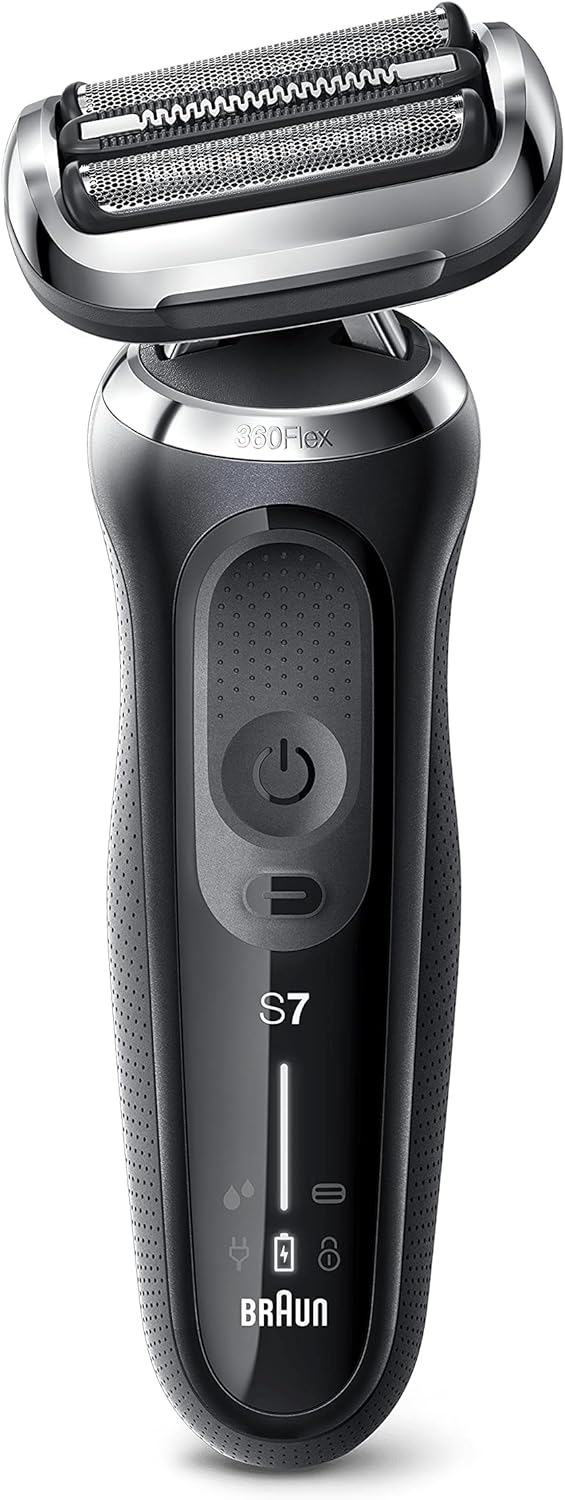
olusin 1: Iwaju view of the Braun Series 7 electric shaver. This image displays the Braun Series 7 electric shaver from the front. Visible features include the flexible shaving head with foil and cutter block, the power button, and LED indicators for battery status and cleaning.

Figure 2: Braun Series 7 shaver with its retail box and travel case. This image shows the complete package: the Braun Series 7 electric shaver, its original retail packaging, and a protective travel case. These are the primary components included with your purchase.
4. Eto
4.1 Gbigba agbara akọkọ
- Before using your shaver for the first time, connect it to the power outlet using the provided Smart Plug.
- Charge the shaver for approximately 1 hour to ensure a full charge. The LED display will indicate charging progress and a full battery. A full charge provides up to 50 minutes of cordless shaving.
- A 5-minute quick charge is sufficient for one shave.
4.2 Attaching/Detaching Attachments (if applicable)
If your model includes a precision trimmer attachment or other EasyClick accessories, ensure the shaver is turned off before attaching or detaching them. Simply click the attachment onto the shaver head until it locks into place. To remove, pull the attachment off.
5. Awọn ilana Iṣiṣẹ
5.1 Titan / Pa a
- To turn the shaver on, press the power button once.
- To turn the shaver off, press the power button again.
5.2 Shaving Tips
Fun awọn abajade to dara julọ, tẹle awọn itọnisọna wọnyi:
- Gbigbe Gbigbe: Ensure your face is dry before shaving. Hold the shaver at a right angle (90°) to your skin and shave against the direction of hair growth.
- Irun omi tutu: You can use the shaver with foam or gel for a refreshing shave. Apply shaving foam/gel to your face, then shave as usual. Rinse the shaver head under running water during and after use.
- 360° Flex Adaptation: The shaver head automatically adapts to your facial contours, ensuring maximum skin contact for a close shave. Apply gentle pressure.
- Imọ-ẹrọ AutoSense: The shaver reads your beard density and adjusts its power accordingly, removing more hairs in every stroke, even with dense beards.

Figure 3: Illustration of the 360° Flex head movement. This image illustrates the 360 Flex adaptation feature of the Braun Series 7 shaver, showing how the head pivots to maintain contact with facial contours. The travel case is also visible.
5.3 Lilo Ṣiṣiriṣi Atunṣe
If your shaver has an integrated precision trimmer, slide it upwards to activate. Use it for precise shaping of sideburns, mustaches, or for pre-trimming longer hairs before shaving.
6. Ninu ati Itọju
Wíwẹ̀ déédéé máa ń mú kí iṣẹ́ àti ìmọ́tótó tó dára jùlọ wà fún olùfọ́ irun rẹ.
6.1 Daily Cleaning (Rinsing)
- Lẹ́yìn gbogbo ìrun, pa ìrun náà.
- Hold the shaver head under warm running water until all residue is rinsed away. You can use liquid soap for a more thorough clean.
- Shake off excess water and let the shaver head air dry.
6.2 Thorough Cleaning (Brush)
- Ensure the shaver is turned off and disconnected from the power supply.
- Remove the foil and cutter block.
- Use the provided cleaning brush to remove any loose hairs from the shaver head and the inner housing. Do not use the brush on the foil as it may damage it.
- Reattach the foil and cutter block.
6.3 SmartCare Center (if applicable)
If your Series 7 model includes a SmartCare Center, refer to its separate instruction manual for detailed cleaning and charging procedures. The SmartCare Center automatically cleans, lubricates, dries, and charges your shaver at the touch of a button.
6.4 Rirọpo Shaver Parts
To maintain 100% shaving performance, replace the foil and cutter block every 18 months, or when worn. Replacement parts are available from Braun retailers or service centers. The shaver's LED display may indicate when replacement is due.
7. Laasigbotitusita
If you encounter issues with your Braun Series 7 shaver, consult the following table:
| Isoro | Owun to le Fa | Ojutu |
|---|---|---|
| Shaver ko ni tan. | Batiri ti ṣofo; Titiipa irin-ajo ti mu ṣiṣẹ. | Charge the shaver; Deactivate travel lock by pressing the power button for 3 seconds. |
| Shaver ko gba agbara. | Smart Plug not properly connected; Faulty power outlet. | Ensure the Smart Plug is securely connected to both the shaver and the power outlet; Try a different power outlet. |
| Irun irun ti ko dara. | Foil and cutter block are worn; Shaver head is dirty; Incorrect shaving technique. | Replace foil and cutter block; Clean the shaver head thoroughly; Ensure shaving against hair growth with gentle pressure. |
| Irun awọ ara lẹhin irun. | Skin not accustomed to electric shaving; Excessive pressure; Worn shaving parts. | Allow a few weeks for skin to adapt; Use gentle pressure; Replace foil and cutter block if worn. |
8. Imọ ni pato
- Brand: Braun
- Orukọ awoṣe: Ẹka 7
- Nọmba awoṣe: 70-N1000S
- Orisun Agbara: Agbara Batiri (Li-Ion)
- Igbesi aye batiri: Títí di ìṣẹ́jú 50 ti fífá irun
- Gbigba agbara kiakia: 5 iṣẹju fun ọkan fá
- Mabomire: 100% waterproof for Wet & Dry use
- Awọn ẹya pataki: 360° Flex Adaptation, AutoSense Technology
- Ìwọ̀n Nkan: 353 giramu
- Ohun elo abẹfẹlẹ: Irin ti ko njepata
- Ori oriṣi: Foil (Testine a lamina)
9. Atilẹyin ọja ati Onibara Support
Your Braun Series 7 shaver comes with a manufacturer's warranty. For detailed warranty information, terms, and conditions, please refer to the warranty card included in your product packaging or visit the official Braun website. For customer support, service, or to purchase replacement parts, please contact Braun customer service or visit their official webojula:
Braun Official Webojula: www.braun.com
Please have your model number (70-N1000S) and proof of purchase ready when contacting support.