
SEMIER SM-138
SEMIER Retro Cassette Player Recorder Boombox User Manual
Awoṣe: SM-138
Ọrọ Iṣaaju
O ṣeun fun riraasing the SEMIER Retro Cassette Player Recorder Boombox. This versatile device allows you to enjoy your favorite cassette tapes, record audio, and listen to AM/FM radio. Designed for ease of use and portability, it offers both AC and battery power options, making it suitable for various environments. Please read this manual carefully to ensure proper operation and to maximize your enjoyment of this product.
Ọja Pariview
The SEMIER Retro Cassette Player Recorder Boombox combines classic audio functionality with modern convenience. Below are the main components and features of your device.
Awọn ẹya pataki:
- Versatile Audio Playback: Play your collected cassette tapes and record external voice or radio directly to cassette using the built-in microphone.
- Superior AM/FM Reception: Equipped with a long antenna and an upgraded DSP chip for clear and reliable reception across AM (520-1710 kHz) and FM (87-108 MHz) frequencies.
- Powerful Sound Quality: Features a robust 6W speaker for excellent sound, plus a 3.5mm headphone jack for private listening.
- Portable and Convenient Design: Compact size (9.5 x 3.3 x 4.5 inches, 2.2 lbs) with a portable handle for easy transport.
- Awọn aṣayan Agbara Rọ: Can be powered via AC plug-in (cord included) or 4 C batteries (not included).
- Ikole ti o tọ: Made from premium ABS material with large, user-friendly control buttons.
Awọn paati ati Awọn iṣakoso:
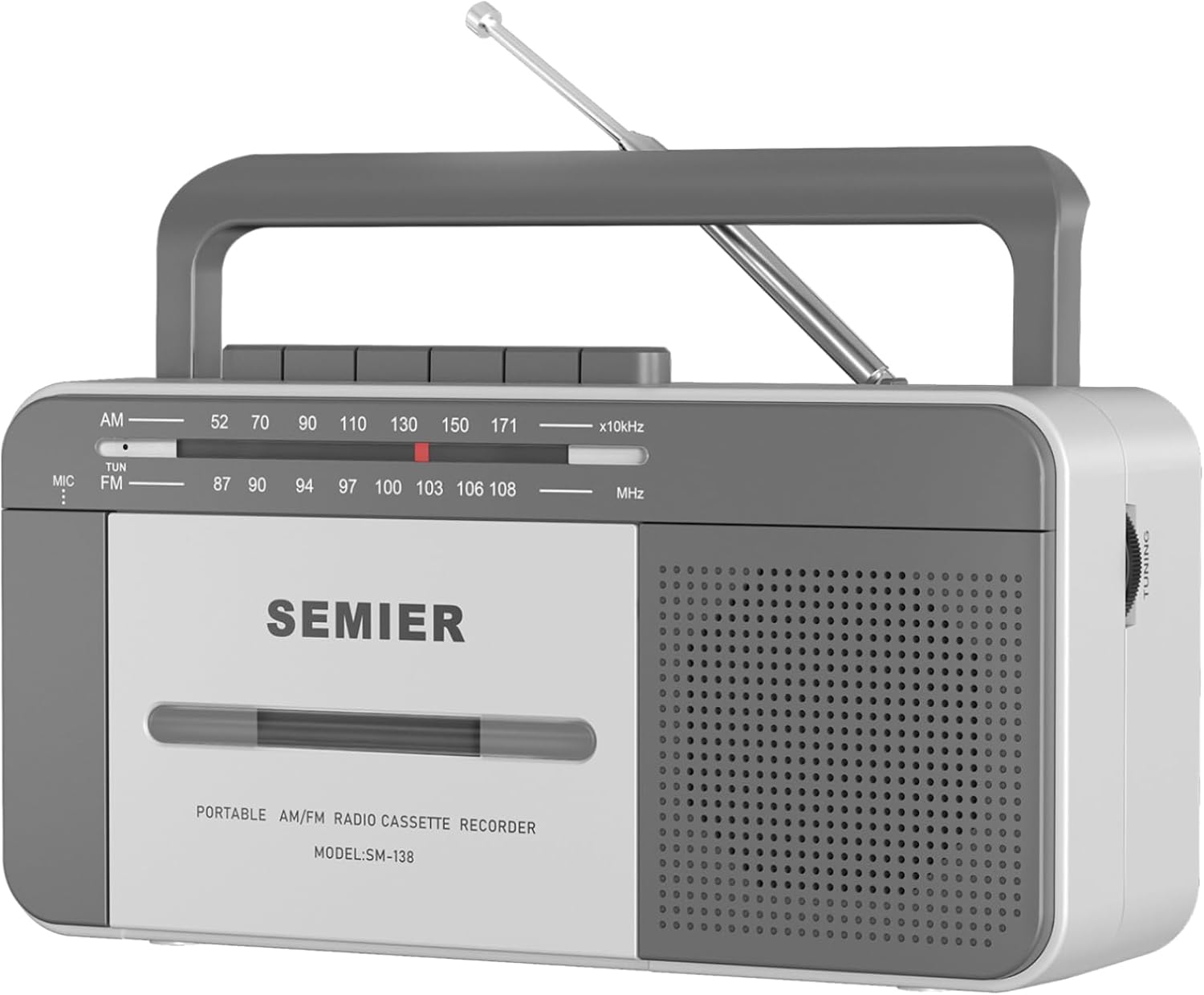
Iwaju View: Shows the cassette deck, speaker grille, AM/FM tuning dial, and main control buttons (Play, Stop/Eject, Fast Forward, Rewind, Record, Pause).

Apa View with Earphone Jack: Illustrates the 3.5mm earphone jack for private listening, located on the side of the unit.

Eriali: The telescopic antenna extends for improved AM/FM radio reception.
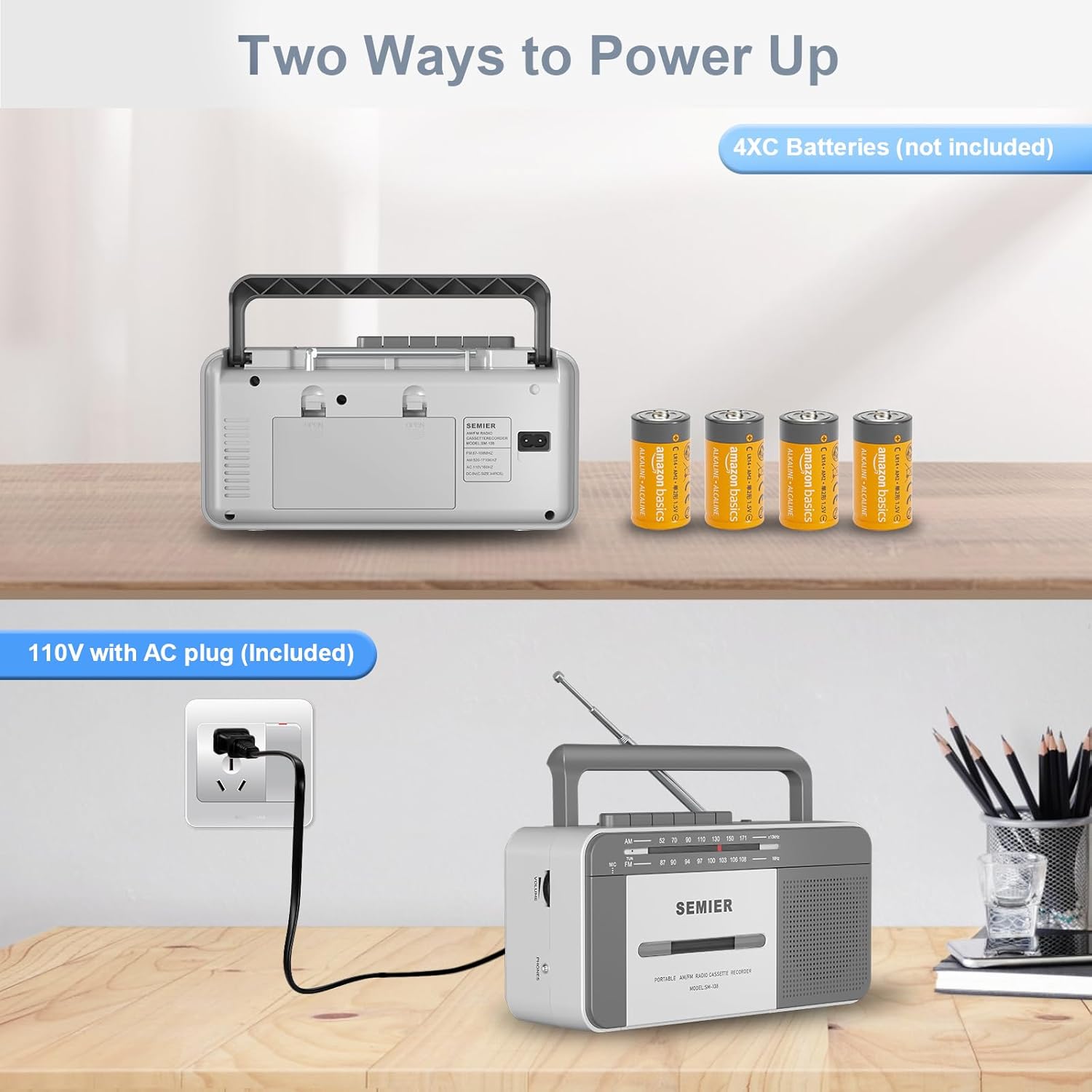
Awọn aṣayan agbara: Ẹyìn view showing the AC power input and the battery compartment for 4 C batteries.
Ṣeto
Agbara ẹrọ rẹ:
Your boombox offers two power options:
- Agbara AC:
- Locate the included AC power cord.
- Insert one end of the cord into the AC input jack on the back of the boombox.
- Plug the other end into a standard 110V AC wall outlet.

Connect the AC cord to the boombox and a wall outlet for continuous power.
- Agbara Batiri:
- Ṣii ideri iyẹwu batiri ni ẹhin ẹyọ.
- Insert 4 "C" size batteries (not included), ensuring correct polarity (+/-) as indicated inside the compartment.
- Pa ideri batiri naa ni aabo.
Insert 4 C batteries into the designated compartment for portable use.
Note: When using AC power, batteries are automatically disconnected. Remove batteries if the unit will not be used for an extended period to prevent leakage.
Awọn ilana Iṣiṣẹ
Sisisẹsẹhin kasẹti:
- Tẹ awọn Duro/EJECT bọtini lati ṣii kasẹti iyẹwu ilekun.
- Insert a cassette tape with the open edge facing upwards and the side you wish to play facing you. Gently push the tape until it clicks into place.
- Pa ẹnu-ọna iyẹwu kasẹti naa.
- Ṣeto iyipada iṣẹ si Teepu.
- Tẹ awọn ERE bọtini lati bẹrẹ ṣiṣiṣẹsẹhin.
- Ṣatunṣe awọn Iwọn didun koko si ipele gbigbọ ti o fẹ.
- Lati yara siwaju, tẹ awọn F.FWD bọ́tìnì náà. Láti padà sẹ́yìn, tẹ REW bọtini. Tẹ ERE to resume playback or Duro/EJECT lati da.
- Lati da ṣiṣiṣẹsẹhin duro, tẹ awọn DÁYÉ bọtini. Tẹ lẹẹkansi lati bẹrẹ pada.
- Lati da ṣiṣiṣẹsẹhin duro, tẹ awọn Duro/EJECT bọtini.
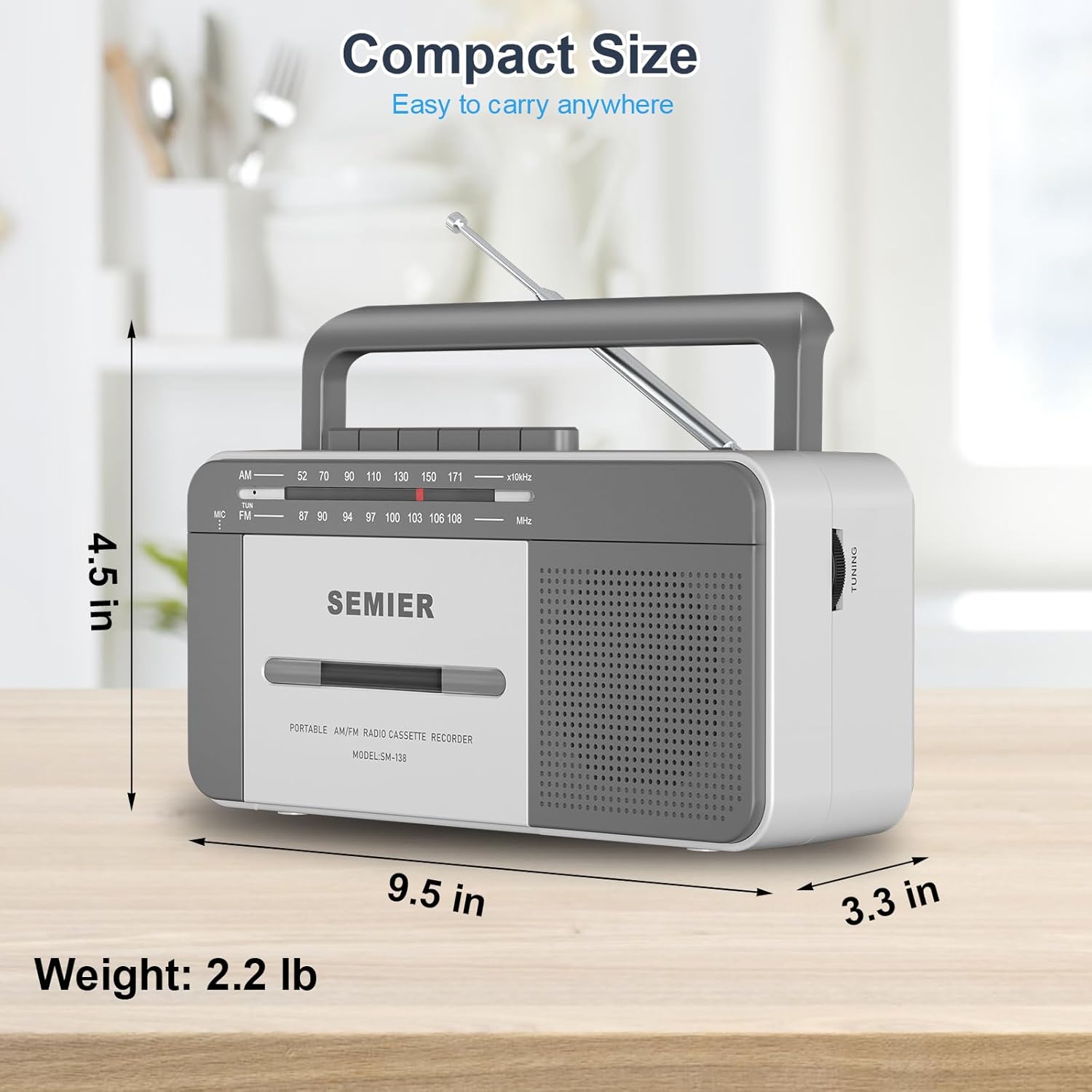
The large, clearly labeled buttons make operation simple and intuitive.
Cassette Recording:
You can record audio from the built-in microphone or from the AM/FM radio.
- Fi teepu kasẹti ti ko ni ofo sinu yara naa.
- To record from the built-in microphone:
- Ṣeto iyipada iṣẹ si Teepu.
- Tẹ awọn Igbasilẹ button (this will also engage the PLAY button).
- Speak clearly into the built-in microphone located on the front of the unit.

Record external audio directly to cassette using the integrated microphone.
- To record from AM/FM Radio:
- Ṣeto iyipada iṣẹ si RADIO.
- Tune to your desired AM or FM radio station (see Radio Operation below).
- Tẹ awọn Igbasilẹ button (this will also engage the PLAY button). The radio broadcast will now be recorded onto the cassette.
- Lati da gbigbasilẹ duro, tẹ bọtini naa Duro/EJECT bọtini.
Isẹ Redio:
- Fa eriali telescopic fun gbigba ti o dara julọ.
- Ṣeto iyipada iṣẹ si RADIO.
- Yan boya AM or FM band using the band selector switch.
- Yiyi awọn TUNTUN knob to find your desired radio station. The tuning dial will indicate the frequency.
- Ṣatunṣe awọn Iwọn didun bọtini si ipele gbigbọ ti o fẹ.
- For best FM reception, adjust the position and length of the telescopic antenna. For AM reception, rotate the unit itself for optimal signal.

The long antenna ensures superior AM/FM reception for clear audio.
Lilo Jack Foonu Agbekọri:
- Plug any standard 3.5mm stereo headphones (not included) into the Jack EADUFUN be lori ẹgbẹ ti awọn kuro.
- The built-in speaker will automatically mute when headphones are connected, allowing for private listening.
Enjoy private listening by connecting your headphones to the 3.5mm earphone jack.
Itoju
- Ninu Ẹka naa: Use a soft, dry cloth to clean the exterior of the boombox. Do not use abrasive cleaners or solvents.
- Ninu Ori Kasẹti naa: Lẹsẹkẹsẹ nu ori teepu naa, rola fun pọ, ati capstan ni lilo swab owu ni sere dampened pẹlu isopropyl oti. Eyi ṣe iranlọwọ lati ṣetọju didara ohun ati idilọwọ ibajẹ teepu.
- Itọju Batiri: If the unit will not be used for an extended period, remove the batteries to prevent corrosion and leakage.
- Ibi ipamọ: Tọju ẹyọ naa ni itura, aye gbigbẹ kuro lati orun taara ati awọn iwọn otutu to gaju.
Laasigbotitusita
| Isoro | Owun to le Fa | Ojutu |
|---|---|---|
| Ko si agbara | AC cord not properly connected; Batteries are dead or inserted incorrectly. | Rí i dájú pé okùn AC ti so mọ́ ara rẹ̀ dáadáa. Fi àwọn tuntun rọ́pò àwọn bátìrì, kí o sì ṣàyẹ̀wò polarity. |
| Ko si ohun lati agbọrọsọ | Volume too low; Headphones plugged in; Function switch set incorrectly. | Increase volume. Disconnect headphones. Set function switch to TAPE or RADIO. |
| Gbigba redio ti ko dara | Eriali ko gbooro tabi ni ipo ti o tọ; Agbegbe ifihan agbara ti ko lagbara. | Fully extend and adjust the telescopic antenna. For AM, rotate the unit. Try moving to a different location. |
| Cassette tape not playing or "eating" tape | Tape head/pinch roller dirty; Old or damaged tape; Tape not inserted correctly. | Clean tape head and pinch roller with isopropyl alcohol. Try a different tape. Ensure tape is fully inserted and compartment is closed. For old tapes, fast forward and rewind completely before playing to loosen the tape. |
| Gbigbasilẹ ko ṣiṣẹ | Tape is write-protected; Microphone blocked; Function switch not set to TAPE or RADIO. | Check the write-protect tab on the cassette. Ensure microphone is clear. Set function switch correctly. |
Awọn pato
- Awoṣe: SM-138
- Brand: Ọ̀PỌ̀
- Awọn iwọn ọja: 9.5 x 3.3 x 4.5 inches (L x W x H)
- Ìwọ̀n Nkan: 2.2 lbs
- Agbejade Agbọrọsọ: 6W
- Awọn Igbohunsafẹfẹ Redio: AM 520-1710 kHz, FM 87-108 MHz
- Asopọmọra: 3.5mm Earphone Jack, Auxiliary
- Orisun Agbara: AC 110V (cord included) or 4 x "C" Batteries (not included)
- Ohun elo: Premium ABS
- Àwọ̀: Funfun, Grẹy
Iwapọ ati apẹrẹ iwuwo fẹẹrẹ fun gbigbe irọrun.
Atilẹyin ọja ati Support
SEMIER is committed to providing high-quality products and excellent customer service. While specific warranty terms are not detailed in this manual, we offer peace of mind with our dedicated customer support.
- For any questions, technical assistance, or support needs, please contact SEMIER customer service.
- Jọwọ ṣe idaduro iwe rira rẹ bi ẹri rira fun eyikeyi awọn ibeere atilẹyin ọja.
Ask a question about this manual
Ask about setup, troubleshooting, compatibility, parts, safety, or missing instructions. Manuals+ will review the question and use this page’s manual context to help answer it.