
SBS MHTWSSTYLEBTB
Ìwé Àfọwọ́kọ Olùlò Àwọn Agbọ́rọ̀ Bluetooth Aláìlágbára SBS Music Hero
Model: MHTWSSTYLEBTB
Ọrọ Iṣaaju
Thank you for choosing the SBS Music Hero Wireless Bluetooth Earphones. This manual provides essential information for the proper setup, operation, and maintenance of your device. Please read it carefully before use.

Image: The SBS Music Hero Wireless Bluetooth Earphones, shown in their light blue charging case. The earbuds are partially visible, indicating their in-ear design.
Package Awọn akoonu
- SBS Music Hero Wireless Bluetooth Earphones
- Ngba agbara Case
- Ear tips/earpads
- Okun Ngba agbara USB
- Itọsọna olumulo

Aworan: A sunmọ-soke view of the two individual SBS Music Hero wireless earphones, highlighting their design and earbud shape.
Eto Itọsọna
1. Ngba agbara si Earphones ati Case
Ṣaaju lilo akọkọ, gba agbara ni kikun awọn agbekọri ati apoti gbigba agbara.
- Connect the Micro-USB charging cable to the charging port on the bottom of the case.
- So opin okun miiran pọ si orisun agbara USB (fun apẹẹrẹ, kọnputa, ohun ti nmu badọgba ogiri).
- The LED indicator on the case will illuminate during charging and turn off when fully charged.
- Place the earphones into the charging case. The earphones will begin charging automatically.

Image: The bottom of the earphone charging case, showing the Micro-USB charging port and an LED indicator light.
A full charge for the case and earphones typically takes approximately 1 hour. The earphones provide about 2-3 hours of play time on a single charge, with the case offering additional charges for up to 24 hours of standby time.

Image: The open charging case, illustrating the estimated battery life: 2-3 hours play time, 24 hours standby time, and 1 hour charge time.
2. Sisopọ pọ pẹlu Ẹrọ Bluetooth kan
The earphones use Bluetooth technology for wireless connection.
- Rii daju pe awọn agbekọri ti gba agbara.
- Open the charging case and remove both earphones. They will automatically enter pairing mode. The LED on one earphone will flash, indicating it's ready to pair.
- Lori ẹrọ rẹ (foonuiyara, tabulẹti, kọǹpútà alágbèéká), mu Bluetooth ṣiṣẹ ki o wa awọn ẹrọ titun.
- Select "SBS Music Hero" or a similar name from the list of available devices.
- Once connected, the LED indicator on the earphone will stop flashing and remain solid or turn off, depending on the model.
If pairing fails, place the earphones back into the case, close it, and then repeat the steps.
Awọn ilana Iṣiṣẹ
The earphones feature a multifunction button for controlling various functions.
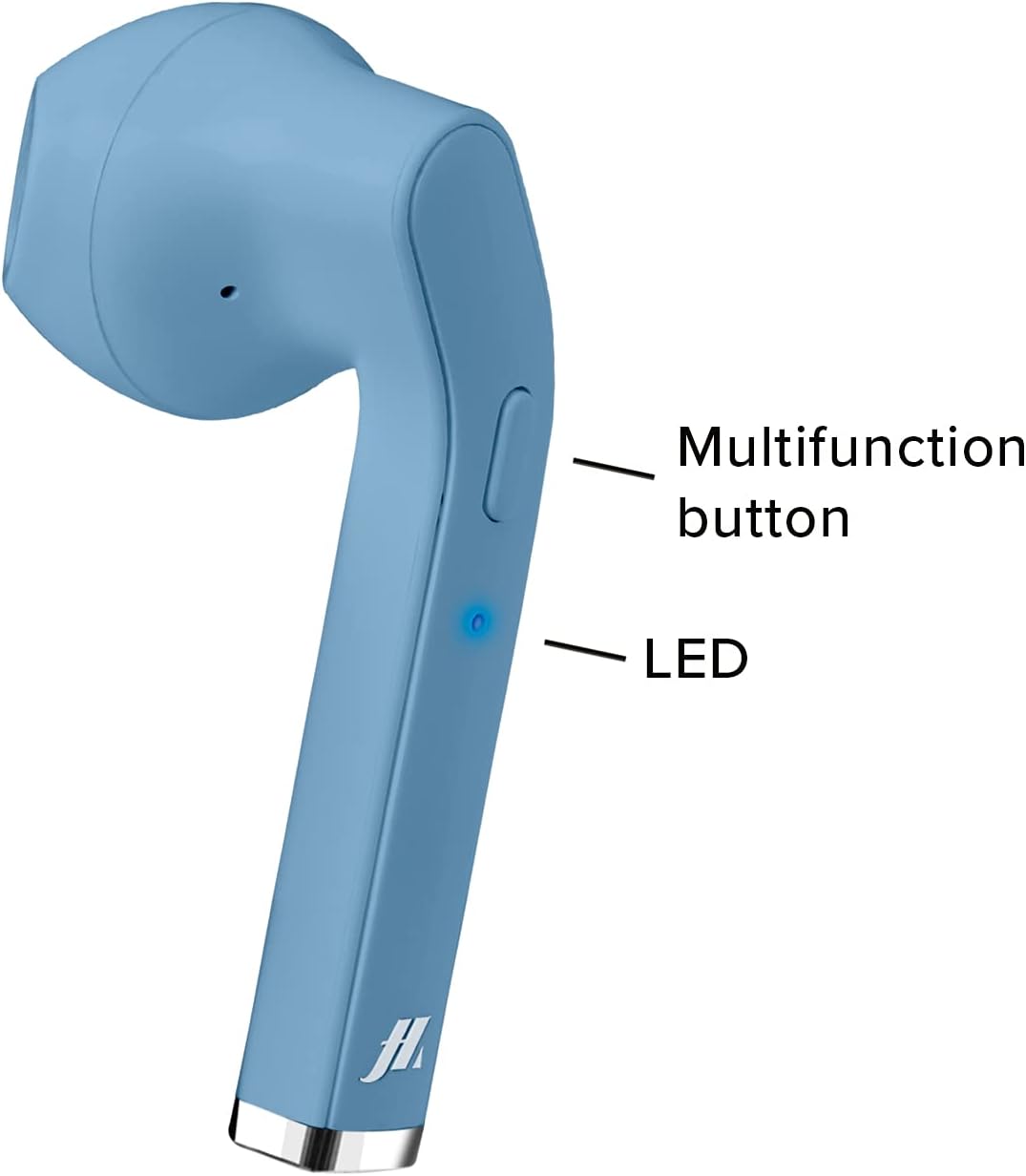
Image: A close-up of one earphone, pointing out the location of the multifunction button and the LED indicator light.
Sisisẹsẹhin Orin
- Ṣiṣẹ/Daduro: Tẹ bọtini multifunction lẹẹkan.
- Orin t’okan: Double-press the right earphone's multifunction button.
- Tẹlẹ Orin: Double-press the left earphone's multifunction button.
Isakoso Ipe
- Idahun/Ipe Ipari: Press the multifunction button once during an incoming call or during an active call.
- Kọ Ipe ti nwọle: Press and hold the multifunction button for approximately 2 seconds during an incoming call.
- Nọmba Ikẹhin Tun Tun: Tẹ bọtini multifunction lẹẹmẹta.

Image: An earphone accompanied by icons illustrating its control functions: play/pause, answer/end call, reject incoming call, and redial last number.
Titan / Paa
- Agbara Tan: The earphones power on automatically when removed from the charging case. Alternatively, press and hold the multifunction button for 3 seconds.
- Agbara Pa: Place the earphones back into the charging case. They will power off automatically. Alternatively, press and hold the multifunction button for 5 seconds.
Itọju ati Itọju
- Nu agbekọri ati apoti gbigba agbara nigbagbogbo pẹlu asọ ti o gbẹ.
- Ma ṣe lo abrasive ose tabi epo.
- Keep the charging contacts on the earphones and inside the case clean to ensure proper charging.
- Avoid exposing the device to extreme temperatures, humidity, or liquids, as it is not water-resistant.
- Tọju awọn agbekọri sinu apoti gbigba agbara wọn nigbati ko si ni lilo lati daabobo wọn ati jẹ ki wọn gba agbara.
Laasigbotitusita
| Isoro | Owun to le Fa | Ojutu |
|---|---|---|
| Awọn agbekọri ko tan. | Batiri kekere. | Gba agbara si awọn agbekọri ati apoti gbigba agbara ni kikun. |
| Ko le so pọ pẹlu ẹrọ. | Bluetooth is off on device; earphones not in pairing mode; too far from device. | Ensure Bluetooth is enabled. Place earphones back in case, then remove to re-enter pairing mode. Move closer to the device. |
| Ko si ohun tabi didara ohun ti ko dara. | Volume too low; earphones not properly connected; ear tips not sealed. | Increase volume on your device. Reconnect earphones. Adjust ear tips for a better fit. |
| Only one earphone works. | One earphone not charged; pairing issue. | Ensure both earphones are charged. Place both earphones back in the case, then remove them together to re-establish stereo pairing. |
Awọn pato ọja
| Ẹya ara ẹrọ | Ẹ̀kúnrẹ́rẹ́ |
|---|---|
| Nọmba awoṣe | MHTWSSTYLEBTB |
| Asopọmọra | Imọ-ẹrọ Alailowaya Bluetooth |
| Earphone Style | Ninu Eti |
| Ohun elo | Ṣiṣu |
| Iwọn Igbohunsafẹfẹ | 20 Hz - 20,000 Hz |
| Ifamọ | 90 dB |
| Batiri Iru | Litiumu Polima (3 nilo, pẹlu) |
| Average Battery Life (Play Time) | Awọn wakati 2 |
| Akoko gbigba agbara | Approx. 1 Hour (Fast Charging) |
| Awọn iwọn | 4 x 18 x 9 cm |
| Iwọn | 90 g |
| Omi Resistance | No (Not water resistant) |
| Awọn ẹrọ ibaramu | Smartphones, Tablets, Laptops, Desktop Computers |
| Ariwo Iṣakoso | Ti nṣiṣe lọwọ Noise Ifagile |
Alaye atilẹyin ọja
Specific warranty details are not provided in the product data. Please refer to the retailer's return policy or contact the manufacturer directly for warranty information.
Onibara Support
For technical support or further assistance, please contact the manufacturer or your point of purchase. Keep your product model number (MHTWSSTYLEBTB) and purchase details ready when contacting support.
Awọn iwe aṣẹ ti o jọmọ - MHTWSSTYLEBTB
 |
MUSIC HERO LIGHT POP Wireless Headphones User Manual User manual for the MUSIC HERO LIGHT POP Stereo Wireless Headphones with LED Lights, covering setup, operation, specifications, and charging. |
 |
Àwọn agbekọri SBS MHTWSKOMBOBTK TWS pẹ̀lú àpótí gbígbóná àti ìbòjú LCD - Àwọn ìlànà ìmọ̀-ẹ̀rọ Àwọn àlàyé pàtó fún àwọn agbekọri SBS MHTWSKOMBOBTK TWS, tí ó ní àwòrán aláilowaya kékeré, àpótí gbigba agbara pẹ̀lú ibojú LCD, àwọn ìṣàkóso ìfọwọ́kàn, àti àkókò ìṣiṣẹ́ wákàtí mẹ́ta. Ó ní àwọn ìwífún nípa ìmọ̀-ẹ̀rọ àti ètò ìgbékalẹ̀. |
 |
SBS TWS Earphones pẹlu Ngba agbara nla ati LCD iboju - Ọja Loriview Ṣe afẹri Awọn ohun afetigbọ SBS TWS, awọn agbekọri alailowaya iwapọ pẹlu ọran gbigba agbara ti o nfihan iboju LCD kan. Gbadun awọn wakati 3 ti ṣiṣiṣẹsẹhin, awọn idari ifọwọkan, ati iwọn iṣẹ-mita 10 kan. Pẹlu apoti gbigba agbara, USB-A si okun USB-C, ati itọnisọna olumulo. |
 |
MUSIC HERO Wireless Stereo Earphones Twin Buds User Manual User manual for MUSIC HERO Wireless Stereo Earphones Twin Buds (MHTWSBEATBT series), covering charging, power, pairing, and function controls. |
 |
Àwọn Agbọ́rọ̀sọ Ere-idaraya JBL Endurance Pace Open-Ear - Alailowaya, IP68, Igbesi aye Batiri Gigun Ṣawari awọn agbekọri ere idaraya JBL Endurance Pace, ti a ṣe apẹrẹ fun itunu ati agbara to ga julọ. Pẹlu IP68 resistance omi ati eruku, imọ-ẹrọ JBL OpenSound, ati titi di wakati mẹwa ti igbesi aye batiri, pipe fun adaṣe eyikeyi. |
 |
Monster Mobile Jamz: Awọn agbekọri Foonu Orin Iṣe to gaju - Afọwọṣe olumulo & Itọsọna Ṣe afẹri Monster Mobile Jamz, awọn agbekọri inu-eti iṣẹ ṣiṣe giga ti a ṣe apẹrẹ fun awọn foonu orin. Itọsọna yii ni wiwa awọn ẹya ọja, awọn iṣe igbọran ailewu, awọn ilana lilo, itọju, ati alaye atilẹyin ọja. |
Ask a question about this manual
Ask about setup, troubleshooting, compatibility, parts, safety, or missing instructions. Manuals+ will review the question and use this page’s manual context to help answer it.