
1. Ifihan
Thank you for choosing the FREESTYLE FH0955 LED Bluetooth Headphones. This manual provides essential information for the proper setup, operation, and maintenance of your new headphones. Please read it carefully before use to ensure optimal performance and longevity of the product.
2. Ọja Ipariview
The FREESTYLE FH0955 headphones offer a wireless audio experience with integrated features designed for convenience and style. Key features include Bluetooth 5.0 + EDR connectivity, a built-in microSD card slot for direct music playback, a foldable headband for portability, and subtle LED backlighting on the earcups.

Aworan 2.1: Iwaju view of the FREESTYLE FH0955 LED Bluetooth Headphones, showcasing the over-ear design and LED lighting.

Aworan 2.2: Ẹgbẹ profile of the FREESTYLE FH0955 LED Bluetooth Headphones, highlighting the earcup and headband design.

Image 2.3: A person wearing the FREESTYLE FH0955 LED Bluetooth Headphones, demonstrating typical usage.
3. Eto
3.1. Ngba agbara si awọn Agbekọri
Before first use, fully charge the headphones. The FH0955LB model is equipped with a 400 mAh Lithium-ion battery.
- Connect the supplied MicroUSB charging cable to the charging port on the headphones.
- Connect the other end of the cable to a USB power source (e.g., computer USB port, USB wall adapter, or power bank).
- The LED indicator will illuminate during charging and turn off or change color once fully charged.
- A full charge typically takes approximately 2 hours and provides up to 10 hours of continuous music playback.
3.2. Sisopọ Bluetooth
To connect your headphones wirelessly to a device:
- Rii daju pe awọn agbekọri ti gba agbara ati agbara si pipa.
- Tẹ bọtini agbara lori agbekọri naa ki o si di mu titi ti ifihan LED yoo fi tan, ti o fihan ipo isopọmọ.
- Lori ẹrọ rẹ (foonuiyara, tabulẹti, kọmputa), mu Bluetooth ṣiṣẹ ki o wa awọn ẹrọ to wa.
- Select "FH0955" or a similar name from the list of found devices.
- Once connected, the LED indicator will stop flashing and remain solid or turn off, depending on the model.
- The Bluetooth 5.0 + EDR technology allows for a stable connection up to 10 meters.
3.3. MicroSD Kaadi Sisisẹsẹhin
The headphones feature an integrated microSD card slot for direct music playback without a connected device.
- Insert a microSD card (pre-loaded with audio files) into the designated slot on the headphones.
- The headphones should automatically switch to microSD playback mode. If not, use the Mode button (if available) to switch.
- Use the playback controls on the headphones to manage your music.
3.4. Asopọ onirin (3.5mm Audio Jack)
For devices without Bluetooth or when the battery is depleted, you can use the included 3.5mm audio cable.
- Connect one end of the 3.5mm audio cable to the audio jack on the headphones.
- So opin miiran pọ si iṣelọpọ ohun afetigbọ 3.5mm ti ẹrọ rẹ.
- The headphones will operate in passive mode, and Bluetooth functionality will be disabled.
4. Awọn ilana Iṣiṣẹ
4.1. Agbara Tan / Paa
- Agbara Tan: Tẹ mọlẹ bọtini agbara fun isunmọ awọn aaya 3 titi ti Atọka LED yoo tan imọlẹ.
- Agbara Pa: Press and hold the Power button for approximately 3-5 seconds until the LED indicator turns off.
4.2. Sisisẹsẹhin Orin
- Ṣiṣẹ/Daduro: Tẹ bọtini Play/Sinmi ni ẹẹkan.
- Orin t’okan: Press the "Next" button (often Volume Up, long press).
- Tẹlẹ Orin: Press the "Previous" button (often Volume Down, long press).
- Iwọn didun Up: Kukuru tẹ bọtini Iwọn didun Up.
- Iwọn didun isalẹ: Kukuru tẹ bọtini Iwọn didun isalẹ.
4.3. Iṣakoso ipe
With the built-in microphone, you can manage phone calls when connected via Bluetooth.
- Idahun/Ipe Ipari: Tẹ bọtini Dun/Sinmi ni ẹẹkan lakoko ipe ti nwọle.
- Kọ Ipe: Press and hold the Play/Pause button for approximately 2 seconds during an incoming call.
- Nọmba Ikẹhin Tun Tun: Lẹẹmeji tẹ bọtini Play/Sinmi.
4.4. LED Backlighting
The headphones feature subtle LED backlighting. Refer to the specific controls on your device for toggling or changing LED modes, if available. This feature is primarily aesthetic.
5. Itọju
5.1. Ninu
- Use a soft, dry cloth to clean the surface of the headphones.
- Má ṣe lo àwọn ohun ìfọṣọ, ọtí líle, tàbí àwọn ohun èlò ìfọ́mọ́ra kẹ́míkà, nítorí pé wọ́n lè ba ìparí rẹ̀ jẹ́.
- Pa ibudo gbigba agbara ati jaketi ohun kuro ninu eruku ati idoti.
5.2. Ibi ipamọ
- Tọju awọn agbekọri naa ni itura, aye gbigbẹ kuro lati orun taara ati awọn iwọn otutu to gaju.
- Tí o kò bá lò ó fún ìgbà pípẹ́, gba agbára bátìrì náà lẹ́ẹ̀kan ní oṣù mẹ́ta kí ó lè máa ṣiṣẹ́ dáadáa.
- Utilize the foldable headband feature for compact storage and transport.
6. Laasigbotitusita
| Isoro | Owun to le Fa | Ojutu |
|---|---|---|
| Awọn agbekọri ko ṣiṣẹ. | Batiri kekere. | Gba agbara si awọn agbekọri ni kikun. |
| Ko le so pọ nipasẹ Bluetooth. | Awọn agbekọri ko si ni ipo sisopọ; Bluetooth ẹrọ pa; ju jina lati ẹrọ. | Ensure headphones are in pairing mode. Turn device Bluetooth off/on. Move closer to device (within 10m). |
| Ko si ohun. | Ohùn tó lọ sílẹ̀ jù; orísun ohùn tí kò tọ́; àwọn agbekọri kò sopọ̀ mọ́ ara wọn. | Increase volume on headphones and device. Check Bluetooth connection or 3.5mm cable. Ensure correct mode (Bluetooth/MicroSD). |
| MicroSD card not playing. | Kaadi ko fi sii daradara; ti ko ni atilẹyin file format; card corrupted. | Reinsert card. Ensure audio files are in a supported format (e.g., MP3). Try a different microSD card. |
7. Awọn pato
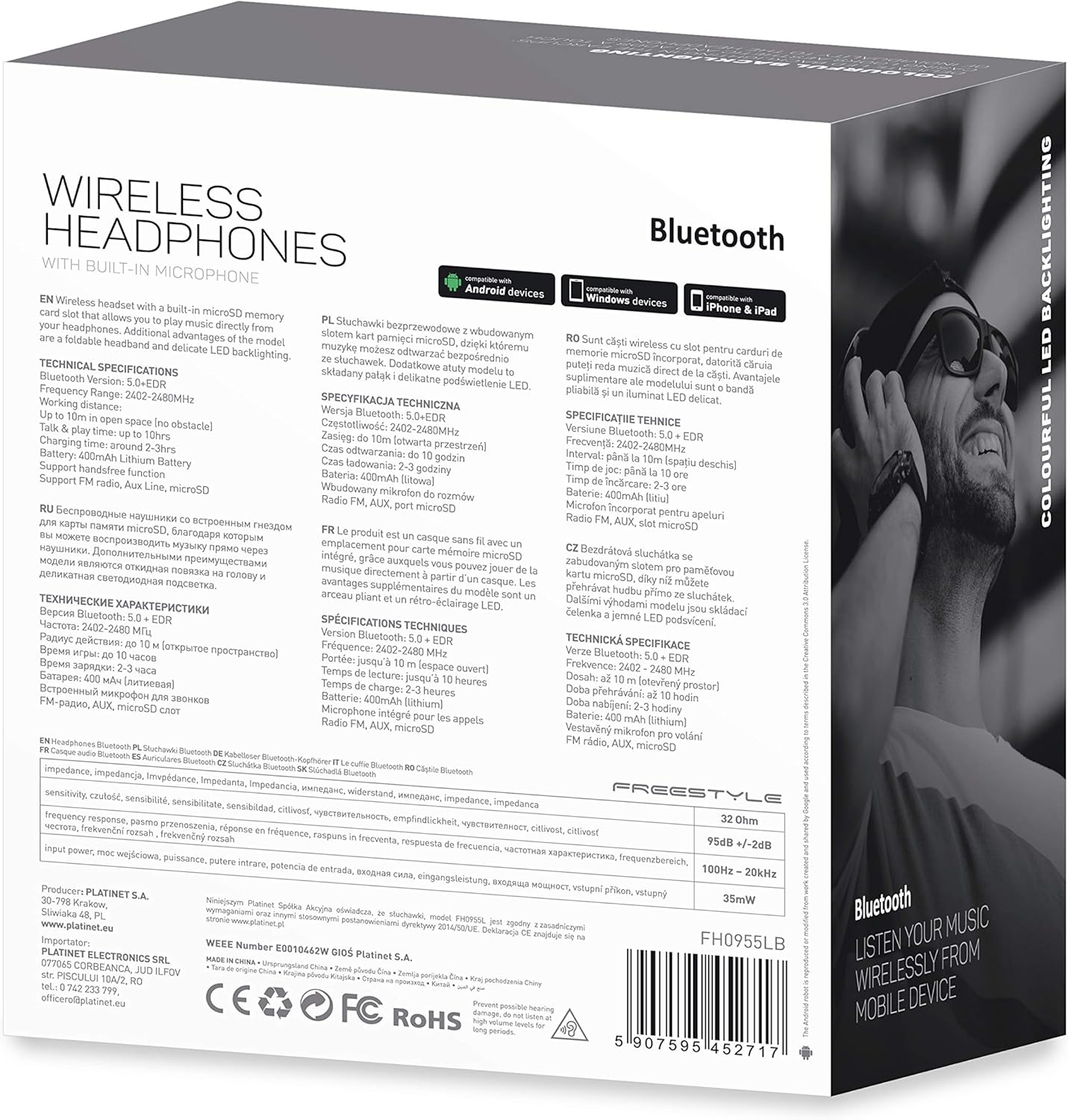
Aworan 7.1: alaye view of the product packaging, showing technical specifications and compliance information.
| Ẹya ara ẹrọ | Sipesifikesonu |
|---|---|
| Nọmba awoṣe | FH0955LB |
| Brand | Freestyle |
| Asopọmọra Technology | Wireless (Bluetooth 5.0 + EDR) |
| Alailowaya Ibiti | Ti o to awọn mita 10 |
| Jack ohun | 3.5 mm |
| Fọọmù ifosiwewe | Over-Ear (Circum-Auricular) |
| Pataki Awọn ẹya ara ẹrọ | Noise Cancellation, LED Backlighting, MicroSD Card Slot |
| Batiri Iru | Integrated Lithium-ion (400 mAh) |
| Akoko Sisisẹsẹhin | Titi di wakati 10 |
| Akoko gbigba agbara | O fẹrẹ to awọn wakati 2 |
| Gbigba agbara Port | MicroUSB |
| Àwọ̀ | Dudu |
| Ohun elo | Leather (earpads/headband) |
| Omi Resistance Ipele | Omi sooro |
| Awọn irinše to wa | 1 bata ti agbekọri |
| Olupese | Platinet |
8. Atilẹyin ọja ati Support
Awọn alaye atilẹyin ọja pato ni a pese nigbagbogbo pẹlu iwe rira tabi lori oṣiṣẹ ti olupese webojula. Jọwọ ṣe idaduro ẹri rira rẹ fun eyikeyi awọn ibeere atilẹyin ọja.
For technical support or inquiries, please refer to the contact information provided by your retailer or the manufacturer, Platinet.
9. Alaye Aabo
- Ma ṣe fi agbekọri han si awọn iwọn otutu to gaju, ọriniinitutu, tabi olomi.
- Yago fun gbigbọ ni awọn ipele iwọn didun giga fun awọn akoko gigun lati dena ibajẹ igbọran.
- Do not attempt to disassemble or modify the headphones, as this may void the warranty and cause damage.
- Jeki kuro ni arọwọto awọn ọmọde.
- Dispose of the product responsibly according to local electronic waste regulations.