1. Ọja Ipariview
Awọn Purline WS015 is a versatile weather station designed to provide detailed and current information regarding indoor and outdoor environmental conditions. This device monitors temperature, humidity, and offers a weather forecast. It also includes a digital clock with an alarm function and a calendar display.
Equipped for both indoor and outdoor use, the WS015 features a clear digital LCD display with animated symbols for weather forecasting. It stores maximum and minimum readings and tracks temperature trends over the past 12 hours. The main unit can also function as a USB charging hub for other devices.
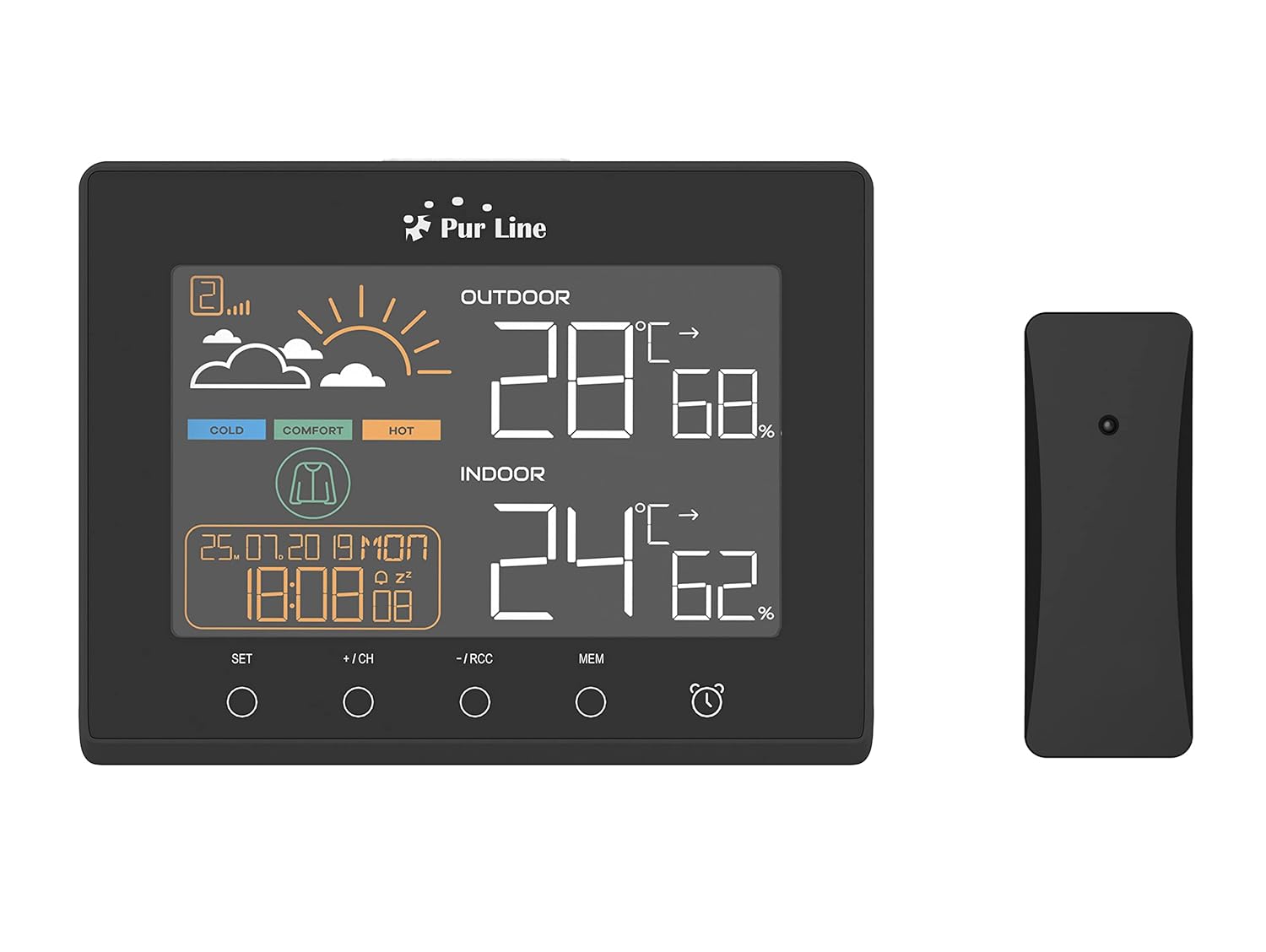
Iwaju view of the PUR LINE WS015 Weather Station display unit and its wireless outdoor sensor.
2. Awọn ilana iṣeto
2.1. Ṣíṣí àwọn ohun èlò àti àwọn ohun èlò
Carefully remove all components from the packaging. Ensure you have the main display unit and the wireless outdoor sensor.
2.2. Ṣiṣe agbara Ẹka akọkọ
The main unit requires 3 AAA batteries (not included) or can be powered via a USB connection. To install batteries:
- Ṣii ideri iyẹwu batiri ni ẹhin ẹyọ akọkọ.
- Fi awọn batiri AAA meji sii, ki o si kiyesi polarity ti o tọ (+/-).
- Pa ideri iyẹwu batiri naa.
Alternatively, connect the main unit to a USB power source using a compatible USB cable (not included).
2.3. Ifisi Sensọ Ita gbangba
The outdoor sensor is splash-proof (IP rated) but should be placed in a sheltered location to protect it from direct rain and prolonged sunlight, which can affect temperature readings. Ensure the sensor is within effective transmission range of the main unit (typically up to 30 meters in open air).
2.4. Amuṣiṣẹpọ akọkọ
Once both the main unit and the outdoor sensor are powered, they should automatically synchronize. If synchronization does not occur, press the 'CH' button on the main unit to initiate a search for the sensor. Ensure the sensor is close to the main unit during initial setup.

Ẹyìn view of the PUR LINE WS015 Weather Station, showing the battery compartment and stand.
3. Awọn ilana Iṣiṣẹ
3.1. Ifihan Loriview
Ifihan LCD fihan alaye wọnyi:
- Iwọn ita gbangba ati ọriniinitutu: Readings from the wireless sensor.
- Iwọn inu ile ati ọriniinitutu: Awọn kika lati awọn sensosi ti abẹnu akọkọ kuro.
- Àfojúsùn ojú ọjọ: Animated symbols indicating predicted weather conditions.
- Akoko ati Ọjọ: Àkókò lọ́wọ́lọ́wọ́, ọjọ́, àti ọjọ́.
- Atọka Ipele Itunu: Based on indoor temperature and humidity.
- Iyipada iwọn otutu: Arrows indicating rising, falling, or stable temperature over the last 12 hours.

Sun mo tipetipe view of the PUR LINE WS015 Weather Station display, showing outdoor and indoor temperature, humidity, time, date, and weather forecast symbols.
3.2. Awọn iṣẹ bọtini
The main unit features several control buttons:
- Ṣeto: Enters setting mode for time, date, and alarm. Confirms settings.
- +/CH: Increases values during setting. In normal mode, cycles through outdoor sensor channels or initiates sensor search.
- -/RCC: Decreases values during setting. In normal mode, manually initiates RCC (Radio Controlled Clock) signal reception.
- MEM: Displays maximum and minimum temperature/humidity records. Press again to clear records.
- Aami itaniji: Muu ṣiṣẹ tabi mu maṣiṣẹ iṣẹ itaniji.
3.3. Eto Aago ati Ọjọ
- Tẹ mọlẹ SET bọtini titi ti ifihan akoko seju.
- Lo awọn + or - awọn bọtini lati ṣatunṣe wakati naa, lẹhinna tẹ SET lati jẹrisi ati gbe si awọn iṣẹju.
- Tún ṣe é fún ìṣẹ́jú, ọdún, oṣù, àti ọjọ́.
- Tẹ SET lati jade ni ipo eto.
3.4. Ṣiṣeto Itaniji
- Tẹ awọn Itaniji Aami button once to display the alarm time.
- Tẹ mọlẹ Itaniji Aami bọtini titi ti akoko itaniji ba tan.
- Lo awọn + or - buttons to adjust the alarm hour, then press the Itaniji Aami button to confirm and move to minutes.
- Tun ṣe fun iṣẹju diẹ.
- Tẹ awọn Itaniji Aami button to exit setting mode. Press it again in normal mode to toggle the alarm on/off.
3.5. USB Charging Outputs
The main unit is equipped with USB outputs that allow you to charge compatible electronic devices. Simply connect your device's USB charging cable to the USB port on the side of the weather station.

The PUR LINE WS015 Weather Station with two smartphones connected to its USB charging outputs.
4. Itọju
4.1. Ninu
To clean the weather station and sensor, use a soft, damp asọ. Ma ṣe lo abrasive ose tabi olomi, bi awọn wọnyi le ba ifihan tabi casing. Ensure no liquid enters the device openings.
4.2. Batiri Rirọpo
When the display becomes dim or readings are inconsistent, it may be time to replace the batteries in the main unit and/or the outdoor sensor. Follow the battery installation steps outlined in Section 2.2 for the main unit. For the outdoor sensor, open its battery compartment, replace the old batteries with new ones of the correct type, and close the compartment securely.
5. Laasigbotitusita
Wọpọ Oran ati Solusan
- No Display on Main Unit:
- Check if batteries are inserted correctly and are not depleted.
- Ensure the USB power cable (if used) is securely connected.
- Outdoor Readings Not Displaying or Incorrect:
- Check the batteries in the outdoor sensor.
- Ensure the outdoor sensor is within range of the main unit and free from major obstructions.
- Tẹ awọn +/CH button on the main unit to re-initiate sensor search.
- Relocate the outdoor sensor to a more suitable position, away from direct sunlight or heat sources.
- Time Not Synchronizing (RCC):
- Ensure the unit is placed away from electronic interference.
- Manually initiate RCC signal reception by pressing the -/RCC bọtini.
- Itaniji Ko N dun:
- Rí i dájú pé iṣẹ́ ìkìlọ̀ náà ti ṣiṣẹ́ (àmì ìkìlọ̀ náà hàn lórí ìfihàn).
- Check that the alarm time is set correctly.
6. Imọ ni pato
- Awoṣe: WS015
- Olupese: Purline
- Àwọn ìwọ̀n (L x D x H): 17 x 3 x 13 cm (isunmọ)
- Orisun Agbara (Ẹka Akọkọ): 3 x AAA batteries (not included) or USB
- Orisun Agbara (Sensor ita gbangba): Batteries (type not specified, typically AAA or AA)
- Ohun elo: Ṣiṣu
- Asopọmọra: Wireless (sensor), USB (charging outputs)
- Awọn ẹya pataki: Programmable alarm, Max/Min memory, Temperature trend, Weather forecast, USB charging outputs
- Iru ifihan: LCD oni -nọmba
7. Atilẹyin ọja ati Support
Information regarding product warranty and specific support contacts is not available in this document. For warranty claims or technical assistance, please refer to the documentation provided at the time of purchase or contact your retailer or the manufacturer directly.