
1. Ifihan
Thank you for choosing the Strong SRT55UC7433 55-inch 4K UHD Smart Android TV. This manual provides essential information for setting up, operating, and maintaining your new television. Please read it thoroughly before use and retain it for future reference.
This television offers an immersive viewing experience with its 4K Ultra HD resolution, High Dynamic Range 10 (HDR), and Wide Color Gamut (WCG) technology, delivering vibrant colors and exceptional detail. Powered by Android TV, it provides seamless access to a wide range of streaming services and applications, enhanced by integrated Wi-Fi and Google Assistant voice control.
2. Alaye Aabo
Lati rii daju iṣẹ ailewu ati yago fun ibajẹ, jọwọ ṣe akiyesi awọn iṣọra ailewu atẹle:
- Ibi ti ina elekitiriki ti nwa: So TV pọ nikan si iṣan agbara AC pẹlu vol ti o tọtage. Má ṣe ju àwọn ibi ìpèsè agbára lọ.
- Afẹfẹ: Ensure adequate ventilation around the TV. Do not block ventilation openings or place the TV on soft surfaces that may impede airflow.
- Ibi: Place the TV on a stable, level surface to prevent it from falling. Avoid placing it in direct sunlight, near heat sources, or in areas with high humidity.
- Omi ati Ọrinrin: Do not expose the TV to rain or moisture. Do not place objects filled with liquids, such as vases, on or near the TV.
- Ninu: Yọ TV kuro ṣaaju ki o to di mimọ. Lo asọ asọ ti o gbẹ. Ma ṣe lo olomi tabi awọn olutọpa aerosol.
- Awọn ọmọde: Supervise children to prevent them from climbing on the TV or playing with the remote controls.
- Ṣiṣẹ: Maṣe gbiyanju lati ṣe iṣẹ TV funrararẹ. Tọkasi gbogbo iṣẹ si awọn oṣiṣẹ iṣẹ ti o peye.
3. Package Awọn akoonu
Daju pe gbogbo awọn nkan wa ninu apoti:
- Strong SRT55UC7433 55-inch 4K UHD Smart Android TV
- Standard Remote Iṣakoso
- Smart Remote Control with Google Assistant button
- AAA Batteries (4x) for remote controls
- Okun agbara
- Itọsọna fifi sori iyara (QIG)
- TV Stand/Feet (2x) and screws
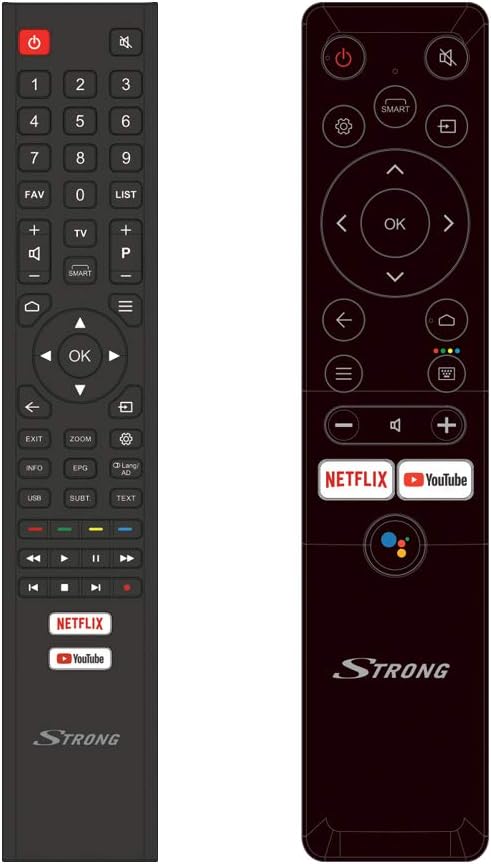
Image: The two included remote controls, one standard and one smart remote with Google Assistant.
4. Eto
4.1 Ṣiṣii ati Gbe
Carefully remove the TV from its packaging. It is recommended to have two people for this process due to the size and weight of the unit. Place the TV in a location that allows for proper ventilation and is away from direct sunlight or heat sources. Ensure the surface is stable enough to support the TV's weight.

Image: The TV in a typical room, illustrating its dimensions (1231.6 mm width, 715.2 mm height without stand).
4.2 So Iduro
If you are not wall-mounting the TV, attach the included stand feet:
- Fi oju TV si isalẹ lori rirọ, dada mimọ lati ṣe idiwọ ibajẹ iboju.
- Mú ẹsẹ̀ dúró kọ̀ọ̀kan pọ̀ mọ́ àwọn ihò tó báramu lórí ìsàlẹ̀ TV náà.
- Secure the feet using the provided screws. Ensure they are tightened firmly.

Aworan: Iwaju view of the Strong SRT55UC7433 TV with its stand properly attached.
4.3 Nsopọ Peripherals
Your TV offers various connection options for external devices:
- HDMI: Connect Blu-ray players, game consoles, or set-top boxes to the HDMI ports (3x HDMI 2.0).
- USB: Connect USB storage devices for media playback (2x USB ports).
- Antenna/Cable: So eriali tabi ifihan agbara TV okun rẹ pọ mọ titẹ sii ti o yẹ.
- Àjọlò: Fun asopọ intanẹẹti iduroṣinṣin, so okun Ethernet pọ si ibudo LAN.
- CI Iho: Insert a Common Interface module for conditional access to Pay TV services.

Image: Icons representing the various connectivity options including HDMI, USB, AV, Headphone, Ethernet, SAT in, CI slot, and S/PDIF.
4.4 Ni ibẹrẹ Power On ati Oṣo oluṣeto
After connecting all necessary cables, plug the TV into a power outlet and press the power button on the TV or remote control. The TV will guide you through the initial setup process, which typically includes:
- Aṣayan ede: Yan ede ti o fẹ julọ.
- Eto Nẹtiwọọki: Sopọ si nẹtiwọki Wi-Fi rẹ tabi lo asopọ Ethernet ti a firanṣẹ.
- Wíwọlé Àkọọ́lẹ̀ Google: Wọlé pẹ̀lú àkọọ́lẹ̀ Google rẹ láti wọlé sí àwọn ẹ̀yà ara Android TV àti Google Play Store.
- Iwoye ikanni: The TV will automatically scan for available channels from your antenna or cable connection. You can create favorite channel lists later.
5. Awọn ilana Iṣiṣẹ
5.1 Awọn iṣakoso latọna jijin
Your TV comes with two remote controls. The standard remote provides full functionality, while the smart remote offers simplified navigation and direct access buttons for popular streaming services and Google Assistant.
- Bọtini agbara: Tan TV si tan tabi paa.
- Awọn bọtini lilọ kiri: Lo pad itọsọna ati bọtini OK lati lilö kiri awọn akojọ aṣayan.
- Iwọn didun/ikanni: Ṣatunṣe iwọn didun ati yi awọn ikanni pada.
- Netflix/YouTube Buttons: Wiwọle taara si awọn ohun elo ṣiṣanwọle wọnyi.
- Bọtini Iranlọwọ Google: Activate voice commands on the smart remote.
5.2 Awọn ẹya Smart TV (Android TV)
The Android TV interface provides access to a world of entertainment:
- Awọn ohun elo: Download and install apps from the Google Play Store, including streaming services like Netflix, YouTube, Prime Video, and Disney+.
- Oluranlọwọ Google: Press the Google Assistant button on your smart remote and speak commands to search for content, get information, or control smart home devices.
- Simẹnti: Use built-in Chromecast functionality to cast content from your smartphone or tablet to the TV.

Image: The Android TV home screen showing various applications like YouTube, Google Play Store, and other streaming services.
5.3 Afikun Awọn ẹya ara ẹrọ
- Iṣakoso obi: Set up parental controls to restrict access to certain channels or content based on ratings.
- Ipo Hotẹẹli: This feature allows for customization of TV settings for use in hotel environments.
- Itọsọna Eto Itanna (EPG): View upcoming TV programs and schedule recordings (if supported by external recording device).
- Ọrọ telifoonu: Access text-based information services provided by broadcasters.
6. Itọju
6.1 Ninu iboju
Láti nu ibojú náà, kọ́kọ́ yọ TV náà kúrò. Fi aṣọ rírọ̀ tí kò ní àwọ̀ rẹ́rẹ́ nu ibojú náà. Fún àmì líle, fi díẹ̀ dì í.ampen the cloth with water or a specialized screen cleaner, then wipe dry immediately. Avoid applying pressure to the screen.
6.2 Itọju Gbogbogbo
Keep the TV free from dust by regularly wiping the cabinet with a soft, dry cloth. Do not use abrasive cleaners or solvents. Ensure the TV is not exposed to extreme temperatures or humidity.
7. Laasigbotitusita
Ti o ba pade awọn ọran pẹlu TV rẹ, tọka si awọn iṣoro ti o wọpọ ati awọn ojutu wọnyi:
| Isoro | Owun to le Fa | Ojutu |
|---|---|---|
| Ko si agbara | Power cable disconnected; power outlet fault | Ṣayẹwo asopọ okun agbara; gbiyanju kan ti o yatọ iṣan. |
| Ko si aworan, ṣugbọn ohun wa | Orísun ìtẹ̀síwájú tí kò tọ́; okùn HDMI tí kò ní àbùkù | Press the 'Source' button on the remote to select the correct input; replace HDMI cable. |
| Ko si ohun, ṣugbọn aworan wa | Ohùn tí a dákẹ́ tàbí tí ó kéré jù; ìṣòro ètò ohùn láti òde | Mu ohùn rẹ kuro tabi mu ipele rẹ pọ si; ṣayẹwo awọn asopọ si awọn ẹrọ ohun ita. |
| Isakoṣo latọna jijin ko ṣiṣẹ | Dead batteries; obstruction between remote and TV | Rọpo awọn batiri; yọ eyikeyi idiwo. |
| Ko le sopọ si Wi-Fi | Ọrọigbaniwọle ti ko tọ; oran olulana; TV ju jina lati olulana | Ṣàyẹ̀wò ọ̀rọ̀ìpamọ́ Wi-Fi; tún ráùtà náà bẹ̀rẹ̀; gbé TV sún mọ́ ráùtà náà tàbí lo ráùtà Ethernet. |
If the problem persists after trying these solutions, please contact Strong customer support.
8. Awọn pato
| Ẹya ara ẹrọ | Sipesifikesonu |
|---|---|
| Brand | Alagbara |
| Nọmba awoṣe | SRT55UC7433 |
| Iwon iboju | 55 inches (139 cm) |
| Ipinnu | 3840 x 2160 (4K UHD) |
| Ifihan ọna ẹrọ | LED |
| Eto isesise | Android |
| Asopọmọra | Wi-Fi, Ethernet, 3x HDMI 2.0, 2x USB, Common Interface (CI) |
| Pataki Awọn ẹya ara ẹrọ | HDR10, WCG, Google Assistant, Parental Control, Hotel Mode, EPG, Teletext |
| Awọn iwọn (pẹlu iduro) | 1231.6 x 260 x 782.4 mm |
| Iwọn (pẹlu iduro) | 13.2 kg |
| Oṣuwọn sọtun | 120 Hz |
| Àwọ̀ | Dudu |
9. Atilẹyin ọja ati Support
For warranty information and customer support, please refer to the documentation included with your product or visit the official Strong website. You can also find useful numbers and information on Strong's Facebook profile and LinkedIn page.
Strong is committed to providing support for all your needs. Please ensure you have your model number (SRT55UC7433) and purchase details ready when contacting support.