Ọrọ Iṣaaju
This manual provides comprehensive instructions for the Elekpia Universal Remote Control, model CT-RC1US-18. This remote is designed for seamless compatibility with a wide range of Toshiba LED LCD HDTV models, including but not limited to CT-90325, CT-90326, CT-90329, CT-8037, CT-90302, CT-90275, CT-90, CT-90366, and CT-RC1US-18. Please read this manual carefully to ensure proper setup and operation of your new remote control.
Ṣeto
Fifi sori batiri
The Elekpia Universal Remote Control requires two (2) 1.5V AA batteries for operation. No programming is needed; simply install the batteries, and the remote will be ready to use with your compatible Toshiba TV.
- Wa ideri iyẹwu batiri ni ẹhin isakoṣo latọna jijin.
- Tẹ mọlẹ lori taabu ki o si rọra ideri si isalẹ lati ṣii yara naa.
- Fi awọn batiri AA meji (2) sii, ni idaniloju awọn ebute rere (+) ati odi (-) ni ibamu pẹlu awọn ami ti o wa ninu yara naa.
- Gbe ideri iyẹwu batiri pada si aaye titi yoo fi tẹ ni aabo.

Nọmba 1: Iwaju ati sẹhin view of the Elekpia Universal Remote Control, highlighting the battery compartment on the rear.
Once batteries are installed, the remote is ready for immediate use with your Toshiba TV. No additional setup or code entry is required.
Awọn ilana Iṣiṣẹ
This universal remote control is designed to replicate the functions of your original Toshiba TV remote. Point the remote directly at your television's infrared receiver for optimal performance.
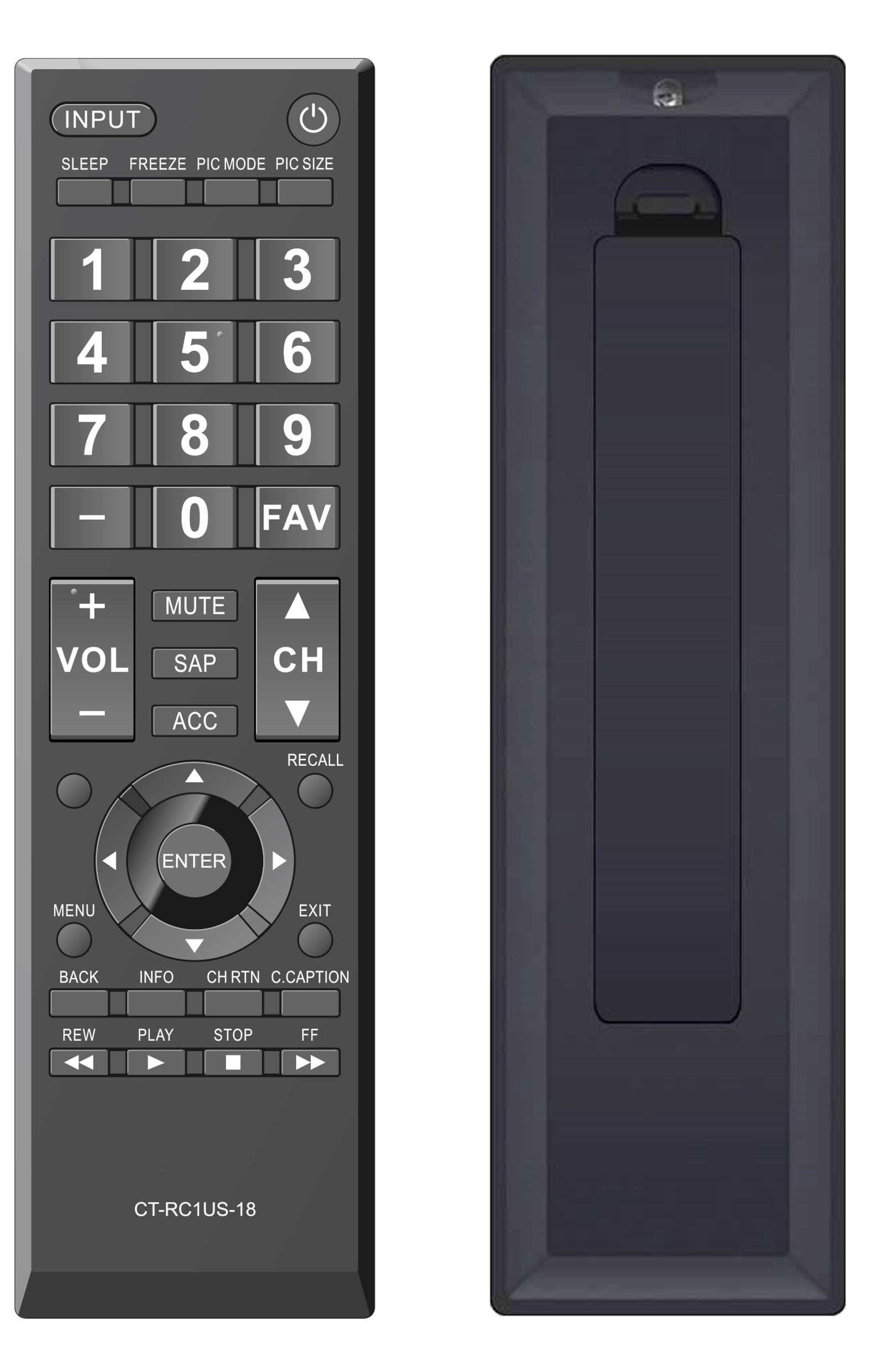
olusin 2: Iwaju view of the Elekpia Universal Remote Control, displaying the layout of all buttons.
Awọn iṣẹ bọtini
- AGBARA (⏻): Ó ń tan tẹlifíṣọ̀n tàbí ó ń pa á.
- ÀWỌN Ọ̀RỌ̀: Cycles through available input sources (HDMI 1, HDMI 2, AV, etc.).
- ORUN: Activates or adjusts the TV's sleep timer function.
- DIDE: Pauses the current image on the screen (functionality may vary by TV model).
- Ipo Aworan: Adjusts picture modes (e.g., Standard, Movie, Dynamic).
- ÌWỌ̀N ÀWÒRÁN: Changes the aspect ratio or picture size.
- Paadi Nọmba (0-9): Ó ń tẹ àwọn nọ́mbà ikanni tààrà.
- - (Dash): Used for entering sub-channels (e.g., 7-1).
- FAV: Wọle si atokọ awọn ikanni ayanfẹ.
- VOL (+/-): Increases or decreases the volume level.
- IKU: Silences the television audio.
- SAP: Selects Secondary Audio Program (SAP) or alternate audio tracks.
- ACC: Accesses accessibility features or audio settings.
- CH (Sókè/Sàn): Changes the television channel up or down.
- ÌRÁNTÍ: Switches between the current and previously viewikanni ed.
- Navigation Pad (Up, Down, Left, Right, ENTER): Navigates through on-screen menus and confirms selections.
- Akojọ: Opens the main menu of the television.
- JADE: Closes the current menu or returns to the previous screen.
- PADA: Ó padà sí àkójọ tàbí ìbòjú tó ti kọjá.
- ALAYE: Ṣe afihan alaye nipa eto lọwọlọwọ tabi titẹ sii.
- CH RTN (Channel Return): Similar to RECALL, returns to the previous channel.
- C.CAPTION (Closed Caption): Ó máa ń tan tàbí pa àwọn àkọlé tí a ti pa.
- REW (Rewind), PLAY, STOP, FF (Fast Forward): Controls for media playback (e.g., when using a connected USB device or smart TV apps, if supported by the TV).
Itoju
Nu latọna jijin mọ
Láti rí i pé ìṣàkóso latọna jijin náà wà ní ìrísí àti iṣẹ́ rẹ̀, máa fọ ọ́ déédéé:
- Lo asọ ti o rọ, ti o gbẹ lati nu dada ti isakoṣo latọna jijin.
- Fun idoti alagidi, die-die dampen asọ pẹlu omi tabi a ìwọnba, ti kii-abrasive regede. Yago fun ọrinrin pupọ.
- Má ṣe lo àwọn kẹ́míkà líle, àwọn ohun èlò ìfọ́, tàbí àwọn ohun èlò ìfọmọ́ra, nítorí pé wọ́n lè ba ìparí tàbí àwọn ohun èlò inú remote náà jẹ́.
Batiri Rirọpo
Replace batteries when the remote's response becomes sluggish or stops working. Always replace both AA batteries at the same time with new ones. Do not mix old and new batteries, or different types of batteries, as this can lead to leakage or damage.
Ibi ipamọ
If the remote control will not be used for an extended period, remove the batteries to prevent potential leakage and damage to the device.
Laasigbotitusita
If you encounter issues with your Elekpia Universal Remote Control, please refer to the following common solutions:
- Latọna jijin ko dahun:
- Ensure the batteries are correctly installed with the proper polarity (+/-).
- Ropo awọn batiri pẹlu alabapade AA batiri.
- Ṣayẹwo fun eyikeyi awọn idena laarin isakoṣo latọna jijin ati sensọ infurarẹẹdi ti TV.
- Ensure you are pointing the remote directly at the TV.
- Diẹ ninu awọn bọtini ko ṣiṣẹ:
- This remote is pre-programmed for Toshiba TVs. Verify your TV model is compatible.
- Clean the remote's surface, especially around the unresponsive buttons, to remove any dirt or debris that might be interfering with button presses.
- TV not turning on/off:
- Confirm the TV is plugged into a working power outlet.
- Try using the power button directly on the TV to confirm it is operational.
If these steps do not resolve the issue, please refer to the customer support section.
Awọn pato
| Nọmba awoṣe | CT-RC1US-18 |
| Brand | Elekpia |
| Ọja Mefa | 7 x 2 x 0.6 inches |
| Iwọn Nkan | 3 iwon |
| Orisun agbara | Awọn batiri 2 x 1.5V AA (kii ṣe pẹlu) |
| Awọn ẹrọ ibaramu | Toshiba LED LCD HDTVs |
| Nọmba ti o pọju Awọn ẹrọ Atilẹyin | 1 |
| Àwọ̀ | Dudu |
Alaye atilẹyin ọja
Specific warranty details for the Elekpia Universal Remote Control CT-RC1US-18 are not provided in this manual. Please refer to the product packaging, the retailer's return policy, or the manufacturer's official website for information regarding warranty coverage and terms.
Onibara Support
For further assistance or inquiries regarding your Elekpia Universal Remote Control, please contact the retailer from whom you purchased the product. You may also visit the official Elekpia website for potential support resources or contact information.