
Candy CS 1492DE-S
Ìwé Ìtọ́sọ́nà fún Ẹ̀rọ Fọ Candy Smart CS 1492DE-S
Model: CS 1492DE-S | Brand: Candy
Ọrọ Iṣaaju
This manual provides essential information for the safe and efficient operation, installation, and maintenance of your Candy Smart CS 1492DE-S washing machine. Please read it thoroughly before using the appliance and keep it for future reference.
The Candy Smart CS 1492DE-S is a front-loading washing machine designed for household use, featuring a 9 kg capacity and a maximum spin speed of 1400 rpm. It includes a variety of wash programs, quick cycles, and smart features via NFC connectivity.
Alaye Aabo
Aabo gbogbogbo:
- Rii daju pe ohun elo ti wa ni ilẹ daradara.
- Maṣe fi ọwọ kan ohun elo pẹlu ọwọ tutu tabi ẹsẹ.
- Ma ṣe gba awọn ọmọde laaye lati ṣiṣẹ tabi ṣere pẹlu ohun elo naa.
- Yọọ ohun elo ṣaaju ṣiṣe mimọ tabi ṣiṣe itọju eyikeyi.
- Do not force the door open during operation.
- Jeki awọn ohun elo apoti kuro lọdọ awọn ọmọde.
Aabo fifi sori ẹrọ:
- Install the machine on a stable, level surface.
- Remove all transit bolts before use. Failure to do so can cause severe damage.
- Ensure water and electrical connections are made by a qualified professional if you are unsure.
Eto ati fifi sori
Ṣiṣi silẹ
Carefully remove all packaging materials. Check for any damage during transit. Keep packaging for future transport if needed.
Yiyọ Transit Bolts
Before operating the washing machine, it is crucial to remove the transit bolts located at the rear of the appliance. These bolts secure the drum during transport and must be removed to prevent damage during operation.
- Locate the transit bolts on the back panel.
- Use a suitable wrench to loosen and remove all bolts.
- Insert the plastic caps provided into the holes.
Ipo ati Ipele
Place the washing machine on a firm, flat surface. Adjust the adjustable feet to ensure the machine is perfectly level. A level machine reduces vibration and noise during operation.
Omi Asopọ
Connect the water inlet hose to a cold water tap with a 3/4" thread. Ensure the connection is tight to prevent leaks. Position the drain hose into a suitable drain pipe or sink, ensuring it is securely fixed and not kinked.
Asopọ Itanna
Pulọọgi okun agbara sinu iṣan itanna ti ilẹ. Rii daju voltage àti ìgbóhùnsáfẹ́fẹ́ bá àwọn ìlànà tó wà lórí àwo ìdíyelé ẹ̀rọ náà mu. Má ṣe lo àwọn okùn ìfàgùn tàbí àwọn adapter.
Awọn ilana Iṣiṣẹ
Ibi iwaju alabujutoview
The washing machine features a rotary knob for program selection and a touch screen for additional functions and settings.

Aworan: Iwaju view of the Candy Smart CS 1492DE-S washing machine, showing the control panel, detergent drawer, and large loading door.
ikojọpọ ifọṣọ
Open the large loading door and place laundry loosely into the drum. Do not overload the machine. The maximum capacity is 9 kg.

Aworan: Isunmọ view of the washing machine drum interior, highlighting the stainless steel drum with perforations.
Fifi Detergent
Pull out the detergent drawer. Add appropriate amounts of detergent and fabric softener to the designated compartments. Refer to your detergent packaging for dosage recommendations.
Aṣayan Eto
Turn the program selector knob to choose one of the 15 available wash programs. These include:
- Owu
- Eco 40°/60°
- Sintetiki
- Fi omi ṣan
- Imugbẹ/omo
- Awọn sokoto
- Eto imototo
- Awọn elege
- 5 Quick Programs: Mixed & Colors (14, 30, 44, 59 minutes), Cotton 59 minutes
Additional Functions (Touch Screen)
Use the touch screen to select additional options:
- Intense Rinse: For thorough rinsing.
- Imọtoto: Enhanced hygiene for laundry.
- Irin ti o rọrun: Reduces creasing.
- Ibẹrẹ Idaduro: Postpone the start of the wash cycle by up to 24 hours.
- Quick Programs: Select specific quick cycle durations.
- Ipele Ile: Adjust wash intensity based on dirtiness.
- Aṣayan otutu: Adjust wash temperature.
- Titiipa aabo: Iṣẹ titiipa ọmọ.
- Ifihan akoko to ku: Shows estimated time left.
- Bẹrẹ / Sinmi: To begin or temporarily stop a cycle.
NFC Connectivity (SimplyFi App)
The washing machine is equipped with NFC technology. Download the Candy SimplyFi app to your smartphone to unlock additional features:
- Machine diagnostics and troubleshooting.
- Download new wash programs.
- Mu oluranlọwọ ohun ṣiṣẹ.
- Manage delay start functions remotely.
Itoju
Ninu Drawer Detergent
Regularly clean the detergent drawer to prevent residue buildup. Remove the drawer and rinse it under running water. Use a brush to clean stubborn deposits.
Ninu ilu
Run a maintenance wash (e.g., a hot cycle with no laundry and a descaling agent) periodically to clean the drum and remove any odors or residue.
Ninu Ajọ Imugbẹ
The drain filter should be cleaned regularly to ensure proper drainage and prevent blockages. This is typically located at the bottom front of the machine.

Aworan: Isunmọ view of the washing machine's drain filter compartment, showing the removable filter and its housing.
- Fi ohun èlò kékeré kan sí abẹ́ ìbòrí àlẹ̀mọ́ náà láti gba omi tí ó ṣẹ́kù.
- Ṣii ideri àlẹmọ.
- Laiyara yọ àlẹmọ kuro ni ọna aago si ọna aago ati gba omi laaye lati fa.
- Remove the filter and clean it under running water, removing any lint or debris.
- Reinsert the filter and screw it back in tightly. Close the cover.
Ninu Igbẹhin Ilẹkùn
Wipe the rubber door seal after each wash to prevent mold and mildew buildup. Ensure no small items are trapped in the seal.
Laasigbotitusita
| Isoro | Owun to le Fa | Ojutu |
|---|---|---|
| Ẹrọ ko bẹrẹ | Power cord unplugged; Door not closed properly; Program not selected; Delay start active. | Check power connection; Ensure door clicks shut; Select a program and press Start; Check delay start setting. |
| Ko si gbigba omi | Omi tẹ ni pipade; Inlet okun kikan; Omi titẹ ju kekere. | Ṣii omi tẹ ni kia kia; Titọ okun; Ṣayẹwo titẹ omi inu ile. |
| Omi ti ko ṣan | Sisan okun kinked tabi dina; Sisan àlẹmọ clogged. | Straighten or clear drain hose; Clean drain filter (refer to Maintenance section). |
| Gbigbọn pupọ/ariwo | Awọn boluti irekọja ko yọ kuro; Ẹrọ kii ṣe ipele; Aiṣedeede fifuye. | Remove transit bolts; Level the machine; Redistribute laundry evenly. |
| Detergent aloku ni duroa | Detergent drawer clogged; Too much detergent used. | Clean detergent drawer; Reduce detergent amount. |
Fun awọn iṣoro ti a ko ṣe akojọ si nihin, tabi ti awọn iṣoro ba tẹsiwaju, jọwọ kan si atilẹyin alabara.
Awọn pato
| Ẹya ara ẹrọ | Ẹ̀kúnrẹ́rẹ́ |
|---|---|
| Brand | Suwiti |
| Nọmba awoṣe | CS 1492DE-S (8059019005140) |
| Agbara | 9 kilo |
| Iyara omo ere Max | 1400 rpm |
| Awọn iwọn (H x W x D) | 85 x 60 x 52 cm |
| Iwọn | 66.5 kilo |
| Ipele Ariwo (Iyiyi) | 79 dB |
| Kilasi Iṣiṣẹ Agbara (Titun) | D (as per 2021 EU energy label) |
| Lododun Lilo Lilo | 218 kWh/year (based on old A+++ rating) / 76 kWh/100 cycles (new D rating) |
| Omi Lilo | 46 Liters/cycle (Eco 40-60 program) |
| Iṣakoso Iru | Fọwọkan (Fọwọkan) |
| Pataki Awọn ẹya ara ẹrọ | 5 Quick Cycles, NFC Connectivity, Hygiene Program |
| Ohun elo | Irin Alagbara (ìlù) |
Fun alaye alaye nipa agbara, wo ibi ipamọ data EU EPREL osise:
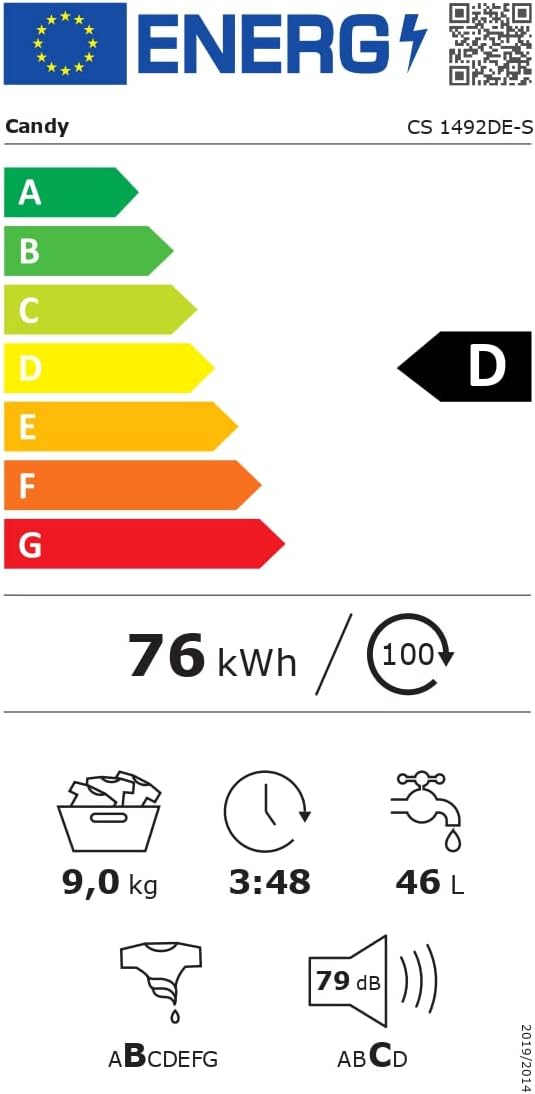
Image: EU Energy Label for the Candy Smart CS 1492DE-S washing machine, showing D energy class, 9 kg capacity, 76 kWh/100 cycles, 46 L/cycle, and 79 dB noise level.
Atilẹyin ọja ati Support
This product comes with a standard manufacturer's warranty. Please refer to your purchase documentation for specific warranty terms and conditions. The typical warranty period is 24 months from the date of purchase.
For technical assistance, spare parts, or service requests, please contact Candy customer support. Have your model number (CS 1492DE-S) and serial number ready when contacting support.
You can also find more information and support resources on the official Candy webojula.
Ask a question about this manual
Ask about setup, troubleshooting, compatibility, parts, safety, or missing instructions. Manuals+ will review the question and use this page’s manual context to help answer it.