
Ọrọ Iṣaaju
This manual provides essential instructions for the proper use and maintenance of your Vikefon Type C Charging and Data Cable. This 1-meter cable is designed for efficient charging and high-speed data transfer between your Type C enabled devices and compatible power sources or computers.

Image: The Vikefon Type C Charging and Data Cable, featuring a standard USB-A connector on one end and a reversible USB-C connector on the other.
Ọja Awọn ẹya ara ẹrọ
- USB Connector Quality: Ensures reliable charging and high-speed data transmission.
- Ijade agbara: Supports up to 5V, 3 Amp fun gbigba agbara yara.
- Ibamu Agbaye: Fully compatible with all Type C mobile devices for fast charging and syncing.
- Reversible USB Type-C Connector: Allows for quick and easy connections in any orientation.
- Apẹrẹ ti o tọ: Features intricate nylon braiding for enhanced durability and longevity, outlasting standard cables.
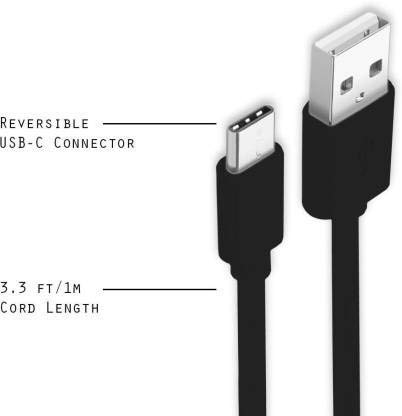
Image: A diagram illustrating the reversible nature of the USB-C connector and the cable's 1-meter (3.3 ft) cord length.
Ṣeto
- Ṣe idanimọ Awọn Asopọmọra: The cable has a standard USB-A connector on one end and a smaller, oval-shaped USB Type-C connector on the other.
- Sopọ̀ mọ́ Orísun Agbára/Kọ̀mpútà: Insert the USB-A end of the cable into a compatible USB port on a wall adapter, power bank, car charger, or computer.
- Sopọ si Ẹrọ: Insert the USB Type-C end into the charging/data port of your smartphone, tablet, or other Type C enabled device. The USB Type-C connector is reversible, so it can be inserted in either orientation.
- Jẹrisi Asopọmọra: Rí i dájú pé àwọn ìpẹ̀kun méjèèjì ti so pọ̀ dáadáa. Ẹ̀rọ rẹ gbọ́dọ̀ fihàn pé ó ń gba agbára tàbí ó ti so pọ̀ fún gbigbe data.
Awọn ilana Iṣiṣẹ
Gbigba agbara ẹrọ rẹ
- Connect the USB-A end of the cable to a compatible USB power adapter (e.g., wall charger, car charger, power bank).
- Connect the USB Type-C end to your device's charging port.
- Ensure the power adapter is plugged into a live power outlet. Your device should begin charging.
Gbigbe Data
- Connect the USB-A end of the cable to a USB port on your computer.
- Connect the USB Type-C end to your device.
- On your device, you may receive a prompt asking to allow data access or to select a USB connection mode (e.g., "File Transfer," "MTP"). Select the appropriate option to enable data transfer.
- Ẹrọ rẹ yẹ ki o han bi awakọ yiyọ kuro tabi ẹrọ media lori kọnputa rẹ, gbigba ọ laaye lati gbe lọ files.
Itoju
- Mimu to tọ: Always grasp the connector head when plugging or unplugging the cable. Avoid pulling directly on the cable itself to prevent damage to the internal wires.
- Yago fun Titẹ: Do not excessively bend or crimp the cable, especially near the connectors, as this can cause internal wire breakage.
- Ibi ipamọ: Store the cable in a clean, dry place away from extreme temperatures and direct sunlight. Avoid tangling the cable.
- Ninu: If necessary, gently wipe the cable and connectors with a dry, soft cloth. Do not use liquids or abrasive cleaners.

Aworan: A sunmọ-soke view highlighting the durable metal heads of the Vikefon Type C cable connectors, designed for anti-oxidation and corrosion resistance.
Laasigbotitusita
- Ohun elo Ko Ngba agbara:
- Rii daju pe awọn opin mejeeji ti okun naa ni asopọ ni aabo.
- Verify that the power adapter is functioning correctly and plugged into a live outlet.
- Gbiyanju lati lo oluyipada agbara ti o yatọ tabi ibudo USB.
- Ṣàyẹ̀wò ibudo gbigba agbara ẹrọ rẹ fun eyikeyi idoti tabi ibajẹ.
- Gbigba agbara lọra:
- Ensure you are using a power adapter that supports fast charging (e.g., 3A output).
- Close any unnecessary background applications on your device.
- Ko si Gbigbe Data:
- Confirm the cable is properly connected to both your device and computer.
- On your device, check the notification panel for USB options and select "File Transfer" or "MTP."
- Gbiyanju lati sopọ si ibudo USB ti o yatọ lori kọnputa rẹ.
- Tun bẹrẹ mejeeji ẹrọ rẹ ati kọmputa.
Awọn pato
| Ẹya ara ẹrọ | Ẹ̀kúnrẹ́rẹ́ |
|---|---|
| Brand | Vikefon |
| Orukọ awoṣe | Iru C |
| Nọmba awoṣe | Iru C 0129 |
| Asopọmọra Iru | Iru USB C (Ọkunrin-si-Ọkunrin) |
| USB Iru | USB |
| Awọn ẹrọ ibaramu | Laptop, PC, Smartphone (e.g., Xiaomi Redmi 8A, Poco M2, Poco M2 Pro, Samsung, Motorola, Lenovo, Lava, Sony, HTC, LG, Karbonn, Maxx) |
| Pataki Awọn ẹya ara ẹrọ | Charging Wire, Durable, High Data Transfer Rate, High Quality, Long Length |
| Data Gbigbe Oṣuwọn | Up to 0.48 Gigabits Per Second (480 Mbps) |
| Asopọmọra Technology | USB |
| Pato sipesifikesonu | ISO |
| Àwọ̀ | Dudu |
| Apẹrẹ Nkan | Yika |
| Outer Material Type | Rubber (with Nylon Braiding) |
| USB Ipari | 1 Mita |
Atilẹyin ọja ati Support
Specific warranty details for the Vikefon Type C Charging and Data Cable are not provided in this manual. For information regarding warranty coverage, returns, or technical support, please refer to the product packaging or contact the manufacturer directly through their official channels.