
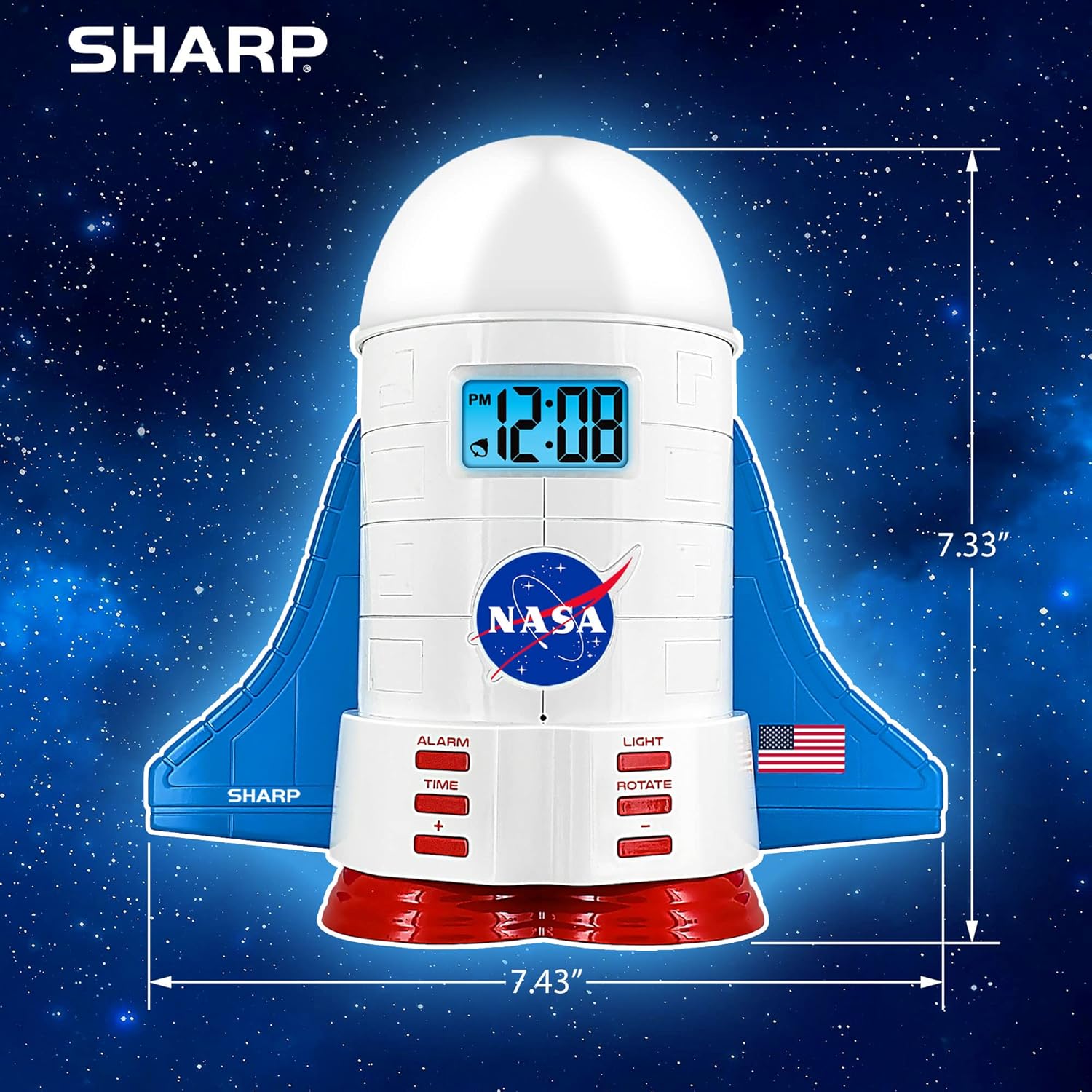
Ọja Pariview
This manual provides instructions for the Sharp NASA Space Shuttle Night Light Alarm Clock. This device combines an alarm clock with a space-themed nightlight and projection feature, designed to enhance a child's bedroom environment.

Ṣeto
Ṣiṣi silẹ
- Ni ifarabalẹ yọ gbogbo awọn paati kuro ninu apoti.
- Rí i dájú pé gbogbo àwọn ohun tí a kọ sí àkójọ "Ohun tí ó wà nínú Àpótí" wà níbẹ̀.
Asopọ agbara
The alarm clock can be powered via the included electric adapter. For continuous operation of all features, including the nightlight and projection, direct power is recommended.
For battery backup, insert appropriate batteries (not included) into the battery compartment located at the base of the unit. This ensures timekeeping and alarm function during power outages.

Awọn ilana Iṣiṣẹ
Ṣiṣeto Akoko naa
- Tẹ awọn AKOKO bọtini.
- Lo awọn + ati - awọn bọtini lati ṣatunṣe awọn wakati ati iseju.
- Tẹ AKOKO lẹẹkansi lati jẹrisi.
Ṣiṣeto Itaniji naa
- Tẹ awọn Itaniji bọtini.
- Lo awọn + ati - awọn bọtini lati ṣeto akoko itaniji ti o fẹ.
- Tẹ Itaniji lẹẹkansi lati mu itaniji ṣiṣẹ. Aami itaniji yoo han loju iboju.
Išẹ lẹẹkọọkan
To temporarily silence the alarm, tap the top of the unit. The alarm will sound again after a short interval.
Nightlight and Projection Features
The unit features light-up wings and a rocket booster base, along with a rotating projection cap.

Awọn Imọlẹ Ṣiṣẹ
Tẹ awọn Imọlẹ button to cycle through the 4 color options for the wings and booster lights.
Projection Caps
The device includes two interchangeable space-themed projection caps and a frosted nightlight cap. Twist counter-clockwise to attach or remove caps.

Asọtẹlẹ Yiyi
Tẹ awọn Yiyi button to activate or deactivate the rotation of the projected images.
Itoju
- Clean the unit with a soft, dry cloth. Avoid abrasive cleaners or solvents.
- Ensure the projection caps are free from dust or smudges for clear image projection.
- Replace batteries in the backup compartment as needed to maintain time settings during power interruptions.
Laasigbotitusita
| Isoro | Owun to le Fa | Ojutu |
|---|---|---|
| Clock not displaying time | Ko si agbara | Ensure the electric adapter is securely plugged in. Check battery backup. |
| Itaniji ko dun | Alarm not set or deactivated | Verify alarm time is set and activated (alarm icon visible). |
| Projection unclear or dim | Dust on cap or insufficient darkness | Clean the projection cap. Ensure the room is sufficiently dark for optimal projection. |
| Isọtẹlẹ ko yiyi | Rotate function off | Tẹ awọn Yiyi button to activate the rotation feature. |
Awọn pato
- Brand: Dinku
- Nọmba awoṣe: Sharp NASA e Shuttle Alarm Clock
- Orisun Agbara: Electric Adapter (Battery backup for timekeeping)
- Orisun Imọlẹ Imọlẹ: LED
- Nightlight Colors: 4 awọn aṣayan
- Projection Themes: 2 interchangeable space scenes
- Ifihan: LCD pẹlu Blue Backlight
- Awọn iwọn: 7.43 x 1.5 x 7.43 inches
- Ìwúwo: 1.33 iwon
- Ohun elo: Ṣiṣu
- Awọn ẹya pataki: Color Changing, Snooze Function, Rotating Projection
Atilẹyin ọja ati Support
Fun alaye atilẹyin ọja tabi atilẹyin imọ-ẹrọ, jọwọ tọka si osise olupese naa. webojula tabi kan si wọn onibara iṣẹ.
Olupese: Dinku
UPC: 049353005447
ASIN: B08PL6K2C5