
1. Ifihan
This manual provides comprehensive instructions for the installation, operation, and maintenance of your Aigo Warrior AK700 Max 700W Power Supply. Designed for high-performance desktop computers, this power supply unit (PSU) delivers stable and efficient power to your system components. Please read this manual thoroughly before installation and use to ensure proper functionality and safety.
2. Alaye Aabo
Always observe the following safety precautions to prevent injury or damage to the product and other components:
- Ensure the power supply is disconnected from the main power outlet before installation or handling.
- Maṣe ṣii ipese agbara casing. Iwọn gigatages are present inside, even when disconnected, and can cause electric shock.
- Fi ipese agbara sii ni agbegbe ti afẹfẹ wa lati dena igbona pupọju.
- Lo awọn okùn tí a pese pẹlu ipese agbara nikan.
- Yago fun ṣiṣafihan ẹyọ naa si ọrinrin tabi awọn iwọn otutu to gaju.
- Ọja yii jẹ apẹrẹ fun lilo inu ile nikan.
3. Package Awọn akoonu
Daju pe gbogbo awọn nkan wa ninu apo rẹ:
- Aigo Warrior AK700 Max 700W Power Supply Unit
- AC Agbara okun
- Modular Cables (if applicable, otherwise fixed cables)
- Iṣagbesori skru
- Afowoyi Olumulo (iwe-ipamọ yii)
4. Ọja Ipariview
The Aigo Warrior AK700 Max is a 700-watt power supply designed to meet the demands of modern gaming and high-performance computing systems. It features an energy-efficient design with a silent 12cm hydraulic bearing fan for optimal cooling and quiet operation. The unit incorporates a built-in Power Factor Correction (PFC) and a dual magnetic ring magnetic amplifier circuit, along with high-frequency low-resistance filter capacitors, to ensure a pure and stable current output. Multiple protection circuits are integrated to safeguard against overvoltage, overcurrent, overload, undervoltage, ati kukuru iyika.
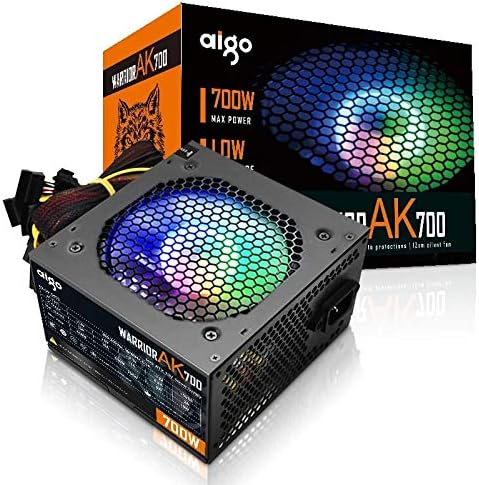
Figure 4.1: The Aigo Warrior AK700 Max 700W Power Supply, showcasing its RGB fan and retail packaging.
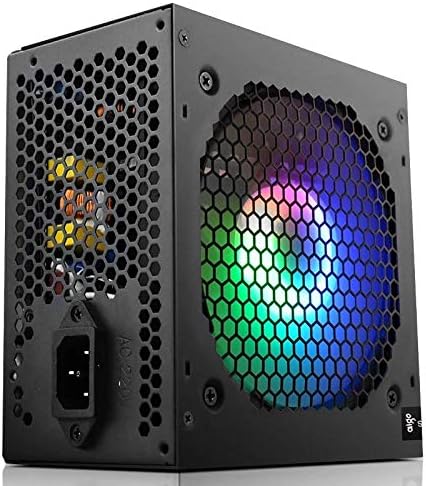
olusin 4.2: Apa view of the power supply, highlighting the 12cm RGB cooling fan and honeycomb grille.

olusin 4.3: Ẹyìn view of the power supply, illustrating the exhaust grille and AC power input socket.
5. Eto ati fifi sori
Follow these steps to properly install the Aigo Warrior AK700 Max power supply into your computer system:
- Igbaradi: Rii daju pe kọmputa rẹ ti wa ni pipa patapata ati yọọ kuro lati inu iṣan ogiri. Ṣii apoti kọnputa rẹ.
- Yọ PSU Atijọ kuro (ti o ba wulo): Disconnect all cables from your old power supply and remove its mounting screws. Carefully slide it out of the case.
- Fi PSU tuntun sori ẹrọ: Gently slide the Aigo Warrior AK700 Max into the power supply bay of your computer case. Ensure the fan is oriented correctly for optimal airflow (usually facing down or up, depending on your case design).
- PSU ti o ni aabo: Align the screw holes on the power supply with those on your case. Secure the power supply using the provided mounting screws.
- Awọn okun Sopọ:
- Asopọ Modabọọdu ATX pin 24: Connect the main 24-pin cable to your motherboard.
- CPU Power Connector (4+4 pin or 8-pin EPS): Connect the CPU power cable to the appropriate socket on your motherboard.
- PCIe Power Connectors (6+2 pin): So awọn wọnyi pọ mọ kaadi aworan rẹ ti o ba nilo.
- Awọn asopọ agbara SATA: Connect to your storage drives (HDDs, SSDs) and optical drives.
- Àwọn Asopọ̀ Ayíká (Molex): Connect to other peripherals as needed.
- Iṣakoso USB: Rọ awọn okùn naa ni ọna ti o tọ lati mu afẹfẹ ati ẹwa dara si ninu apo rẹ.
- Ọran pipade: Once all connections are made and verified, close your computer case.
- Sopọ agbara AC: So okùn agbára AC mọ́ orísun agbára náà, lẹ́yìn náà, so orísun agbára náà mọ́ orí ògiri.
6. Awọn ilana Iṣiṣẹ
After successful installation, follow these steps to operate your computer system with the Aigo Warrior AK700 Max power supply:
- Agbara Tan: Ensure the power switch on the back of the PSU is in the 'ON' (I) position. Press the power button on your computer case.
- Bata eto: Your computer should now power on and begin its boot sequence. The RGB fan on the power supply will illuminate.
- Agbara Pa: To turn off your computer, use the operating system's shutdown function. For a complete power cycle, switch the PSU to the 'OFF' (O) position after shutting down the computer.
The intelligent temperature control design automatically adjusts the fan speed to maintain optimal cooling and extend the lifespan of the unit, ensuring quiet operation under various loads.
7. Itọju
Itọju to dara ṣe idaniloju igbesi aye gigun ati iṣẹ ti o dara julọ ti ipese agbara rẹ:
- Pipa eruku: Periodically clean dust from the power supply's fan and vents using compressed air. Ensure the computer is powered off and unplugged before cleaning.
- Fife ategun: Ensure that the power supply's intake and exhaust vents are not obstructed by cables or other components within the computer case.
- Awọn ipo Ayika: Operate the power supply in a clean, dry environment with adequate ventilation.
- Maṣe Tu: Never attempt to open the power supply unit. There are no user-serviceable parts inside, and doing so will void your warranty and poses a risk of electric shock.
8. Laasigbotitusita
If you encounter issues with your Aigo Warrior AK700 Max power supply, refer to the following common problems and solutions:
| Isoro | Owun to le Fa | Ojutu |
|---|---|---|
| Kọmputa ko ni agbara lori. |
|
|
| Eto naa n tan ṣugbọn o wa ni pipa lẹsẹkẹsẹ. |
|
|
| Fan is not spinning or is excessively loud. |
|
|
If the problem persists after attempting these solutions, please contact Aigo customer support for further assistance.
9. Awọn pato
Detailed technical specifications for the Aigo Warrior AK700 Max 700W Power Supply:
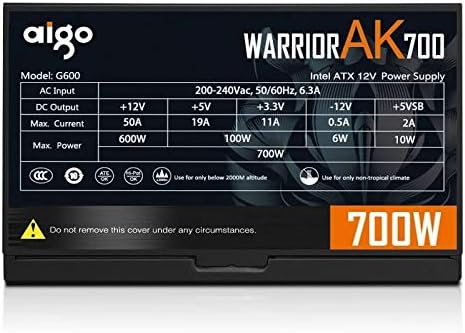
Figure 9.1: The specifications label found on the Aigo Warrior AK700 Max Power Supply.
| Ẹya ara ẹrọ | Ẹ̀kúnrẹ́rẹ́ |
|---|---|
| Awoṣe | AK700 Max |
| Wattage | 700 Wattis |
| Fọọmù ifosiwewe | ATX, ATX12V |
| Iṣagbewọle Voltage | 220V (Minimum 220V, Maximum 220V) |
| Ọna Itutu | Itutu afẹfẹ |
| Fan Iwon | 120 Millimeters (Hydraulic Bearing) |
| Awọn ẹrọ ibaramu | Kọmputa ti ara ẹni |
| Asopọmọra Iru | SATA, PCIe (6+2 pin), ATX 24-pin, EPS 4+4 pin |
| Idaabobo Awọn ẹya ara ẹrọ | Apọjutage, Overcurrent, Overload, Undervoltage, Short Circuit, Light Protection |
| Iwọn Nkan | 1.9 kilo |
| Package Mefa | 5 x 5 x 5 cm (isunmọ) |
10. Atilẹyin ọja ati Support
For warranty information and technical support, please refer to the official Aigo webaaye tabi kan si alagbata agbegbe rẹ. Jeki ẹri rira rẹ fun awọn iṣeduro atilẹyin ọja.
Aigo Official Webojula: www.aigocorp.com (Akiyesi: Eyi jẹ aaye kan URL gẹ́gẹ́ bí kò ṣe aláṣẹ website was provided in the product data. Please refer to actual product documentation for correct contact information.)