
1. Ifihan
The Tycon TPSC2440NMPPT is an advanced Maximum Power Point Tracking (MPPT) solar charge controller designed for efficient battery charging from solar panels. It automatically adjusts to 12V or 24V battery systems and supports various battery types including Flooded, AGM, GEL, and Lithium, with a customizable USER setting. This controller features an integral LCD display for monitoring key system parameters.
2. Awọn ilana aabo
Please read and understand all instructions before installation and operation. Failure to follow these instructions may result in electric shock, fire, or severe injury.
- Ensure all wiring is correctly polarized and securely connected.
- Do not disassemble or attempt to repair the controller. Refer to qualified service personnel.
- Fi olùdarí náà sí ibi tí afẹ́fẹ́ lè máa tàn kálẹ̀ dáadáa, jìnnà sí àwọn ohun èlò tí ó lè jóná àti àwọn gáàsì tí ó lè bàjẹ́.
- Always disconnect the battery and solar panel before installing or moving the controller.
- Wọ ohun elo aabo ti ara ẹni ti o yẹ (PPE) lakoko fifi sori ẹrọ.
- The controller is designed for indoor use or protected outdoor environments (IP32 rating). Avoid direct exposure to water.
3. Ọja Ipariview
The TPSC2440NMPPT controller is equipped with several features to optimize solar charging and battery management:
- MPPT Imọ-ẹrọ: Maximizes power harvest from solar panels.
- Auto-Ranging Voltage: Compatible with 12V or 24V battery arrays.
- Multimode Load Operation: Offers 5 selectable modes for load control.
- Soft Start Load Output: Powers high capacitive loads safely.
- Automatic Battery Equalization: Performs 30-day equalization for optimal battery health.
- Conformal Coated Electronics: Provides environmental protection.
- TVS Lightning Protection: Enhances durability against electrical surges.
- Integral LCD Display: Fihan Batiri Voltage, Capacity, Charging Capacity, Temperature, Load Current, and Solar Current.
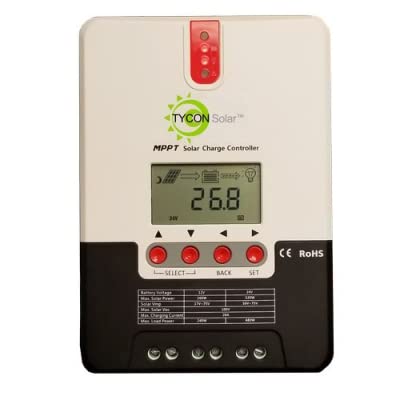
olusin 1: Iwaju view of the Tycon TPSC2440NMPPT Solar MPPT Battery Charging Controller, showing the LCD display and connection terminals.
4. Eto ati fifi sori
Tẹle awọn igbesẹ wọnyi fun fifi sori ẹrọ to dara:
- Iṣagbesori: Choose a suitable location for mounting the controller. Ensure good ventilation and protection from direct sunlight and moisture.
- Asopọ batiri: Connect the battery to the controller's battery terminals first. Ensure correct polarity (+ to + and - to -). The controller will automatically detect the battery voltage (12V tabi 24V).
- Isopọmọ igbimọ oorun: Connect the solar panel array to the controller's solar input terminals. Observe correct polarity. Ensure the open-circuit voltage of the solar array does not exceed the controller's maximum input voltage (110V at 25°C).
- Load Connection (Optional): If using the load output, connect your DC loads to the controller's load terminals. Do not exceed the rated load current (20A Max).
- Sensọ iwọn otutu: Connect the included battery temperature probe cable to the designated port on the controller. Place the sensor near the battery for accurate temperature compensation.
- Agbara Tan: Once all connections are secure, the controller will power on and begin operation.
5. Awọn ilana Iṣiṣẹ
The integral LCD display provides real-time information about your solar charging system. Use the buttons (if present, assuming standard UP/DOWN/SET) to navigate through the display menus and adjust settings.
5.1 LCD Ifihan Alaye
- Batiri Voltage: lọwọlọwọ voltage ti batiri ti o sopọ.
- Agbara Batiri: Estimated state of charge.
- Agbara gbigba agbara: Current power being delivered to the battery.
- Iwọn Batiri: Temperature measured by the external probe.
- Fifuye Lọwọlọwọ: Current being drawn by connected DC loads.
- Solar Current: Current being generated by the solar panels.
5.2 Battery Type Settings
The controller supports Flooded, AGM, GEL, and Lithium battery types. A USER setting allows for custom charge parameters. Refer to the on-screen menu for selecting and configuring the battery type.
5.3 Load Operation Modes
The controller offers 5 selectable load operation modes. Consult the device's menu for details on each mode and how to select them, typically involving timed operation or dusk-to-dawn control.
6. Itọju
Itọju deedee n ṣe idaniloju iṣẹ ṣiṣe to dara julọ ati igba pipẹ ti oludari agbara oorun rẹ.
- Ṣayẹwo awọn isopọ: Lokọọkan ṣayẹwo gbogbo awọn asopọ onirin fun wiwọ ati ipata.
- Adarí mimọ: Keep the controller clean and free of dust. Use a dry cloth for cleaning. Do not use liquids.
- Ilera Batiri: Bojuto batiri voltage and capacity on the LCD. Ensure batteries are properly maintained according to their manufacturer's guidelines.
- Afẹfẹ: Rí i dájú pé afẹ́fẹ́ wà ní ibi tí a fi sori ẹrọ dáadáa láti dènà ìgbóná jù.
7. Laasigbotitusita
| Isoro | Owun to le Fa | Ojutu |
|---|---|---|
| Ko si ifihan/Ko si agbara | Loose battery connection; Battery voltage too low; Blown fuse (external, if applicable). | Check battery connections and polarity. Charge battery if voltage is below operating threshold. Check and replace any external fuses. |
| Ko si gbigba agbara oorun | Solar panel not connected; Incorrect polarity; Insufficient sunlight; Damaged solar panel/wiring. | Verify solar panel connections and polarity. Ensure panels are receiving adequate sunlight. Inspect panels and wiring for damage. |
| Fifuye ko ṣiṣẹ | Load disconnected; Overload; Short circuit; Battery voltage kere ju. | Check load connections. Reduce load if exceeding 20A. Check for short circuits. Ensure battery is sufficiently charged. |
| Awọn kika ti ko pe | Loose connections; Faulty sensor. | Check all wiring connections. Ensure temperature sensor is properly connected and placed. |
8. Awọn pato
- Awoṣe: TPSC2440NMPPT
- Auto Voltage: 12V/24V (System)
- Ampere: 40A
- Ti won won fifuye Lọwọlọwọ: Iye ti o ga julọ ti 20A
- Ìrùsókè O pọju: 10,000uF
- Max Solar Input Voltage: 110V (25°C), 90V (25°C)
- Max Power Point Range: 2VDC to 75VDC (Battery Volts)
- Imudara Iyipada: 96% Iru.
- MPPT Tracking Efficiency: 99%
- Lilo ara-ẹni: 1W
- Biinu iwọn otutu: -3.0mV/°C/Sẹli
- Iwọn Waya ti o pọju: 8 AWG
- Voltage and Current Accuracy: +/- 2%
- Ilẹ: Ilẹ odi
- Idaabobo Ayika: IP32
- Awọn iwọn ọja: 12 x 9 x 6 inches
- Ìwọ̀n Nkan: 5.16 iwon
- Iru ifihan: LCD