
1. Ifihan
Thank you for choosing the HOCO E52 Euphony Wireless Bluetooth Audio Receiver. This manual provides essential information for the safe and efficient use of your device. Please read it thoroughly before operation and retain it for future reference.
2. Ọja Ipariview
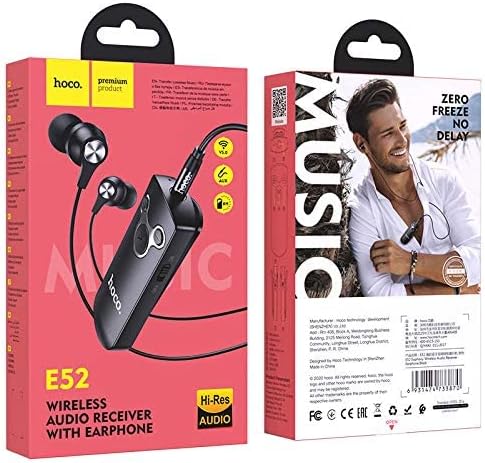
The HOCO E52 is a compact wireless Bluetooth audio receiver designed to convert wired audio devices into Bluetooth-enabled ones. It features an integrated microphone for hands-free calls and comes with a pair of in-ear earphones.

Figure 2.1: HOCO E52 Euphony Wireless Bluetooth Audio Receiver with included earphones.
Nọmba 2.2: Alaye view of the HOCO E52 receiver, highlighting the control buttons and power switch.
3. Package Awọn akoonu
Rii daju pe gbogbo awọn nkan wa ninu package:
- HOCO E52 Wireless Bluetooth Audio Receiver
- Ni-eti Earphones
- Ngba agbara USB
- Awọn iṣu Eti (oriṣiriṣi titobi)
- Ọran Idaabobo
- Afowoyi Olumulo (iwe-ipamọ yii)
4. Eto
4.1 Ngba agbara si Ẹrọ
Before first use, fully charge the HOCO E52 receiver. Connect the provided charging cable to the micro-USB port on the receiver and the other end to a USB power source (e.g., computer USB port, wall adapter). The indicator light will show charging status and turn off or change color when fully charged.
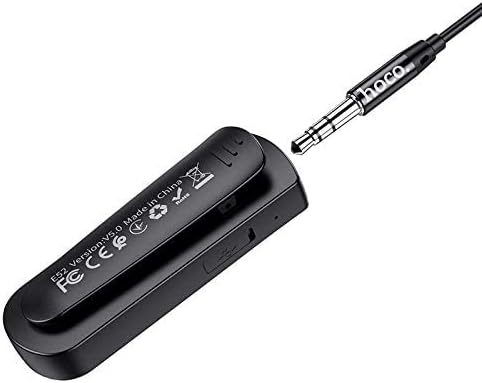
olusin 4.1: Ẹyìn view of the HOCO E52 receiver, illustrating the clip and the micro-USB charging port.
4.2 Sisopọ Bluetooth
- Agbara Tan: Slide the power switch to the 'ON' position. The indicator light will flash, indicating it is in pairing mode.
- Mu Bluetooth ṣiṣẹ: On your smartphone or other Bluetooth-enabled device, go to the Bluetooth settings and ensure Bluetooth is turned on.
- Yan Ẹrọ: Look for 'HOCO E52' (or similar) in the list of available devices and select it to connect.
- Ìmúdájú: Once successfully paired, the indicator light on the E52 will stop flashing and remain solid, or flash slowly. A voice prompt may also confirm the connection.
- So Awọn Agbekọri pọ: Plug the included earphones (or your own 3.5mm wired headphones) into the 3.5mm audio jack on the HOCO E52 receiver.
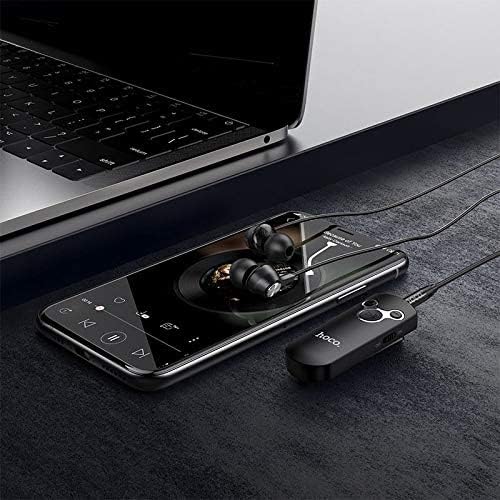
Figure 4.2: The HOCO E52 receiver connected to a smartphone, demonstrating its use with a media device.
5. Awọn ilana Iṣiṣẹ
5.1 Agbara Tan / Pa
- Agbara Tan: Slide the 'ON/OFF' switch to the 'ON' position.
- Agbara Pa: Slide the 'ON/OFF' switch to the 'OFF' position.
5.2 Sisisẹsẹhin Orin
- Ṣiṣẹ/Daduro: Press the central Ṣiṣẹ / Sinmi bọtini lẹẹkan.
- Orin t’okan: Tẹ mọlẹ Iwọn didun soke (+) bọtini.
- Tẹlẹ Orin: Tẹ mọlẹ Iwọn didun isalẹ (-) bọtini.
5.3 ipe Management
With the built-in microphone, you can manage calls directly from the receiver.
- Idahun/Ipe Ipari: Press the central Ṣiṣẹ / Sinmi button once during an incoming call to answer, or during an active call to end.
- Kọ Ipe: Press and hold the central Ṣiṣẹ / Sinmi button for 2 seconds during an incoming call.
- Nọmba Ikẹhin Tun Tun: Double-press the central Ṣiṣẹ / Sinmi bọtini.
5.4 Iṣakoso iwọn didun
- Mu iwọn didun pọ si: Tẹ awọn Iwọn didun soke (+) bọtini.
- Din iwọn didun silẹ: Tẹ awọn Iwọn didun isalẹ (-) bọtini.
6. Itọju
- Jeki ẹrọ naa gbẹ. Yago fun ifihan si ọrinrin tabi olomi.
- Nu ẹrọ naa pẹlu asọ ti o tutu, ti o gbẹ. Maṣe lo awọn kẹmika ti o lewu tabi awọn afọmọ abrasive.
- Tọju ẹrọ naa ni itura, aye gbigbẹ nigbati o ko ba wa ni lilo.
- Avoid extreme temperatures, as this can shorten the lifespan of electronic components.
- Má ṣe gbìyànjú láti tú tàbí yí ẹ̀rọ náà padà, nítorí èyí yóò sọ àtìlẹ́yìn náà di òfo, ó sì lè fa ìbàjẹ́.
7. Laasigbotitusita
| Isoro | Owun to le Fa | Ojutu |
|---|---|---|
| Ẹrọ naa ko ṣiṣẹ | Batiri kekere | Gba agbara si ẹrọ ni kikun. |
| Ko le so pọ pẹlu ẹrọ | Bluetooth not enabled on source device; E52 not in pairing mode; too far apart | Ensure Bluetooth is on. Power cycle E52 to enter pairing mode. Keep devices within 10 meters. |
| Ko si ohun | Volume too low; earphones not connected properly; incorrect audio output selected on source device | Increase volume on E52 and source device. Re-plug earphones. Check audio output settings on your phone/computer. |
| Aye batiri kukuru | Device not fully charged; high volume usage | Ensure full charge. Reduce volume if possible. |
8. Awọn pato
- Awoṣe: E52
- Ẹya Bluetooth: 5.0
- Imọ-ẹrọ Asopọmọra: Ailokun (Bluetooth)
- Music & Talk Time: O fẹrẹ to awọn wakati 6
- Gbohungbohun: Ti ṣepọ
- Okunfa Fọọmu Agbekọri: Ninu Eti
- Àwọ̀: Dudu
- Awọn iwọn idii: 18.2 x 10.8 x 3.2 cm
- Ìwọ̀n Nkan: 72 g
- Olupese: HOCO
9. Alaye Aabo
- Do not expose the device to extreme temperatures, direct sunlight, or fire.
- Yago fun sisọ silẹ tabi tẹriba ẹrọ si awọn ipa to lagbara.
- Jeki kuro ni arọwọto awọn ọmọde.
- Sọ ẹrọ naa ati batiri rẹ ni ifojusọna ni ibamu si awọn ilana agbegbe.
- Do not use the device while driving or in situations where your attention is critical.
10. Atilẹyin ọja ati Support
For warranty information and customer support, please refer to the documentation provided at the point of purchase or contact your retailer. HOCO products typically come with a limited warranty against manufacturing defects.