
Ọrọ Iṣaaju
This manual provides detailed instructions for the proper use and maintenance of your Conambo Trucker Bluetooth Headset 5.0. Please read this manual thoroughly before using the device to ensure optimal performance and longevity.
Package Awọn akoonu
Nigbati o ba ṣii package, jọwọ rii daju pe gbogbo awọn nkan wọnyi wa pẹlu:
- Conambo Trucker Bluetooth Headset (Model DE-JBT9)
- USB-C Ngba agbara Cable
- Itọsọna olumulo

Image: The Conambo Trucker Bluetooth Headset, a USB-C charging cable, and the user manual are neatly arranged in the product packaging.
Ọja Pariview
Mọ ara rẹ pẹ̀lú onírúurú àwọn ohun èlò àti ìdarí agbekọri rẹ.
- Akọkọ ti o le ṣatunṣe: Allows for a customized and comfortable fit for various head sizes.
- Soft Protein Memory-Foam Earpad: Provides comfort for extended wear.
- Flexible Gooseneck Microphone: Can be rotated 270 degrees for use on either the left or right ear, and adjusted for optimal voice pickup. Features a wind cover for clear audio.
- Awọn bọtini Iṣakoso: Located on the earpiece for easy access to power, volume, call management, and mute functions.
- Ibudo Ngba agbara USB-C: Fun gbigba agbara batiri agbekari.

Image: A user demonstrates the adjustable headband, soft ear pad, and anti-slip pad for comfortable wear on either ear.
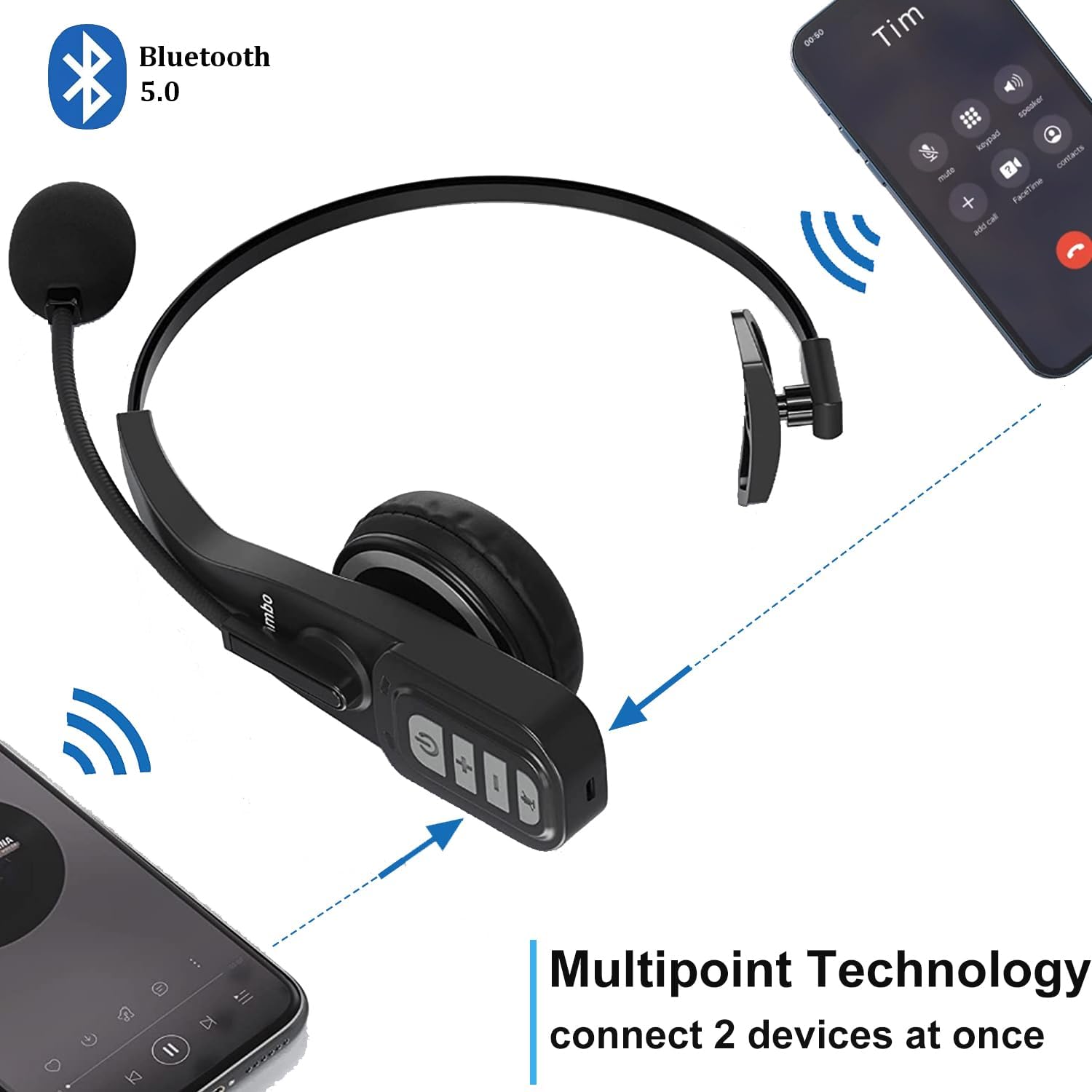
Image: Close-up of the headset's control panel, highlighting the volume up/down, power/call, and mute buttons.
Ṣeto
1. Ngba agbara si Agbekọri
Before initial use, fully charge your headset. A full charge takes approximately 4 hours.
- Connect the provided USB-C charging cable to the charging port on the headset.
- So opin keji okun USB-C pọ mọ orisun agbara USB ti o baamu (fun apẹẹrẹ, ibudo USB kọmputa, adapter ogiri).
- The LED indicator on the headset will show charging status (refer to the LED indicator section for details).
2. Sisopọ pọ pẹlu Ẹrọ Bluetooth kan
The headset uses Bluetooth 5.0 technology for stable and fast connections. It supports multipoint connection, allowing simultaneous connection to two Bluetooth devices.
- Rii daju pe agbekari ti gba agbara.
- Slide the power switch to the "ON" position. The headset will automatically enter pairing mode, indicated by a flashing LED light.
- On your device (e.g., smartphone, laptop, PC), enable Bluetooth and search for available devices.
- Select "A19" or "Conambo JBT900" (or similar model name) from the list of found devices to connect.
- Once connected, the LED indicator will become solid, confirming successful pairing.

Image: The headset is shown connected to two different smartphones, illustrating its multipoint technology feature.
Video: A demonstration of the Conambo JBT900 Bluetooth 5.0 Headset, showcasing awọn ẹya ara ẹrọ ati irọrun ti lilo.
Awọn ilana Iṣiṣẹ
Isakoso Ipe
- Idahun/Ipe Ipari: Press the Phone Call button once.
- Kọ Ipe: Press and hold the Phone Call button for 2 seconds.
- Pa ẹ / Mu Gbohungbohun dakẹ: During a call, press the Mute button (often the same as the Phone Call button or a dedicated button) once.
- Nọmba Ikẹhin Tun Tun: Double-press the Phone Call button.

Image: A woman wearing the headset, demonstrating the mute function during a call.
Iṣakoso Orin
- Ṣiṣẹ/Daduro: Press the Phone Call button once.
- Iwọn didun Soke/Isalẹ: Use the dedicated Volume + and Volume - buttons.
- Orin t’okan: Tẹ ki o si mu bọtini Iwọn didun + naa.
- Tẹlẹ Orin: Tẹ bọtini Iwọn didun ki o si mu.
Voice Assistant (Siri/Google Assistant)
Press and hold the Mute button to activate your device's voice assistant for hands-free commands.
Itunu ati Atunṣe
The Conambo headset is designed for comfort during prolonged use.
- The headband is stretchable and can be adjusted to fit various head sizes.
- The soft protein memory-foam earpad ensures a comfortable fit on your ear.
- The microphone boom can be rotated 270 degrees, allowing you to wear the earpiece on either your left or right ear.

Image: A man wearing the headset, demonstrating the flexible microphone positioned for clear communication, highlighting its noise-cancelling capabilities.
Itoju
Láti rí i dájú pé agbekọri rẹ pẹ́ tó àti pé ó ń ṣiṣẹ́ dáadáa, tẹ̀lé àwọn ìlànà ìtọ́jú wọ̀nyí:
- Clean the earpad and microphone foam regularly with a soft, dry cloth.
- Yẹra fún fífi headphone sí ojú otútù tó le koko, ọrinrin tàbí oòrùn tààrà.
- Tọju agbekari ni itura, aye gbigbẹ nigbati ko si ni lilo.
- Má ṣe gbìyànjú láti tú agbekọri náà tàbí láti tún un ṣe fúnra rẹ. Pe olùrànlọ́wọ́ oníbàárà fún ìrànlọ́wọ́.
Laasigbotitusita
If you encounter any issues with your headset, please refer to the following common solutions:
- Agbekọri ko tii: Rii daju pe agbekari ti gba agbara ni kikun.
- Ko le so pọ: Make sure the headset is in pairing mode (flashing LED) and your device's Bluetooth is enabled and searching. Try restarting both the headset and your device.
- No audio/poor audio quality: Check the volume levels on both the headset and your connected device. Ensure the headset is within the 33ft wireless range of your device.
- Gbohungbohun ko ṣiṣẹ: Ensure the microphone is not muted. Adjust the microphone's position closer to your mouth.
Awọn pato
| Nọmba awoṣe | DE-JBT9 |
| Ẹya Bluetooth | 5.0 |
| Asopọmọra Technology | Bluetooth 5.0, Alailowaya |
| Alailowaya Ibiti | Titi de 33 ẹsẹ (10 mita) |
| Aago Ọrọ | Titi di wakati 22 |
| Akoko gbigba agbara | O fẹrẹ to awọn wakati 4 |
| Akoko Iduro | Up to 360 hours (implied from images) |
| Ariwo Iṣakoso | Ìfagilé Ariwo Tí Ń Ṣiṣẹ́ (fún gbohùngbohùn) |
| Iwọn Nkan | 0.17 kilogram (5.9 iwon) |
| Ohun elo | Leather, Soft protein memory-foam, Stretchable headband |
| Awọn ẹrọ ibaramu | Cellphones, Laptops, PC Call Center Equipment |
Atilẹyin ọja ati Support
For warranty information or technical support, please refer to the contact details provided in the included user manual or visit the official Conambo webojula.