
1. Ifihan
The Lepro PR902103-US Smart Table Lamp offers versatile lighting solutions for your home. This LED touch lamp features RGB color changing capabilities, tunable warm to cool white light, and dimmable brightness. It is designed for seamless integration with smart home ecosystems, supporting both Amazon Alexa and Google Assistant for voice control, as well as control via a dedicated mobile application. This manual provides comprehensive instructions for setup, operation, and maintenance.

Figure 1: Lepro Smart Table Lamp ifihanasing its app control interface.
2. Ohun ti o wa ninu Apoti
Jọwọ rii daju pe gbogbo awọn paati wa ninu apoti:
- 1 x Lepro Smart Table Lamp (Model: PR902103-US)
- 1 x 4.9 ft USB Cable
- 1 x Agbara Adapter
- 1 x Itọsọna olumulo (iwe yii)
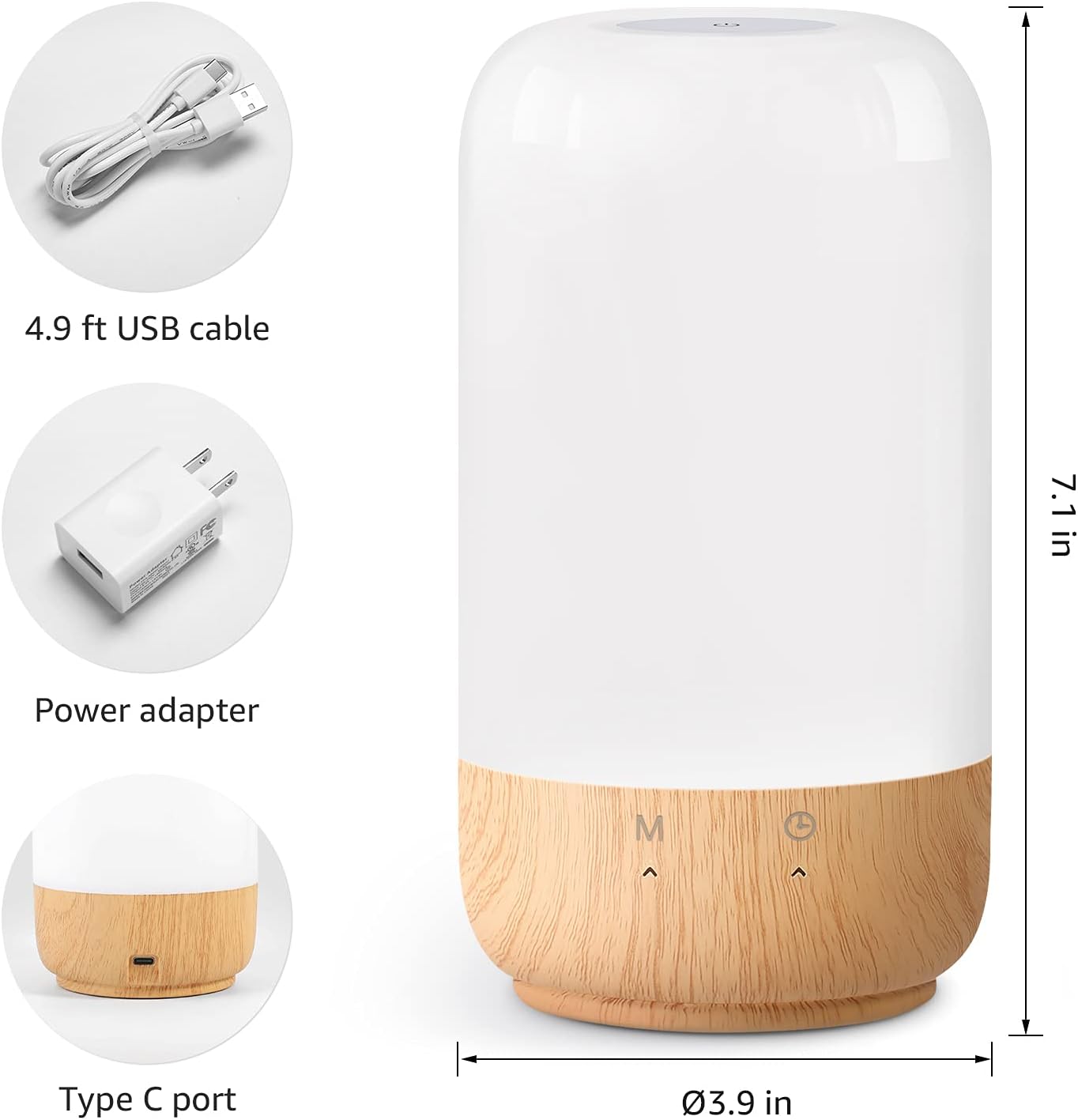
Figure 2: Included components and product dimensions.
3. Eto
Follow these steps to set up your Lepro Smart Table Lamp:
- Asopọ agbara: So okun USB ti a pese si lamp's Type-C port and the power adapter. Plug the power adapter into a standard wall outlet. The lamp yoo tan imọlẹ.
- Igbasilẹ ohun elo: Download the 'Lepro LampUX' app from your mobile device's App Store (iOS) or Google Play Store (Android).
- Iforukọsilẹ akọọlẹ: Open the 'Lepro LampUX' app and register a new account or log in if you already have one.
- Ohun elo Pipọ:
- Nínú àpù náà, tẹ 'Fi Ẹ̀rọ kún' tàbí àmì '+' náà.
- Select 'Table Lamp' from the lighting category.
- Rii daju pe lamp is powered on. Long press the timer button on the lamp's base for at least 5 seconds until the indicator light blinks rapidly.
- Confirm the indicator light is blinking rapidly in the app and proceed.
- Select your 2.4 GHz Wi-Fi network and enter the password. (Note: The lamp only supports 2.4 GHz Wi-Fi networks. If your router is 5 GHz, please set it to 2.4 GHz during setup.)
- The app will begin adding the device. Once successfully added, you can rename your lamp fun rọrun idanimọ.
Video 1: Detailed steps on how to set up your Lepro Smart Lamp lilo ohun elo alagbeka.
4. Awọn ilana Iṣiṣẹ
The Lepro Smart Table Lamp can be controlled via touch, the mobile app, or voice commands.
4.1. Awọn iṣakoso ifọwọkan
- Titan/Apapa: Short press the power button (marked 'M') on the lampipilẹ.
- Atunse Imọlẹ: Slide your finger along the left side of the lamp's base to adjust brightness.
- Color Change (RGB): Slide your finger along the right side of the lamp's base to cycle through RGB colors.
- Yipada ipo: Short press the timer button (clock icon) to switch between white light modes (warm white, cool white) and RGB color mode.
4.2. Mobile App Controls
The 'Lepro LampUX' app provides comprehensive control over your lamp:
- Brightness & Color Temperature: Adjust the brightness level and select color temperatures from 2700K (warm white) to 5700K (cool white).
- Àṣàyàn Àwọ̀ RGB: Choose from 16 million colors using the color wheel in the app.
- Awọn iwoye: Select from pre-set scenes like 'Night', 'Read', 'Meeting', 'Leisure', or customize your own scenes with specific colors and effects.
- Timer & Wake-up: Set schedules for the lamp to turn on/off automatically. Utilize the 'Sunrise Simulation' feature to gradually increase light for a gentle wake-up.

Figure 3: Mobile application interface for controlling lamp eto.

Nọmba 4: Lamp's timer and wake-up functions in use.
4.3. Awọn iṣakoso ohun
The Lepro Smart Table Lamp Ó bá Amazon Alexa àti Google Assistant mu. Láti mú kí ìṣàkóso ohùn ṣiṣẹ́:
- Rii daju pe lamp is successfully paired with the 'Lepro LampUX' app.
- Open the Amazon Alexa or Google Home app.
- Lọ sí abala 'Àwọn Ọgbọ́n àti Àwọn Eré' (Alexa) tàbí 'Works with Google' (Google Home).
- Wa fun and enable the 'Lepro LampUX' skill/service.
- Link your 'Lepro LampUX' account with your Alexa/Google account.
- Ni kete ti o ti sopọ, o le lo awọn pipaṣẹ ohun bii:
- "Alexa, turn on [Lamp Orúkọ].
- "Hey Google, set [Lamp Orúkọ] sí funfun gbígbóná.
- "Alexa, yí padà [L]amp Orúkọ] sí bulu."
- "Hey Google, dim [Lamp Orúkọ] sí 50%.

Figure 5: Voice control integration with Amazon Alexa.
Video 2: Demonstration of the Lepro Smart Table Lamp working with Alexa and Google Home.
5. Itọju
To ensure the longevity and optimal performance of your Lepro Smart Table Lamp, please follow these maintenance guidelines:
- Ninu: Yọ agbara kuro ki o to nu. Lo aṣọ rirọ ati gbigbẹ lati nu omi naa.amp's surface. Avoid using abrasive cleaners, solvents, or harsh chemicals, as these may damage the finish or electronic components.
- Ibi ipamọ: Ti o ba tọju lamp Fún ìgbà pípẹ́, rí i dájú pé ó mọ́ tónítóní àti gbígbẹ. Tọ́jú rẹ̀ sí ibi tí ó tutù, tí ó sì gbẹ, tí kò sí ìmọ́lẹ̀ oòrùn tààrà àti ooru tó le koko.
- Mimu: Mu lamp pẹlu abojuto. Yẹra fun sisọ silẹ tabi tẹriba si awọn ipa to lagbara.
6. Laasigbotitusita
If you encounter issues with your Lepro Smart Table Lamp, wo àwọn ìṣòro àti ojútùú tó wọ́pọ̀ wọ̀nyí:
| Isoro | Owun to le Fa | Ojutu |
|---|---|---|
| Lamp ko tan. | Ko si ipese agbara. | Ṣàyẹ̀wò bóyá ohun tí a fi ń so agbára náà mọ́ inú i náà dáadáaamp àti ibi tí a ti ń ta omi sí. Rí i dájú pé ibi tí a ti ń ta omi náà ṣiṣẹ́ dáadáa. |
| Ko le sopọ si Wi-Fi. | Incorrect Wi-Fi band (5 GHz). Ọrọigbaniwọle ti ko tọ. Alailagbara Wi-Fi ifihan agbara. | Ensure your Wi-Fi network is 2.4 GHz. Verify the Wi-Fi password. Move the lamp closer to your router. |
| Iṣakoso ohun ko ṣiṣẹ. | Skill not enabled/linked. Orukọ ẹrọ ti ko tọ. | Ensure the 'Lepro LampUX' skill is enabled and linked in your Alexa/Google Home app. Use the exact device name configured in the app. |
| Lamp jẹ dásí. | Ibùgbé software glitch. | Yọọ lamp from the power outlet for 10 seconds, then plug it back in to perform a soft reset. |
7. Awọn pato
| Ẹya ara ẹrọ | Ẹ̀kúnrẹ́rẹ́ |
|---|---|
| Brand | Adẹtẹ |
| Nọmba awoṣe | PR902103-US |
| Ọja Mefa | 3.9"D x 3.9"W x 7.1"H |
| Iwọn Nkan | 1.19 iwon |
| Ohun elo | Ṣiṣu, Igi |
| Imọlẹ Orisun Orisun | LED |
| Wattage | 7 watt |
| Imọlẹ | 350 Lumen |
| Awọ Imọlẹ | RGB + CCT (Tunable White 2700-5700K) |
| Ọna Iṣakoso | App, Touch, Voice (Alexa, Google Assistant) |
| Asopọmọra | WiFi 2.4 GHz nìkan |
| inu ile / ita gbangba Lilo | Ninu ile |
8. Atilẹyin ọja ati Support
Lepro products are designed and manufactured to the highest quality standards. For warranty information and technical support, please refer to the contact details provided on the product packaging or visit the official Lepro webojula. Tọju iwe-ẹri rira rẹ bi ẹri rira fun awọn iṣeduro atilẹyin ọja.