
Ọrọ Iṣaaju
Thank you for choosing the MEIKEE SWL-FL01 Rechargeable LED Work Light. This versatile and durable work light is designed to provide reliable illumination for a wide range of activities, including construction, camping, fishing, garage work, and emergency situations. Featuring multiple lighting modes, adjustable brightness, and flexible charging options, this manual will guide you through its proper use and maintenance to ensure optimal performance.
Awọn Itọsọna Aabo
- Má ṣe wo tààrà sí inú iná LED nígbà tí ó bá ń ṣiṣẹ́, nítorí pé èyí lè fa ìpalára ojú.
- Jeki ẹrọ naa kuro ni iwọn otutu ti o pọju, imọlẹ orun taara, ati awọn olomi ibajẹ.
- Do not disassemble or modify the product. Repairs should only be performed by qualified personnel.
- Ensure the USB port's silicone cover is properly sealed when not in use, especially in wet conditions, to maintain splash resistance.
- Jeki kuro ni arọwọto awọn ọmọde.
Package Awọn akoonu
Jọwọ ṣayẹwo package fun awọn nkan wọnyi:
- MEIKEE SWL-FL01 Rechargeable LED Work Light
- Okun Ngba agbara USB
- Itọsọna olumulo

Image: MEIKEE Rechargeable LED Work Light package contents including the light, USB cable, and user manual, along with product dimensions. The image also shows the product dimensions: 154mm (6.06in) length, 114mm (4.49in) height, and 32mm (1.25in) thickness.
Ọja Pariview
The MEIKEE SWL-FL01 features a robust design with intuitive controls and multiple functionalities.
Awọn eroja:
- LED Light Panel
- Solar Charging Panel (rear)
- Bọtini agbara
- Mode/Brightness Adjustment Buttons
- USB-A Output Port (for charging external devices)
- USB-C Input Port (for charging the work light)
- Splash-proof Silicone Cover for USB ports
- Adjustable 180-degree Handle/Stand
- Integrated Magnets (2)
- 1/4-inch Tripod Mount Hole
- Power Indicator Lights (4 green LEDs)
- Charging Indicator Light (1 red/green LED)

Image: MEIKEE LED Work Light functioning as a power bank, charging a mobile phone via its USB output port, with a detailed view of the USB-A output, USB-C input, and splash-proof cover. The image shows the USB-A output (Out 5V 2A), USB-C input (In 5V 2A), and the protective silicone cover.
Ṣeto
Gbigba agbara akọkọ:
Before first use, it is recommended to fully charge the work light. Connect the provided USB-C cable to the input port on the device and to a compatible USB power adapter (not included). The charging indicator light will illuminate during charging. A full charge via USB takes approximately 8 hours.
Atọka Agbara:
The four green LED lights indicate the remaining battery capacity. Each light represents approximately 25% of the battery charge. Check these indicators regularly to ensure your device is sufficiently charged for your tasks.

Image: MEIKEE LED Work Light illuminating a wide area at 1000 lumens, with a close-up of the battery power indicator lights. The green LEDs indicate the battery level.
Awọn ilana Iṣiṣẹ
Titan/Apapa:
Press and hold the power button for 3 seconds to turn the work light ON or OFF.
Adjusting Modes and Brightness:
Once the light is on, short press the mode button to cycle through the four lighting modes:
- White Gbona (2700K): Ideal for a cozy ambiance or situations requiring less harsh light.
- Natural White (4000K): A balanced light suitable for general tasks.
- White Cool (6000K): Bright, clear light for detailed work or maximum visibility.
- Red & Blue SOS Flash: Fun ifihan agbara pajawiri.
Short press the brightness button to cycle through the five brightness levels (100%, 75%, 50%, 25%, 10%) within each mode. The MEIKEE work light maintains constant brightness throughout its operation, unlike some other lights that dim over time.
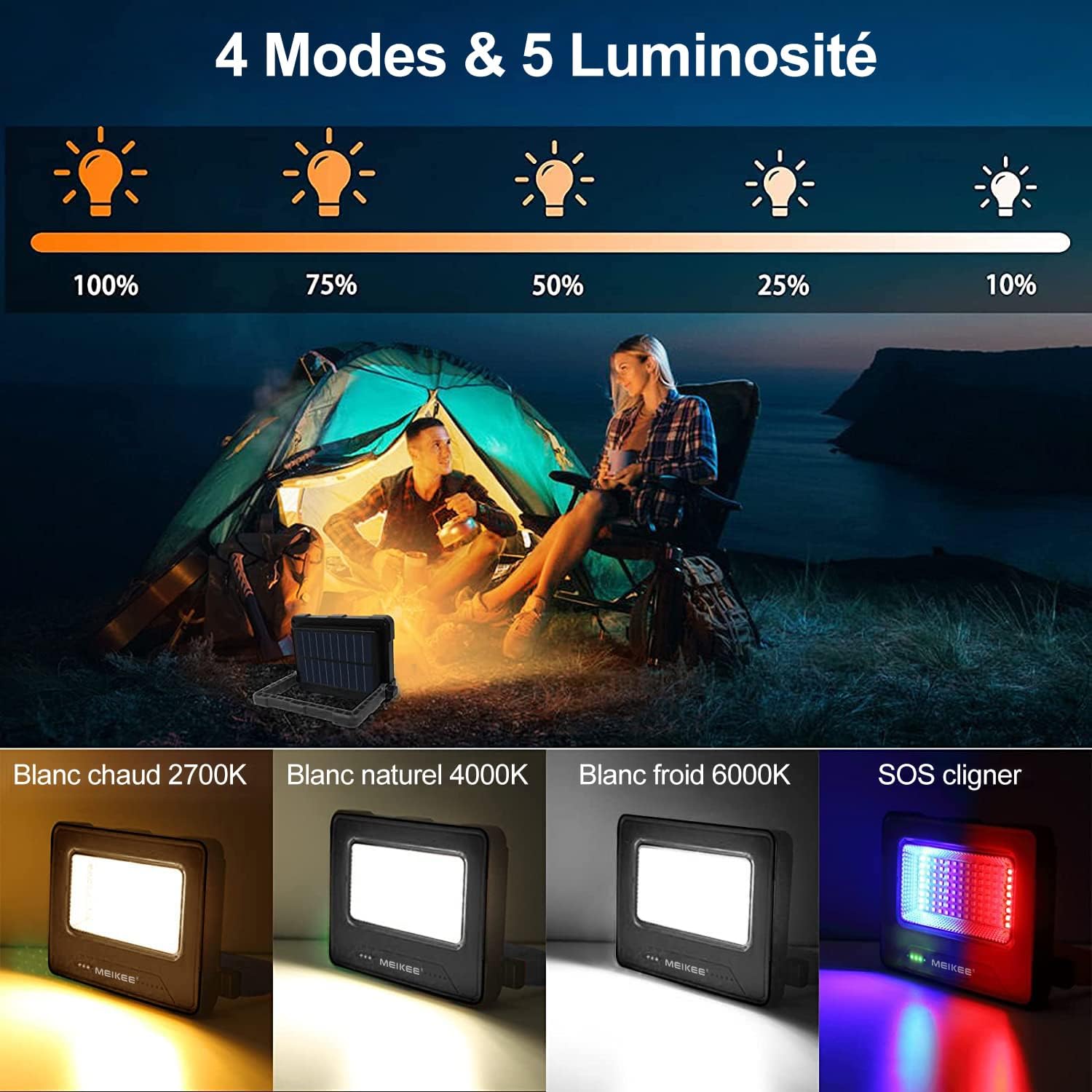
Image: MEIKEE LED Work Light displaying its four lighting modes (Warm, Natural, Cool White, SOS) and five brightness levels. The image shows the light in use during camping and detailed views of each light mode and brightness percentage.

Image: Comparison demonstrating MEIKEE LED Work Light's constant brightness feature (1000LM for 10 hours) versus other lights that dim over time (500LM after 5 hours). This highlights the stable illumination provided by the MEIKEE light.
Charging the Work Light:
The MEIKEE SWL-FL01 offers three convenient charging methods:
- Ngba agbara USB: Connect the provided USB-C cable to the input port and a 5V USB power source. Full charge takes approximately 8 hours.
- Gbigba agbara Oorun: Place the work light with its solar panel facing direct sunlight. This method takes approximately 24 hours for a full charge, depending on sunlight intensity.
- Light Charging: In low light conditions, the solar panel can still trickle charge the battery, though this is the slowest method, taking up to 60 hours for a full charge.

Image: MEIKEE LED Work Light showing two charging methods: solar charging via its integrated panel and USB charging. The image depicts both solar panel exposure and USB cable connection for charging.
Iṣẹ Bank Power:
The integrated 12000mAh lithium polymer battery allows the work light to double as a power bank. Connect your mobile phone or other USB-powered device to the USB-A output port (Out 5V 2A) using your device's charging cable. The work light can charge a typical smartphone 3-4 times.
Awọn aṣayan iṣagbesori:
The MEIKEE SWL-FL01 is designed for flexible positioning:
- Adjustable Handle/Stand: The 180-degree adjustable handle can be used to carry the light or to position it as a stand on flat surfaces.
- Asomọ oofa: Two powerful magnets on the back allow you to securely attach the light to metal surfaces for hands-free operation, such as under a car hood or on a metal workbench.
- Tripod Oke: A standard 1/4-inch screw hole is provided for mounting the light onto a tripod (not included) for elevated or more stable positioning.
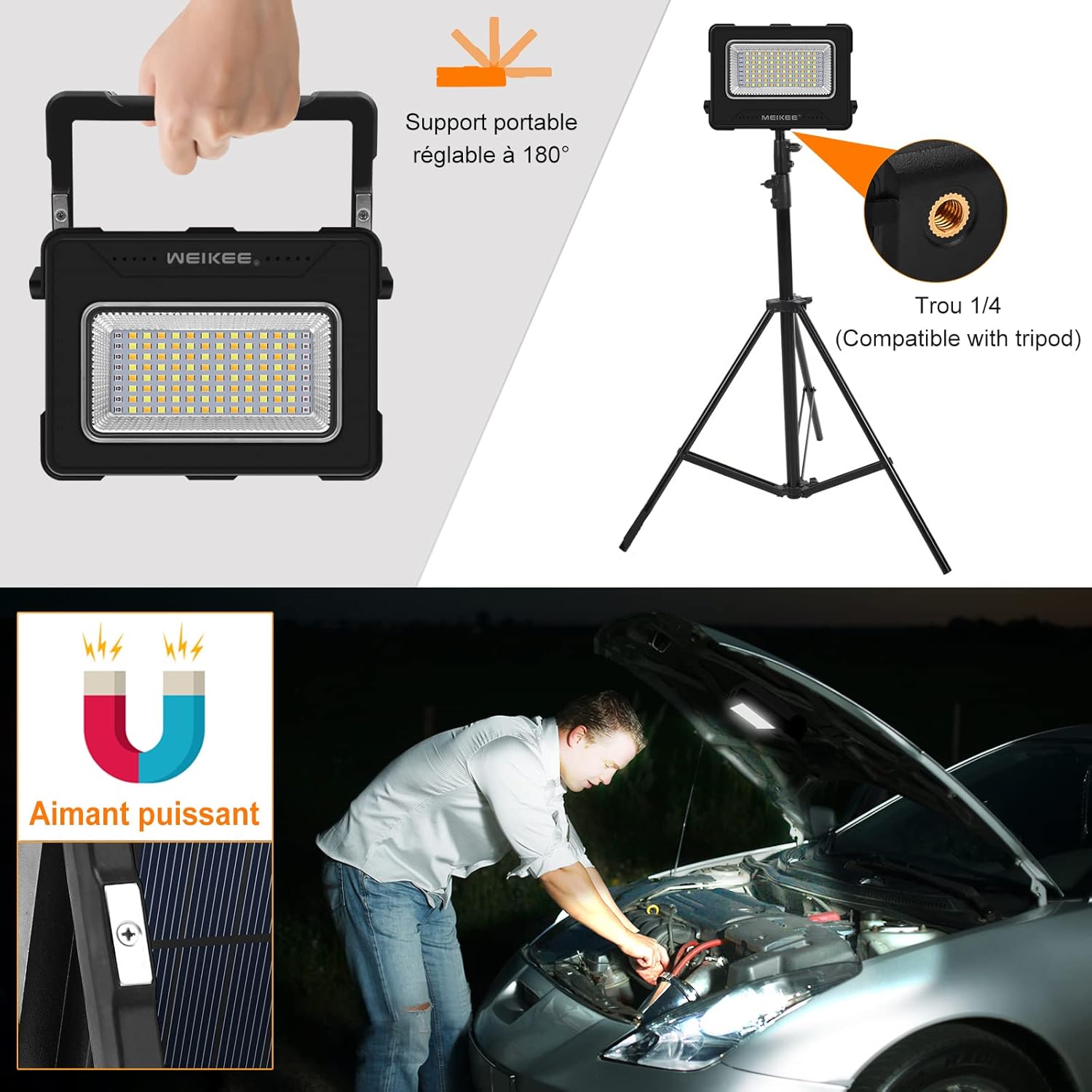
Image: MEIKEE LED Work Light showcasing its versatile mounting options: a 180-degree adjustable stand, a 1/4-inch tripod mount, and powerful integrated magnets for hands-free use. The image demonstrates the adjustable handle, tripod compatibility, and magnetic attachment under a car hood.
Itoju
- Ninu: Mu ina naa nu pẹlu asọ, damp cloth. Do not use abrasive cleaners or solvents. Ensure the solar panel is clean for efficient charging.
- Ibi ipamọ: Store the work light in a cool, dry place when not in use. If storing for extended periods, charge the battery every 3-6 months to prolong its lifespan.
- Idaabobo ibudo USB: Always ensure the silicone cover for the USB ports is securely closed to prevent dust and water ingress.
Laasigbotitusita
| Isoro | Owun to le Fa | Ojutu |
|---|---|---|
| Imọlẹ ko tan. | Batiri ti dinku. | Charge the work light using USB or solar power. |
| Light dims unexpectedly. | Batiri naa kere. | Saji ẹrọ. |
| Gbigba agbara oorun ko lọra tabi ko munadoko. | Insufficient direct sunlight; dirty solar panel. | Place in direct sunlight; clean the solar panel. |
| Kò le gba agbara si ẹrọ ita. | Work light battery is low; incorrect cable/port. | Ensure work light is charged; use the correct USB-A output port and a functional cable. |
| Awọn bọtini ko dahun. | Ibùgbé software glitch. | Try turning the device off and on again by holding the power button for 3 seconds. |
Awọn pato
| Ẹya ara ẹrọ | Ẹ̀kúnrẹ́rẹ́ |
|---|---|
| Brand | MEIKEE |
| Nọmba awoṣe | SWL-FL01 |
| Ọja Mefa | 15.4 x 3.2 x 11.4 cm |
| Iwọn Nkan | 490 giramu |
| Orisun agbara | Agbara oorun, gbigba agbara USB |
| Batiri Iru | Agbara Lithium Polymer gbigba agbara |
| Agbara Batiri | 12000mAh |
| Voltage | 5 Volts |
| Wattage | 60 Wattis |
| Imọlẹ Orisun Orisun | LED |
| Iwọn Lumens | 1000 Lumens |
| Awọn ipo iwọn otutu awọ | 2700K (Warm White), 4000K (Natural White), 6000K (Cool White), Red & Blue SOS |
| Awọn ipele Imọlẹ | 5 (100%, 75%, 50%, 25%, 10%) |
| Ohun elo | Acrylonitrile Butadiene Styrene (ABS) |
| Pari Iru | Matte |
| Pataki Awọn ẹya ara ẹrọ | 180° Adjustable Stand, 2 Magnets, Tripod Mount, Power Bank Function, Splash-proof USB Port |
Atilẹyin ọja ati Support
MEIKEE products are manufactured to high-quality standards. For warranty information or technical support, please refer to the contact details provided on the product packaging or visit the official MEIKEE webojula. Jọwọ ṣe idaduro ẹri rira rẹ fun eyikeyi awọn ibeere atilẹyin ọja.