
1. Ifihan
Thank you for choosing the HOCO ES40 Genial TWS Bluetooth Wireless Headset. This manual provides detailed instructions for the proper use, setup, and maintenance of your new wireless earbuds. Please read this manual thoroughly before using the product to ensure optimal performance and longevity. This headset is designed for use with various Bluetooth-enabled devices, including mobile phones.
2. Ọja Ipariview
The HOCO ES40 headset consists of two wireless earbuds and a portable charging case. Familiarize yourself with the components for ease of use.
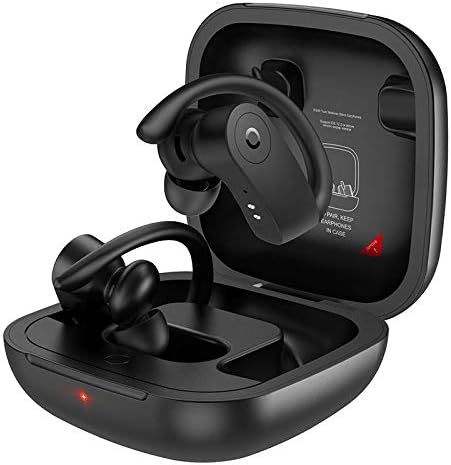
Image 2.1: HOCO ES40 earbuds placed inside their open charging case, showing the ear hook design and charging indicators.

Aworan 2.2: A sunmọ-soke view of a single HOCO ES40 earbud, highlighting the ergonomic ear hook and the control button area.
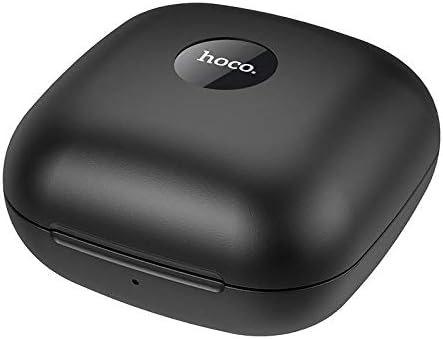
Image 2.3: The HOCO ES40 charging case in a closed position, displaying the 'hoco.' brand logo on the top surface.
3. Package Awọn akoonu
Upon opening your HOCO ES40 package, please verify that all the following items are included:
- HOCO ES40 TWS Bluetooth Wireless Earbuds (Left and Right)
- Alailowaya Ngba agbara Case
- USB Charging Cable (typically included with such devices)
- Afowoyi Olumulo (iwe-ipamọ yii)
4. Eto
4.1. Ngba agbara si Agbekọri
Before initial use, it is recommended to fully charge both the charging case and the earbuds.
- Gbigba agbara si ọran naa: Connect the USB charging cable to the charging port on the case and to a suitable USB power source. The charging indicator on the case will illuminate to show charging status. The charging case takes approximately 2 hours to fully charge.
- Ngba agbara si Earbuds: Place the earbuds into their respective slots in the charging case. Ensure they are correctly seated. The earbuds will begin charging automatically. The headset charging time is approximately 1 hour.
4.2. Sisopọ Bluetooth
Follow these steps to pair your HOCO ES40 headset with your device:
- Agbara Tan: Ṣii apoti gbigba agbara ki o yọ awọn agbekọri mejeeji kuro. Wọn yoo tan-an laifọwọyi ati tẹ ipo sisopọ pọ sii.
- Mu Bluetooth ṣiṣẹ: On your smartphone or other Bluetooth-enabled device, navigate to the Bluetooth settings and ensure Bluetooth is turned on.
- Yan Ẹrọ: In the list of available Bluetooth devices, locate and select "HOCO ES40".
- Jẹrisi Isopọpọ: Once selected, your device should confirm that the headset is connected. You may hear an audible confirmation from the earbuds.

Image 4.1: A smartphone screen showing the Bluetooth settings with "HOCO ES40" listed as a connected device, next to the open charging case with earbuds.
The headset uses Bluetooth V5.0 for a stable and efficient connection.
5. Awọn ilana Iṣiṣẹ
Once paired, you can control various functions of your HOCO ES40 headset.
5.1. Agbara Tan / Paa
- Agbara Tan: Awọn agbekọri naa n tan ina laifọwọyi nigbati o ba yọ kuro ninu apoti gbigba agbara.
- Agbara Pa: Place the earbuds back into the charging case. They will automatically disconnect and power off.
5.2. Sisisẹsẹhin Orin
The earbuds feature touch-sensitive controls for music management:
- Ṣiṣẹ/Daduro: Fọwọ ba boya agbekọri lẹẹkan.
- Orin t’okan: Fọwọ ba agbekọri ọtun lẹẹmeji.
- Tẹlẹ Orin: Fọwọ ba agbekọri osi lẹẹmeji.
5.3. Iṣakoso ipe
Manage your phone calls directly from the earbuds:
- Idahun/Ipe Ipari: Tap either earbud once during an incoming call or an active call.
- Kọ Ipe: Press and hold either earbud for approximately 2 seconds during an incoming call.
6. Itọju
Proper care and maintenance will extend the life of your HOCO ES40 headset.
- Ninu: Use a soft, dry, lint-free cloth to clean the earbuds and charging case. Avoid using abrasive materials or harsh chemicals.
- Ibi ipamọ: Tí o kò bá lò ó, fi àwọn ètí ìgbọ́rọ̀ sí inú àpótí ìgbóná wọn láti dáàbò bò wọ́n kúrò lọ́wọ́ eruku àti ìbàjẹ́. Tọ́jú sí ibi tí ó tutù tí ó sì gbẹ, tí kò sí ìmọ́lẹ̀ tààrà àti ooru tó le koko.
- Itọju Batiri: To maintain battery health, avoid fully discharging the batteries frequently. Charge the device regularly, even if not used for extended periods.
- Ifihan omi: Àwọn ètí ìgbọ́rọ̀ kò lè gbà omi. Yẹra fún fífi omi, òjò tàbí ọ̀rinrin tó pọ̀ jù.
7. Laasigbotitusita
If you encounter issues with your HOCO ES40 headset, refer to the following common solutions:
- Earbuds ko so pọ pẹlu kọọkan miiran: Place both earbuds back into the charging case, close the lid, wait a few seconds, then open the lid and remove them again. This often resets their connection.
- Awọn agbekọri ti ko sopọ si ẹrọ: Ensure Bluetooth is enabled on your device. Forget the "HOCO ES40" from your device's Bluetooth list and attempt to pair again. Ensure the earbuds are charged.
- Ko si ohun lati inu agbekọri agbekọri kan: Check if both earbuds are charged. Try placing them back in the case and reconnecting.
- Awọn iṣoro gbigba agbara: Ensure the charging cable is securely connected to both the case and the power source. Try a different USB port or power adapter. Clean the charging contacts on the earbuds and inside the case.
- Iwọn kekere: Adjust the volume on both your connected device and the earbuds (if volume control is available via touch, though not explicitly stated for this model).
8. Awọn pato
Below are the technical specifications for the HOCO ES40 Genial TWS Bluetooth Wireless Headset:
| Ẹya ara ẹrọ | Sipesifikesonu |
|---|---|
| Bluetooth Specification | Bluetooth V5.0 JL6936D |
| Agbara Batiri Agbekọri | 50mAh (single headset) |
| Ngba agbara Batiri Case | 400mAh |
| Aago Gbigba agbara Agbekọri | O fẹrẹ to wakati 1 |
| Gbigba agbara Case Time | O fẹrẹ to awọn wakati 2 |
| Talk / Music Time | wakati meji 5 |
| Akoko Iduro | wakati meji 200 |
| Awọn iwọn (Ọran) | 78 * 78 * 46mm |
| Ìwọ̀n (Àpapọ̀) | 109g |
| Weight (Single Headset) | 10g |
| Àwọ̀ | Dudu |
| Agbekọri Fọọmù ifosiwewe | Ninu Eti |
| Asopọmọra Technology | Ailokun |
| Awọn ẹrọ ibaramu | Awọn foonu alagbeka |
| Ohun elo | Ṣiṣu |
9. Atilẹyin ọja ati Support
The HOCO ES40 Genial TWS Bluetooth Wireless Headset comes with a standard manufacturer's warranty. For specific warranty terms and conditions, please refer to the warranty card included in your product packaging or visit the official HOCO website. For technical support, troubleshooting assistance beyond this manual, or warranty claims, please contact your retailer or the HOCO customer service department.