
Ọrọ Iṣaaju
This manual provides detailed instructions for the safe and effective use, maintenance, and care of your VGR V-052 Beard Trimmer. Please read all instructions carefully before first use and retain this manual for future reference.
Awọn Itọsọna Aabo
- A ko ṣe apẹrẹ ẹrọ yii fun lilo nipasẹ awọn ọmọde labẹ ọdun 8.
- Inexperienced users should operate the trimmer under adult supervision.
- Keep the device away from children and water to prevent accidents.
- Avoid exposing the trimmer to high-temperature environments.
- Ensure the device is fully dry before charging or storing.
- Do not attempt to repair or disassemble the trimmer yourself. Contact authorized service personnel for assistance.
Package Awọn akoonu
Nigbati o ba ṣii package, rii daju pe gbogbo awọn nkan wọnyi wa pẹlu:
- 1x VGR V-052 Hair Trimmer
- 1x Adjustable Guide Comb
- 1x USB Ngba agbara USB
- 1x Cleaning fẹlẹ
- 1x Lubricating Oil
- 1x Itọsọna olumulo (iwe yii)
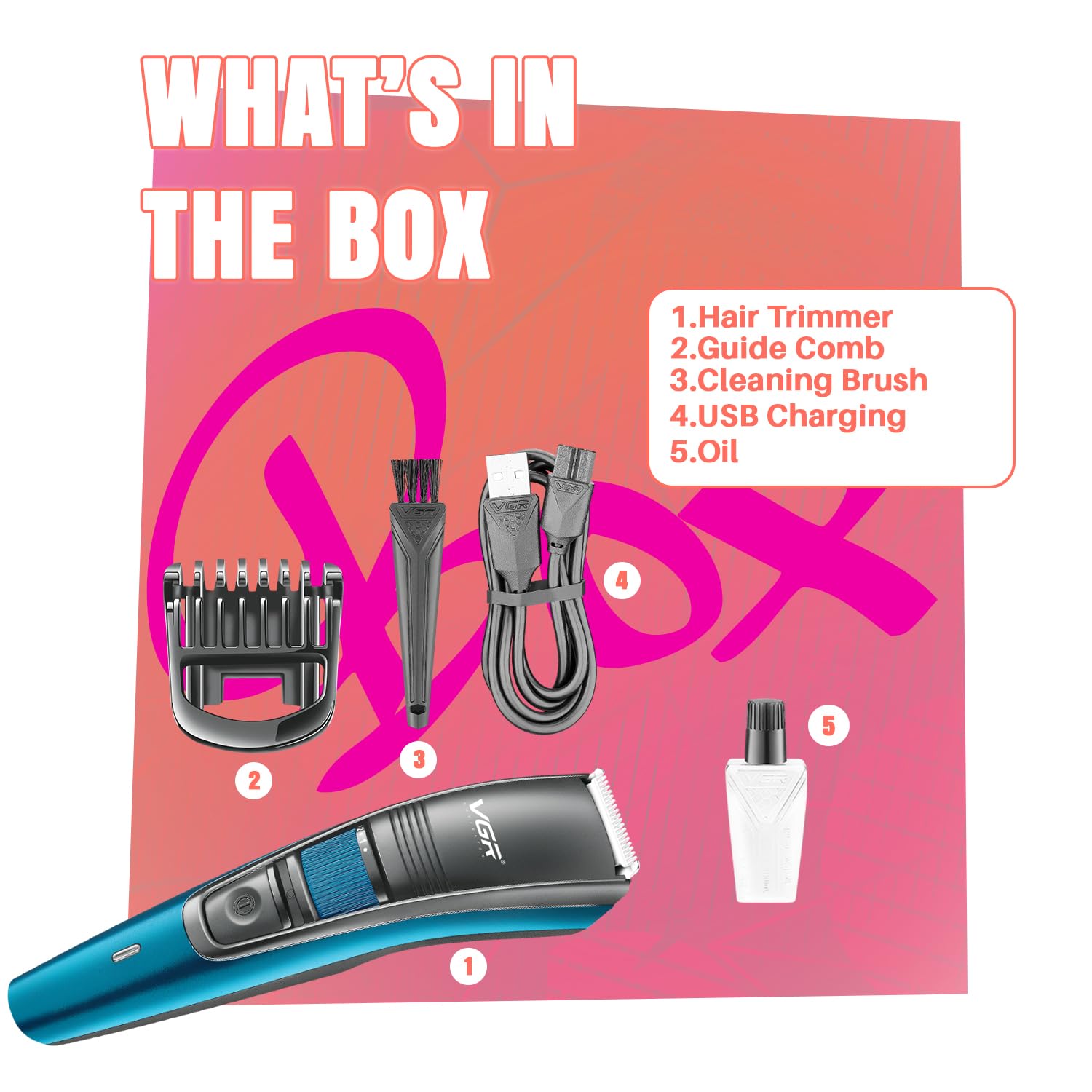
Image: All components included in the VGR V-052 Beard Trimmer package, including the trimmer, guide comb, USB cable, cleaning brush, and oil.
Ọja Awọn ẹya ara ẹrọ
- Awọn abẹfẹlẹ Irin Alagbara titọ: Designed for smooth, precise trimming without pulling or snagging.
- 20 Adjustable Length Settings: A zoom wheel allows for precise length adjustments from 0.5mm to 10mm, suitable for various beard and hair styles.
- Okun & Isẹ Ailokun: Use the trimmer with or without the cord for flexibility.
- Batiri pipẹ: Equipped with a 600mAh lithium battery providing up to 120 minutes of runtime on a 2-hour charge.
- Ngba agbara USB: Conveniently charge via laptop, power bank, or a 5V-1A adapter.
- Atọka LED Smart: Displays charging status (red for charging, green for fully charged).
- Washable Blade Head: Detachable and washable blade head for easy cleaning and hygiene.
- Apẹrẹ Ergonomic: Lightweight, compact, and comfortable for extended use and travel.

Image: Key features of the VGR V-052 Trimmer, including adjustable length settings, battery life, and washable head.

Image: The zoom wheel on the VGR V-052 Trimmer, illustrating the 20 precision length settings from 0.5mm to 10mm.

Image: Detail of the stainless steel blade, emphasizing its precision for clean cuts.
Eto ati gbigba agbara
- Idiyele Ibẹrẹ: Before first use, fully charge the trimmer for approximately 2 hours. Connect the USB charging cable to the trimmer and a compatible USB power source (laptop, power bank, or 5V-1A adapter). The LED indicator will show red during charging and turn green when fully charged.
- Attaching the Guide Comb: Ensure the trimmer is turned off. Align the guide comb with the trimmer head and slide it on until it clicks into place.
- Adjusting Length Settings: Use the zoom wheel located on the trimmer body to select your desired trimming length from 0.5mm to 10mm. The selected length will be indicated on the display.

Image: The VGR V-052 Trimmer being charged via USB, highlighting its battery capacity and runtime.
Isẹ
- Titan/Apapa: Tẹ bọtini agbara lati tan trimmer tabi pa.
- Gige:
- For best results, ensure your hair is clean and dry.
- Hold the trimmer with the blades facing the area you wish to trim.
- Gbé ẹ̀rọ ìgé irun náà sí ibi tí irun náà ti ń dàgbà kí ó lè gé irun náà déédé.
- Apply light pressure and use smooth, controlled strokes.
- Lilo okun: If the battery is low or you prefer continuous power, connect the USB charging cable to the trimmer and a power source. The trimmer can be used while charging.

Image: A user demonstrating beard trimming with the VGR V-052 Trimmer.

Image: The trimmer in use for styling, illustrating its versatility for different beard and hair looks.
Itọju ati Cleaning
- Cleaning the Blade Head:
- Ensure the trimmer is turned off and unplugged.
- Gently push the blade head to detach it from the trimmer body.
- Use the included cleaning brush to remove any loose hairs from the blades and the trimmer body.
- Rinse the detachable blade head under running water. Do NOT rinse the main body of the trimmer.
- Allow the blade head to air dry completely before reattaching.
- Lubrication: After every few uses, apply a small drop of the included lubricating oil to the blades to maintain optimal performance and extend blade life. Turn the trimmer on for a few seconds to distribute the oil.
- Ibi ipamọ: Tọ́jú ẹ̀rọ ìtọ́jú náà sí ibi tí ó tutù tí ó sì gbẹ, tí kò sí ìmọ́lẹ̀ oòrùn àti ọ̀rinrin nínú rẹ̀.

Image: Visual instructions for detaching, cleaning, and washing the trimmer head.
Laasigbotitusita
| Isoro | Owun to le Fa | Ojutu |
|---|---|---|
| Trimmer ko ni tan. | Batiri ti dinku. | Gba agbara fun trimmer naa fun wakati mẹwa. |
| Trimmer fa irun tàbí gígé láìdọ́gba. | Awọn abẹfẹlẹ jẹ ṣigọgọ tabi dipọ pẹlu irun. | Clean and lubricate the blades. If problem persists, blades may need replacement. |
| Atọka gbigba agbara ko tan ina. | Aṣiṣe USB tabi orisun agbara. | Gbiyanju okun USB ti o yatọ tabi ohun ti nmu badọgba agbara. Rii daju pe awọn asopọ wa ni aabo. |
Awọn pato
| Ẹya ara ẹrọ | Ẹ̀kúnrẹ́rẹ́ |
|---|---|
| Nọmba awoṣe | VGR V-052 |
| Blade elo | Irin ti ko njepata |
| Awọn Eto gigun | 20 (0.5mm si 10mm) |
| Orisun agbara | Agbara Batiri (Lithium ion) |
| Agbara Batiri | 600mAh |
| Akoko ṣiṣe | Titi di iṣẹju 120 |
| Akoko gbigba agbara | wakati meji 2 |
| Gbigba agbara Iru | USB |
| Ọja Mefa | 16.2 x 3.8 x 4.2 cm |
| Iwọn Nkan | 110 g |
| Pataki Awọn ẹya ara ẹrọ | Detachable Head, LED Indicator, Washable Head |
Atilẹyin ọja ati Support
The VGR V-052 Beard Trimmer comes with a 2-odun atilẹyin ọja covering defects in materials or workmanship under normal use. For warranty claims or technical support, please contact VGR customer service.
Alaye olubasọrọ Olupese:
Mail id: support@loomantha.in
Call us: +91-9667796740
Fidio ọja
Video: An unboxing and demonstration of the VGR V-052 Beard Trimmer, showcasing its components and basic operation.