
1. Ifihan
Thank you for choosing the HOCO ES43 Bluetooth 5.0 Wireless Stereo Earphones. This manual will guide you through the features, setup, and operation of your new earphones to ensure an optimal audio experience. Please read these instructions carefully before use and retain them for future reference.
2. Ọja Ipariview
The HOCO ES43 earphones offer a seamless wireless audio experience with Bluetooth 5.0 connectivity and a built-in microphone for calls. The compact charging case provides extended battery life, making them ideal for on-the-go use.
Awọn ẹya pataki:
- Bluetooth Version 5.0 for stable and efficient connection.
- JL AC6976 Chipset for reliable performance.
- Gbohungbohun ti a ṣe sinu ẹrọ fun pipe laisi ọwọ.
- Supports master-slave switching for flexible use of single or dual earbuds.
- Iwapọ ati apẹrẹ iwuwo fẹẹrẹ fun gbigbe.
Awọn akoonu idii:
- HOCO ES43 Wireless Stereo Earphones (Left and Right)
- Ngba agbara Case
- Ngba agbara USB
- Itọsọna olumulo

Image: The retail packaging for the HOCO ES43 earphones, showing the product and key features on the box.
3. Eto
3.1 Ngba agbara si Awọn Agbekọri ati Ọran
Ṣaaju lilo akọkọ, gba agbara ni kikun awọn agbekọri ati apoti gbigba agbara.
- Place the earphones into the charging case. Ensure they are correctly seated in their respective slots.
- Connect the charging cable to the charging port on the case and to a USB power source.
- The charging case has a battery capacity of 400 mAh, and each earphone has a 40 mAh battery.
- Charging time for the case is approximately 1.5 hours. Earphones take approximately 2 hours to fully charge inside the case.
- Indicator lights on the case and/or earphones will show charging status and turn off or change color when fully charged.
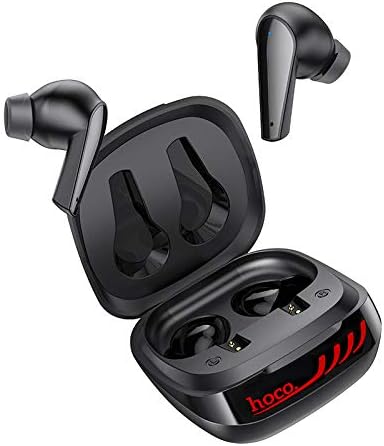
Image: The HOCO ES43 earphones placed inside their open charging case, showing the charging contacts.
3.2 Sisopọ Bluetooth
Lati so awọn agbekọri rẹ pọ mọ ẹrọ kan:
- Rii daju pe awọn agbekọri ti gba agbara.
- Open the charging case. The earphones will automatically power on and enter pairing mode (indicated by flashing LED lights on the earbuds).
- Lori ẹrọ rẹ (foonuiyara, tabulẹti, ati be be lo), jeki Bluetooth.
- Wa fun available Bluetooth devices and select "HOCO ES43" from the list.
- Once connected, the earphone indicator lights will stop flashing or change to a solid color.
- The earphones support master-slave switching, allowing you to use either earbud independently after initial pairing.
4. Awọn ilana Iṣiṣẹ
The HOCO ES43 earphones feature touch controls for easy management of music and calls.
4.1 Agbara Tan / Pa
- Agbara Tan: Open the charging case, and the earphones will automatically power on. Alternatively, press and hold the touch area on both earbuds for a few seconds.
- Agbara Pa: Place the earphones back into the charging case and close the lid. Alternatively, disconnect Bluetooth and the earphones will power off automatically after a few minutes, or press and hold the touch area on both earbuds for a few seconds.
4.2 Sisisẹsẹhin Orin
- Ṣiṣẹ/Daduro: Fọwọ ba agbegbe ifọwọkan lori boya agbekọri lẹẹkan.
- Orin t’okan: Tẹ agbegbe ifọwọkan lẹẹmeji lori agbekọri ọtun.
- Tẹlẹ Orin: Tẹ agbegbe ifọwọkan lẹẹmeji ni agbekọri osi.
4.3 ipe Management
- Idahun/Ipe Ipari: Fọwọ ba agbegbe ifọwọkan lori boya agbekọri lẹẹkan.
- Kọ Ipe: Tẹ ki o si di agbegbe ifọwọkan naa mu lori eti mejeji fun awọn aaya meji.
4.4 Iranlọwọ ohun
- Mu Oluranlọwọ Ohun ṣiṣẹ: Tẹ ibi ifọwọkan naa lẹẹmẹta lori agbekọri mejeeji.

Image: A person wearing the HOCO ES43 earphones, demonstrating typical usage during an activity.
5. Itọju
Proper maintenance ensures the longevity and optimal performance of your HOCO ES43 earphones.
- Ninu: Ṣe nu awọn agbekọri nigbagbogbo ati apoti gbigba agbara pẹlu asọ, gbẹ, asọ ti ko ni lint. Maṣe lo awọn kẹmika lile tabi awọn ohun elo abrasive.
- Awọn olubasọrọ gbigba agbara: Ensure the charging contacts on both the earphones and the case are clean and free of debris to maintain proper charging.
- Ibi ipamọ: Nigbati o ko ba si ni lilo, tọju awọn agbekọri sinu apoti gbigba agbara wọn lati daabobo wọn lọwọ eruku ati ibajẹ. Tọju ni itura kan, ibi gbigbẹ.
- Yago fun Omi: These earphones are not waterproof. Avoid exposure to water, moisture, or extreme temperatures.
- Itọju Batiri: Lati tọju igbesi aye batiri, yago fun gbigba agbara ni kikun awọn agbekọri ati apoti gbigba agbara nigbagbogbo. Gba agbara si wọn nigbagbogbo, paapaa ti kii ṣe ni lilo igbagbogbo.
6. Laasigbotitusita
If you encounter issues with your HOCO ES43 earphones, refer to the following common solutions:
- Earphones not pairing with device:
- Rii daju pe Bluetooth ti ṣiṣẹ lori ẹrọ rẹ.
- Make sure the earphones are charged and out of the charging case.
- Forget/delete "HOCO ES43" from your device's Bluetooth list and try pairing again.
- Tun ẹrọ rẹ ati awọn agbekọri bẹrẹ.
- Foonu agbekọri kan ṣoṣo ti n ṣiṣẹ:
- Place both earphones back into the charging case, close the lid, wait a few seconds, then open it again to allow them to re-sync.
- Rii daju pe awọn agbekọri mejeeji ti gba agbara.
- Try resetting the earphones (refer to manufacturer's webAaye fun awọn ilana atunṣe pato ti o ba nilo).
- Ko si ohun tabi iwọn kekere:
- Ṣayẹwo ipele iwọn didun lori ẹrọ rẹ mejeeji ati awọn agbekọri.
- Rii daju pe awọn agbekọri ti sopọ daradara si ẹrọ rẹ.
- Clean any debris from the earphone speaker grilles.
- Awọn iṣoro gbigba agbara:
- Rii daju pe okun gbigba agbara ti sopọ ni aabo si ọran mejeeji ati orisun agbara.
- Verify that the power source is working.
- Nu awọn olubasọrọ gbigba agbara lori awọn agbekọri ati inu ọran naa.
- Gbiyanju okun gbigba agbara ti o yatọ tabi ohun ti nmu badọgba agbara.
7. Awọn pato
| Ẹya Bluetooth | 5.0 |
| Chip Bluetooth | JL AC6976 |
| Ngba agbara Batiri Case | 400 mAh |
| Agbara Batiri Earphone | 40 mAh (kọọkan) |
| Akoko gbigba agbara (Ila) | Isunmọ. wakati meji 1.5 |
| Akoko gbigba agbara (Earphone) | Isunmọ. wakati meji 2 |
| Orin / Akoko Ọrọ | Isunmọ. wakati meji 4 |
| Akoko Iduro | Isunmọ. wakati meji 200 |
| Apapọ iwuwo | 48 giramu |
| Agbekọri Fọọmù ifosiwewe | Ninu Eti |
| Asopọmọra Technology | Ailokun (Bluetooth) |
| Iṣakoso Iru | Call Control, Touch Control |
| Nọmba awoṣe | ES43 |
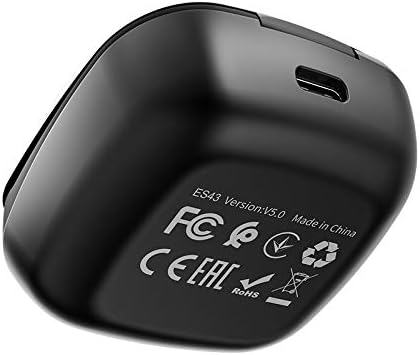
Image: The underside of the HOCO ES43 charging case, displaying model number, Bluetooth version, and compliance markings.
8. Alaye Aabo
Jọwọ tẹle awọn itọnisọna ailewu wọnyi:
- Ma ṣe tuka, tunṣe, tabi tun ọja naa pada.
- Pa awọn agbekọri ati apoti gbigba agbara mọ kuro ninu iwọn otutu ti o ga julọ, oorun taara, ati ina ti o ṣii.
- Yago fun fifi ọja han si omi tabi awọn olomi miiran.
- Ma ṣe lo ọja ni iwọn giga fun awọn akoko ti o gbooro sii lati ṣe idiwọ ibajẹ igbọran.
- Jeki kuro ni arọwọto awọn ọmọde ati awọn ohun ọsin.
- Sọ ọja naa ni ifojusọna ni ibamu si awọn ilana agbegbe.
9. Atilẹyin ọja ati Support
For warranty information and customer support, please refer to the documentation provided at the time of purchase or contact your retailer. HOCO is committed to providing quality products and support.