
1. Ifihan
This manual provides detailed instructions for the safe and efficient use of your Hoco HC3 Bounce Sports Wireless Speaker. Please read this manual thoroughly before operating the device and retain it for future reference. The Hoco HC3 is a versatile portable speaker supporting Bluetooth, FM radio, TF card, USB, AUX, and TWS modes.

Figure 1: Hoco HC3 Bounce Sports Wireless Speaker. This image displays the speaker in a vertical orientation, showcasing its black mesh grille, the 'hoco' logo at the bottom right, and a braided carrying strap attached to the top left side. The control buttons are visible on the side panel.
2. Package Awọn akoonu
Rii daju pe gbogbo awọn ohun kan wa lori ṣiṣi silẹ:
- Hoco HC3 Bounce Sports Wireless Speaker
- Okun Ngba agbara USB
- Afowoyi Olumulo (iwe-ipamọ yii)
- AUX Audio Cable (if included with your model)
3. Ọja Ipariview
3.1 Àwọn Ẹ̀yà Agbọrọsọ

Figure 2: Rear panel of the Hoco HC3 speaker. This image highlights the various input ports and control buttons located on the back of the speaker. Visible elements include the power switch, USB port, TF card slot, AUX input, and LED indicator.
Mọ ararẹ pẹlu awọn iṣakoso agbọrọsọ ati awọn ebute oko:
- Bọtini agbara: Tẹ̀ ẹ́ pẹ́ láti tan/pa agbára. Tẹ̀ ẹ́ kúrú láti yí àwọn ipò padà.
- Bọ́tìnnì Ṣíṣe/Sánu duro: Mu ohun orin ṣiṣẹ tabi da duro. Dahun/pari awọn ipe.
- Iwọn didun Up / Bọtini orin atẹle: Tẹ kukuru fun orin ti o tẹle, tẹ gun fun didun soke.
- Iwọn didun isalẹ / Bọtini orin ti iṣaaju: Tẹ kukuru fun orin ti tẹlẹ, tẹ gun fun iwọn didun isalẹ.
- Bọtini Ipo (M): Short press to cycle through Bluetooth, FM, TF card, USB, and AUX modes.
- Ibudo USB: Fun ṣiṣiṣẹsẹhin drive USB.
- Iho Kaadi TF: Fun TF (MicroSD) kaadi šišẹsẹhin.
- Iṣawọle AUX: 3.5mm jack fun asopọ ohun onirin.
- Ibudo gbigba agbara: Ibudo USB Micro fun gbigba agbara agbọrọsọ naa.
- Atọka LED: Displays charging status and operating mode.
3.2 Key Awọn ẹya ara ẹrọ
- Bluetooth V5.0: Pese asopọ alailowaya ti o duro ṣinṣin ati ti o munadoko.
- Awọn ọna Sisisẹsẹhin lọpọlọpọ: Supports Bluetooth, FM radio, TF card, USB drive, and AUX input.
- Sitẹrio Alailowaya otitọ (TWS): Allows two HC3 speakers to connect wirelessly for a stereo sound experience.
- Igbesi aye batiri gigun: 2400mAh battery capacity offers up to 5 hours of music playback.
- Awọn Agbọrọsọ Meji: Equipped with two 45mm speaker units, each with 5W power output.
- Iwapọ ati Gbigbe: Dimensions of 202*60*60mm and weight of 561g for easy transport.
4. Eto
4.1 Gbigba agbara si Agbọrọsọ
- So okun gbigba agbara USB ti a pese si ibudo gbigba agbara ti agbọrọsọ.
- Connect the other end of the USB cable to a 5V USB power adapter (not included) or a computer's USB port.
- The LED indicator will illuminate to show charging status. It typically takes about 3 hours for a full charge.
- Once fully charged, the LED indicator will change or turn off (refer to specific LED behavior in the troubleshooting section if unsure).
Note: For optimal battery life, fully charge the speaker before first use.
4.2 Titan / Pa a
- Lati Fi agbara: Long press the Power button until you hear an audible prompt and the LED indicator lights up.
- Lati Paarẹ: Long press the Power button again until you hear an audible prompt and the LED indicator turns off.
5. Awọn ilana Iṣiṣẹ
5.1 Sisopọ Bluetooth
- Ensure the speaker is powered on and in Bluetooth mode (the LED indicator will typically flash blue, indicating it's ready for pairing). If not, short press the Mode (M) button to switch to Bluetooth mode.
- Enable Bluetooth on your mobile device (smartphone, tablet, computer).
- Wa fun available Bluetooth devices. You should see "HC3" or "Hoco HC3" in the list.
- Select "HC3" to connect. Once paired, the speaker will emit an audible confirmation, and the LED indicator will stop flashing and remain solid blue.
- O le mu ohun ṣiṣẹ bayi lati ẹrọ rẹ nipasẹ agbọrọsọ.
Àkíyèsí: Agbọ́hùnsọ̀ náà yóò gbìyànjú láti tún so mọ́ ẹ̀rọ ìbáṣepọ̀ tó kẹ́yìn nígbà tí a bá tan án, tí Bluetooth ẹ̀rọ náà bá ń ṣiṣẹ́ tí ó sì wà láàárín ibi tí a lè gbé e sí.
5.2 FM Redio Ipo
- Agbara lori agbọrọsọ.
- Short press the Mode (M) button repeatedly until you enter FM radio mode.
- To auto-scan and save available FM stations, short press the Play/Pause button. The speaker will scan and store stations.
- Use the Volume Up / Next Track and Volume Down / Previous Track buttons to navigate between saved stations.
5.3 TF Kaadi / USB Sisisẹsẹhin
- Agbara lori agbọrọsọ.
- Insert a TF (MicroSD) card into the TF card slot or a USB flash drive into the USB port.
- The speaker should automatically switch to TF card or USB mode and begin playing audio files. If not, short press the Mode (M) button to select the correct mode.
- Use the Play/Pause, Volume Up / Next Track, and Volume Down / Previous Track buttons to control playback.
Note: Ensure your TF card or USB drive contains compatible audio files (e.g., MP3 format).
5.4 AUX Ipo
- Agbara lori agbọrọsọ.
- Connect one end of a 3.5mm audio cable (if included) to the speaker's AUX input port.
- Connect the other end of the audio cable to the audio output jack of your external device (e.g., MP3 player, computer).
- The speaker should automatically switch to AUX mode. If not, short press the Mode (M) button to select AUX mode.
- Ṣakoso ṣiṣiṣẹsẹhin lati ẹrọ ita rẹ. Iwọn didun le ṣe atunṣe lori mejeeji agbọrọsọ ati ẹrọ ita.
5.5 TWS (Otitọ Alailowaya Sitẹrio) iṣẹ
The TWS function allows you to pair two Hoco HC3 speakers together for a true stereo sound experience.
- Ensure both HC3 speakers are powered off.
- Power on both speakers simultaneously. They should both enter Bluetooth pairing mode.
- On ọkan of the speakers (this will become the primary speaker), long press the Mode (M) button or a dedicated TWS button (if present, otherwise try the Play/Pause button for 3-5 seconds) until you hear a pairing tone. The speakers will attempt to connect to each other.
- Once successfully paired, you will hear a confirmation tone, and one speaker's LED will indicate it's the primary (e.g., flashing slowly), while the other's LED will be solid.
- Now, connect your mobile device to the jc speaker via Bluetooth as described in section 5.1.
- Audio yoo mu ṣiṣẹ ni sitẹrio nipasẹ awọn agbohunsoke mejeeji.
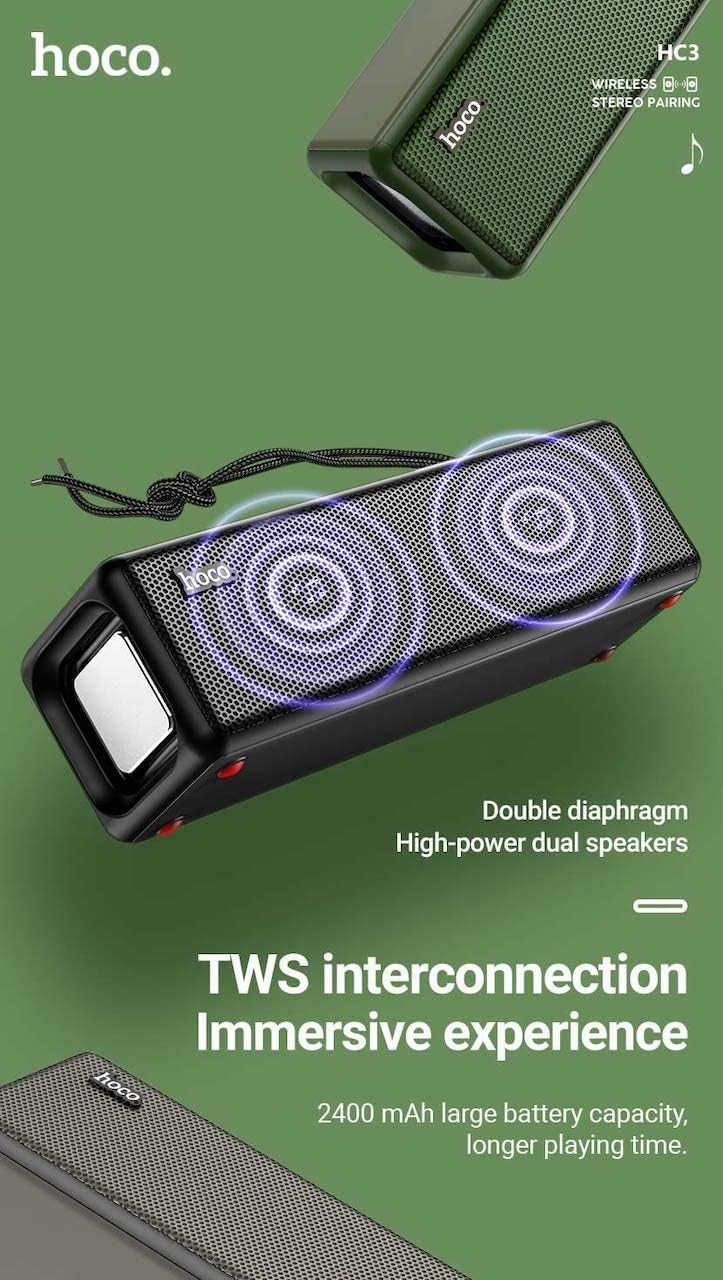
Figure 3: TWS Interconnection. This image illustrates the concept of two Hoco HC3 speakers wirelessly connected to provide a stereo audio experience, highlighting the dual speaker setup and the 2400 mAh battery capacity.
5.6 Ipe mimu
Nígbà tí a bá sopọ̀ mọ́ fóònù alágbéka nípasẹ̀ Bluetooth:
- Idahun Ipe: Kukuru tẹ bọtini Play/Daduro.
- Ipe Ipari: Kukuru tẹ bọtini Dun/Daduro lakoko ipe kan.
- Kọ Ipe: Tẹ bọtini Play/Duro fun igba pipẹ nigbati ipe ti nwọle ba dun.
- Nọmba Ikẹhin Tun Tun: Lẹẹmeji tẹ bọtini Play/Sinmi.
6. Itọju
- Ninu: Use a soft, dry cloth to clean the speaker's surface. Do not use abrasive cleaners, alcohol, or other chemical solvents.
- Ibi ipamọ: Tọju agbohunsoke ni itura, aye gbigbẹ kuro lati orun taara ati awọn iwọn otutu to gaju.
- Itọju Batiri: To prolong battery life, charge the speaker regularly, even if not in use for extended periods (e.g., once every 3 months). Avoid fully discharging the battery frequently.
- Omi Resistance: While designed for sports, avoid submerging the speaker in water. Refer to product specifications for any IP rating.
- Yago fun Ipa: Protect the speaker from drops and strong impacts.
7. Laasigbotitusita
If you encounter issues with your Hoco HC3 speaker, refer to the following table for common problems and solutions:
| Isoro | Owun to le Fa | Ojutu |
|---|---|---|
| Agbọrọsọ ko ni agbara lori. | Batiri kekere. | Gba agbara fun agbọrọsọ naa fun o kere ju iṣẹju 30. |
| Ko le so pọ nipasẹ Bluetooth. | A kò ṣiṣẹ́ Bluetooth lórí ẹ̀rọ náà; agbọ́hùnsọ̀ kò sí ní ipò ìsopọ̀; ó jìnnà jù sí ẹ̀rọ náà. | Ensure Bluetooth is on, speaker is in pairing mode (flashing blue LED), and devices are within 10 meters. Forget "HC3" on your device and try pairing again. |
| Ko si ohun. | Ohùn tó lọ sílẹ̀ jù; ipò tí kò tọ́ ni a ti yàn; ẹ̀rọ náà kò gbọ́ ohùn. | Increase volume on both speaker and connected device. Verify correct mode (Bluetooth, AUX, TF, USB). Ensure audio is playing on the source device. |
| Gbigba redio FM ko dara. | Ifihan agbara; kikọlu ayika. | Move the speaker to a location with better reception. Re-scan for stations. |
| Kaadi TF/ Sisisẹsẹhin USB ko ṣiṣẹ. | Card/drive not inserted correctly; incompatible file ọna kika; ti bajẹ files. | Ensure card/drive is fully inserted. Check file formats (MP3 recommended). Try another card/drive. |
| TWS sisopọ kuna. | Speakers not in TWS pairing mode; too far apart. | Ensure both speakers are powered on and in TWS pairing mode. Keep them close during pairing. Refer to section 5.5. |
8. Awọn pato
| Ẹya ara ẹrọ | Ẹ̀kúnrẹ́rẹ́ |
|---|---|
| Awoṣe | HC3 |
| Awọn iwọn | 202 x 60 x 60 mm |
| Iwọn | 561 g |
| Ẹya Bluetooth | V5.0 (Chip: JLAC6928B) |
| Agbara Batiri | 2400mAh |
| Akoko gbigba agbara | O fẹrẹ to awọn wakati 3 |
| Ọrọ / Orin Time | Titi di wakati 5 |
| Agbọrọsọ Unit | 45mm * 2 |
| Ipilẹ Agbara Agbọrọsọ | 5W * 2 |
| Awọn ọna Asopọmọra | Bluetooth, FM, TF card, USB, AUX, TWS |
| Ipo Ijade Ohun | Ayika |
| Olupese | Hoco |
| Ilu isenbale | China |
9. Atilẹyin ọja ati Support
Hoco products are manufactured to high quality standards. For information regarding warranty coverage, please refer to the warranty card included with your purchase or contact your local Hoco distributor or retailer. Keep your proof of purchase for any warranty claims.
For technical support or further assistance, please visit the official Hoco website or contact their customer service department. Contact details are typically available on the product packaging or the official webojula.