
ttec 2KM133T
Ìwé Ìtọ́sọ́nà Olùlò fún àwọn Agbọ́rọ̀ Aláìlókùn Tòótọ́ Tẹ́tíkì AirBeat Free
Model: 2KM133T
Ọrọ Iṣaaju
Thank you for choosing the ttec AirBeat Free True Wireless Earphones. This manual provides essential information for setting up, operating, and maintaining your earphones to ensure optimal performance and longevity. Please read this manual thoroughly before using the product.
Package Awọn akoonu
Rii daju pe gbogbo awọn nkan wa ninu apo rẹ:
- ttec AirBeat Free True Wireless Earphones (Left and Right)
- Ngba agbara Case
- Okun Ngba agbara USB
- Awọn iṣu Eti
- Afowoyi Olumulo (iwe-ipamọ yii)
Ọja Pariview
Familiarize yourself with the components of your ttec AirBeat Free earphones and charging case.

Figure 1: The compact ttec AirBeat Free charging case, shown held in a hand, highlighting its portable design.
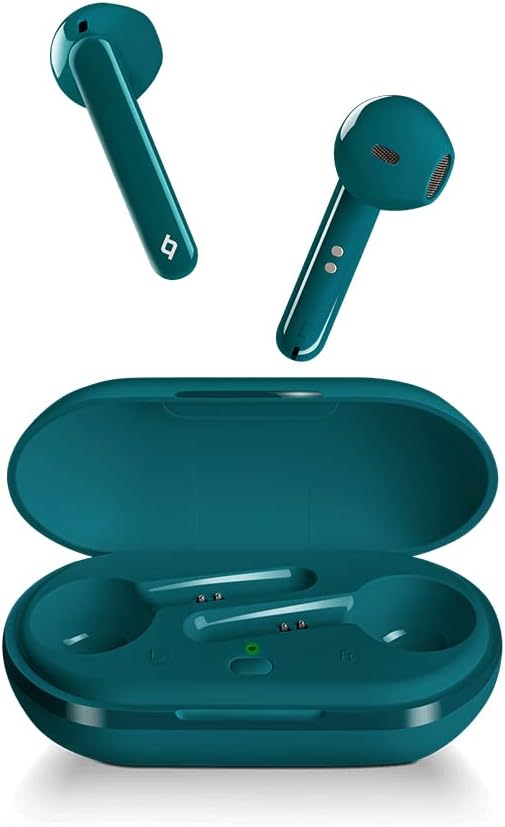
Figure 2: The ttec AirBeat Free earbuds displayed alongside their open charging case, showing the earbuds' design and the charging slots.

Figure 3: A single ttec AirBeat Free earbud positioned next to its open charging case, illustrating the earbud's form factor and the case's interior.
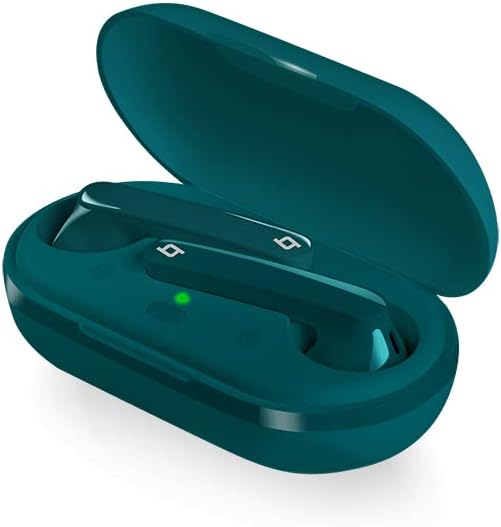
olusin 4: An angled view of the ttec AirBeat Free earbuds securely placed within their open charging case, showing the charging indicators.
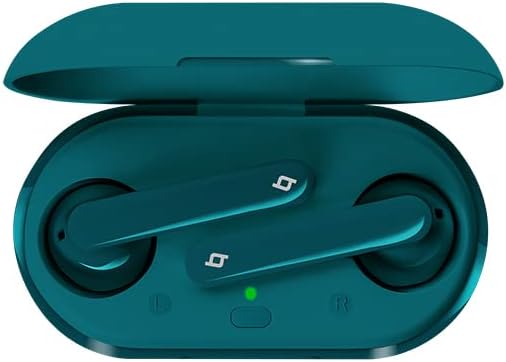
olusin 5: A oke-isalẹ view of the ttec AirBeat Free earbuds nestled in their open charging case, clearly showing the left and right earbud positions and the charging status light.
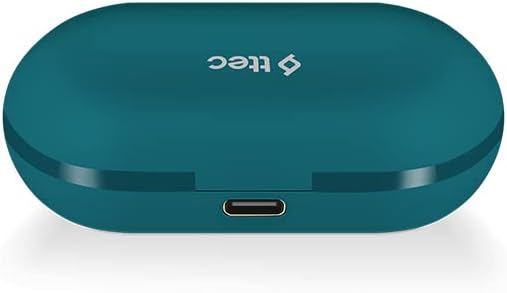
Figure 6: The closed ttec AirBeat Free charging case, viewed from the back, highlighting the USB-C charging port.
Ṣeto
1. Ngba agbara si Earphones ati Case
Ṣaaju lilo akọkọ, gba agbara ni kikun awọn agbekọri ati apoti gbigba agbara.
- Gbe awọn agbekọri mejeeji sinu apoti gbigba agbara.
- Connect the USB charging cable to the charging port on the back of the case (refer to Figure 6) and plug the other end into a USB power source.
- The indicator light on the charging case will show charging status. A full charge provides up to 30 hours of extra battery life with the case, and up to 4 hours for the earphones on a single charge.
- Awọn Charge & Go feature allows 1 hour of use with only 15 minutes of charging.
2. Sisopọ Bluetooth
Pair your ttec AirBeat Free earphones with your Bluetooth-enabled device.
- Rii daju pe awọn agbekọri ti gba agbara ati inu apoti gbigba agbara.
- Ṣii ideri apoti gbigba agbara. Awọn agbekọri yoo tẹ ipo sisopọ laifọwọyi.
- Lori ẹrọ rẹ (foonuiyara, tabulẹti, ati bẹbẹ lọ), lọ si awọn eto Bluetooth ki o mu Bluetooth ṣiṣẹ.
- Wa fun available devices. Select "ttec AirBeat Free"lati akojọ.
- Nígbà tí o bá ti so pọ̀ mọ́ ara rẹ, o máa gbọ́ ohùn ìjẹ́rìísí, ìmọ́lẹ̀ tí ó wà lórí àwọn ètígbọ́ náà sì lè yípadà.
- Awọn MonoSmart technology allows either earbud to be used independently. To use a single earbud, simply remove one from the case while the other remains inside or is turned off.
Awọn ilana Iṣiṣẹ
The ttec AirBeat Free earphones feature touch sensors for easy control of music and calls.
Iṣakoso Orin
- Ṣiṣẹ/Daduro: Single tap on either earbud's touch sensor.
- Orin t’okan: Double tap on the right earbud's touch sensor.
- Tẹlẹ Orin: Double tap on the left earbud's touch sensor.
- Iwọn didun Up: Triple tap on the right earbud's touch sensor.
- Iwọn didun isalẹ: Triple tap on the left earbud's touch sensor.
Iṣakoso ipe
- Idahun/Ipe Ipari: Single tap on either earbud's touch sensor.
- Kọ Ipe: Press and hold either earbud's touch sensor for 2 seconds.
- Mu Oluranlọwọ Ohun ṣiṣẹ: Press and hold either earbud's touch sensor for 3 seconds (e.g., Siri, Google Assistant).
Titan / Paa
- Agbara Tan: Open the charging case lid, or press and hold the touch sensor for 3 seconds if out of case.
- Agbara Pa: Place earphones back into the charging case and close the lid, or press and hold the touch sensor for 5 seconds.
Itọju ati Itọju
Itọju to dara yoo fa igbesi aye awọn agbekọri rẹ pọ si.
- Ninu: Lo asọ ti o gbẹ, asọ ti ko ni lint lati nu agbekọri ati apoti gbigba agbara. Maṣe lo awọn kẹmika lile tabi awọn ohun elo abrasive.
- Omi Resistance: The earphones have an IPX4 water and dust proof rating, meaning they are resistant to splashing water from any direction. Do not submerge them in water or expose them to heavy rain. Dry them thoroughly if they get wet.
- Ibi ipamọ: Nigbati o ko ba si ni lilo, tọju awọn agbekọri sinu apoti gbigba agbara wọn lati daabobo wọn ki o jẹ ki wọn gba agbara. Tọju ni itura, ibi gbigbẹ kuro lati awọn iwọn otutu to gaju.
- Igbesi aye batiri: To preserve battery life, charge the earphones and case regularly, even if not used for extended periods.
Laasigbotitusita
If you encounter issues with your ttec AirBeat Free earphones, try the following solutions:
| Isoro | Owun to le Solusan |
|---|---|
| Earphones not pairing/connecting. |
|
| Agbekọri agbekọri kan ṣoṣo ti n ṣiṣẹ. |
|
| Iwọn kekere tabi didara ohun ko dara. |
|
| Ngba agbara ko gba agbara. |
|
Awọn pato
Key technical specifications for the ttec AirBeat Free True Wireless Earphones:
- Orukọ awoṣe: AirBeat Ọfẹ
- Nọmba awoṣe: 2KM133T
- Ẹya Bluetooth: 5.0
- Water and Dust Proof Rate: IPX4
- Ìwúwo Atẹ́tíkọ́: 3.6 giramu (kọọkan)
- Iwọn gbigba agbara: 37 giramu
- Earphone Battery Life (single charge): Titi di wakati 4
- Lapapọ Igbesi aye Batiri (pẹlu ọran gbigba agbara): Titi di wakati 30
- Gbigba agbara kiakia: 15 minutes charge for 1 hour playback (Charge & Go)
- Iṣakoso Ariwo: Ti nṣiṣe lọwọ Noise Ifagile
- Imọ-ẹrọ Asopọmọra: Ailokun (Bluetooth)
- Headphones Ear Placement: Ninu Eti
- Awọn eroja to wa: Awọn iṣu Eti
- Àwọ̀: Turquoise
Atilẹyin ọja ati Support
For warranty information and customer support, please refer to the official ttec webaaye ayelujara tabi kan si alagbata agbegbe rẹ.
Olupese: ttec
Ọjọ Akọkọ Wa: Oṣu Kẹta Ọjọ 9, Ọdun 2021
If you experience issues not covered in the troubleshooting section, please contact ttec customer service for further assistance.
Ask a question about this manual
Ask about setup, troubleshooting, compatibility, parts, safety, or missing instructions. Manuals+ will review the question and use this page’s manual context to help answer it.