
Hoco ES32 Plus
Hoco ES32 Plus Series TWS Wireless Bluetooth Headset User Manual
Model: ES32 Plus | Brand: Hoco
Ọrọ Iṣaaju
Thank you for choosing the Hoco ES32 Plus Series TWS Wireless Bluetooth Headset. This manual provides detailed instructions on how to set up, operate, and maintain your new headset. Please read this manual carefully before use to ensure optimal performance and longevity of your device.
Package Awọn akoonu
- Hoco ES32 Plus TWS Wireless Bluetooth Headset (Left and Right Earbuds)
- Ngba agbara Case
- Ngba agbara USB
- Silikoni Case
- Ìkọ́
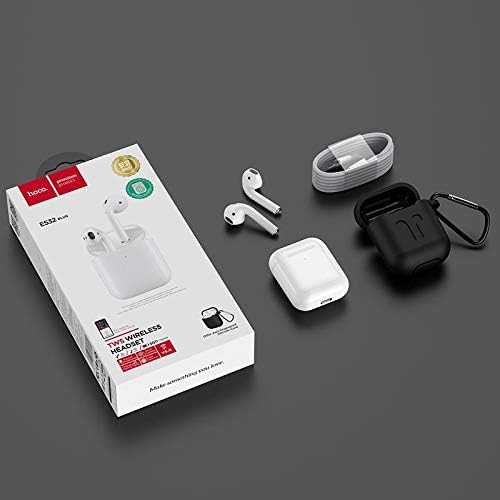
Image: Contents of the Hoco ES32 Plus package, including the earbuds, charging case, charging cable, silicone case, and hook.
Ọja Pariview ati Awọn ẹya ara ẹrọ
The Hoco ES32 Plus headset is designed for a seamless wireless audio experience. Key features include:
- Bluetooth V5.0: Ṣe idaniloju Asopọmọra alailowaya iduroṣinṣin ati lilo daradara.
- Airoha AB1536U Chip: Provides reliable performance.
- Agbara Batiri: 350mAh for the charging case, 30mAh for each earbud.
- Igbesi aye batiri gigun: Approximately 3 hours of talk/music time, 200 hours standby time.
- Apẹrẹ Iwapọ: Earbuds and case are lightweight and portable.
- Pop-Up Window Support: For Apple mobile phones, enabling quick pairing and battery display.
- Yipada Titunto-Ẹrú: Allows independent use of either earbud.
- Ṣiṣawari Ninu-Eti: Ó máa ń dá ohùn dúró/ń ṣeré láìfọwọ́sí nígbà tí a bá yọ/fi àwọn ètítíkì kúrò.
- Atilẹyin gbigba agbara Alailowaya: Convenient charging without cables.
- Isẹ Fọwọkan: Intuitive controls for music and calls.

Aworan: A alaye view of the Hoco ES32 Plus wireless earbuds, highlighting their design.
Eto Itọsọna
1. Gbigba agbara akọkọ
Before first use, fully charge the charging case and earbuds. Place the earbuds into the charging case. Connect the charging cable to the case and a USB power source, or place the case on a compatible wireless charger.

Image: The Hoco ES32 Plus charging case being charged wirelessly on a charging pad.
2. Sisopọ pẹlu Ẹrọ Rẹ
- Rí i dájú pé àwọn agbekọri náà wà nínú àpótí gbigba agbara àti pé àpótí náà ní agbára tó.
- Ṣii ideri apoti gbigba agbara. Awọn agbekọri yoo tẹ ipo isọpọ sii laifọwọyi.
- On your mobile device (e.g., iPhone, Samsung, Huawei, Oppo), go to Bluetooth settings and turn Bluetooth on.
- Wa fun available devices. You should see "HOCO ES32 Plus" or similar in the list.
- Select "HOCO ES32 Plus" to connect. For Apple devices, a pop-up window may appear for quick pairing.
- Nígbà tí a bá ti so àwọn agbekọri náà pọ̀ tán, a ti ṣetán fún lílò.

Image: Visual guide demonstrating the pairing process for the Hoco ES32 Plus headset with an iPhone, including the pop-up window for connection and battery status.
Awọn ilana Iṣiṣẹ
Awọn iṣakoso ifọwọkan
The Hoco ES32 Plus earbuds feature intuitive touch controls on the outer surface of each earbud.
- Ṣiṣẹ/Daduro: Fọwọ ba ẹyọkan lori boya agbekọri.
- Orin t’okan: Fọwọ ba agbekọri ọtun lẹẹmeji.
- Tẹlẹ Orin: Fọwọ ba agbekọri osi lẹẹmeji.
- Idahun/Ipe Ipari: Tẹ ẹyọkan lori boya agbekọri lakoko ipe ti nwọle.
- Kọ Ipe: Tẹ mọlẹ boya agbekọri fun iṣẹju meji 2 lakoko ipe ti nwọle.
- Mu Oluranlọwọ Ohun ṣiṣẹ (Siri/Oluranlọwọ Google): Fọwọ ba meteta boya agbekọri.
Iwari-Ni-Eti
The earbuds are equipped with in-ear detection. Music will automatically pause when you remove an earbud and resume when you put it back in.
Itoju
- Ninu: Lo asọ ti o gbẹ, asọ ti ko ni lint lati nu afikọti ati apoti gbigba agbara. Maṣe lo awọn kẹmika lile tabi awọn ohun elo abrasive.
- Ibi ipamọ: Nigbati o ko ba si ni lilo, tọju awọn afikọti sinu apoti gbigba agbara wọn lati daabobo wọn ki o jẹ ki wọn gba agbara.
- Itọju Batiri: Lati pẹ aye batiri, yago fun gbigba agbara si batiri ni kikun nigbagbogbo. Gba agbara si ẹrọ nigbagbogbo, paapaa ti kii ṣe ni lilo igbagbogbo.
- Omi Resistance: Àwọn ètí ìgbọ́rọ̀ náà kì í ṣe omi tí ó lè gbà. Yẹra fún fífi ara hàn sí omi, òógùn tàbí ọ̀rinrin púpọ̀.
Laasigbotitusita
| Isoro | Owun to le Solusan |
|---|---|
| Earbuds ko so pọ/so pọ |
|
| Ko si ohun lati agbekọri kan |
|
| Ngba agbara ko gba agbara |
|
| Didara ohun ko dara |
|
Awọn pato
| Ẹya ara ẹrọ | Ẹ̀kúnrẹ́rẹ́ |
|---|---|
| Ẹya Bluetooth | V5.0 |
| Chipset | Airoha AB1536U |
| Ngba agbara Batiri Case | 350mAh |
| Earbud Battery Capacity (Single) | 30mAh |
| Ọrọ / Orin Time | Isunmọ. wakati meji 3 |
| Akoko Iduro | wakati meji 200 |
| Awọn iwọn (Ọran) | 53.8 x 44.3 x 21.4 mm |
| Ìwọ̀n (Àpapọ̀) | 47g |
| Asopọmọra | Ailokun |
| Àwọ̀ | Funfun |
| Nọmba awoṣe | ES32 Plus |
| Awọn ẹrọ ibaramu | Awọn foonu alagbeka |
| Pataki Awọn ẹya ara ẹrọ | Dual ear, Pop-up window support (Apple), Master-slave switching, In-ear detection, Wireless charging support |
Atilẹyin ọja ati Support
For warranty information and technical support, please refer to the official Hoco website or contact your local retailer where the product was purchased. Keep your proof of purchase for any warranty claims.
Fun iranlọwọ siwaju sii, o le ṣabẹwo si Hoco brand page on Amazon.eg.
Ask a question about this manual
Ask about setup, troubleshooting, compatibility, parts, safety, or missing instructions. Manuals+ will review the question and use this page’s manual context to help answer it.