
1. Ifihan
This manual provides instructions for the Sharp Digital Alarm Clock, Model SPC547AJAMZ. This device features an easy-to-read LED display, a high-speed USB charging port, and essential alarm functions. Please read this manual thoroughly before use to ensure proper operation and to maximize the product's lifespan.

Figure 1: Sharp Digital Alarm Clock (Model SPC547AJAMZ) front view.
2. Awọn ẹya Ọja
The Sharp Digital Alarm Clock offers the following key features:
- Ifihan Rọrun-lati Ka: Large, clear green LED digits for visibility from a distance.
- High-Speed USB Charging Port: Ọdun 2 AMP USB port for rapid charging of compatible devices such as smartphones and tablets.
- Iwọn didun Itaniji ti o le ṣatunṣe: Select between high and low alarm volume settings.
- Isẹ ti o rọrun: Intuitive button controls for setting time and alarm.
- Batiri Afẹyinti: N tọju akoko ati awọn eto itaniji lakoko agbara outages (requires 2 AAA batteries, not included). The display will be blank during battery backup mode, but the internal clock will continue to run, and the alarm will sound at the set time.

Figure 2: Alarm clock with a smartphone connected to the USB charging port.
3. Package Awọn akoonu
Jẹrisi pe gbogbo awọn ohun kan wa ninu package:
- Sharp Digital Alarm Clock (Model SPC547AJAMZ)
- Adaparọ Agbara AC
- Afowoyi Olumulo (iwe-ipamọ yii)
Note: 2 AAA batteries for backup are not included and must be purchased separately.
4. Alaye Aabo
Jọwọ ṣe akiyesi awọn iṣọra ailewu wọnyi:
- Ma ṣe fi ẹrọ naa han si omi tabi ọrinrin pupọ.
- Yago fun gbigbe ẹrọ naa si nitosi awọn orisun ooru tabi ni imọlẹ orun taara.
- Use only the provided AC power adapter.
- Ma ṣe gbiyanju lati ṣajọpọ tabi yi ẹyọ naa pada.
- Jeki kuro ni arọwọto awọn ọmọde.
- Rii daju pe fentilesonu to dara ni ayika ẹyọ naa.
5. Eto
5.1 Asopọ agbara
- So ohun tí a fi ń ṣe agbára AC mọ́ inú àpò DC IN tó wà ní ẹ̀yìn aago ìdágìrì náà.
- So opin keji ti adapter agbara AC sinu ibudo ogiri boṣewa (120V AC, 60Hz).
- The display will illuminate, and the clock will be ready for time setting.
5.2 Batiri Afẹyinti fifi sori
Lati rii daju pe akoko ati awọn eto itaniji wa ni idaduro lakoko agbara outage:
- Wa yara batiri ni isalẹ ti kuro.
- Ṣii ideri iyẹwu batiri naa.
- Insert two (2) new AAA batteries, observing the correct polarity (+ and -) as indicated inside the compartment.
- Pa ideri batiri naa ni aabo.
Note: Batteries are for backup only. The clock display will not be lit during a power outage when operating on battery backup, but the internal clock will continue to run, and the alarm will sound at the set time.
6. Awọn ilana Iṣiṣẹ
Familiarize yourself with the control buttons located on the top of the unit:
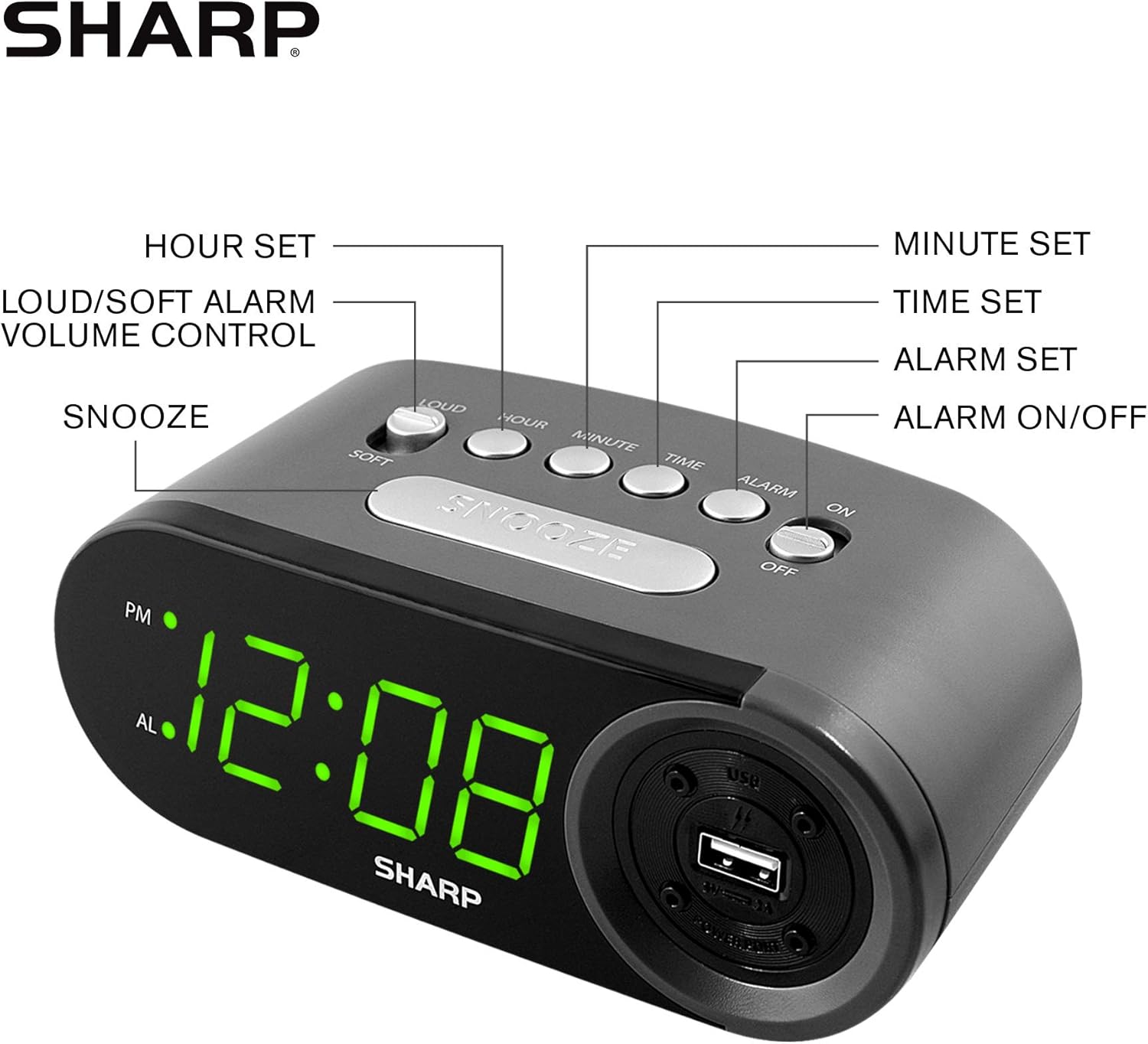
Ṣe nọmba 3: Awọn iṣakoso nronu oke ati awọn iṣẹ wọn.
6.1 Ṣíṣeto Àkókò Lọ́wọ́lọ́wọ́
- Tẹ mọlẹ AKOKO button until the display begins to flash.
- Tẹ awọn WAKATI button repeatedly to set the hour. Observe the PM indicator for afternoon hours.
- Tẹ awọn ISEJU button repeatedly to set the minutes.
- Ni kete ti o ba ti ṣeto akoko ti o fẹ, tẹ bọtini naa AKOKO bọtini lẹẹkansi lati jẹrisi ati jade ipo eto akoko.
6.2 Ṣíṣeto Àkókò Ìkìlọ̀
- Tẹ mọlẹ Itaniji button until the alarm time display begins to flash. The "AL" indicator will also flash.
- Tẹ awọn WAKATI button repeatedly to set the alarm hour. Observe the PM indicator.
- Tẹ awọn ISEJU button repeatedly to set the alarm minutes.
- Once the desired alarm time is set, press the Itaniji bọtini lẹẹkansi lati jẹrisi ati jade kuro ni ipo eto itaniji.
6.3 Muu ṣiṣẹ / Muu ṣiṣẹ Itaniji
- Lati yi itaniji pada ON, rọra awọn IKỌ NIPA / PA switch to the "ON" position. The "AL" indicator will appear on the display.
- Lati yi itaniji pada PAA, rọra awọn IKỌ NIPA / PA switch to the "OFF" position. The "AL" indicator will disappear.
6.4 Iṣiṣẹ Snooze
Nigbati itaniji ba ndun, tẹ tobi ṢEGBE Bọtini naa. Itaniji naa yoo da duro fun igba diẹ yoo si tun dun lẹhin bii iṣẹju 9.
6.5 Dídá ìkìlọ̀ náà dúró
To stop the alarm completely after it sounds (without using snooze), slide the IKỌ NIPA / PA switch to the "OFF" position. The alarm will reset for the next day if the switch is moved back to "ON".
6.6 Ṣíṣe àtúnṣe iwọn didun itaniji
Tẹ awọn LOUD/SOFT button to toggle between high and low alarm volume settings.
6.7 Lilo Ibudo Ngba agbara USB
Awọn 2 AMP USB charging port is located on the right side of the unit.
- Connect your device's USB charging cable (not included) to the USB port on the alarm clock.
- Connect the other end of the cable to your smartphone, tablet, or other compatible USB-powered device.
- Ensure the alarm clock is connected to AC power for the USB port to function.
Note: Charging speed may vary depending on your device and cable.
7. Itọju
To keep your alarm clock in optimal condition:
- Ninu: Mu ese kuro pẹlu asọ ti o gbẹ. Ma ṣe lo abrasive ose tabi epo.
- Rirọpo Batiri: Replace AAA backup batteries annually or when the battery low indicator (if present) appears, to ensure reliable backup functionality.
- Ibi ipamọ: Tí o bá ń tọ́jú ẹ̀rọ náà fún ìgbà pípẹ́, yọ àwọn bátírì àfikún kúrò kí ó má baà jò.
8. Laasigbotitusita
| Isoro | Owun to le Fa | Ojutu |
|---|---|---|
| Ifihan aago ko ṣofo. | No AC power; power outage; unit unplugged. | Ensure AC adapter is securely plugged into the unit and a working wall outlet. Check for power outages. |
| Itaniji ko dun. | Alarm is not activated; alarm time is incorrect; volume is too low. | Slide ALARM ON/OFF switch to "ON". Verify alarm time is set correctly. Adjust alarm volume using the LOUD/SOFT button. |
| Ibudo gbigba agbara USB ko ṣiṣẹ. | Clock not connected to AC power; device not compatible; faulty cable. | Ensure the clock is plugged into AC power. Try a different USB cable or device to confirm compatibility. |
| Awọn eto akoko/itaniji ti sọnu lẹhin agbara outage. | Awọn batiri afẹyinti ti ku tabi ko fi sii. | Install two fresh AAA batteries in the battery compartment, ensuring correct polarity. |
9. Awọn pato
- Brand: Dinku
- Awoṣe: SPC547AJAMZ
- Iru ifihan: LED oni-nọmba (Awọ ewe)
- Orisun Agbara: Corded Electric (AC 120V, 60Hz)
- Batiri Afẹyinti: Awọn batiri 2 x AAA (kii ṣe pẹlu)
- Ibudo Gbigba agbara USB: 2 AMP (5V)
- Awọn iwọn ọja: Nǹkan bí 6.2" W x 2.3" H x 3.25" D
- Ìwọ̀n Nkan: Isunmọ 9.6 iwon
- Ohun elo: Ṣiṣu
- UPC: 049353006000

olusin 4: Awọn iwọn ọja.
10. Atilẹyin ọja & Atilẹyin
10.1 atilẹyin ọja Alaye
This Sharp product is covered by a limited manufacturer's warranty. For specific warranty terms and conditions, please refer to the warranty card included with your purchase or visit the official Sharp webojula. Tọju iwe-ẹri rira rẹ bi ẹri rira.
10.2 Onibara Support
If you have any questions, require assistance, or need to report an issue with your Sharp Digital Alarm Clock, please contact Sharp customer support. Contact details can typically be found on the official Sharp webaaye tabi lori apoti ọja.
Fun alaye diẹ sii, ṣabẹwo si Ile itaja Sharp lori Amazon.