
1. Ifihan
The TAKSTAR DA10 is a versatile 2-in-1 device designed to function as both a wireless microphone and a portable voice amplifier with an integrated speaker. It is suitable for various applications including karaoke, singing, home parties, meetings, outdoor events, and speeches. This manual provides detailed instructions for the proper setup, operation, and maintenance of your DA10 device.
Note: This device cannot connect to external speakers, amplifiers, or audio receivers like PA systems or karaoke systems.
2. Ohun ti o wa ninu Apoti
- TAKSTAR DA10 Wireless Microphone & Voice Ampitanna
- USB Iru-C Ngba agbara USB
- Itọsọna olumulo
3. Ọja Ipariview & Awọn ẹya
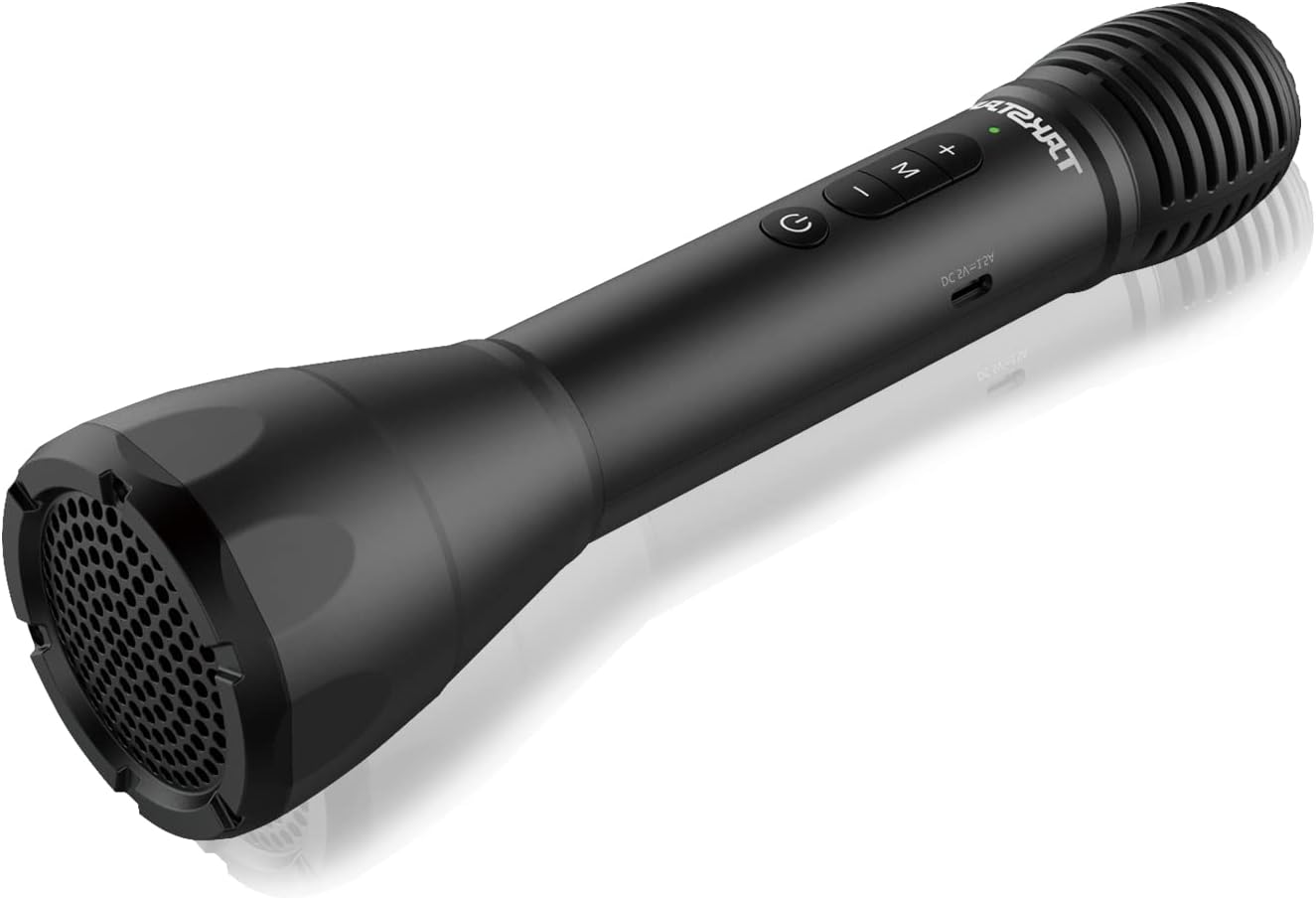
Figure 1: TAKSTAR DA10 Main Unit. A sleek black handheld microphone with integrated speaker at the base and control buttons on the handle.

Figure 2: Cardioid Pickup Pattern. The microphone features a cardioid pickup pattern for focused sound capture and clearer vocals, enhanced by a built-in DSP anti-howling chip.
Awọn ẹya pataki:
- 2-in-1 Iṣẹ-ṣiṣe: Combines microphone, power amplifier, and speaker.
- Alailowaya Bluetooth: Convenient wireless playing and connectivity to mobile phones, computers, and tablets.
- Didara Ohun Ọjọgbọn: Built-in DSP chip for effective howling reduction and clear, natural sound. Rear earth material speaker for lightweight portability and strong audio.
- Ipo Karaoke: Features reverb effects for an enhanced singing experience.
- Gun lasting: Up to 8 hours of working time on a single charge, with ultra-long standby and automatic power-off after 15 minutes of no input.
- Atunse iwọn didun: Adjustable loudspeaker volume to suit different situations.
- Awọn ọna pupọ: Switch between Speech Mode, Host Mode, Karaoke Mode, and Bluetooth Mode.
- Ibora ti o gbooro: Covers an area of approximately 1,000 sq ft (100m²), suitable for about 25 people.
4. Eto
4.1 Ngba agbara si Ẹrọ
Before first use, fully charge your TAKSTAR DA10. Connect the provided USB Type-C charging cable to the charging port on the microphone and to a suitable USB power source (e.g., computer, USB wall adapter). A full charge takes approximately 3 hours.
4.2 Sisopọ Bluetooth
- Power on the TAKSTAR DA10 by pressing and holding the power button.
- Press the 'M' button to switch to Bluetooth Mode. The device will indicate it is ready for pairing.
- On your mobile phone, computer, or tablet, enable Bluetooth and search for available devices.
- Select 'TAKSTAR DA10' from the list of devices to pair. Once paired, the device will confirm the connection.

Figure 3: Bluetooth Connection. The diagram illustrates how to connect the TAKSTAR DA10 to a smartphone or laptop/PC via Bluetooth 5.0.
5. Awọn ilana Iṣiṣẹ
5.1 Agbara Tan / Pa
Tẹ mọlẹ bọtini agbara lati tan ẹrọ tabi tan-an.
5.2 Aṣayan ipo
Press the 'M' button to cycle through the available modes:
- Ipo Ọrọ: Optimized for clear vocal delivery.
- Host Mode: Suitable for presentations and public speaking.
- Ipo Karaoke: Adds reverb effects for singing.
- Ipo Bluetooth: For wireless audio playback from a paired device.
5.3 iwọn didun tolesese
Use the volume control buttons (+/-) on the device to adjust the loudspeaker volume to your desired level.
5.4 Karaoke Reverb Effects
In Karaoke Mode, the built-in reverb effects are automatically applied to enhance your singing experience.

Àwòrán 4: Ohùn Amplifier Coverage. The TAKSTAR DA10 provides 8W output power, covering up to 1000+ sq.ft (100+ m²) for effective voice amplification.

Figure 5: Versatile Usage. The image displays various applications for the TAKSTAR DA10, including karaoke, lectures/seminars, weddings, and teaching.
6. Itọju
- Jeki ẹrọ naa gbẹ ati mimọ.
- Yago fun ṣiṣafihan ẹrọ naa si awọn iwọn otutu to gaju tabi oorun taara.
- Do not disassemble the device. Contact customer support for repairs.
- Charge the device regularly to maintain battery health, even if not in frequent use.
7. Laasigbotitusita
| Isoro | Owun to le Solusan |
|---|---|
| Ko si ohun lati agbọrọsọ | Ensure device is powered on and volume is adjusted. Check Bluetooth connection. |
| Ko le so pọ nipasẹ Bluetooth | Ensure device is in Bluetooth Mode. Turn off and on Bluetooth on your external device. Restart the TAKSTAR DA10. |
| Howling/Feedback noise | Reduce microphone volume. Avoid pointing the microphone directly at the speaker. |
| Aye batiri kukuru | Ensure device is fully charged before use. Reduce usage time at maximum volume. |
8. Awọn pato
| Ẹya ara ẹrọ | Ẹ̀kúnrẹ́rẹ́ |
|---|---|
| Brand | TAKSTAR |
| Orukọ awoṣe | DA10 |
| Asopọmọra Technology | Bluetooth |
| Gbohungbo Fọọmù ifosiwewe | Amusowo |
| Orisun agbara | Agbara Batiri (Lithium ion) |
| Akoko Ṣiṣẹ | Titi di wakati 8 |
| Akoko gbigba agbara | O fẹrẹ to awọn wakati 3 |
| Agbara Ijade | 8W |
| Agbegbe Agbegbe | Approx. 1,000 sq ft (100m²) |
| Ifamọ Audio | 47.5 Decibels |
| Ifihan Ibuwọlu-si-Noise | 66 dB |
| Idahun Igbohunsafẹfẹ | 8 kHz |
| Asopọmọra Iru | USB Iru-C |
| Iwọn Nkan | 0.035 iwon (1 Giramu) |
| Package Mefa | 11.26 x 4.09 x 3.31 inches |
9. Official ọja Video
Video 1: TAKSTAR DA10S Bluetooth Wireless Microphone. This video provides an overview of the TAKSTAR DA10S, highlighting its features and functionality as a Bluetooth wireless microphone. Note: The DA10S is a variant of the DA10 model.
10. Atilẹyin ọja & Atilẹyin
For warranty information or technical support, please refer to the contact card included in your product packaging or visit the official TAKSTAR website. You may also contact the seller, Takstar Official Store, directly through the Amazon platform for assistance.