
Sharp OZJONG
SHARP Digital Alarm Clock with AccuSet
Model: OZJONG
Ọrọ Iṣaaju
The SHARP Digital Alarm Clock with AccuSet is designed for effortless timekeeping. Featuring automatic time setting, a clear LED display, and user-friendly controls, this clock is ideal for any bedroom. Its AccuSet technology ensures the time is always accurate, eliminating the need for manual adjustments, making it perfect for seniors, children, or anyone seeking a hassle-free alarm clock solution.

olusin 1: Iwaju view of the SHARP Digital Alarm Clock with green LED display.
Key Awọn ẹya ara ẹrọ
- AccuSet Automatic Time Set: The clock is pre-programmed to automatically set the correct time, removing the need for manual adjustments. Simply select your time zone.
- Quick Daylight Savings Time (DST) Adjustment: A convenient switch allows for easy adjustment for Daylight Savings Time (+1 hour) or Standard Time (-1 hour).
- High/Low Dimmer Control: Adjust the brightness of the LED display to your preference, ensuring comfortable viewing ọjọ tabi oru.
- Batiri Afẹyinti: A pre-installed CR2032 button cell battery provides backup for time settings during power outages, ensuring continuous accuracy.
- Aṣayan Agbegbe Aago: Easily select your local time zone from the options provided at the bottom of the clock.

Figure 2: Diagram illustrating the key features and functionalities of the alarm clock.
Eto Itọsọna
- Ṣii silẹ: Carefully remove the alarm clock from its packaging.
- Battery Installation (Pre-installed): The CR2032 button cell battery for backup is pre-installed in a screw-secured cabinet at the bottom of the clock. This battery is designed to last for several years. No immediate action is required for initial setup.
- Aṣayan Agbegbe Aago: Before plugging in the clock, locate the time zone selection switch at the bottom of the unit. Select your correct time zone (e.g., EST, CST, MST, PST). The default time zone is Eastern Standard Time.
- Asopọ agbara: Plug the clock into an approved electrical source. The AccuSet feature will automatically program the correct time based on your selected time zone.
- Daylight Savings Time (DST) Adjustment: If applicable, slide the DST switch at the bottom of the clock to "ON" to add one hour (+1 hr) for Daylight Savings Time. For Standard Time, slide the switch to "OFF" to subtract one hour (-1 hr).

Figure 3: Top panel controls for setting time, alarm, and adjusting display.
Awọn ilana Iṣiṣẹ
Ṣiṣeto Itaniji naa
- Tẹ awọn Itaniji button once. The alarm time will appear on the display.
- Nigba ti akoko itaniji ba han, tẹ awọn WAKATI bọtini lati ṣatunṣe wakati itaniji.
- Tẹ awọn ISEJU bọtini lati ṣatunṣe iṣẹju itaniji.
- Lati muu ṣiṣẹ tabi mu maṣiṣẹ itaniji, tẹ awọn IKỌ NIPA / PA button. An alarm indicator light (usually a small LED) will illuminate when the alarm is active.
- To return to the current time display, press the AKOKO button or wait a few seconds for it to revert automatically.
Lilo Išẹ lẹẹkọọkan
Nigbati itaniji ba ndun, tẹ tobi ṢEGBE button located on the top of the clock. This will temporarily silence the alarm for a set period (typically 9 minutes), allowing for extra rest. The alarm will sound again after the snooze period ends.
Adjusting Display Brightness (Dimmer Control)
The clock features a High/Low dimmer control to adjust the display brightness. Locate the DIMMER HI/LO button on the top panel. Press this button to toggle between high and low brightness settings to suit your environment and preference.

Figure 4: Illustration of the High & Low Display Dimmer Control.
Itoju
- Ninu: To clean the clock, use a soft, dry cloth. Do not use abrasive cleaners or solvents, as they may damage the finish.
- Rirọpo Batiri: The CR2032 backup battery is designed for long-term use. If the clock loses time during a power outage after several years, it may be time to replace the battery. This is located in a screw-secured compartment at the bottom of the clock.
- Ibi: Place the clock on a stable, flat surface. Avoid placing it in direct sunlight, near heat sources, or in areas with high humidity.
Laasigbotitusita
| Isoro | Owun to le Fa | Ojutu |
|---|---|---|
| Clock does not display time after plugging in. | Not connected to power, or power outlet is not active. | Rii daju pe okun agbara ti wa ni edidi ni aabo sinu iṣan itanna ti n ṣiṣẹ. |
| Akoko ko tọ. | Incorrect time zone selected, or DST switch is set incorrectly. | Verify the time zone switch at the bottom of the clock is set to your local zone. Check the DST switch position. |
| Itaniji ko dun. | Alarm is not activated, or alarm volume is too low (if adjustable). | Ensure the alarm is turned ON using the ALARM ON/OFF button. Check for an alarm indicator light. |
| Ifihan naa ti ni imọlẹ pupọ tabi o ti di dudu pupọ. | Dimmer setting needs adjustment. | Press the DIMMER HI/LO button to cycle through brightness settings. |
| Clock loses time during power outage. | Backup battery is depleted. | Replace the CR2032 backup battery located in the compartment at the bottom of the clock. |
Awọn pato
| Ẹya ara ẹrọ | Ẹ̀kúnrẹ́rẹ́ |
|---|---|
| Brand | Dinku |
| Nọmba awoṣe | OZJONG |
| Àwọ̀ | Black - Green Led |
| Ifihan Iru | Oni-nọmba |
| Pataki Awọn ẹya ara ẹrọ | Alarm, Daylight Saving, Auto Dimmable |
| Ọja Mefa | 5.5"W x 2.6"H |
| Orisun agbara | Okun Itanna, Agbara Batiri |
| Batiri Afẹyinti | CR2032 (ti fi sii tẹlẹ) |
| Ohun elo | Ṣiṣu |
| Iwọn Nkan | 9.9 iwon |
| Iṣagbesori Iru | Tabili |
| UPC | 049353006079 |
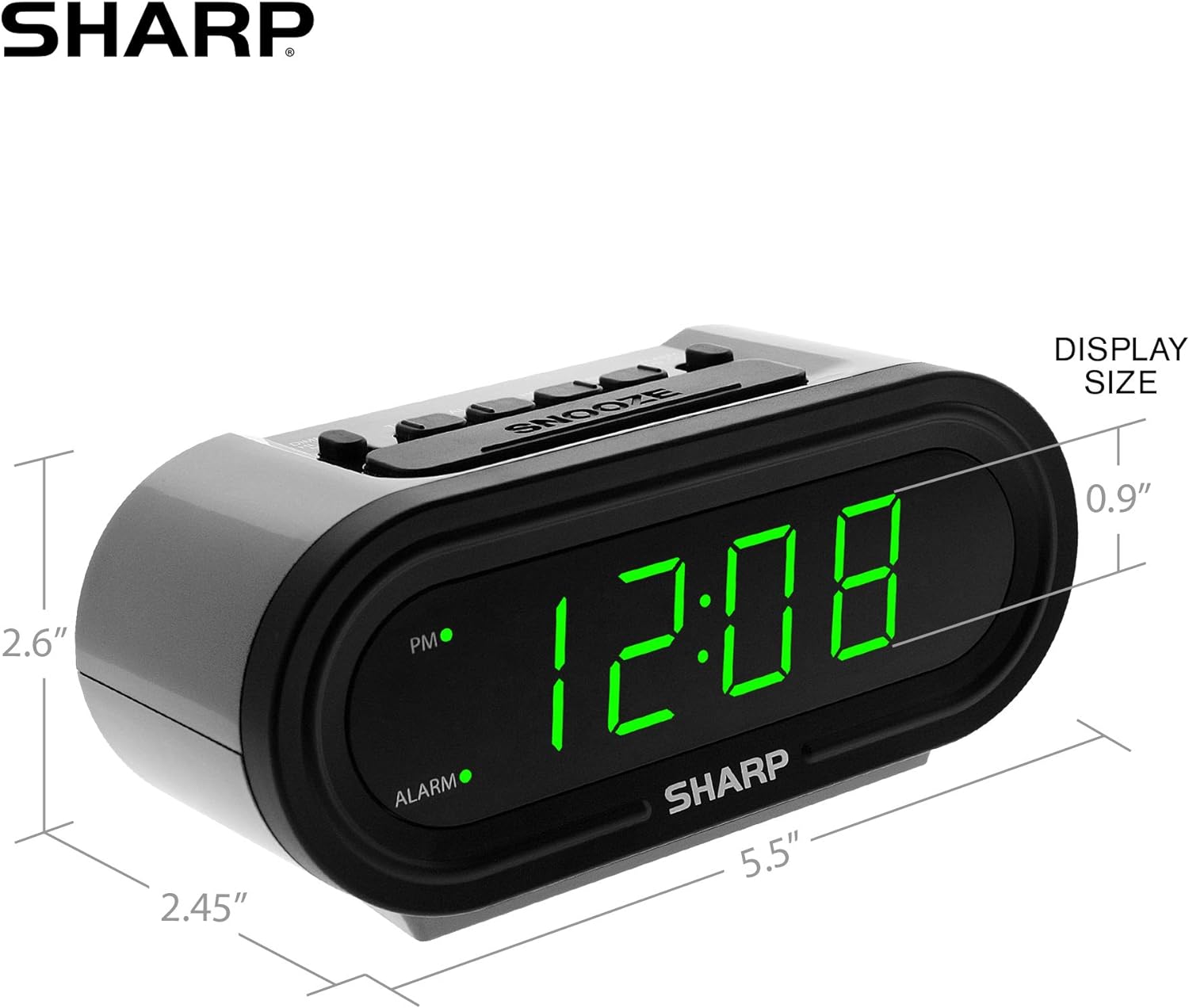
Ṣe nọmba 5: Awọn iwọn ọja fun itọkasi rọrun.
Atilẹyin ọja ati Support
For warranty information or technical support, please refer to the contact details provided in your product packaging or visit the official Sharp webojula. Tọju iwe-ẹri rira rẹ fun awọn ẹtọ atilẹyin ọja.
Ask a question about this manual
Ask about setup, troubleshooting, compatibility, parts, safety, or missing instructions. Manuals+ will review the question and use this page’s manual context to help answer it.