
1. Ifihan
Thank you for choosing the Orvibo Smart Door Lock C1. This smart lock is designed to provide enhanced security and convenience for your home or office. It integrates multiple unlocking methods, including fingerprint, password, RFID card, and traditional mechanical key, along with smart app control for remote management and monitoring. Please read this manual carefully before installation and operation to ensure proper use and optimal performance.
2. Alaye Aabo
- Má ṣe gbìyànjú láti tú tàbí tún ìdènà náà ṣe fúnra rẹ. Tọ́ka sí àwọn onímọ̀ ẹ̀rọ tó mọ̀ nípa iṣẹ́ náà fún iṣẹ́ náà.
- Use only the specified battery type (4 x AA batteries). Do not mix old and new batteries or different types of batteries.
- Keep the mechanical keys in a safe place outside your home in case of emergency or battery depletion.
- Yẹra fún fífi ìdènà sí oòrùn tààrà, òjò, tàbí ooru tó le gan-an.
- Ensure the door thickness is within the specified range (35mm ~ 120mm) for proper installation.
- Regularly check the battery level and replace batteries when indicated by the low battery warning.
3. Ọja Ipariview
The Orvibo Smart Door Lock C1 consists of an outer panel with a keypad, fingerprint sensor, and card reader, and an inner panel with the battery compartment and manual lock. The design is sleek and modern, suitable for various home aesthetics.

Nọmba 3.1: Iwaju ati sẹhin view of the Orvibo Smart Door Lock C1, showcasing its sleek black design and components.
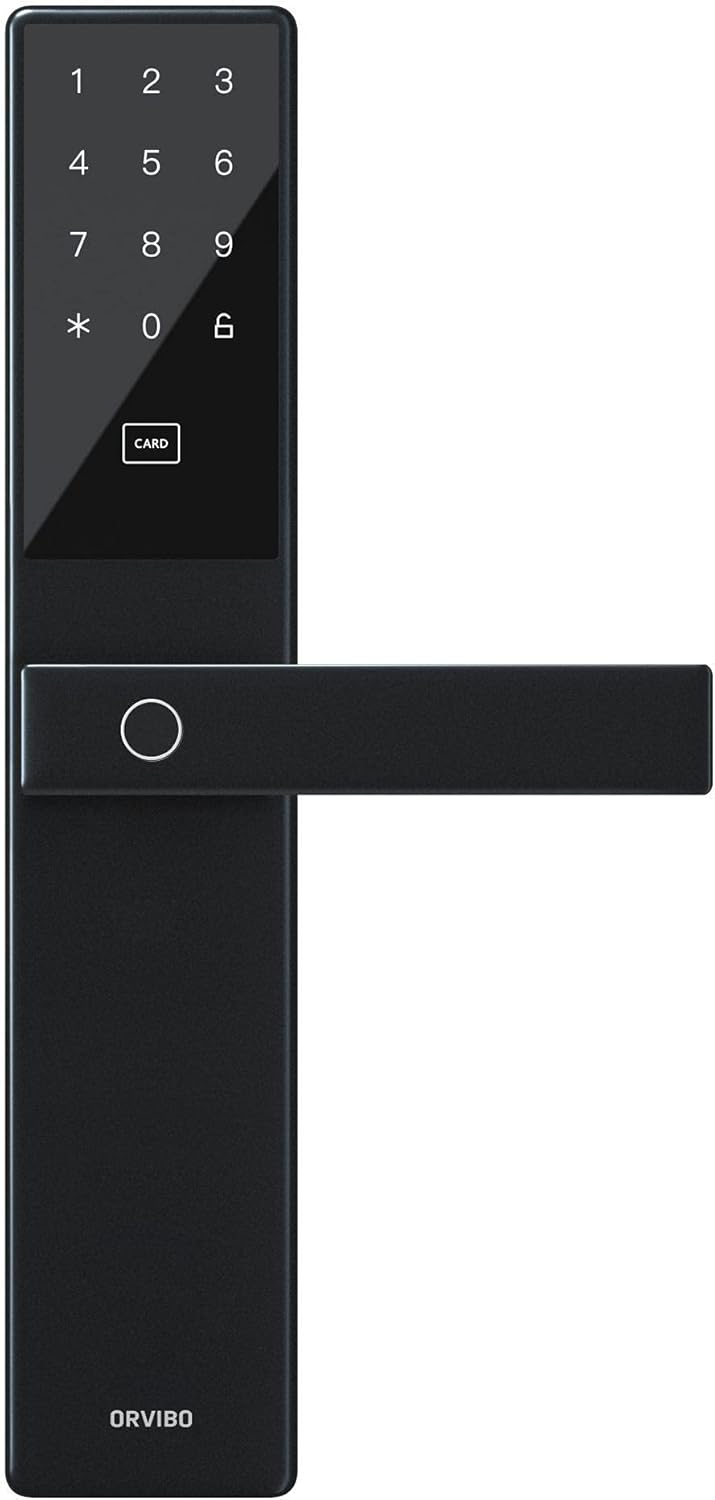
olusin 3.2: Isunmọ view of the exterior panel, highlighting the numeric keypad, card reader area, and fingerprint sensor.
4. Eto ati fifi sori
Proper installation is crucial for the lock's functionality and security. It is recommended to have the lock installed by a professional if you are unsure about the process.
4.1 Pre-fifi sori Ṣayẹwo
- Verify door thickness: 35mm to 120mm.
- Ensure the door frame is sturdy and aligned.
- Check package contents: Smart lock (front and back panels), mortise, strike plate, screws, keys, installation template, user manual.
4.2 fifi sori Igbesẹ
- Ṣetan ilẹkun: Use the provided template to mark and drill holes on the door.
- Install the Mortise: Insert the mortise into the side of the door and secure it with screws.
- Install the Outer Panel: Pass the spindle and cables through the mortise. Align the outer panel and secure it.
- Install the Inner Panel: Connect the cables from the outer panel to the inner panel. Align the inner panel and secure it with screws.
- Fi sori ẹrọ Kọlu Plate: Install the strike plate on the door frame, ensuring proper alignment with the mortise latch.
- Fi awọn batiri sii: Open the battery cover on the inner panel and insert 4 AA batteries, observing polarity.
- Iṣe idanwo: Test all unlocking methods (key, fingerprint, card, password) to ensure smooth operation.
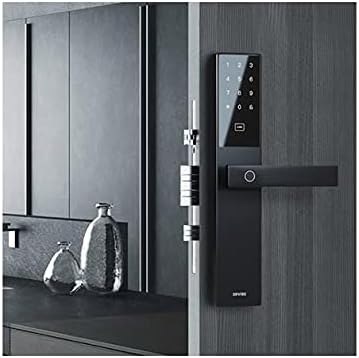
Figure 4.1: The Orvibo Smart Door Lock C1 installed on a wooden door, demonstrating its integrated appearance.
5. Awọn ilana Iṣiṣẹ
The Orvibo Smart Door Lock C1 offers multiple convenient ways to unlock your door.
5.1 Awọn ọna ṣiṣi silẹ
- Ikawe kikọ: Gbe ika rẹ ti o forukọsilẹ sori sensọ itẹka. Titiipa naa yoo ṣii ti ika ika ọwọ ba jẹ idanimọ.
- Ọrọigbaniwọle: Tẹ ọrọ igbaniwọle ti o forukọsilẹ sori oriṣi bọtini, atẹle nipa bọtini '#'.
- Kaadi RFID: Present your registered RFID card to the card reader area on the outer panel.
- Kọ́kọ́rọ́ Ẹ̀rọ: Insert the backup mechanical key into the keyhole and turn to unlock.
- Temporary/One-Time Password: Generate a temporary or one-time password via the smartphone app and provide it to guests.
5.2 Titiipa ilekun
The lock will automatically engage after the door is closed. You can also manually lock it from the inside using the thumb-turn or by pressing the lock button on the outer panel (if available).
6. App Integration and Smart Features
The Orvibo Smart Door Lock C1 connects to your smartphone via Wi-Fi, offering advanced control and monitoring features.
6.1 Nsopọ si App
- Download the Orvibo Smart Home App from your device's app store.
- Ṣẹda iroyin tabi wọle.
- Follow the in-app instructions to add the Smart Door Lock C1 to your device list. This typically involves putting the lock in pairing mode and connecting it to your home Wi-Fi network.
6.2 App Awọn ẹya ara ẹrọ
- Ṣii silẹ Latọna jijin: Unlock your door from anywhere using the app.
- Isakoso olumulo: Add, modify, or delete fingerprints, passwords, and RFID cards for up to 25 users.
- Àwọn ọ̀rọ̀ìpamọ́ ìgbà díẹ̀: Generate time-limited or one-time passwords for visitors.
- Ṣii Awọn akọọlẹ: View a history of all lock and unlock events, including the method used and timestamp.
- Titari Awọn iwifunni: Receive real-time alerts on your phone for various events, such as low battery or unauthorized access attempts.
- Ipo Batiri: Monitor the current battery level of the lock.
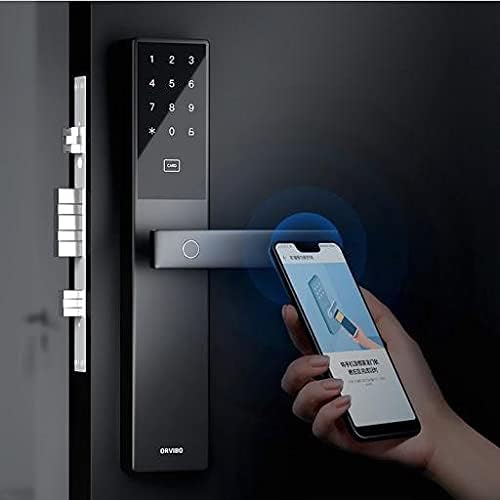
Figure 6.1: A user interacting with the Orvibo Smart Door Lock C1 and its corresponding smartphone application, demonstrating remote control capabilities.
7. Itọju
Regular maintenance ensures the longevity and optimal performance of your smart lock.
- Ninu: Wipe the lock surface with a soft, dry cloth. Do not use abrasive cleaners or solvents.
- Rirọpo Batiri: When the low battery indicator appears (or approximately every 400 days), replace all four AA batteries simultaneously. Ensure correct polarity.
- Ṣayẹwo ẹrọ: Periodically check that the door closes smoothly and the latch operates without obstruction.
8. Laasigbotitusita
If you encounter issues with your Orvibo Smart Door Lock C1, refer to the following common problems and solutions:
| Isoro | Owun to le Fa | Ojutu |
|---|---|---|
| Titiipa ko dahun | Awọn batiri ti o ku | Rọpo gbogbo awọn batiri AA 4. |
| Titẹ ika ọwọ ko mọ | Finger wet/dirty, improper placement, unregistered fingerprint | Clean finger, ensure proper placement, register fingerprint if new. |
| Password not working | Incorrect password, unregistered password | Verify password, ensure it's registered. |
| App asopọ oran | Weak Wi-Fi signal, incorrect pairing | Check Wi-Fi signal, re-pair the lock with the app. |
| Lock makes unusual noises | Mechanical obstruction, loose parts | Check for obstructions, tighten screws. If issue persists, contact support. |
9. Awọn pato
| Ẹya ara ẹrọ | Ẹ̀kúnrẹ́rẹ́ |
|---|---|
| Awoṣe | C1 Smart Way Wi-Fi |
| Agbara olumulo | Titi di awọn olumulo 25 |
| Ibi ti ina elekitiriki ti nwa | 4 x AA batiri |
| Awọn ọna Voltage | DC 3V |
| Ṣiṣẹ lọwọlọwọ | <150mA (apapọ) |
| Igbesi aye batiri | Isunmọ. 400 ọjọ |
| Alailowaya Asopọmọra | Wi-Fi |
| Ohun elo nronu | Aluminum Alloy, Zinc Alloy, Stainless Steel, ABS Plastic |
| Dara enu Sisanra | 35mm ~ 120mm |
| Status Detection | Ipo nẹtiwọki, Ipo batiri |
| Awọn ọna ṣiṣi silẹ | Fingerprint, Card, Password, Temporary/One-time Password, Mechanical Key |
10. Atilẹyin ọja ati Support
Orvibo provides a standard warranty for this product. For detailed warranty terms and conditions, please refer to the warranty card included with your purchase or visit the official Orvibo website. If you require technical assistance, troubleshooting, or have any questions regarding your Smart Door Lock C1, please contact Orvibo customer support through their official channels. Please have your product model and purchase information ready when contacting support.


