
1. Ifihan
O ṣeun fun riraasing the QFX PBX-8080 Portable Bluetooth Speaker. This manual provides important information regarding the setup, operation, and maintenance of your device. Please read it thoroughly before use and retain it for future reference.
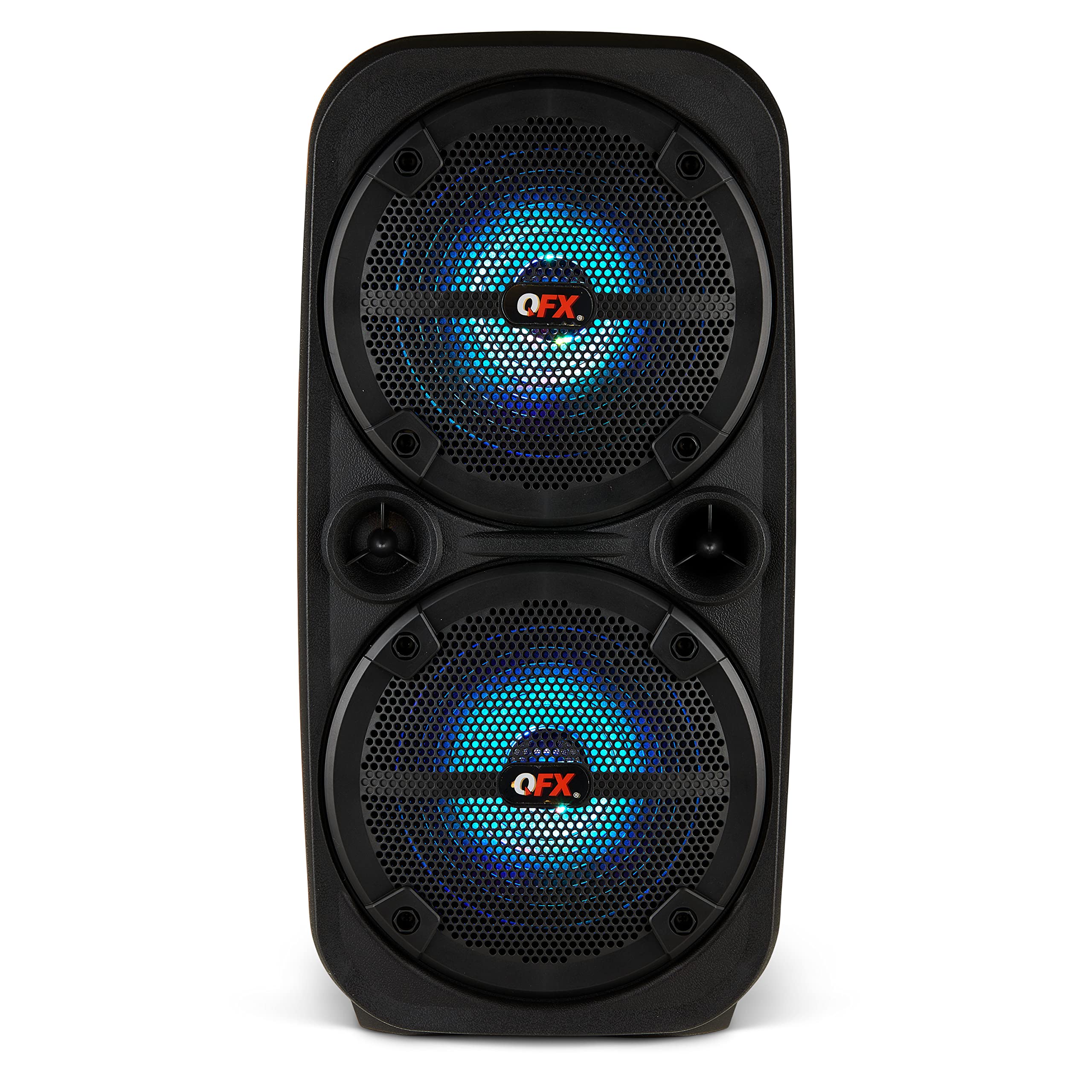
Aworan 1.1: Iwaju view of the QFX PBX-8080 Portable Bluetooth Speaker. This image displays the speaker's robust design, featuring two 8-inch woofers, a central control panel, and illuminated LED party lights, indicating its readiness for use.
2. Awọn ilana aabo
- Ka Awọn ilana: Ka gbogbo awọn ilana aabo ati iṣiṣẹ ṣaaju lilo ọja naa.
- Daduro Awọn ilana: Tọju aabo ati awọn ilana iṣiṣẹ fun itọkasi ọjọ iwaju.
- Awọn ikilọ Tẹtisi: Tẹmọ gbogbo awọn ikilọ lori ọja ati ninu awọn ilana ṣiṣe.
- Tẹle Awọn ilana: Tẹle gbogbo iṣẹ ṣiṣe ati lo awọn ilana.
- Omi ati Ọrinrin: Maṣe lo ohun elo yii nitosi omi.
- Ninu: Mọ pẹlu asọ gbigbẹ nikan.
- Afẹfẹ: Ma ṣe dina eyikeyi awọn ṣiṣi atẹgun. Fi sori ẹrọ ni ibamu pẹlu awọn ilana ti olupese.
- Ooru: Maṣe fi sori ẹrọ nitosi awọn orisun ooru gẹgẹbi awọn imooru, awọn iforukọsilẹ ooru, awọn adiro, tabi awọn ohun elo miiran (pẹlu ampliifiers) ti o gbe ooru jade.
- Aabo Agbara-Okun: Dabobo okun agbara lati ma rin lori tabi pin, ni pataki ni awọn pilogi, awọn ohun elo irọrun, ati aaye nibiti wọn ti jade kuro ninu ohun elo naa.
- Awọn asomọ: Lo awọn asomọ/awọn ẹya ara ẹrọ ti a sọ pato nipasẹ olupese.
- Mànàmáná: Yọọ ohun elo yi nigba iji manamana tabi nigba lilo fun igba pipẹ.
- Ṣiṣẹ: Tọkasi gbogbo iṣẹ si awọn oṣiṣẹ iṣẹ ti o peye. Iṣẹ nilo nigbati ohun elo ba ti bajẹ ni ọna eyikeyi, gẹgẹbi okun ipese agbara tabi plug ti bajẹ, omi ti ta silẹ tabi awọn nkan ti ṣubu sinu ẹrọ, ohun elo naa ti farahan si ojo tabi ọrinrin, ko ṣiṣẹ deede. , tabi ti lọ silẹ.
3. Package Awọn akoonu
Jọwọ ṣayẹwo apoti fun awọn nkan wọnyi:
- QFX PBX-8080 Portable Bluetooth Speaker
- Okun Ngba agbara USB
- Ilana Afowoyi (iwe yii)
4. Ọja Ipariview
The QFX PBX-8080 is a versatile portable speaker designed for powerful audio output and various connectivity options. It features dual 8-inch woofers, LED party lights, and multiple input methods.
Awọn eroja pataki:
- Àwọn Woofers oní-8-inch méjì: For powerful bass and clear audio.
- Ibi iwaju alabujuto: Located on the top or front, featuring buttons for power, mode selection, volume, playback control, and LED light control.
- Awọn imọlẹ Party Party: Integrated lights that synchronize with music or can be set to various patterns.
- Awọn ibudo Input: USB, Aux-in (3.5mm), Microphone input.
- Ibudo gbigba agbara: Fun sisopọ okun gbigba agbara USB.
- Awọn imudani: Fun irọrun gbigbe.
5. Eto
5.1 Gbigba agbara si Agbọrọsọ
- Wa ibudo gbigba agbara lori agbọrọsọ.
- So okun gbigba agbara USB ti a pese mọ ibudo gbigba agbara agbọrọsọ naa.
- Connect the other end of the USB cable to a compatible USB power adapter (not included) or a powered USB port.
- The charging indicator light (if present) will illuminate, typically red, during charging.
- Once fully charged, the indicator light may change color (e.g., turn off or turn green). A full charge typically takes several hours.
- The speaker supports "Charge & Play," allowing you to use it while it is charging.
5.2 Titan / Pa a
- To power on the speaker, press and hold the Power button (usually marked with ⏻ or "POWER") for a few seconds until you hear an audible prompt or see the display/LEDs light up.
- Lati pa agbara, tẹ mọlẹ Bọtini Agbara lẹẹkansii titi ti agbọrọsọ yoo ti ku.
6. Awọn ilana Iṣiṣẹ
6.1 Sisopọ Bluetooth
- Ensure the speaker is powered on and in Bluetooth mode. If not, press the "MODE" button until "Bluetooth" or "BT" is displayed/announced. The Bluetooth indicator will typically flash, indicating it's in pairing mode.
- Lori ẹrọ alagbeka rẹ (foonuiyara, tabulẹti, ati bẹbẹ lọ), mu Bluetooth ṣiṣẹ ki o wa awọn ẹrọ to wa.
- Select "QFX PBX-8080" from the list of found devices.
- Once paired, the speaker will emit an audible confirmation, and the Bluetooth indicator light will stop flashing and remain solid.
- O le mu ohun ṣiṣẹ bayi lati ẹrọ rẹ nipasẹ agbọrọsọ.
6.2 Otitọ Alailowaya Sitẹrio (TWS) iṣẹ
The TWS function allows you to connect two PBX-8080 speakers wirelessly for a stereo sound experience.
- Ensure both PBX-8080 speakers are powered on and in Bluetooth mode, but kii ṣe ti sopọ si eyikeyi ẹrọ.
- On one of the speakers, press and hold the "TWS" button (or a similar button, refer to speaker markings) for a few seconds.
- The speakers will attempt to connect to each other. Once connected, you will hear a confirmation tone.
- Now, connect your mobile device to one of the paired PBX-8080 speakers via Bluetooth (as described in section 6.1). Both speakers will play audio in stereo.
6.3 Awọn Imọlẹ Ayẹyẹ LED
The PBX-8080 features dynamic LED party lights. Use the "LIGHT" button (or similar) on the control panel to cycle through different light modes or to turn the lights off.
6.4 Gbigbe gbohungbohun
- Connect a wired microphone (not included) to the "MIC IN" jack on the speaker.
- Adjust the microphone volume using the dedicated "MIC VOL" knob or buttons on the control panel.
- You can use the microphone while playing music from other sources.
6.5 Aux Input
- Connect an external audio device (e.g., MP3 player, laptop) to the "AUX IN" jack using a 3.5mm audio cable (not included).
- Press the "MODE" button on the speaker until "AUX" mode is selected.
- Control playback and volume from your connected device or the speaker's main volume control.
6.6 USB Input
- Insert a USB flash drive (containing MP3 audio files) into the "USB" port.
- The speaker will automatically switch to USB mode and begin playing music from the drive. If not, press the "MODE" button to select "USB" mode.
- Lo àwọn ìṣàkóso ìṣiṣẹ́ orin (Play/Duro, Next/Previous Track) lórí agbọ́hùnsọ láti ṣàkóso orin rẹ.
6.7 Redio FM
- Press the "MODE" button until "FM" radio mode is selected.
- Press the "PLAY/PAUSE" button (or a dedicated scan button) to automatically scan and save available FM radio stations.
- Use the "NEXT/PREVIOUS" buttons to navigate between saved stations.
- For better reception, ensure the speaker is in an open area.
7. Itọju
- Ninu: Lo asọ rirọ, ti o gbẹ lati nu ode ti agbọrọsọ. Ma ṣe lo awọn afọmọ abrasive, waxes, tabi awọn nkanmimu.
- Ibi ipamọ: Nigbati o ko ba wa ni lilo fun awọn akoko ti o gbooro sii, tọju agbohunsoke si tutu, ibi gbigbẹ, kuro lati orun taara ati awọn iwọn otutu to gaju.
- Itọju Batiri: Lati pẹ aye batiri, yago fun gbigba agbara si batiri ni kikun nigbagbogbo. Gba agbara si agbọrọsọ nigbagbogbo, paapaa ti ko ba si ni lilo, lati ṣetọju ilera batiri.
- Yago fun Omi: This speaker is not waterproof. Keep it away from water and moisture to prevent damage.
8. Laasigbotitusita
| Isoro | Owun to le Solusan |
|---|---|
| Agbọrọsọ ko ni agbara lori. |
|
| Ko si ohun lati agbọrọsọ. |
|
| Asopọ Bluetooth kuna. |
|
| Gbigba redio FM ko dara. |
|
9. Awọn pato
| Ẹya ara ẹrọ | Ẹ̀kúnrẹ́rẹ́ |
|---|---|
| Orukọ awoṣe | PBX-8080 |
| Brand | QFX |
| Agbọrọsọ Iru | Woofer (2 x 8-inch) |
| Asopọmọra Technology | Bluetooth |
| Pataki Awọn ẹya ara ẹrọ | Bluetooth, True Wireless Stereo (TWS), LED Party Lights, Microphone Input, Aux Input, USB Input, FM Radio, Rechargeable, Handles |
| Ipo Ijade Ohun | Sitẹrio |
| Orisun agbara | Corded Electric (for charging), Rechargeable Battery |
| Iwọn Nkan | 5.73 iwon (2.6 kg) |
| Awọn iwọn Ẹyọ (WxDxH) | 9.65 x 7.36 x 19.69 inches (isunmọ.) |
| UPC | 606540039670 |
10. Atilẹyin ọja ati Support
QFX products are designed and manufactured to the highest quality standards. For specific warranty information, please refer to the warranty card included with your purchase or visit the official QFX website. If you encounter any issues or require technical assistance, please contact QFX customer support.
QFX Customer Support:
- Fun alaye atilẹyin tuntun julọ, jọwọ ṣabẹwo si QFX Store on Amazon or the official QFX webojula.