
MageGee V620
Ìwé Àfọwọ́kọ Olùlò Àpapọ̀ Kííbọọ̀dù Aláìlókùn àti Àsin MageGee V620
Awoṣe: V620
Ọrọ Iṣaaju
O ṣeun fun riraasing the MageGee V620 Wireless Keyboard and Mouse Combo. This manual provides detailed instructions on how to set up, operate, maintain, and troubleshoot your new wireless peripheral set. Please read this manual carefully before use to ensure optimal performance and longevity of your product.

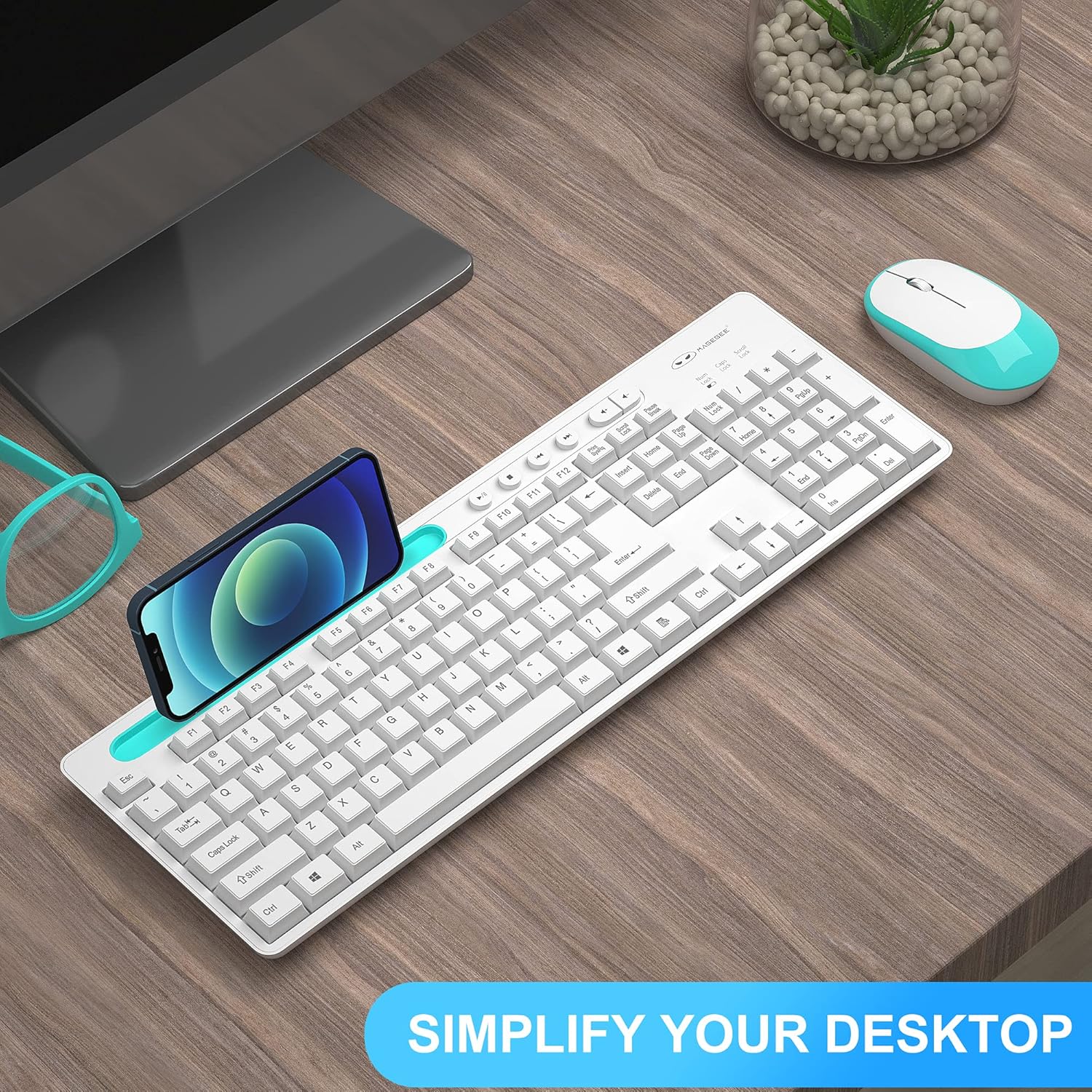
Image: The MageGee V620 wireless keyboard and mouse combo, featuring a full-size keyboard with an integrated phone holder and a compact, ergonomic mouse. A smartphone is shown placed in the keyboard's holder.
Package Awọn akoonu
- MageGee V620 Wireless Keyboard
- MageGee Wireless Mouse
- Olugba USB (ti o fipamọ sinu yara batiri Asin)
- Afowoyi Olumulo (iwe-ipamọ yii)
- AA Battery (for mouse, pre-installed or included)
Ṣeto
Follow these steps to set up your MageGee V620 Wireless Keyboard and Mouse Combo:
- Fi Awọn batiri sii:
- Asin: Open the battery compartment cover on the bottom of the mouse. Insert the provided AA battery, ensuring correct polarity (+/-). Close the cover.
- Àtẹ bọ́tìnnì The keyboard typically uses AAA batteries (not explicitly mentioned in JSON, but common for wireless keyboards). Open the battery compartment on the bottom of the keyboard and insert the required batteries (usually 2x AAA, not included based on JSON).
- Wa olugba USB: The USB receiver for both the keyboard and mouse is usually stored inside the mouse's battery compartment for safekeeping during transport. Carefully remove it.
- So olugba USB pọ: Plug the USB receiver into an available USB port on your computer (desktop, laptop, PC).
- Agbara Tan:
- Asin: Tan-an agbara yipada ti o wa ni isalẹ ti Asin.
- Àtẹ bọ́tìnnì Ensure the keyboard is powered on (some keyboards have a power switch, others activate upon key press).
- Asopọmọra Aifọwọyi: The keyboard and mouse should automatically connect to your computer within a few seconds. No additional drivers are typically required for Windows, macOS, or Linux systems.

Image: Illustration demonstrating the 2.4GHz wireless connection of the MageGee V620 combo. A USB receiver is shown plugged into a laptop, wirelessly connecting to both the keyboard and mouse, indicating a range of 33 feet.
Awọn ilana Iṣiṣẹ
Keyboard Awọn ẹya ara ẹrọ
- Ìfilélẹ Ìtóbi Ni kikun: Ó ní keyboard nọ́mbà kan fún ìtẹ̀síwájú data tó munadoko.
- Quiet Crater-Switch Keys: Designed for responsive and quiet typing, reducing noise during use.
- Dimu Foonu Iṣọkan: A convenient slot at the top of the keyboard allows you to prop up your smartphone or tablet for easy viewing.
- Media Shortcut Keys: Access common functions quickly with dedicated media keys (e.g., volume control, play/pause).
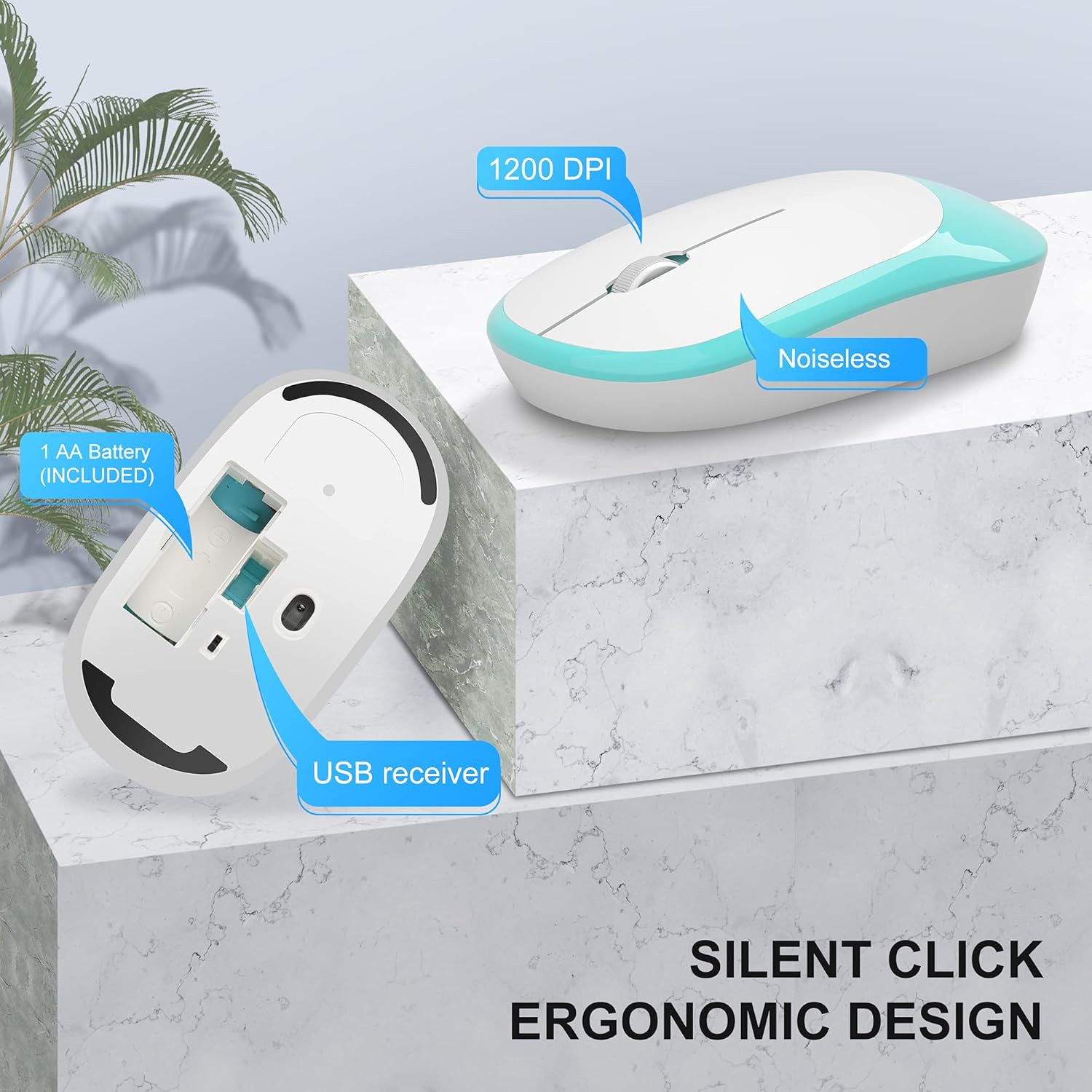
Image: The MageGee V620 wireless keyboard, with highlighted sections indicating the integrated phone holder and the location of 6 media shortcut keys.

Aworan: A sunmọ-soke view of the MageGee V620 keyboard keys, emphasizing the responsive and quiet crater-switch design. Icons below indicate anti-scratch, comfortable touch, soft click, and crater switch features.
Asin Awọn ẹya ara ẹrọ
- Apẹrẹ Ergonomic: Shaped for comfortable use over extended periods.
- Tẹ ipalọlọ: Reduces click noise, ideal for quiet environments.
- 1200 DPI: Provides precise and smooth cursor control.
- Ibi ipamọ olugba USB: The USB receiver can be conveniently stored inside the mouse when not in use, preventing loss.
Aworan: A alaye view of the MageGee V620 wireless mouse, pointing out its silent click feature, ergonomic design, 1200 DPI sensitivity, and the location of the AA battery compartment and USB receiver storage.
Itoju
- Ninu: Lo asọ ti o tutu, ti o gbẹ lati nu mọlẹ keyboard ati Asin. Fun idoti alagidi, die-die damp cloth with mild soap can be used, ensuring no liquid enters the device. Do not use harsh chemicals or abrasive cleaners.
- Rirọpo Batiri:
- When the keyboard or mouse becomes unresponsive or experiences lag, it may be time to replace the batteries.
- Refer to the "Setup" section for instructions on opening battery compartments and inserting new batteries.
- Sọ awọn batiri atijọ sọnu ni ifojusọna ni ibamu si awọn ilana agbegbe.
- Ibi ipamọ: When not in use for extended periods, turn off the mouse to conserve battery life. Store the USB receiver inside the mouse's compartment to prevent loss.
Laasigbotitusita
If you encounter issues with your MageGee V620 combo, try the following solutions:
- No Connection / Unresponsive:
- Rii daju pe olugba USB ti ṣafọ ni aabo sinu ibudo USB ti n ṣiṣẹ lori kọnputa rẹ.
- Check if the mouse and keyboard are powered on.
- Rọpo awọn batiri ni mejeji awọn keyboard ati Asin.
- Gbiyanju lati so olugba USB sinu ibudo USB ti o yatọ.
- Gbe keyboard ati Asin sunmọ olugba USB lati yọkuro awọn iṣoro agbegbe.
- Tun kọmputa rẹ bẹrẹ.
- Asopọ ti o n fa fifalẹ tabi ti o n da duro:
- Ensure there are no large metal objects or other electronic devices (like Wi-Fi routers, other wireless devices) between the keyboard/mouse and the receiver that might cause interference.
- Try using a USB extension cable to position the receiver closer to the keyboard and mouse, away from potential interference sources.
- Ṣayẹwo awọn ipele batiri.
- Keys Not Working / Mouse Cursor Not Moving:
- Clean any debris from around the affected keys or the mouse sensor.
- Ensure the Num Lock or Caps Lock indicators are functioning correctly (for keyboard).
- Re-establish connection by unplugging and re-plugging the USB receiver.
Awọn pato
| Ẹya ara ẹrọ | Ẹ̀kúnrẹ́rẹ́ |
|---|---|
| Brand | MageGee |
| Awoṣe | V620 |
| Asopọmọra Technology | Alailowaya 2.4GHz (olugba USB) |
| Awọn ẹrọ ibaramu | Gaming Console, Laptop, Personal Computer (Windows, PC) |
| Pataki Ẹya | Ergonomic Design, Quiet Keys, Phone Holder |
| Asin DPI | 1200 DPI |
| Apejuwe Keyboard | Full-size with Number Pad |
| Iwọn Nkan | 1.44 poun (isunmọ 0.65 kg) |
| Package Mefa | 17.48 x 8.62 x 1.5 inches (iwọn 44.4 x 21.9 x 3.8 cm) |

Image: Technical drawing showing the dimensions of the MageGee V620 wireless keyboard: approximately 440mm (length), 145mm (width), and 27mm (height).

Image: Technical drawing showing the dimensions of the MageGee V620 wireless mouse: approximately 108mm (length), 60mm (width), and 26mm (height).
Atilẹyin ọja ati Support
MageGee products are designed for reliability and performance. For warranty information or technical support, please refer to the contact details provided with your purchase or visit the official MageGee webojula. Tọju iwe-ẹri rira rẹ bi ẹri rira fun awọn iṣeduro atilẹyin ọja.
For further assistance, you may contact MageGee customer service through their official channels. You can often find support information on the MageGee Store on Amazon.