
1. Ifihan ati Loriview
This manual provides detailed instructions for the installation, operation, and maintenance of your Sharp QW-MA814-SS Dishwasher. Please read this manual thoroughly before using your appliance to ensure safe and efficient operation. This dishwasher features 14 place settings and 8 wash programs, including an Auto wash function, designed for optimal cleaning performance.
- Agbara: 14 Awọn eto ibi
- Awọn eto: 8 (including Auto wash)
- Awọn ẹya pataki: Child Lock, LED light inside, Delay Start (1-24 Hours), Anti-Bacterial Filter, Alternative Wash, Three Layer Cutlery Drawer
- Lilo Agbara: A++
- Lilo Omi: 11L / ọmọ
2. Alaye Aabo
Nigbagbogbo tẹle awọn iṣọra aabo ipilẹ nigba lilo awọn ohun elo itanna lati dinku eewu ina, mọnamọna, tabi ipalara. Jeki iwe afọwọkọ yii fun itọkasi ọjọ iwaju.
- Rii daju pe ẹrọ fifọ ti wa ni ilẹ daradara.
- Ma ṣe ṣiṣẹ ẹrọ fifọ ti o ba bajẹ.
- Pa awọn ọmọde kuro ni ẹrọ fifọ, paapaa nigbati o ba n ṣiṣẹ.
- Lo awọn ohun elo ifọṣọ nikan ki o fi omi ṣan awọn iranlọwọ ti a ṣe apẹrẹ fun awọn ẹrọ fifọ.
- Maṣe fi ọwọ kan eroja alapapo lakoko tabi lẹsẹkẹsẹ lẹhin lilo.
- Always turn off the power supply before performing any maintenance or cleaning.
3. Eto ati fifi sori
The Sharp QW-MA814-SS is a freestanding dishwasher. Proper installation is crucial for optimal performance and safety.

Nọmba 3.1: Iwaju view of the Sharp QW-MA814-SS Dishwasher. This image shows the sleek Inox Silver exterior with the control panel located at the top of the door.
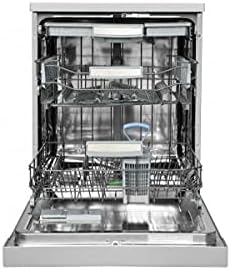
Nọmba 3.2: Inu ilohunsoke view of the Sharp QW-MA814-SS Dishwasher with the door open. This image highlights the three-layer cutlery drawer and the spacious racks designed for 14 place settings.
3.1 Ibi
Place the dishwasher on a level, stable surface. Ensure there is adequate space for the door to open fully. The dimensions are approximately 59.8D x 84.5W x 61H centimeters.
3.2 Omi ati Itanna Awọn isopọ
Connect the water inlet hose to a cold water supply and the drain hose to a suitable drain. Ensure all connections are secure to prevent leaks. Connect the power cord to a grounded 240 Volt electrical outlet. It is recommended to have a qualified technician perform the initial installation.
4. Awọn ilana Iṣiṣẹ
Your Sharp dishwasher is equipped with a user-friendly touch control panel and various features to simplify dishwashing.
4.1 Nkojọpọ ẹrọ ifọṣọ
- Pa awọn patikulu ounjẹ nla kuro ninu awọn ounjẹ ṣaaju ikojọpọ.
- Gbe awọn ohun ti o tobi ju sinu agbọn isalẹ ati awọn ohun kekere, awọn gilaasi, ati awọn agolo ninu agbọn oke.
- Utilize the three-layer cutlery drawer for forks, knives, and spoons, ensuring they do not block spray arms.
4.2 Fifi Detergent ati Iranlọwọ Fi omi ṣan
Fill the detergent dispenser with the appropriate amount of dishwasher detergent. Check the rinse aid indicator and refill the rinse aid dispenser as needed for spot-free drying.
4.3 Yiyan Eto kan
Use the touch controls to select one of the 8 available wash programs. The LED light inside illuminates the interior for better visibility during loading and unloading. The 'Auto wash' program automatically adjusts settings based on soil level.
4.4 Bibẹrẹ Ayika Wẹ
Close the dishwasher door firmly. Press the Start button to begin the selected program. You can use the 'Delay Start' feature to postpone the start of a cycle by 1 to 24 hours.
4.5 Išẹ Titiipa Ọmọ
Activate the Child Lock feature to prevent accidental program changes or operation by children. Refer to the control panel instructions for activating and deactivating this function.
5. Itọju ati Cleaning
Itọju deede ṣe idaniloju gigun ati ṣiṣe ti ẹrọ fifọ ẹrọ rẹ.
5.1 Ninu awọn Ajọ
The dishwasher is equipped with an Anti-Bacterial Filter. Regularly clean the filter system (coarse filter, fine filter, and microfilter) to prevent food particles from recirculating and affecting wash performance. Twist and remove the filter assembly, rinse under running water, and brush if necessary.
5.2 Ninu awọn sokiri Arms
Check the spray arm nozzles for blockages. Remove the spray arms and clean any clogged holes with a thin wire or toothpick.
5.3 Ita ati inu ilohunsoke Cleaning
Pa ode nu pẹlu asọ, damp cloth. For the interior, periodically run a dishwasher cleaning cycle with a specialized dishwasher cleaner to remove grease and limescale buildup.
6. Laasigbotitusita
Ṣaaju ki o to kan si iṣẹ, tọka si awọn ọran ti o wọpọ atẹle ati awọn ojutu wọn.
| Isoro | Owun to le Fa | Ojutu |
|---|---|---|
| Apoti ko bẹrẹ | Power supply issue, door not closed properly, child lock active. | Check power connection, ensure door is latched, deactivate child lock. |
| Awọn awopọ ko mọ | Clogged spray arms, dirty filters, improper loading, insufficient detergent. | Clean spray arms and filters, reload dishes correctly, add more detergent. |
| Omi ti ko ṣan | Clogged sisan okun tabi àlẹmọ, sisan fifa oro. | Check and clear drain hose/filter, consult service if pump is faulty. |
| Ariwo ti o pọju | Items hitting spray arms, foreign object in pump, improper installation. | Ṣe atunto awọn ounjẹ, ṣayẹwo fun awọn nkan ajeji, rii daju pe ẹrọ fifọ jẹ ipele. |
7. Awọn pato
| Orukọ awoṣe | QW-MA814-SS |
| Brand | Dinku |
| Àwọ̀ | Silver (Inox) |
| Fọọmù ifosiwewe | Sisun |
| Awọn iwọn Ọja (D x W x H) | 59.8 x 84.5 x 61 cm |
| Iwọn Nkan | 25.2 kilo |
| Agbara | 14 Awọn eto ibi |
| Nọmba ti Awọn eto | 8 |
| Iru Iṣakoso | Fọwọkan |
| Ariwo Ipele | 53 dB |
| Voltage | 240 Volts |
| Lododun Lilo Lilo | Awọn wakati kilowatt 290 |
| Lilo Omi (fun iyipo) | 11 liters |
| Pataki Awọn ẹya ara ẹrọ | Delay Start, Child Lock, LED light inside, Anti-Bacterial Filter |
8. Atilẹyin ọja ati Support
Your Sharp QW-MA814-SS Dishwasher comes with a standard manufacturer's warranty. For specific warranty terms and conditions, please refer to the warranty card included with your purchase or contact Sharp customer service.
Extended warranty options may be available from third-party providers, such as Salama Care, offering 1-Year or 2-Year extended coverage. Please check with your retailer for details.
For technical support, spare parts, or service inquiries, please visit the official Sharp Store or contact their authorized service centers. You can find more information and support resources by visiting the Sharp Store on Amazon.ae.