
Ọrọ Iṣaaju
This manual provides detailed instructions for the operation and maintenance of your Casio W736H Series Digital Watch, model W-736H-5AV. Please read this manual thoroughly to ensure proper use and to fully utilize all features of your watch. Keep this manual for future reference.
Ọja Pariview
The Casio W736H Series Digital Watch is designed for durability and functionality, featuring a 1/100 second stopwatch, countdown timer, daily alarm with vibration, dual time, and a Super Illuminator LED light. It also boasts 100-meter water resistance and a 10-year battery life.
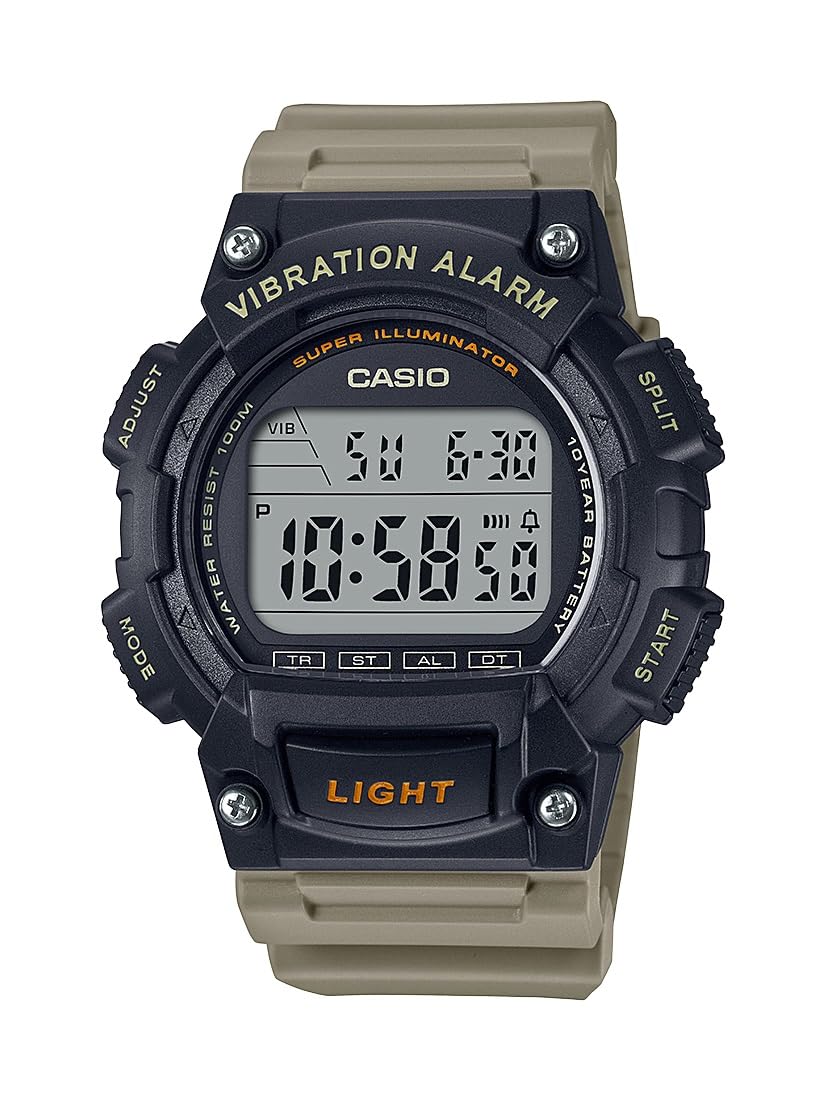
Image: Casio W736H Series Digital Watch, model W-736H-5AV. The watch features a digital display, four side buttons labeled 'ADJUST', 'MODE', 'SPLIT', 'START', and a front button labeled 'LIGHT'.
Awọn iṣẹ bọtini
- ṢAtunṣe (Loke Osi): Ti a lo lati tẹ ati jade awọn ipo eto, ati lati jẹrisi eto.
- MODE (Isalẹ Osi): Cycles through different watch modes (Timekeeping, Stopwatch, Countdown Timer, Alarm, Dual Time).
- SPLIT / START (Top Right): In Stopwatch mode, used for split/lap timing. In other modes, may function as a start button or for value adjustment.
- START / RESET (Bottom Right): Used to start/stop functions or to reset values. Also used for value adjustment in setting modes.
- ÌMỌ̀LẸ́ (Ìsàlẹ̀ Iwájú): Activates the Super Illuminator LED backlight.
Ṣeto
Ṣiṣeto Aago ati Ọjọ
- Ni Ipo Itọju akoko, tẹ mọlẹ ṢAtunṣe bọtini titi awọn aaya bẹrẹ lati filasi, nfihan iboju eto.
- Tẹ awọn MODE button to cycle through the settings in the following order: Seconds → DST (Daylight Saving Time) → Hour → Minute → Year → Month → Day.
- Lo awọn START / RESET (Bottom Right) and SPLIT / START (Top Right) buttons to adjust the flashing value.
- START / RESET: Mu iye naa pọ si.
- SPLIT / START: Decreases the value (or cycles through options).
- Ni kete ti gbogbo awọn eto ti tunto, tẹ bọtini naa ṢAtunṣe Bọtini lati jade kuro ni iboju eto ati pada si Ipo Ṣiṣe Aago.
12/24-Aago kika
Ni Ipo Itọju akoko, tẹ bọtini naa START / RESET Bọtini lati yi laarin awọn ọna kika wakati 12 ati wakati 24.
Awọn ọna ṣiṣe
Tẹ awọn MODE button to cycle through the watch's various modes:
- Ipo Akoko
- Ipo aago iṣẹju-aaya (ST)
- Countdown Timer Mode (TR)
- Ipo itaniji (AL)
- Dual Time Mode (DT)
Ipo Aago iṣẹju-aaya
Iwọn aago iṣẹju -aaya ṣe akoko ti o ti kọja, awọn akoko pipin, ati awọn ipari meji.
- Lati Ipo Itọju akoko, tẹ MODE until 'ST' appears on the display.
- Tẹ START / RESET (Bottom Right) to start the stopwatch.
- Tẹ START / RESET lẹẹkansi lati da aago iṣẹju-aaya duro.
- Láti tún aago ìdúró padà sí òdo, tẹ SPLIT / START (Top Right) while it is stopped.
- Fun awọn akoko pipin, tẹ SPLIT / START nígbà tí aago ìdádúró bá ń ṣiṣẹ́. Ìfihàn náà yóò fi àkókò pípín hàn. Tẹ SPLIT / START lẹẹkansi lati pada si wiwọn akoko ti o ti kọja.
Ipo Aago Kika
The countdown timer can be set for a period from 1 minute to 24 hours.
- Lati Ipo Itọju akoko, tẹ MODE until 'TR' appears on the display.
- Tẹ mọlẹ ṢAtunṣe titi wakati eto seju.
- Lo START / RESET (Bottom Right) and SPLIT / START (Top Right) to set the desired countdown start time (hours and minutes).
- Tẹ ṢAtunṣe lati jade ni iboju eto.
- Tẹ START / RESET lati bẹrẹ kika.
- Tẹ START / RESET again to pause the countdown. Press it once more to resume.
- To stop and reset the timer, press SPLIT / START while the timer is paused.
- When the countdown reaches zero, the watch will emit a vibration alarm.
Ipo itaniji
The watch features a daily alarm with a vibration alert.
- Lati Ipo Itọju akoko, tẹ MODE until 'AL' appears on the display.
- Tẹ mọlẹ ṢAtunṣe titi wakati eto seju.
- Lo START / RESET (Bottom Right) and SPLIT / START (Top Right) to set the alarm hour and minute.
- Tẹ ṢAtunṣe lati jade ni iboju eto.
- Nínú Ipò Àkíyèsí, tẹ START / RESET to toggle the alarm ON/OFF. An alarm indicator will appear when the alarm is active.
- To stop the alarm once it sounds/vibrates, press any button.
Ipo Aago Meji
Ipo yii ngbanilaaye lati tọju abala agbegbe akoko keji.
- Lati Ipo Itọju akoko, tẹ MODE until 'DT' appears on the display.
- Tẹ mọlẹ ṢAtunṣe titi wakati eto seju.
- Lo START / RESET (Bottom Right) and SPLIT / START (Top Right) to set the desired hour and minute for the second time zone.
- Tẹ ṢAtunṣe lati jade ni iboju eto.
Super Illuminator LED Light
The Super Illuminator LED light provides illumination for the display in low-light conditions.
- Tẹ awọn Imọlẹ button (front bottom) to illuminate the display.
- The illumination duration is preset and cannot be adjusted.
Itoju
Batiri Alaye

Image: A gold and black emblem indicating '10 Year Battery Life'.
This watch is equipped with a long-life battery, designed to last approximately 10 years under normal use. When the display becomes dim or the light function weakens, it indicates that the battery power is low. Battery replacement should be performed by a qualified watch technician to ensure water resistance is maintained.
Omi Resistance
The watch is rated for 100-meter water resistance. This means it is suitable for swimming, showering, and snorkeling. However, it is not suitable for scuba diving. Do not operate buttons while the watch is wet or submerged in water, as this can compromise the water resistance.
Ninu
Wipe the watch case and band with a soft, dry cloth to remove dirt and moisture. For resin bands, a mild soap solution and water can be used, followed by thorough rinsing and drying. Avoid using harsh chemicals or abrasive cleaners.
Laasigbotitusita
- Ifihan ti ṣofo tabi baibai: Batiri naa le jẹ kekere. Ro ọjọgbọn rirọpo batiri.
- Akoko ko pe: Re-adjust the time and date settings as described in the 'Setup' section. Ensure DST (Daylight Saving Time) is correctly set if applicable.
- Itaniji ko ṣiṣẹ: Check if the alarm is activated in Alarm Mode. Ensure the volume/vibration setting is enabled.
- Awọn bọtini ko dahun: Ensure the watch is not wet. If the issue persists, a reset may be required (consult a service center), or there might be an internal malfunction.
If problems persist after attempting these solutions, please contact a Casio service center for assistance.
Awọn pato
- Nọmba awoṣe: W-736H-5AV
- Module: (Not specified in provided data, typically a 4-digit number)
- Omi Resistance: 100 mita (10 BAR)
- Igbesi aye batiri: Approximately 10 years (CR2032 Lithium Metal battery)
- Yiye: ±30 seconds per month (average)
- Akoko: Hour, minute, second, p.m., month, date, day
- Eto Kalẹnda: Full auto-calendar (to year 2099)
- Aago iṣẹju-aaya: 1/100-second; measuring capacity: 23:59'59.99''; measuring modes: elapsed time, split time, 1st-2nd place times
- Aago kika: Measuring unit: 1 second; countdown range: 24 hours; countdown start time setting range: 1 minute to 24 hours (1-minute increments and 1-hour increments)
- Itaniji: Daily alarm with vibration alert
- Aago Meji: Bẹẹni
- Imọlẹ: Super Illuminator LED backlight
- Awọn iwọn: 6 x 6 x 4 inches (Product Dimensions as packaged)
- Ìwúwo: 3.84 ounces (Product Weight as packaged)
Atilẹyin ọja ati Support
For warranty information, service, or additional support, please refer to the official Casio website or contact your local authorized Casio dealer. Keep your proof of purchase for warranty claims.
Casio osise Webojula: www.casio.com