
OWLOTECH OT-BOOM-MAX
OWLOTECH BOOM MAX 10W Bluetooth Speaker User Manual
Brand: OWLOTECH | Model: OT-BOOM-MAX
1. Ifihan
Thank you for choosing the OWLOTECH BOOM MAX 10W Bluetooth Speaker. This manual provides essential information for the safe and effective use of your new device. Please read it thoroughly before operation and retain it for future reference.
2. Alaye Aabo
- Ma ṣe fi agbọrọsọ si awọn iwọn otutu to gaju, imọlẹ orun taara, tabi ọriniinitutu giga.
- Yago fun sisọ tabi tẹriba agbọrọsọ si awọn ipa to lagbara.
- Ma ṣe tuka, tunṣe, tabi tun ẹrọ naa funrararẹ. Tọkasi gbogbo iṣẹ si oṣiṣẹ oṣiṣẹ.
- Jẹ́ kí agbọ́hùnsọ̀ náà jìnnà sí omi àti àwọn ohun míràn. Kò lè mú omi jáde.
- Lo okun gbigba agbara pàtó ati orisun agbara nikan.
- Clean the speaker only with a dry, soft cloth.
3. Package Awọn akoonu
- OWLOTECH BOOM MAX 10W Bluetooth Speaker
- Lanyard/Strap
- USB Charging Cable (not explicitly listed but inferred for battery-powered device)
- Itọsọna olumulo
4. Ọja Ipariview
Familiarize yourself with the various parts and controls of your OWLOTECH BOOM MAX speaker.

olusin 4.1: Iwaju View. Shows the main speaker grille and the prominent '+' and '-' buttons for volume control.

Figure 4.2: Bottom/Rear View. Displays the input ports including AUX, USB, TF card slot, and DC5V charging port, along with playback control buttons.
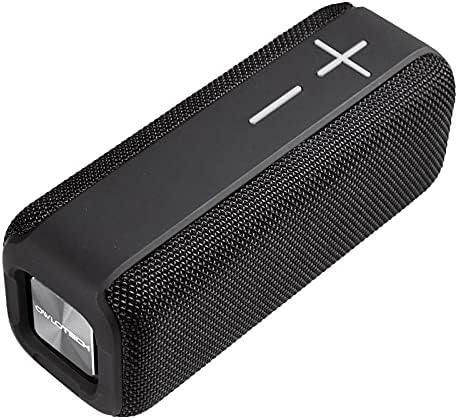
olusin 4.3: Angled View. Provides a perspective of the speaker's overall design and texture.
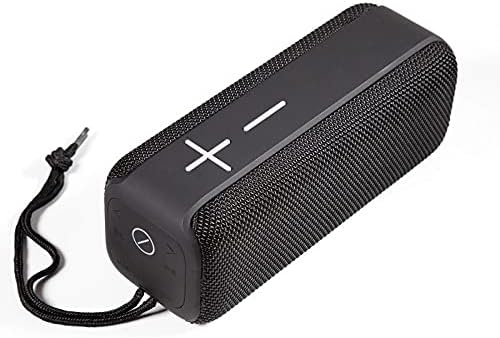
Nọmba 4.4: View with Lanyard. Illustrates the speaker with its attached lanyard, highlighting its portability.
5. Eto
5.1 Gbigba agbara si Agbọrọsọ
- Connect the USB charging cable to the DC5V port on the speaker.
- So opin keji okun USB pọ mọ adapter agbara USB ti o baamu (fun apẹẹrẹ, 5V/1A) tabi ibudo USB kọmputa kan.
- Ina Atọka gbigba agbara yoo tan imọlẹ. Yoo pa tabi yi awọ pada ni kete ti o ti gba agbara ni kikun.
- Gbigba agbara ni kikun maa n gba awọn wakati 2-3.
5.2 Sisopọ Bluetooth
- Rii daju pe a ti gba agbara ati agbara si pipa.
- Press and hold the Power button (usually the 'play/pause' button or a dedicated power button) for a few seconds until you hear an audible prompt or see the LED indicator flash rapidly, indicating pairing mode.
- Lórí ẹ̀rọ alágbèéká rẹ (fóònù alágbèéká, tábìlẹ́ẹ̀tì, kọ̀ǹpútà), mu Bluetooth ṣiṣẹ́.
- Wa fun available Bluetooth devices. You should see "OWLOTECH BOOM MAX" or a similar name in the list.
- Select the speaker from the list to connect. Once connected, you will hear a confirmation sound, and the LED indicator will typically stop flashing and remain solid.
- Ti o ba beere fun ọrọ igbaniwọle, tẹ "0000".
6. Awọn ilana Iṣiṣẹ
6.1 Agbara Tan / Pa
- Agbara Tan: Tẹ mọlẹ bọtini agbara fun isunmọ awọn aaya 3.
- Agbara Pa: Tẹ mọlẹ bọtini agbara fun isunmọ awọn aaya 3.
6.2 Orin Sisisẹsẹhin (Ipo Bluetooth)
- Ṣiṣẹ/Daduro: Press the Play/Pause button (often marked with a circle or play symbol).
- Iwọn didun Up: Press the '+' button. Hold the '+' button to increase volume rapidly.
- Iwọn didun isalẹ: Press the '-' button. Hold the '-' button to decrease volume rapidly.
- Orin t’okan: Press the '>>|' or 'Next' button.
- Tẹlẹ Orin: Press the '|<<' or 'Previous' button.
6.3 AUX Ipo
- Insert a 3.5mm audio cable into the AUX port on the speaker and connect the other end to your audio source.
- Agbọrọsọ naa yẹ ki o yipada laifọwọyi si ipo AUX.
- Volume control can be adjusted on both the speaker and the connected device.
6.4 Sisisẹsẹhin Kaadi TF
- Fi kaadi TF (microSD) pẹlu ohun MP3 sii files sinu TF kaadi Iho.
- Agbọrọsọ naa yoo rii kaadi naa laifọwọyi ati bẹrẹ si dun orin.
- Use the playback controls (Play/Pause, Next/Previous) to manage music.
7. Itọju
7.1 Ninu
- Wipe the speaker's surface with a soft, dry, lint-free cloth.
- Do not use abrasive cleaners, alcohol, benzene, or other chemical solvents, as these may damage the casing.
7.2 Ibi ipamọ
- Nigbati o ko ba wa ni lilo fun awọn akoko ti o gbooro sii, tọju agbohunsoke si tutu, ibi gbigbẹ, kuro lati orun taara ati awọn iwọn otutu to gaju.
- It is recommended to charge the speaker at least once every three months to maintain battery health.
8. Laasigbotitusita
| Isoro | Owun to le Fa | Ojutu |
|---|---|---|
| Agbọrọsọ ko ni tan. | Batiri kekere; Agbara bọtini ko te gun to. | Gba agbara si agbọrọsọ; Tẹ mọlẹ bọtini Agbara fun iṣẹju meji 3. |
| Ko le so pọ nipasẹ Bluetooth. | Speaker not in pairing mode; Bluetooth disabled on device; Device too far. | Ensure speaker is in pairing mode; Enable Bluetooth on your device; Move device closer to speaker (within 10m). |
| Ko si ohun. | Iwọn ti o kere ju; Ipo titẹ sii ti ko tọ; Ẹrọ ko ni asopọ. | Increase volume on speaker and device; Check if speaker is in correct mode (Bluetooth/AUX/TF); Reconnect device. |
| Iparun ohun. | Ohùn tó ga jù; Ẹ̀rọ náà jìnnà jù sí agbọ́hùnsọ. | Dín ohùn sílẹ̀; Gbé ẹ̀rọ náà sún mọ́ agbọ́rọ̀sọ. |
9. Awọn pato
| Ẹya ara ẹrọ | Ẹ̀kúnrẹ́rẹ́ |
|---|---|
| Brand | OWLOTECH |
| Orukọ awoṣe | OWLOTECH BOOM MAX ALTAVOZ BLUETOOTH 10W |
| Olupese Reference | OT-BOOM-MAX |
| Iru Asopọmọra | Bluetooth |
| Asopọmọra Technology | Ethernet (Note: Bluetooth is the primary wireless connectivity for audio) |
| Orisun agbara | Batiri |
| Ipo Ijade Ohun | Sitẹrio |
| Agbọrọsọ Iru | Multimedia |
| Pataki Ẹya | Bluetooth |
| Niyanju Lilo | Agbọrọsọ |
| Awọn ẹrọ ibaramu | Speaker (refers to general audio playback devices) |
| Ọja Mefa | 30 x 1.2 x 1.5 cm |
| Iwọn Ọja | 20 g |
| Se mabomire | Eke |
| Adarí Iru | Remote Control (Note: This likely refers to the speaker's own buttons acting as controls for the connected device) |
| Iṣagbesori Iru | Table Mount |
| Nọmba ti Sipo | 1.0 ẹyọkan |
| Akọkọ Wa Ọjọ | Oṣu Kẹrin Ọjọ 28, Ọdun 2021 |
| ASIN | B093QF3F2Q |
| Software imudojuiwọn Titi | Aimọ |
10. Atilẹyin ọja ati Support
For warranty information or technical support, please refer to the documentation provided with your purchase or contact OWLOTECH customer service directly. Contact details can typically be found on the product packaging or the official OWLOTECH webojula.