
1. Ifihan
This manual provides essential information for the installation, operation, and maintenance of your Sophos XGS 136 Next-Gen Firewall. The Sophos XGS 136 is designed to deliver advanced network security with high performance, utilizing a dual-processor architecture and a dedicated Xstream Flow Processor for accelerated threat processing.

Image 1.1: Sophos XGS Series with Xstream Protection overview. This image illustrates the core components and the protective capabilities of the Sophos XGS firewall.
2. Ọja Ipariview
The Sophos XGS 136 is a desktop-form factor next-generation firewall suitable for small to medium businesses and branch offices. It integrates multiple security functions into a single appliance, providing comprehensive protection against various cyber threats. The device features multiple network ports for flexible deployment and connectivity.

Image 2.1: Sophos XGS Series Appliances. This image displays a stack of various Sophos XGS series firewall models, highlighting their compact design.
2.1 Igbimọ iwaju
The front panel of the Sophos XGS 136 features status indicators and a USB port for management or external storage.
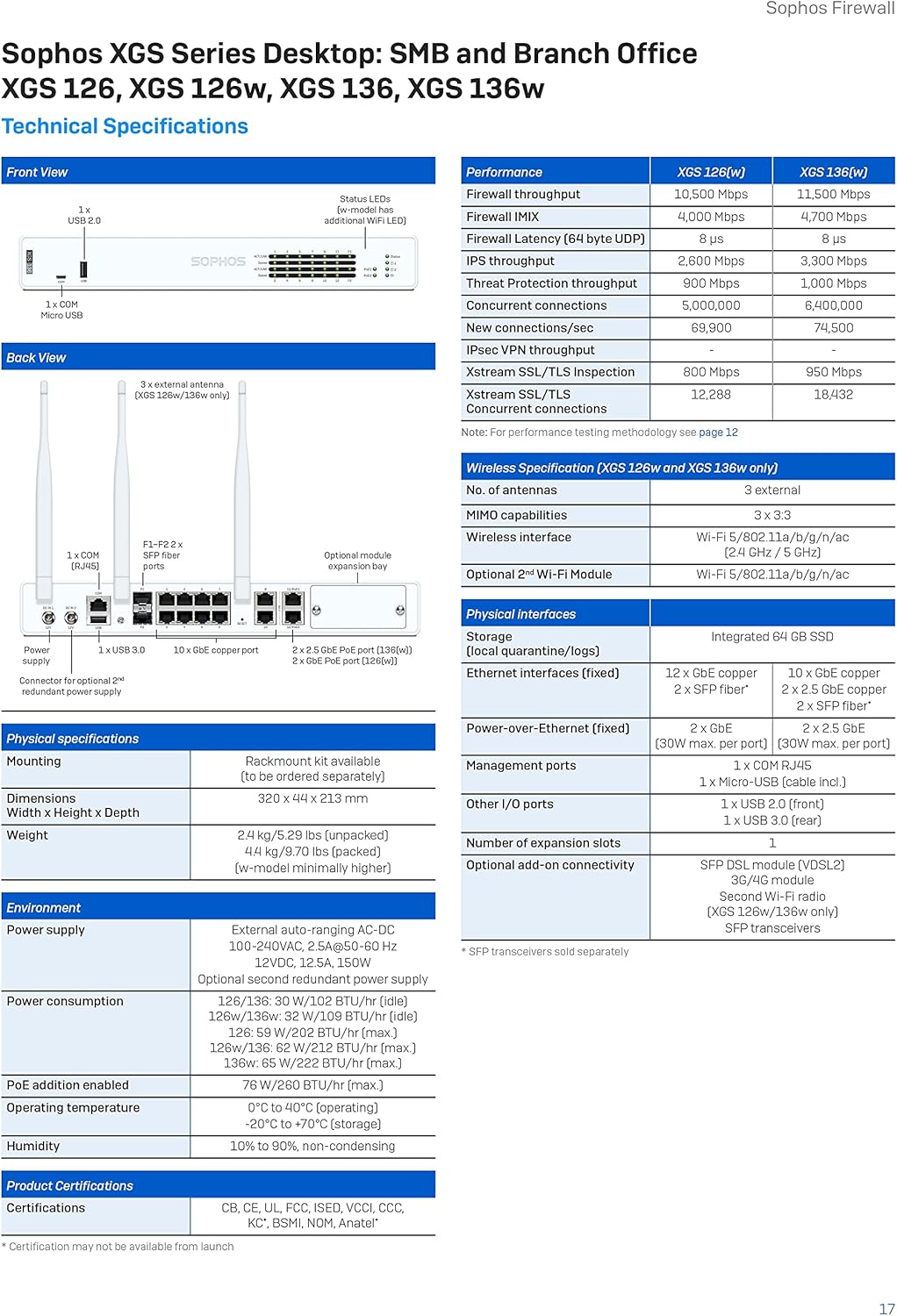
Aworan 2.2: Iwaju view of the Sophos XGS 136 firewall. This image shows the status LEDs, USB 2.0 port, and the Sophos branding on the front panel.
2.2 ru Panel
The rear panel provides all necessary connectivity options, including power inputs, network interfaces, and a console port for initial configuration.

Aworan 2.3: Ẹyin view of the Sophos XGS 136 firewall. This image displays the dual DC power inputs, console port, USB 3.0 ports, 10 GE copper ports, and SFP ports.
3. Eto ati fifi sori
Follow these general steps for initial setup of your Sophos XGS 136 firewall:
- Yọ Ẹrọ naa kuro: Carefully remove the firewall from its packaging. Ensure all components, including the US power cord, are present.
- Ibi ti ara: Place the device on a stable, flat surface in a well-ventilated area. Ensure adequate space around the unit for airflow.
- So agbara: Connect the provided US power cord to the device's power input and then to a suitable power outlet. The device supports dual DC power inputs for redundancy.
- Awọn isopọ Nẹtiwọọki: Connect your network cables to the appropriate LAN and WAN ports on the rear panel. Refer to the rear panel diagram for port identification.
- Iṣeto akọkọ: Connect a computer to the console port using a serial cable (if required) or use a network port for web-based management. Follow the Sophos documentation for initial configuration steps, including setting up network interfaces and basic security policies.
4. Operating Principles and Protection Features
The Sophos XGS 136 leverages Sophos Firewall's Xstream Protection architecture to provide comprehensive security. This includes advanced threat protection, deep packet inspection, and intelligent traffic management.

Image 4.1: Xstream Protection - A Single Bundle For Ultimate Protection. This image outlines the key features of the Xstream Protection bundle, including Base Firewall, Network Protection, Web Protection, and Zero-Day Protection.
4.1 Protection Modules
The XGS 136 offers a variety of protection modules that can be customized to meet specific security requirements:
- Base Firewall: Includes networking, wireless, SD-WAN, application awareness, traffic shaping, and VPN capabilities.
- Idaabobo nẹtiwọki: Provides intrusion prevention, advanced threat protection, synchronized security heartbeat, and clientless VPN.
- Web Idaabobo: Awọn ipese web control, application control, synchronized app control, and extensive reporting.
- Zero-Day Protection: Utilizes deep packet inspection, machine learning, cloud sandboxing, and advanced threat intelligence to block unknown threats.

Image 4.2: Blocks Unknown Threats. This image highlights the firewall's capability to block new and emerging threats.

Image 4.3: Exposes Hidden Risks. This image emphasizes the firewall's ability to identify and mitigate hidden network vulnerabilities.
Image 4.4: Automatically Responds to Incidents. This image illustrates the firewall's automated response capabilities to security incidents.
5. Licensing Options
Sophos offers various licensing bundles to customize the protection level for your firewall. These bundles provide different levels of security features and support.

Image 5.1: All Licensing Options for Sophos XGS Series. This image details the various protection bundles available, including Xstream Protection, Standard Protection, and additional modules.
For detailed information on each protection bundle and its included features, refer to the Sophos Firewall Feature List documentation.
6. Awọn pato
The following tables provide detailed technical specifications and performance metrics for the Sophos XGS 136 firewall.

Image 6.1: Sophos XGS Series Desktop Technical Specifications. This image presents a table with performance data, physical interfaces, dimensions, weight, power consumption, and certifications for XGS 126, XGS 126w, XGS 136, and XGS 136w models.
6.1 Product Matrix
The product matrix below outlines the key differences and capabilities across various Sophos XGS Series Appliances.

Image 6.2: Sophos XGS Series Appliances Product Matrix. This image provides a comparative table of different XGS models, detailing their form factor, ports/slots, tech specs, and throughput performance metrics.
6.2 Performance Test Methodology
Performance figures are based on maximum throughput measured under ideal test conditions using industry-standard Keysight-Ixia BreakingPoint test tools. Actual performance may vary depending on network conditions and activated services.
- Ogiriina: Measured using HTTP traffic and 512 KB response size.
- Firewall IMIX: UDP losi da lori a apapo ti 66 baiti, 570 baiti ati 1518 baiti awọn iwọn soso.
- IPS: Measured with IPS with HTTP traffic using default IPS ruleset and 512 KB object size.
- IPsec VPN: HTTP throughput using multiple tunnels and 512 KB HTTP response size.
- TLS Inspection: Performance measured with IPS with HTTPS sessions and different cipher suites.
- Idaabobo Ihalẹ: Measured with Firewall, IPS, Application Control, and malware prevention enabled using HTTP 200 KB response size.
7. Itọju
To ensure optimal performance and security of your Sophos XGS 136 firewall, regular maintenance is recommended:
- Awọn imudojuiwọn sọfitiwia: Regularly check for and apply the latest firmware and software updates provided by Sophos. These updates often include security patches and performance enhancements.
- Afẹyinti Iṣeto: Periodically back up your firewall configuration. This allows for quick restoration in case of unexpected issues or hardware replacement.
- Ayewo ti ara: Ensure the device is free from dust and that ventilation openings are not obstructed. Maintain a stable operating environment within specified temperature and humidity ranges.
- Àkọsílẹ̀ Review: Nigbagbogbo tunview system logs and security reports for any unusual activity or potential threats.
8. Laasigbotitusita
If you encounter issues with your Sophos XGS 136, consider the following basic troubleshooting steps:
- Ṣayẹwo agbara ati awọn isopọ: Verify that the power cord is securely connected and the device is receiving power. Ensure all network cables are properly seated in their respective ports.
- Awọn Atọka Ipo Observe the front panel LEDs. Refer to the Sophos documentation for the meaning of different LED states to diagnose issues.
- Asopọmọra nẹtiwọki: Confirm that connected devices have proper IP configurations and can reach the firewall. Test connectivity to external networks.
- Tun ẹrọ bẹrẹ: As a first step for many issues, try restarting the firewall. Power it off, wait for 30 seconds, and then power it back on.
- Kan si Iwe Iroyin: Refer to the official Sophos support documentation and knowledge base for specific error messages or symptoms.
- Olubasọrọ Support: If problems persist, contact Sophos technical support for assistance.
9. Atilẹyin ọja ati Support
The Sophos XGS 136 typically includes a standard warranty and can be augmented with various protection plans for extended coverage and support.
- Standard Protection: The product includes a 1-year standard protection plan, which covers basic support and hardware replacement.
- Awọn Eto Idabobo ti o gbooro: Additional protection plans, such as the 4-Year Protection Plan or the monthly Complete Protect plan, are available for purchase to extend coverage and enhance support services. These plans may include advanced threat protection, 24/7 support, feature updates, and expedited hardware replacement.
- Oluranlowo lati tun nkan se: For technical assistance, please refer to the Sophos support portal or contact your Sophos partner. Ensure you have your product serial number and details of your protection plan readily available.