
1. Ifihan
This manual provides instructions for the safe and efficient use of your Brookstone Portable Mini Personal Fan with Power Bank, Model B-FAN-H300-6CS. This versatile device offers personal cooling with 5 adjustable speeds and includes a detachable power bank for charging other electronic devices.
1.1. Package Awọn akoonu
- Brookstone Portable Mini Personal Fan (Fan Head and Power Bank Handle)
- Ibi iduro gbigba agbara
- Okun Ngba agbara USB
- Okun Ọwọ
- Instruction Booklet (this document)
2. Eto
2.1. Ikọju akọkọ
Before first use, fully charge the fan's internal battery. Connect the provided USB charging cord to the charging dock and then to a USB power source (e.g., computer, wall adapter). Place the fan into the charging dock. The indicator lights on the fan handle will illuminate to show charging status. A full charge is indicated when all four lights are solid.

The Brookstone fan placed in its white charging dock, which also serves as a stable base for desktop use. A hand is shown interacting with the fan.
2.2. So okun ọwọ ọwọ
Thread the loop of the wrist strap through the small opening at the bottom of the fan's handle. Secure the strap by passing the larger end through the loop you just created and pulling it tight.

The Brookstone fan with its integrated wrist strap, shown on a desk next to a laptop. This highlights the fan's portability and ease of use while multitasking.
3. Awọn ilana Iṣiṣẹ
3.1. Powering On/Off and Adjusting Speed
The fan features a single control button located on the handle. Press the button repeatedly to cycle through the 5 fan speeds and to turn the fan off.
- Tẹ 1st: Activates Speed 1 (lowest)
- Tẹ 2nd: Activates Speed 2
- Tẹ 3rd: Activates Speed 3
- 4th Tẹ: Activates Speed 4
- 5th Tẹ: Activates Speed 5 (highest)
- 6th Tẹ: Yipada awọn àìpẹ si pa

Brookstone Portable Mini Personal Fan with Power Bank. The fan features a white body, a circular fan head with a protective grille, and a handle. The brand name 'Brookstone' is visible on the fan's center.
3.2. Awọn Imọlẹ Atọka Batiri
Four LED indicator lights on the fan handle display the remaining battery charge. Each light represents approximately 25% of the battery capacity. When all four lights are illuminated, the fan is fully charged.
4. Charging the Fan
The fan can be charged using the included charging dock or directly via the USB charging port on the handle.
4.1. Charging with the Dock
- Connect the USB charging cord to the charging dock.
- Plug the other end of the USB cord into a compatible USB power source.
- Place the fan into the charging dock. Ensure it is seated correctly.
- The indicator lights will show charging progress.
4.2. Direct USB Charging
- Locate the USB charging port on the fan handle.
- Connect the USB charging cord directly to this port.
- Plug the other end of the USB cord into a compatible USB power source.
- The indicator lights will show charging progress.
A full charge provides up to 8 hours of continuous use on the lowest speed setting.
5. Lilo bi Bank Power
The fan's handle contains a detachable 2600mAh power bank, allowing you to charge personal electronic devices.
5.1. Detaching the Power Bank
Gently twist and pull the fan head from the handle to detach the power bank. The handle itself is the power bank unit.
5.2. Ngba agbara si Awọn ẹrọ Ita
- With the power bank detached, locate the USB-A output port on the top of the power bank (where the fan head connects).
- Connect your device's charging cable to this USB-A output port.
- Connect the other end of your device's charging cable to your electronic device.
- The power bank will begin charging your device. The indicator lights will show the power bank's remaining charge.
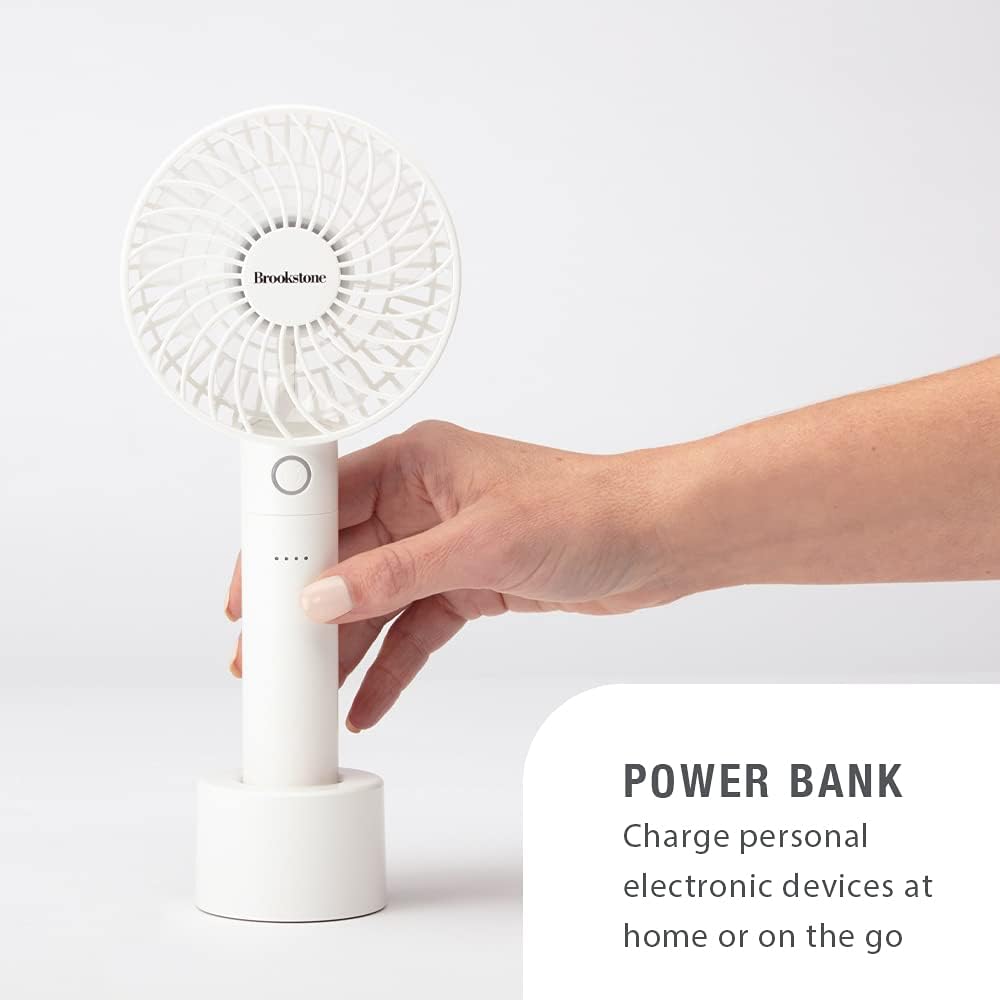
A hand holding the Brookstone fan, demonstrating its use as a power bank. The fan is shown connected to a charging cable, ready to charge another device.
6. Itọju
6.1. Ninu
To clean the fan, ensure it is powered off and disconnected from any power source. Use a soft, dry cloth to wipe the exterior surfaces. Do not use abrasive cleaners, solvents, or immerse the fan in water.
6.2. Ibi ipamọ
Store the fan in a cool, dry place away from direct sunlight and extreme temperatures. If storing for an extended period, ensure the battery is partially charged (around 50%) to prolong its lifespan.
7. Laasigbotitusita
| Isoro | Owun to le Fa | Ojutu |
|---|---|---|
| Fan ko ni tan-an. | Batiri ti dinku. | Charge the fan using the charging dock or USB cable. |
| Afẹfẹ alailagbara. | Afẹ́fẹ́ náà wà lórí ètò iyàrá kékeré tàbí pé bátírì náà kò tó. | Increase the fan speed. Recharge the fan if indicator lights show low battery. |
| Bank agbara ko gbigba agbara awọn ẹrọ. | Power bank battery is depleted or cable is not connected properly. | Ensure the power bank is charged. Verify the charging cable is securely connected to both the power bank and the device. |
| Fan ki asopọ dani ariwo. | Ìdènà nínú àwọn abẹ́ afẹ́fẹ́. | Turn off the fan and carefully check for any obstructions in the fan blades. Remove any debris. |
8. Awọn pato
- Nọmba awoṣe: B-FAN-H300-6CS
- Brand: Brookstone
- Agbara Batiri: 2600mAh
- Nọmba Awọn Iyara: 5
- Akoko Ṣiṣe ti o pọju: Up to 8 hours (on lowest speed)
- Dimensions (Fan): 4.06" W x 9.75" H (10.31 cm W x 22.86 cm H)
- Ohun elo: Ṣiṣu
- Awọn eroja to wa: Fan head, detachable power bank, charging dock, USB charging cord, wrist strap

An image illustrating the dimensions of the Brookstone Portable Mini Personal Fan. The fan measures 4.06 inches (10.31 cm) in width and 9.75 inches (22.86 cm) in height.
9. Atilẹyin ọja ati Support
9.1. Atilẹyin ọja to lopin
This Brookstone Portable Mini Personal Fan with Power Bank is covered by a 1-odun Atilẹyin ọja Limited lati ọjọ ti o ra. Atilẹyin ọja yi ni wiwa awọn abawọn iṣelọpọ ninu awọn ohun elo ati iṣẹ ṣiṣe labẹ lilo deede.
Atilẹyin ọja naa ko bo ibajẹ ti o fa nipasẹ ilokulo, ijamba, iyipada laigba aṣẹ, tabi ibajẹ deede. Jọwọ pa ẹri rira rẹ mọ fun awọn ibeere atilẹyin ọja.
9.2. Onibara Support
For warranty service or technical support, please refer to the contact information provided in your original product packaging or visit the official Brookstone webojula.