
Ọrọ Iṣaaju
Thank you for choosing the Hbada Ergonomic Gaming Chair. This manual provides essential information for the safe and efficient assembly, operation, and maintenance of your new chair. Please read these instructions carefully before use and retain them for future reference.

Image: The Hbada Ergonomic Gaming Chair in a modern gaming environment, showcasing awọn oniwe-apẹrẹ ati niwaju.
Alaye Aabo
- Rii daju pe gbogbo awọn paati wa ati ti ko bajẹ ṣaaju apejọ. Ma ṣe lo ti eyikeyi awọn ẹya ba sonu tabi fọ.
- Follow the assembly instructions precisely. Incorrect assembly can lead to instability and injury.
- Má ṣe dúró lórí àga. Lo ó fún ìjókòó nìkan.
- Má ṣe ju agbára ìwọ̀n tó pọ̀ jù lọ lọ (wo àwọn ìlànà pàtó).
- Pa awọn ọmọde ati awọn ohun ọsin kuro ni alaga lakoko apejọ.
- Yago fun ṣiṣafihan alaga si imọlẹ oorun taara tabi awọn iwọn otutu to gaju lati ṣe idiwọ ibajẹ ohun elo.
Ọja Mefa
Understanding the dimensions of your chair is important for proper placement and comfortable use. Below are the key measurements:
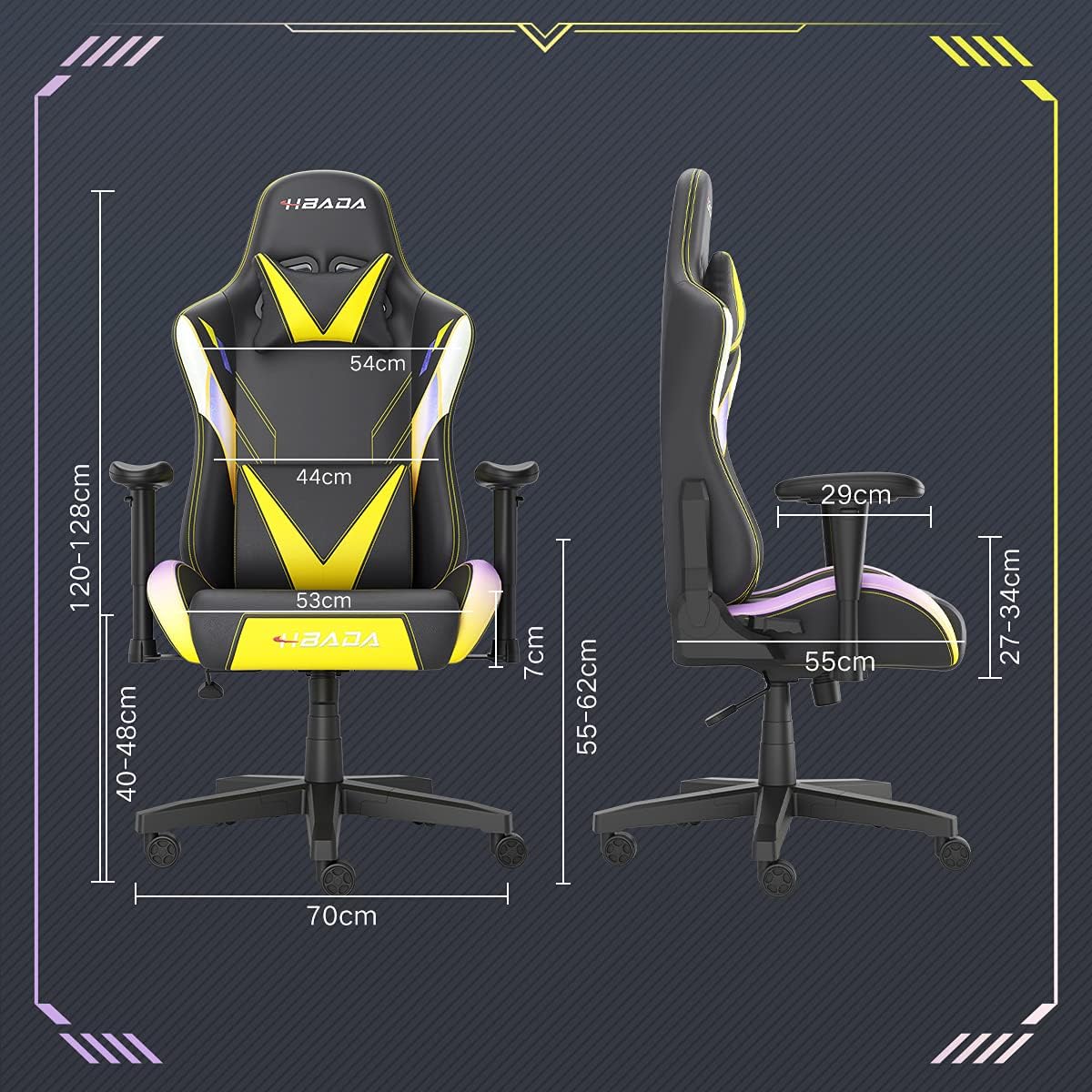
Image: A detailed diagram illustrating the various dimensions of the Hbada Gaming Chair, including height, width, and depth measurements.
- Apapọ Giga: 120-128 cm (atunṣe)
- Giga Ijoko: 40-48 cm (atunṣe)
- Ifẹ Ijoko: 53 cm
- Ijinle ijoko: 55 cm
- Ìbú Afẹyinti: 54 cm (shoulder area), 44 cm (lumbar area)
- Giga Armrest (lati ijoko): 7 cm (adjustable)
- Iwọn Ipilẹ: 70 cm
Eto ati Apejọ
Please follow these steps carefully to assemble your Hbada Gaming Chair. It is recommended to have a clear, spacious area for assembly.
Awọn Igbesẹ Apejọ:
- Step 1: Assemble the Base and Wheels
Insert the five casters into the holes on the star base. Then, place the gas lift cylinder into the center hole of the base.

Image: Illustration of attaching the five casters to the chair's star-shaped base and inserting the gas lift cylinder.
- Step 2: Attach the Seat and Backrest
Connect the backrest to the seat using the provided screws and mounting plates. Ensure all screws are tightened securely.

Image: Diagram showing the process of securing the backrest to the seat cushion using screws and brackets.
- Igbesẹ 3: Fi Armrests sori ẹrọ
Attach the armrests to the sides of the seat using the designated screws. Make sure they are firmly attached.

Image: Visual guide for attaching the armrests to the chair's seat base.
- Step 4: Connect Seat to Base
Carefully place the assembled seat onto the gas lift cylinder, ensuring it is properly seated and stable.

Image: Depiction of lowering the assembled seat onto the gas lift cylinder, connecting the upper and lower parts of the chair.
- Step 5: Attach Headrest and Lumbar Pillow
Secure the detachable headrest and lumbar support pillow to the chair as desired for optimal comfort.

Image: Instructions for attaching the headrest and lumbar support pillows to the gaming chair.
Awọn ilana Iṣiṣẹ
Your Hbada Gaming Chair is designed with several adjustable features to provide personalized comfort and support.
Key Adjustable Functions:
- Adjustable Sitting Height: Use the lever located under the seat on the right side to raise or lower the chair. Pull the lever up to adjust the height, then release it at your desired position. The seat has an 8 cm elevation range.
- Reclining Backrest (90° to 155°): The backrest can be reclined from 90 degrees (upright) to 155 degrees (nearly flat). Use the recline lever on the side of the chair to adjust the angle. Lean back to your preferred position and lock the lever.
- Awọn ihamọra ti o le ṣatunṣe: The armrests can be adjusted in height by 7 cm. Locate the button or lever on the side of each armrest to unlock, adjust, and then lock them into your desired height.
- 360° Free Swivel: The chair features a full 360-degree swivel function, allowing for easy movement and access to your surroundings without needing to move the entire chair.
- Detachable Headrest and Lumbar Support: The chair includes a removable headrest pillow and lumbar support cushion for enhanced ergonomic comfort. Adjust their positions or remove them based on your preference.

Aworan: An loriview of the chair's ergonomic systems, highlighting adjustable sitting height, armrests, 155° reclining, 360° swivel, cool racing casters, and durable base.

Image: The Hbada Gaming Chair demonstrated in its 155-degree reclined position, illustrating the recline controller.
Itoju
Regular maintenance will help prolong the life and appearance of your Hbada Gaming Chair.
- Ninu Alawọ PU: Nu awọn oju awọ PU pẹlu asọ ti o tutu, damp cloth. For stubborn stains, use a mild soap solution and then wipe with a clean, damp Aṣọ. Yẹra fún àwọn kẹ́míkà líle tàbí àwọn ohun ìfọmọ́ tí ó lè fa ìpalára, nítorí pé àwọn wọ̀nyí lè ba ohun èlò náà jẹ́.
- Itọju Caster: Periodically check the casters for accumulated dust or hair. Clean them with a brush or vacuum cleaner to ensure smooth movement and prevent damage to your flooring.
- Férémù àti Àwọn Ohun Èlò: Regularly inspect all screws and bolts to ensure they are tight. Re-tighten if necessary to maintain stability.
- Yago fun Imọlẹ Oorun Taara: Prolonged exposure to direct sunlight can cause the PU leather to fade and crack. Position your chair away from direct sunlight when possible.
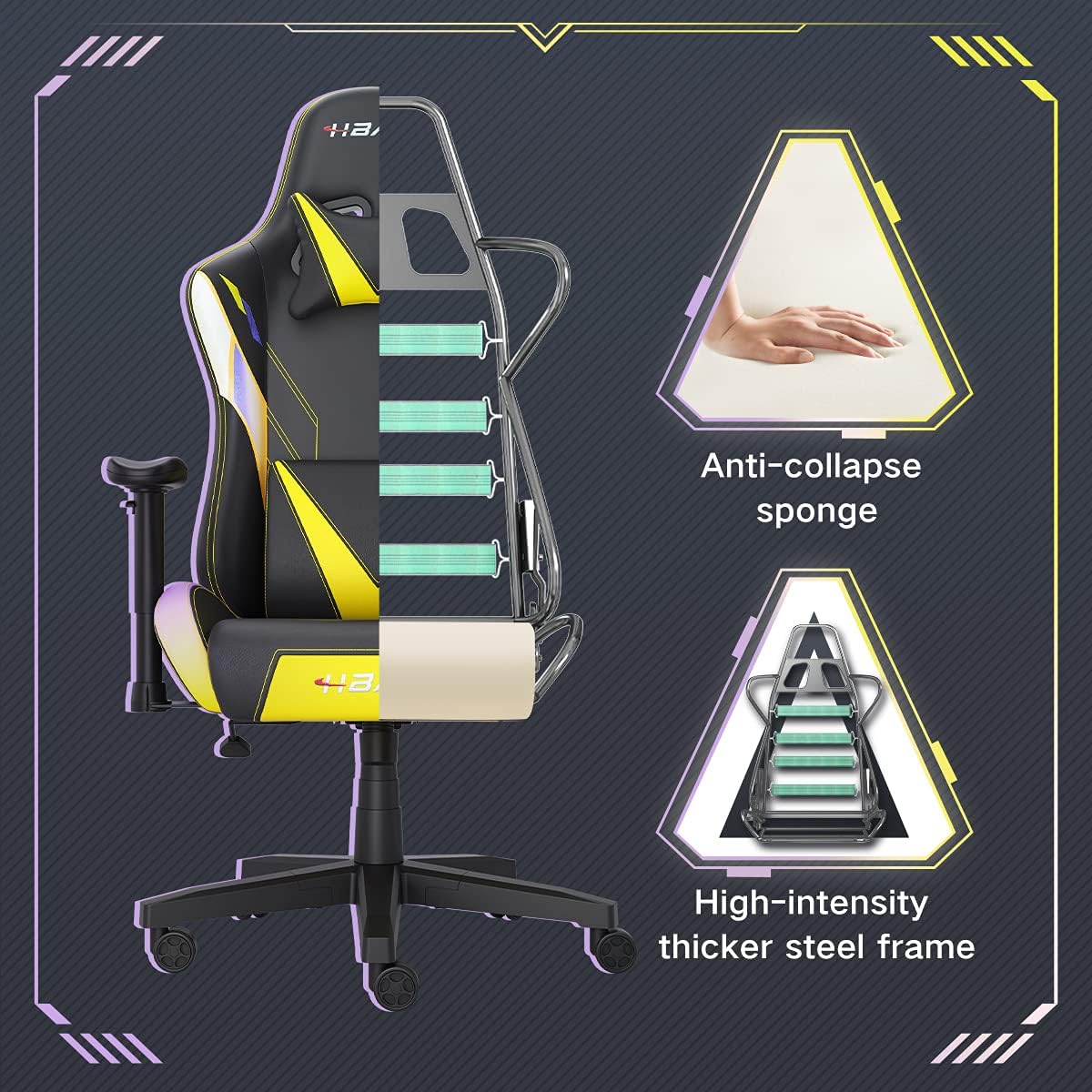
Aworan: A cutaway view of the chair's internal structure, highlighting the anti-collapse sponge padding and the high-intensity thicker steel frame, indicating durable construction.
Laasigbotitusita
If you encounter any issues with your Hbada Gaming Chair, refer to the following common problems and solutions:
| Isoro | Owun to le Fa | Ojutu |
|---|---|---|
| Alaga ko ṣatunṣe iga | Àìṣiṣẹ́ tàbí ìdènà gaasi kò ṣiṣẹ́. | Rii daju pe lefa atunṣe giga ti ṣiṣẹ ni kikun. Ti ọrọ naa ba wa, gbigbe gaasi le nilo rirọpo. Kan si atilẹyin alabara. |
| Alaga jẹ riru tabi riru | Awọn skru alaimuṣinṣin tabi apejọ ti ko tọ. | Check all assembly screws and bolts, and tighten them securely. Refer to the assembly instructions. |
| Casters ko yipo laisiyonu | Awọn idoti (irun, eruku) ti a mu ni awọn simẹnti. | Turn the chair over and remove any debris from the caster wheels. |
| Iduro ẹhin ko ni joko tabi tiipa | Recline mechanism jammed or lever not engaged. | Ensure the recline lever is fully engaged. Check for any obstructions around the mechanism. |
Awọn pato
| Ẹya ara ẹrọ | Ẹ̀kúnrẹ́rẹ́ |
|---|---|
| Brand | Hbada |
| Nọmba awoṣe | W203YMA/EU |
| ASIN | B095PSFLKX |
| Àwọ̀ | Yellow |
| Ohun elo | PU Leather, Metal Frame |
| Ọja Mefa | 70 x 70 x 128 cm (Ipari x Iwọn x Giga) |
| Iwọn Ọja | 22 kilo |
| Pataki Awọn ẹya ara ẹrọ | Ergonomic, Swivel, Casters, Headrest Support, Adjustable Recline (90°-155°), Adjustable Seat Height (8cm range), Adjustable Armrests (7cm range) |
| Nọmba ti Sipo | 1.0 Iṣiro |
Atilẹyin ọja ati Support
Your Hbada Gaming Chair comes with a ọkan-odun atilẹyin ọja lati ọjọ ti o ra. Atilẹyin ọja yi ni wiwa awọn abawọn iṣelọpọ ati awọn abawọn ohun elo labẹ lilo deede.
If you experience any issues during use, including problems with installation, damage, or missing parts, please do not hesitate to contact Hbada customer service. We are committed to providing reliable service and can offer free exchanges for covered issues.
For support, please visit the official Hbada webojula tabi kan si alagbata rẹ.