
1. Ifihan
This manual provides instructions for the assembly, operation, and maintenance of your iPower 4x4 Grow Tent Kit. This kit includes a 48"x48"x78" grow tent, a 200W full-spectrum LED grow light, a 6-inch inline fan, a carbon filter, ducting, and various accessories designed for indoor plant cultivation.
2. Alaye Aabo
- Always disconnect power before performing any maintenance or assembly.
- Rii daju pe gbogbo awọn asopọ itanna wa ni aabo ati ni ibamu pẹlu awọn koodu itanna agbegbe.
- Má ṣe fi àwọn ohun èlò iná mànàmáná hàn sí omi tàbí ọrinrin tó pọ̀ jù.
- Keep the grow tent and all components away from flammable materials.
- Ensure adequate ventilation to prevent heat buildup inside the tent.
- Wear appropriate safety glasses when working with LED grow lights to protect your eyes.
3. Package Awọn akoonu
Daju pe gbogbo awọn paati ti a ṣe akojọ si isalẹ wa ninu package rẹ:
- 48"x48"x78" Grow Tent (1)
- 200W LED Grow Light (1)
- 6" Inline Fan (1)
- 6" Carbon Filter (1)
- 6" x 25' Ducting (1)
- 5 Gallon Plant Bags (5)
- Ducting Repair Adhesive Tape (1)
- Hygrometer Thermometer (1)
- Mechanical Timer (1)
- 3' x 3' Elastic Trellis Netting (1)
- Grow Room Glasses (1)
- Metal Poles and Connectors for Tent Frame
- Àwo Ilẹ̀ Tí A Lè Yọkúrò
- Apo Irinṣẹ

Image: Essential accessories included in the kit, such as grow bags, ducting, repair tape, hygrometer, timer, trellis netting, and grow room glasses.
4. Awọn ilana iṣeto
4.1. Gbin Àgọ́ Àgọ́
- Ṣe akojọpọ fireemu naa: Connect the metal poles using the solid metal corner connectors. Depress the tab on the pole while inserting it into the connector to lock it securely in place. The frame is designed for tool-free assembly.
- Drape the Canvas: Carefully drape the heavy-duty oxford canvas over the assembled metal frame. Ensure the zippers are aligned correctly for easy access.
- Install Floor Tray: Place the removable waterproof floor tray inside the tent. Secure it to the frame using the provided security straps to prevent spills.

Image: Illustration of the all-metal construction and tool-free assembly process for the grow tent frame.

Image: Demonstrates the removable floor tray, its easy setup, secure straps, and cleaning process.
4.2. LED Grow Light Installation
- Gbe Imọlẹ naa duro: Use the provided hanging kit to suspend the LED grow light from the top bars of the tent frame. Adjust the height according to your plant's growth stage ati awọn ibeere ina.
- So agbara: Plug the LED grow light into a suitable power outlet. Ensure the power cord is routed safely and not pinched.

Image: Close-up of the LED grow light featuring CREE COB technology, highlighting its brightness and efficiency.

Image: The LED grow light with two integrated cooling fans and an aluminum heat-sink for thermal management.
4.3. Ṣíṣeto Ètò Afẹ́fẹ́
- Assemble Fan and Filter: Connect the 6" inline fan to the 6" carbon filter. The fan can be mounted inside or outside the tent.
- Attach Ducting: Connect the 6" ducting to both ends of the fan/filter assembly. Use ducting repair adhesive tape to secure connections and prevent air leaks.
- Route Ducting: Route the ducting through the dual sleeve duct ports of the grow tent. These ports minimize light seepage and are adjustable for 4", 6", or 8" ducting.
- Mount System: Hang the assembled fan and filter system from the tent's support bars using appropriate hangers.
- Olùdarí Ìyàra Ìsopọ̀: Plug the inline fan into the variable speed controller, then plug the controller into a power outlet.
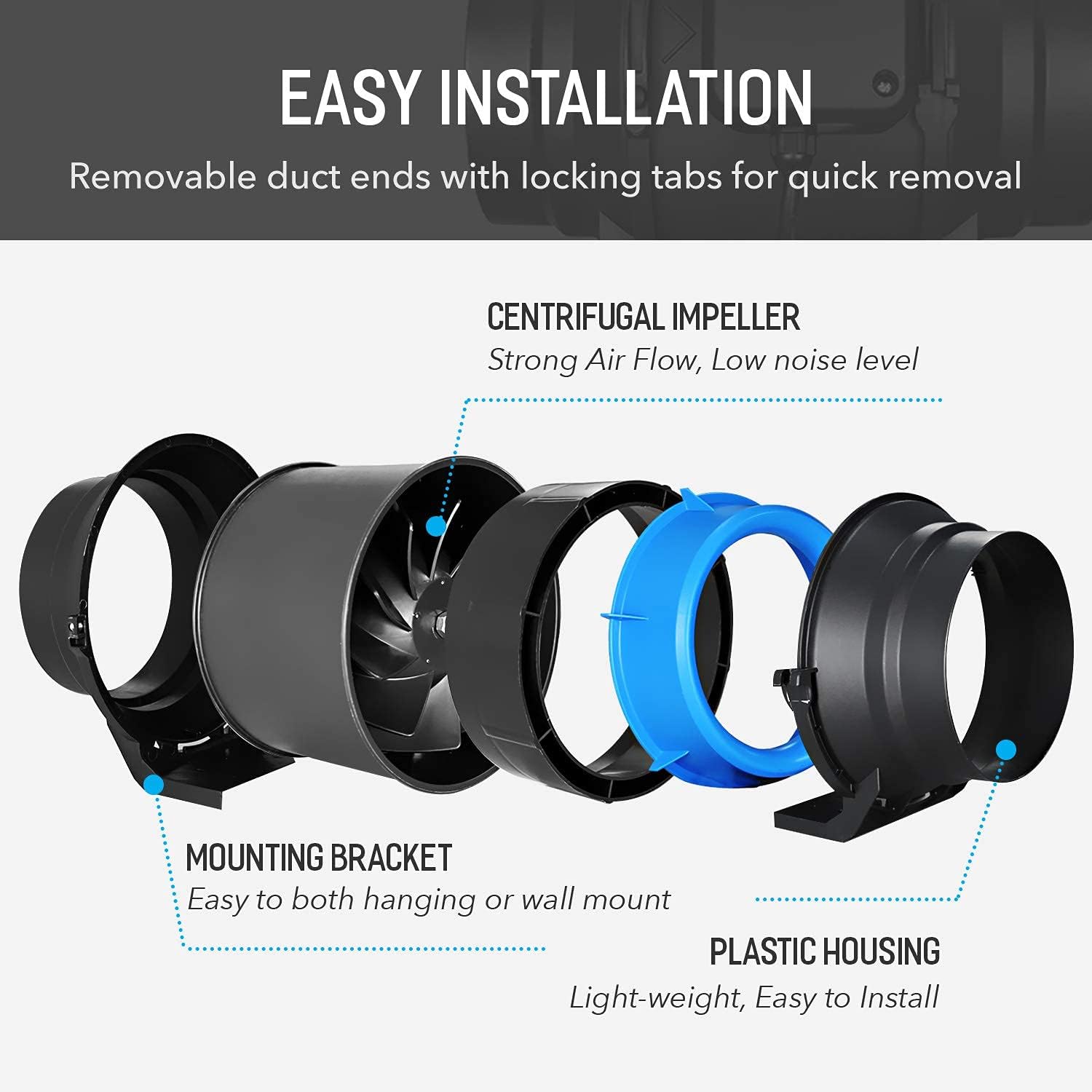
Aworan: Exploded view of the inline fan, showing its centrifugal impeller, mounting bracket, and plastic housing for easy installation.

Image: Cross-section of the carbon filter, illustrating its internal structure with a pre-filter, charcoal bed, and mesh layers for odor removal.

Image: Diagram illustrating the airflow path through the carbon filter, inline fan, and ducting for effective grow tent ventilation.
4.4. Gbé Àwọn Ohun Èlò Sílẹ̀
- Hygrometer Thermometer: Place the hygrometer thermometer inside the tent to monitor temperature and humidity levels.
- Aago ẹ̀rọ: Use the mechanical timer to automate the on/off cycles for your LED grow light.
- Àwọ̀n Trellis: Install the 3'x3' elastic trellis netting as needed to support plants and manage canopy growth.

Aworan: Example setup of the iPower grow tent kit, showing plants, the LED light, and the ventilation system in operation.
5. Awọn ilana Iṣiṣẹ
5.1. Iṣẹ́ Ìmọ́lẹ̀ Ìdàgbàsókè LED
The LED grow light features two switches for different growth stages:
- VEG Switch: Controls the 2 COB lamp beads, suitable for the vegetative growth phase.
- BLOOM Switch: Controls the 58 small lamp beads, ideal for the flowering phase.
- VEG + BLOOM: When both switches are turned on, all lamp beads illuminate, providing maximum light power for intense growth.

Image: Diagram showing the VEG and BLOOM switches on the LED grow light and their respective light outputs.
5.2. Iṣẹ́ Ètò Afẹ́fẹ́
The inline fan's speed can be adjusted using the variable speed controller:
- Turn the dial to select between Off, Low, Medium, and High fan speeds.
- Adjust the fan speed as needed to maintain optimal temperature and humidity levels within the grow tent.

Image: The variable speed controller for the inline fan, showing its Off, High, Medium, and Low settings.
6. Itọju
6.1. Grow Tent Cleaning
- The removable floor tray can be easily taken out and cleaned with water and mild soap.
- Wipe down the interior and exterior of the tent canvas with a damp aṣọ bí ó bá ṣe pàtàkì. Yẹra fún àwọn kẹ́míkà líle tí ó lè ba ohun èlò náà jẹ́.
6.2. Carbon Filter Maintenance
- The pre-filter should be cleaned or replaced regularly to maintain optimal airflow and odor filtration.
- The carbon bed has a limited lifespan. Replace the carbon filter when you notice a decrease in odor control effectiveness.
6.3. LED Grow Light Cleaning
- Rí i dájú pé iná náà ti yọ, kí ó sì tutù kí ó tó di mímọ́.
- Gently wipe the LED surface and cooling fins with a dry, soft cloth to remove dust and debris.
7. Laasigbotitusita
- Imọlẹ Ko Tii: Check power connections, ensure the light is plugged in, and verify that the VEG/BLOOM switches are in the 'ON' position. Check the mechanical timer settings.
- Olufẹ Ko Ṣiṣẹ: Ensure the fan is plugged into the speed controller and the controller is plugged into a power outlet. Check the speed controller setting.
- Poor Airflow/Odor Control: Check for blockages in the ducting. Ensure the carbon filter is correctly installed and not past its effective lifespan. Clean or replace the pre-filter.
- Excessive Heat/Humidity: Increase fan speed, ensure all ventilation ports are open, and consider adjusting the LED light's height.
8. Awọn pato
| Ẹya ara ẹrọ | Sipesifikesonu |
|---|---|
| Gbin Awọn Iwọn Agọ | 48"L x 48"W x 78"H |
| Ohun elo fireemu | Irin |
| Ohun elo ita | Oxford Canvas |
| Agbara Imọlẹ Idagbasoke LED | 200W |
| LED julọ.Oniranran | Full Spectrum (COB, 630nm, 12000k, 3500k, IR, UV, 460nm) |
| Iwọn Fẹ́ẹ́fù Inline | 6 Inṣi |
| Afẹ́fẹ́ afẹ́fẹ́ inú ìlà | 294 CFM |
| Inline Fan Speed | 2450 RPM |
| Ipele Ariwo Afẹ́fẹ́ Inline | <35dB |
| Inline Fan Input Power | 50 W |
| Voltage/Igbohunsafẹfẹ | 110V/60Hz |
| Ducting Length | 25 ft (fully extended) |
| Iwọn Nkan | 62.9 iwon |

Image: Detailed technical specifications for the 6-inch inline fan.

Image: Breakdown of the full spectrum LED configuration, including COB, 630nm, 12000k, 3500k, IR, UV, and 460nm diodes.
9. atilẹyin ọja Information
iPower products typically come with a manufacturer's warranty. Please refer to the warranty card included with your product or visit the official iPower webAaye fun alaye atilẹyin ọja ofin ati ipo. Tọju iwe-ẹri rira rẹ bi ẹri rira fun eyikeyi awọn ibeere atilẹyin ọja.
10. Onibara Support
For technical assistance, troubleshooting, or replacement parts, please contact iPower customer support. You can typically find contact information on the iPower webaaye tabi nipasẹ alagbata ti o ti ra ọja naa.
Awọn orisun Ayelujara: Ṣabẹwo si Ile itaja iPower lori Amazon fun afikun ọja alaye ati support.