
cellularline BTHUSHTWSK
Cellularline HUSH Bluetooth In-Ear Earbuds User Manual
Model: BTHUSHTWSK
1. Ifihan
This manual provides detailed instructions for the Cellularline HUSH Bluetooth In-Ear Earbuds. These earbuds feature an interactive touch display, Active Noise Cancelling (ANC), Noise-Free Calls technology, and customizable sound with 5 EQ modes. Please read this manual carefully to ensure proper use and optimal performance of your device.
2. Ohun ti o wa ninu Apoti
- Cellularline HUSH Earbuds
- Ngba agbara Case
- Itọsọna olumulo
3. Ọja Ipariview
The Cellularline HUSH earbuds are designed for an advanced and personalized audio experience. The compact charging case features an interactive touch display for easy control.

Image 1: Cellularline HUSH Earbuds in their charging case, showcasing the sleek design and in-ear fit.
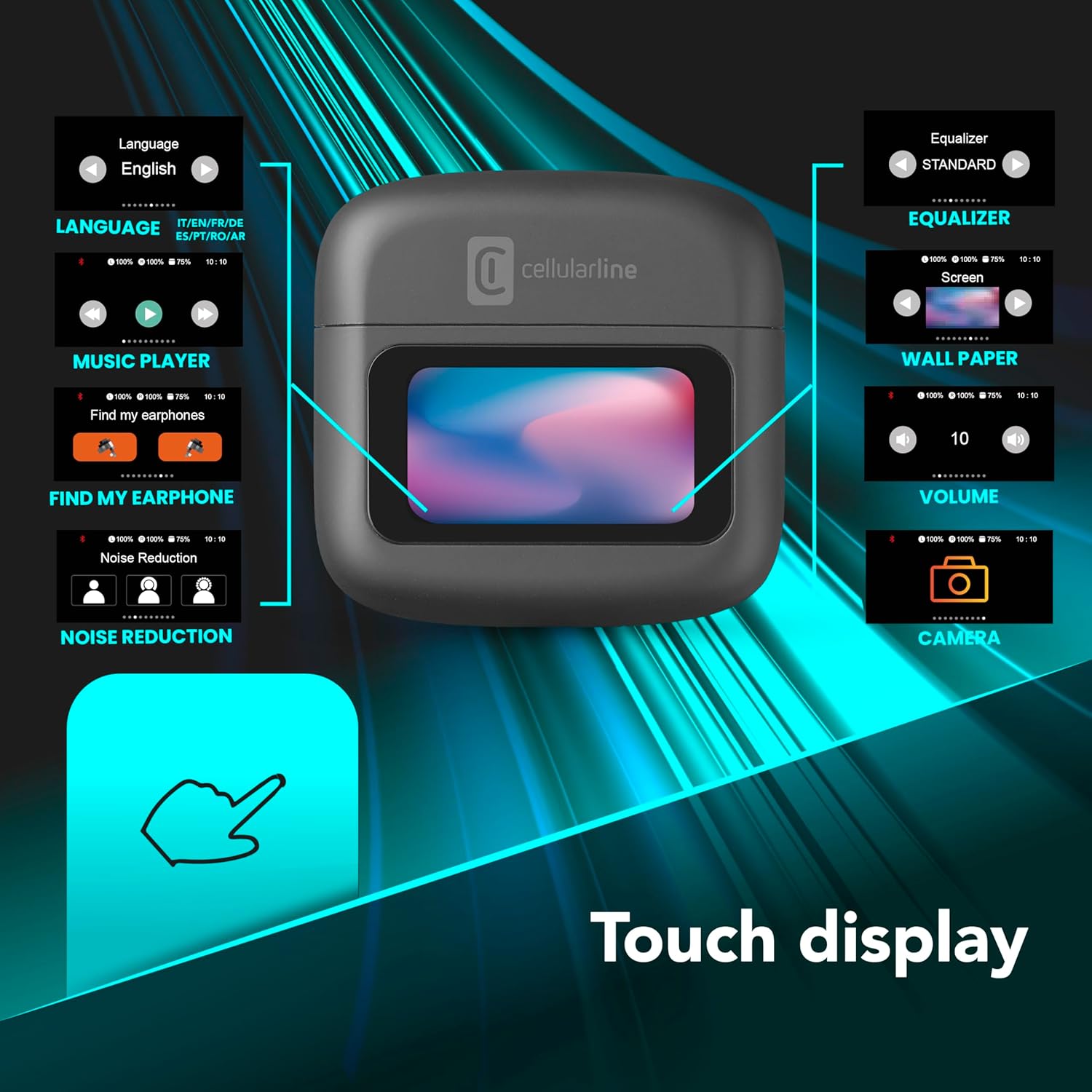
Image 2: An illustration highlighting the various functions accessible via the touch display on the charging case, including language, music player, 'Find My Earphone', noise reduction, equalizer, wallpaper, volume, and camera control.
4. Eto
4.1 Gbigba agbara
Before first use, fully charge the earbuds and the charging case. Place the earbuds into the charging case. The magnetic closure ensures proper placement for charging. The case and earbuds offer up to 42 hours of total play time.

Image 3: Graphic indicating 42 hours of total play time and 6 hours of charger time for the Cellularline HUSH earbuds.
4.2 Sisọpọ
The earbuds feature an Autopairing function. When removed from the charging case, they will automatically enter pairing mode or reconnect to the last paired device. To pair with a new device, ensure Bluetooth is enabled on your device and select 'Cellularline HUSH' from the list of available devices.
5. Awọn ilana Iṣiṣẹ
5.1 Touch Display Controls
The interactive touch display on the charging case allows for easy management of various functions. You can control music playback, manage calls, adjust noise reduction modes, and select EQ settings directly from the display.
5.2 Ifagile Ariwo Nṣiṣẹ (ANC)
Activate Active Noise Cancelling to reduce ambient low-frequency noise, providing an immersive listening experience. This feature can be controlled via the touch display.
5.3 Noise-Free Calls
The integrated microphones utilize Noise-Free Calls technology to eliminate background noise, ensuring clear and crisp voice transmission during calls.

Image 4: The charging case display showing an incoming call with options to answer or decline, next to a smartphone displaying a similar call interface.
5.4 Equalizer (EQ) Awọn ipo
Customize your audio experience by selecting one of the 5 available EQ modes through the touch display. This allows you to tailor the sound profile si awọn ayanfẹ rẹ.
5.5 Àwọn Ọ̀nà Ìdínkù Ariwo
Switch between different noise reduction modes, including Active Noise Cancelling, Normal Mode, and Transparency Mode, to suit your environment. These modes are accessible via the touch display.

Image 5: The charging case display showing options for Noise Reduction, including Active Noise Cancelling, Normal Mode, and Transparency Mode.
6. Itọju
To ensure the longevity and optimal performance of your Cellularline HUSH earbuds:
- Keep the earbuds and charging case clean and dry.
- Yago fun ṣiṣafihan ẹrọ naa si awọn iwọn otutu to gaju tabi ọriniinitutu.
- Clean the ear tips regularly with a soft, dry cloth.
- Tọ́jú àwọn agbekọri inú àpótí ìgbara wọn nígbà tí o kò bá lò wọ́n.
7. Laasigbotitusita
If you encounter issues with your Cellularline HUSH earbuds, refer to the following common solutions:
- Ko si Ohun:
- Rii daju pe awọn agbekọri ti gba agbara.
- Ṣayẹwo asopọ Bluetooth si ẹrọ rẹ.
- Ṣatunṣe iwọn didun lori awọn agbekọri mejeeji ati ẹrọ ti a sopọ.
- Ko le So pọ:
- Ensure earbuds are in pairing mode (usually indicated by a flashing light).
- Paa ati tan Bluetooth lori ẹrọ rẹ.
- Gbagbe ẹrọ naa lati awọn eto Bluetooth ti foonu rẹ ki o gbiyanju lati so pọ lẹẹkansi.
- ANC Ko Ṣiṣẹ:
- Ensure ANC is activated via the touch display.
- Check for proper fit of the earbuds in your ears.
- Awọn ọran gbigba agbara:
- Rii daju pe okun gbigba agbara ti sopọ ni aabo.
- Verify the charging case has power.
- Mọ awọn olubasọrọ gbigba agbara lori awọn agbekọri ati apoti.
8. Awọn pato
| Ẹya ara ẹrọ | Ẹ̀kúnrẹ́rẹ́ |
|---|---|
| Brand | cellularline |
| Awoṣe | BTHUSHTWSK |
| Awọn ẹrọ ibaramu | Awọn ẹrọ Bluetooth |
| Ọna Iṣakoso | Fọwọkan |
| Afikun Awọn ẹya ara ẹrọ | Active Noise Cancellation and Noise-Free Calls |
| Apapọ batiri Life | Awọn wakati 42 |
| Iwọn Nkan | 126 g |
| Àwọ̀ | Nero |
| Gbigbe Eti | Ninu-eti |
| Fọọmù ifosiwewe | Ninu-eti |
| Ariwo Iṣakoso | Ti nṣiṣe lọwọ Noise Ifagile |
| Jack agbekọri | Jack-less |
| Asopọmọra Technology | Ailokun |
| Imọ-ẹrọ Ibaraẹnisọrọ Alailowaya | Bluetooth |
9. Atilẹyin ọja ati Support
For warranty information and customer support, please refer to the documentation included with your product or visit the official Cellularline webojula. Jeki ẹri rira rẹ fun awọn iṣeduro atilẹyin ọja.
Ask a question about this manual
Ask about setup, troubleshooting, compatibility, parts, safety, or missing instructions. Manuals+ will review the question and use this page’s manual context to help answer it.