
1. Ifihan
Thank you for choosing the AIYIMA A05 TPA3221 Power Amplifier. This compact 2.0 channel stereo amplifier is designed to deliver high-fidelity audio to passive speakers, featuring both Bluetooth and RCA input options. This manual provides detailed instructions for setup, operation, and maintenance to ensure optimal performance and longevity of your device.
2. Awọn ilana aabo
- Ibi ti ina elekitiriki ti nwa: Use only the specified power adapter (DC 12-32V) to prevent damage. Ensure the power outlet voltage ni ibamu.
- Afẹfẹ: Gbe awọn amplifier in a well-ventilated area. Do not block ventilation openings. Avoid placing it on soft surfaces that may obstruct airflow.
- Ọrinrin: Keep the device away from water, humidity, and liquids. Do not operate with wet hands.
- Ooru: Avoid direct sunlight, heat sources, or extreme temperatures.
- Ninu: Ge asopọ agbara ṣaaju ṣiṣe mimọ. Lo asọ asọ ti o gbẹ. Ma ṣe lo olomi tabi awọn olutọpa aerosol.
- Ṣiṣẹ: Má ṣe gbìyànjú láti tún ẹ̀rọ náà ṣe tàbí tú u fúnra rẹ. Tọ́ka gbogbo iṣẹ́ ìtọ́jú náà sí àwọn òṣìṣẹ́ tó péye.
- Awọn ọmọde: Jeki kuro ni arọwọto awọn ọmọde.
3. Package Awọn akoonu
Jọwọ ṣayẹwo package fun awọn nkan wọnyi:
- AIYIMA A05 Bluetooth 5.0 Ampalufa x1
- Eriali Bluetooth x 1
- Ilana olumulo x 1
- Kaadi atilẹyin ọja x 1
- DC 32V Power Adapter x 1

Aworan 3.1: Contents of the AIYIMA A05 amppackage lifier, pẹlu amplifier unit, Bluetooth antenna, user manual, warranty card, and power adapter.
4. Ọja Ipariview
4.1 Iwaju Panel idari
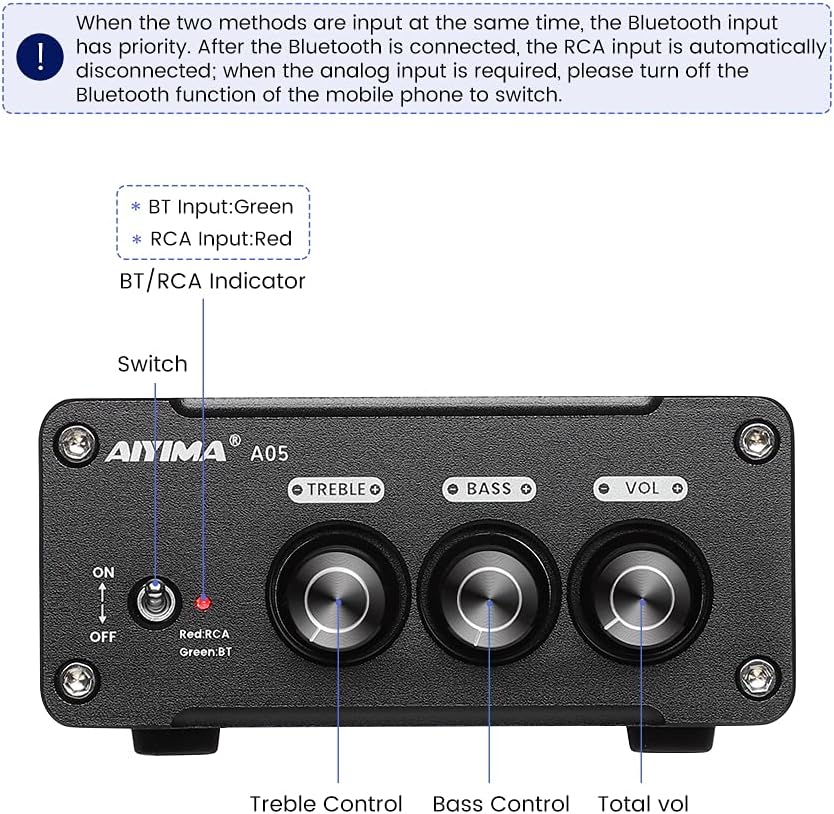
Aworan 4.1: Front panel of the AIYIMA A05 amplifier, showing the power switch, input indicator, treble, bass, and volume controls.
- Yipada Agbara (TAN/PA): Balu awọn ampagbara lifier.
- BT/RCA Indicator: Displays the active input source. Green indicates Bluetooth (BT) input, Red indicates RCA input.
- Iṣakoso Treble: Ṣe atunṣe iṣẹjade ohun igbohunsafẹfẹ giga-giga.
- Iṣakoso Bass: Ṣe atunṣe iṣelọpọ ohun-igbohunsafẹfẹ kekere.
- Iṣakoso iwọn didun: Adjusts the overall audio output level.

Aworan 4.2: Sun mo tipetipe view of the power switch and the BT/RCA input indicator on the front panel.

Aworan 4.3: Sun mo tipetipe view of the Treble, Bass, and Volume control knobs.
4.2 Ru Panel Awọn isopọ

Aworan 4.4: Rear panel of the AIYIMA A05 amplifier, showing the Bluetooth antenna port, RCA audio input, speaker outputs, and DC power input.
- ANT (Bluetooth Antenna Port): Connect the included Bluetooth antenna here for wireless audio reception.
- AUDIO IN (RCA Input): Connect audio sources (e.g., CD player, TV, DAC) using RCA cables.
- SPEAKER (Audio Output): Connect passive speakers using speaker wires. Ensure correct polarity (+ to + and - to -).
- DC 24-32V (Power Input): Connect the provided DC power adapter.
5. Awọn ilana iṣeto
Tẹ̀lé àwọn ìgbésẹ̀ wọ̀nyí láti ṣètò AIYIMA A05 rẹ ampolutọpa:
- So Antenna Bluetooth pọ: Screw the included Bluetooth antenna into the ANT port on the rear panel.
- So Awọn Agbọrọsọ: Connect your passive speakers to the SPEAKER output terminals on the rear panel. Ensure the positive (+) terminal of the amplifier connects to the positive (+) terminal of the speaker, and the negative (-) terminal connects to the negative (-).
- Connect Audio Source (RCA): If using a wired audio source, connect it to the AUDIO IN (RCA) ports on the rear panel using appropriate RCA cables.
- So agbara: Connect the DC power adapter to the DC 24-32V input port on the rear panel, then plug the adapter into a wall outlet.
- Agbara Tan: Flip the power switch on the front panel to the "ON" position. The input indicator will light up.

Aworan 5.1: Ru nronu ti awọn amplifier with Bluetooth antenna, RCA cables, speaker wires, and power adapter connected.
6. Awọn ilana Iṣiṣẹ
6.1 Titan / Pa a
Lati agbara lori awọn amplifier, flip the front panel switch to the "ON" position. To power off, flip the switch to the "OFF" position.
6.2 Bluetooth Asopọ
- Rii daju pe amplifier is powered on and the BT/RCA indicator is green, indicating Bluetooth mode. If it's red, ensure no RCA cable is connected or disconnect it.
- Lórí ẹ̀rọ alágbèéká rẹ (fóònù, tábìlẹ́ẹ̀tì, àti bẹ́ẹ̀ bẹ́ẹ̀ lọ), mu Bluetooth ṣiṣẹ́ kí o sì wá àwọn ẹ̀rọ tó wà.
- Select "AIYIMA A05" from the list of devices to pair.
- Once paired, the indicator light will remain green, and you can play audio from your device through the amplifier.
6.3 RCA Input Usage
- Connect your audio source to the RCA input ports on the rear panel.
- Rii daju pe amplifier is powered on. The BT/RCA indicator should be red, indicating RCA input mode.
- If the indicator is green (Bluetooth mode), ensure Bluetooth is disconnected on any paired device, or turn off Bluetooth on your mobile device to switch to RCA input.
6.4 Adjusting Audio
- Iwọn didun: Rotate the "VOL" knob clockwise to increase volume and counter-clockwise to decrease.
- Tirẹbu: Rotate the "TREBLE" knob to adjust high-frequency sounds to your preference.
- Bass: Rotate the "BASS" knob to adjust low-frequency sounds to your preference.
7. Itọju
- Ninu: Disconnect the power adapter before cleaning. Use a soft, dry, lint-free cloth to wipe the surface of the amplifier. Do not use harsh chemicals or abrasive materials.
- Ibi ipamọ: If not in use for an extended period, store the amplifier in a cool, dry place, away from direct sunlight and extreme temperatures.
- Awọn isopọ: Lokọọkan ṣayẹwo gbogbo awọn asopọ okun lati rii daju pe wọn wa ni aabo ati ominira lati ipata.
8. Laasigbotitusita
If you encounter issues with your AIYIMA A05 amplifier, jọwọ wo awọn iṣoro ati awọn solusan ti o wọpọ wọnyi:
| Isoro | Owun to le Fa | Ojutu |
|---|---|---|
| Ko si ohun jade |
|
|
| Distorted or buzzing sound |
|
|
| Bluetooth ko sopọ |
|
|
| Loud noise/ticking on startup |
|
|
If the problem persists after trying these solutions, please contact AIYIMA customer support for further assistance.
9. Awọn pato

Aworan 9.1: Dimensions of the AIYIMA A05 amplifier: 107mm (4.2in) width, 87mm (3.4in) depth, 36mm (1.4in) height.
| Ẹya ara ẹrọ | Sipesifikesonu |
|---|---|
| Awoṣe | A05 |
| Agbara Ijade | 105 Watts (at 4 Ω) |
| Nọmba ti awọn ikanni | 2.0 (Stẹrio) |
| Ẹya Bluetooth | QCC3034 APTX Bluetooth 5.0 |
| Chipset | TPA3221 |
| Ipese ti o kere ju Voltage | 12 Volts (DC) |
| O pọju Ipese Voltage | 32 Volts (DC) |
| Iwọn Nkan | 500 giramu |
| Awọn iwọn (Itosi.) | 107mm (W) x 87mm (D) x 36mm (H) |
10. Atilẹyin ọja ati Support
AIYIMA A05 amplifier comes with a warranty. Please refer to the included Warranty Card for specific terms and conditions. For technical support, troubleshooting assistance, or warranty claims, please contact AIYIMA customer service through the retailer where the product was purchased or visit the official AIYIMA webojula.
Awọn orisun Ayelujara: For additional information and support, you may visit the AIYIMA store page: AIYIMA Official Store