
Ọrọ Iṣaaju
This manual provides essential information for setting up, operating, maintaining, and troubleshooting your CyberpowerPC Gamer Xtreme Gaming PC. This system is designed for high-performance gaming and multitasking, featuring an AMD Ryzen 7 3700X processor, NVIDIA GeForce RTX 3060 graphics, 16GB DDR4 RAM, and a combination of SSD and HDD storage, running on Windows 10 Home 64-Bit.
1. Eto
1.1 Ṣiṣii silẹ
Carefully remove the PC from its packaging. Ensure all accessories, including the power cable, keyboard, and mouse, are present. Retain the original packaging for future transport or service needs.

olusin 1: Iwaju view of the CyberpowerPC Gamer Xtreme, highlighting its design and RGB lighting.
1.2 Nsopọ Peripherals
Connect your monitor, keyboard, mouse, and other peripherals to the appropriate ports on the rear and top of the PC. Ensure all connections are secure.
- Atẹle: Connect your monitor to the graphics card's HDMI or DisplayPort output.
- Keyboard ati Asin: Connect to any available USB ports (USB 2.0 or USB 3.0).
- Agbara: Connect the power cable to the PC's power supply unit (PSU) and then to a grounded electrical outlet.
- Nẹtiwọọki: Fún ìkànnì aláwọ̀, so okùn Ethernet mọ́ ibudo LAN. Fún aláìlọ́wọ́, rí i dájú pé eriali Wi-Fi (tí ó bá wà pẹ̀lú rẹ̀) wà ní ìsopọ̀ mọ́ ọn.

olusin 2: Angled view of the CyberpowerPC Gamer Xtreme, highlighting the front panel design and side ventilation.

olusin 3: Top view of the PC, illustrating the accessible front I/O ports and top ventilation.
1.3 Agbára-ṣíṣe àkọ́kọ́ àti Ṣíṣeto Windows
Press the power button located on the top panel of the PC. The system will boot up. Follow the on-screen instructions to complete the Windows 10 Home setup, including language selection, network connection, and user account creation.
2. Awọn ilana Iṣiṣẹ
2.1 Agbara Tan / Pa
- Lati Fi agbara: Press the power button on the top panel.
- Lati Tii: Tẹ bọtini Bẹrẹ ni Windows, lẹhinna yan Agbara> Tiipa.
- Lati Tun bẹrẹ: Tẹ bọtini Ibẹrẹ, lẹhinna yan Agbara > Tun bẹrẹ.
- Lati Sun: Tẹ bọtini Ibẹrẹ, lẹhinna yan Agbara > Sùn.
2.2 Nsopọ si Nẹtiwọọki kan
Your PC supports both wired (Ethernet) and wireless (Wi-Fi) network connections.
- Ti fiwe: Connect an Ethernet cable from your router/modem to the LAN port on the rear of the PC.
- Ailokun: In Windows, click the network icon in the taskbar, select your Wi-Fi network, enter the password, and click Connect.
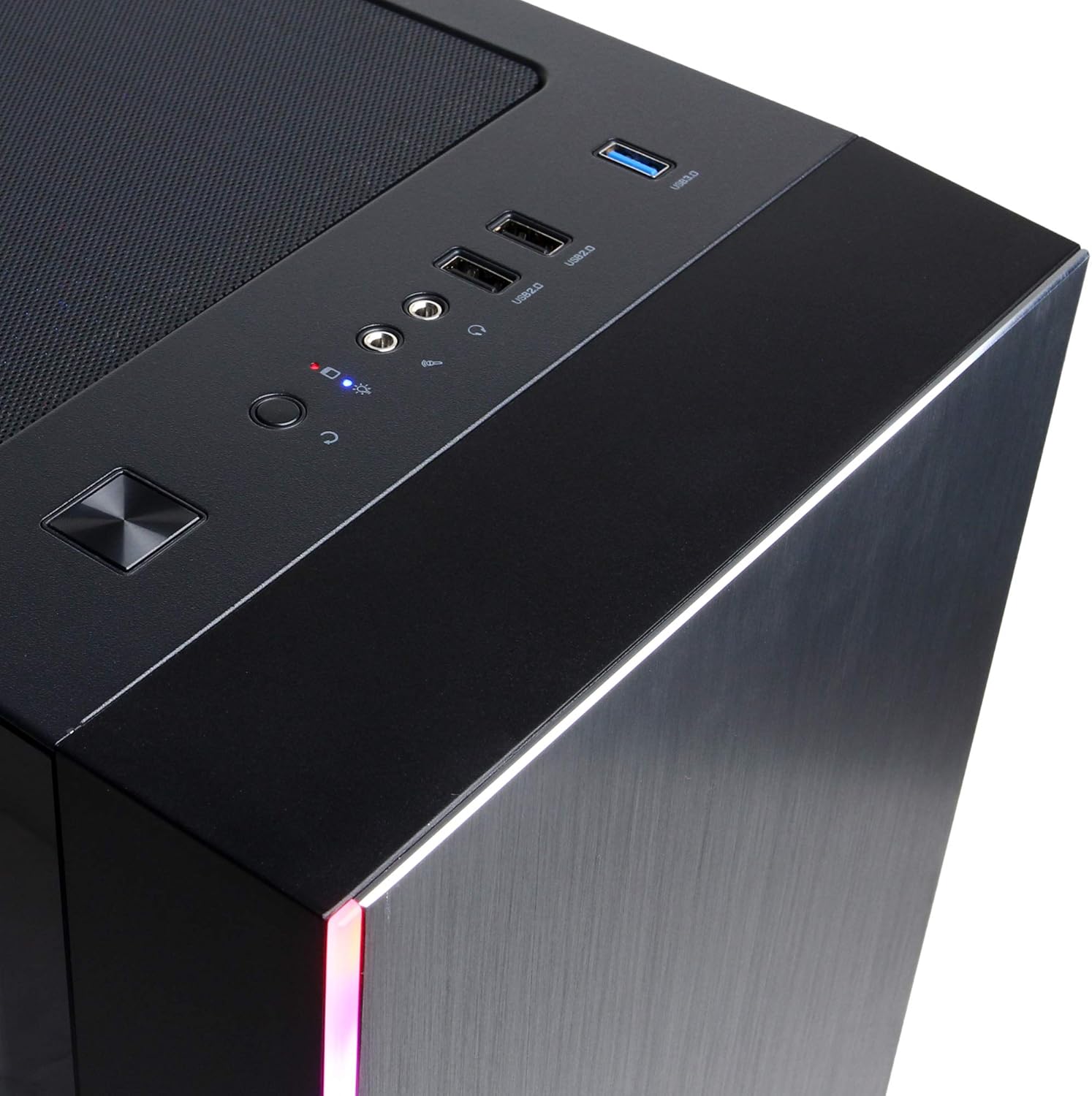
Figure 4: Detail of the top I/O panel, providing easy access to USB and audio connections.
3. Itọju
3.1 Ninu
Regular cleaning helps maintain optimal performance and extends the lifespan of your PC.
- Òde: Lo asọ, damp cloth to wipe down the exterior. Avoid harsh chemicals.
- Eruku: Lo afẹ́fẹ́ tí a fi ìfúnpọ̀ ṣe lẹ́ẹ̀kọ̀ọ̀kan láti mú eruku kúrò nínú àwọn gíláàsì afẹ́fẹ́ àti àwọn ohun èlò inú. Rí i dájú pé kọ̀ǹpútà náà ti pa àti pé ó ti yọ ìsopọ̀ mọ́ kí o tó sọ ọ́ di mímọ́.
3.2 Software imudojuiwọn
Keep your operating system, drivers, and applications updated to ensure security, stability, and performance.
- Awọn imudojuiwọn Windows: Lọ si Eto> Imudojuiwọn & Aabo> Imudojuiwọn Windows.
- Àwọn Awakọ̀ Àwòrán: Download the latest drivers directly from NVIDIA's official webojula.
4. Laasigbotitusita
4.1 Ko si Agbara
- Rí i dájú pé okùn agbára náà so mọ́ PC àti ibi tí ó wà ní ògiri dáadáa.
- Rii daju pe iṣan ogiri jẹ iṣẹ-ṣiṣe nipasẹ sisọ sinu ẹrọ miiran.
- Check the power switch on the PSU (if present) is in the 'On' position.
4.2 Ko si Ifihan
- Confirm the monitor is powered on and connected to the graphics card's output, not the motherboard's integrated graphics ports (if applicable).
- Gbiyanju okùn ifihan tabi atẹle miiran ti o ba wa.
- Ensure the monitor's input source is correctly selected.
4.3 System Slowdown or Freezing
- Check Task Manager (Ctrl+Shift+Esc) for high CPU, RAM, or disk usage by specific applications.
- Rii daju pe Windows ati awọn awakọ ti wa ni imudojuiwọn.
- Run a virus and malware scan.
- Ensure adequate ventilation and check for excessive dust buildup.
5. Awọn pato
| Ẹya ara ẹrọ | Ẹ̀kúnrẹ́rẹ́ |
|---|---|
| Brand | CyberpowerPC |
| Orukọ awoṣe | Gamer Xtreme |
| Eto isesise | Windows 10 Ile |
| Sipiyu Awoṣe | AMD Ryzen 7 3700X |
| Sipiyu Iyara | 3.6 GHz (Base) |
| Olupilẹṣẹ Graphics | NVIDIA GeForce RTX 3060 |
| Graphics Card RAM | 12 GB GDDR6 |
| Ramu Memory sori ẹrọ | 16 GB DDR4 |
| Ibi ipamọ | 240 GB SSD, 1 TB HDD |
| Asopọmọra | HDMI, Wi-Fi (802.11ab), USB 2.0, USB 3.0 |
| Awọn iwọn Nkan (LxWxH) | 18.6 x 17.4 x 8.9 inches |
| Ọna Itutu | Afẹfẹ |
| UPC | 811842073769 |
6. atilẹyin ọja Information
Your CyberpowerPC Gamer Xtreme Gaming PC is covered by a manufacturer's limited warranty. Specific terms and conditions, including warranty duration and coverage details, are typically provided with your purchase documentation or can be found on the official CyberpowerPC webojula. Jọwọ ṣe idaduro ẹri rira rẹ fun awọn iṣeduro atilẹyin ọja.
7. Atilẹyin
For technical assistance, troubleshooting, or further inquiries, please visit the official CyberpowerPC support website or contact their customer service. You may need your product model number (GMA3088W) and serial number for support.
- Osise Webojula: www.cyberpowerpc.com
- Support Section: Look for a "Support" or "Contact Us" link on their webojula.