
Weltool TC59
Weltool TC59 Flashlight Tailcap Switch Instruction Manual
Model: TC59 | Brand: Weltool
1. Ifihan ati Loriview
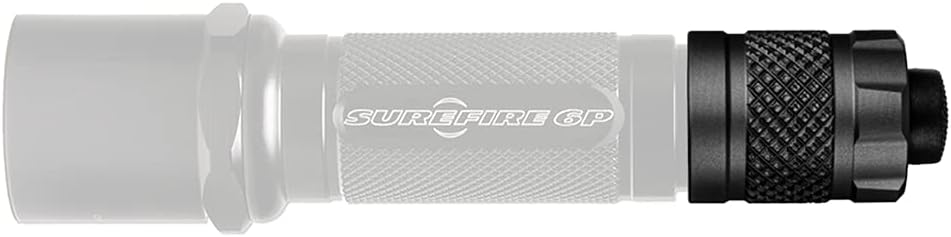
The Weltool TC59 is a high-quality, durable tailcap click switch designed as a replacement or upgrade for various flashlights. It features a 1-inch diameter and is compatible with Surefire 6P, 9P, 6PX, 6PX Pro, C2, C3, Z2, L5, M2, M3, M3T, and other flashlights. Constructed from aviation CNC machined aluminum with a hard-anodized black finish, the TC59 is built to withstand rigorous use and can handle up to 4A current. It is also compatible with Weltool's BB3 flashlight body.
2. Eto ati fifi sori
To install the TC59 tailcap switch, ensure your flashlight is powered off and any batteries are removed for safety. Unscrew the existing tailcap from your flashlight body. Align the Weltool TC59 tailcap with the threads on the flashlight body and carefully screw it on until it is finger-tight. Do not overtighten. Once installed, reinsert batteries if removed, and test the switch functionality.


3. Awọn ilana Iṣiṣẹ
The Weltool TC59 functions as a standard click-type tailcap switch. To operate your flashlight, simply press the button on the tailcap. A full press will engage the constant-on mode. Pressing the button again will turn the flashlight off. For momentary activation, lightly press and hold the button; release to turn off.
4. Itọju
The Weltool TC59 tailcap switch requires minimal maintenance. To ensure optimal performance and longevity:
- Ninu: Periodically wipe the exterior of the tailcap with a soft, dry cloth to remove dust and debris. Avoid using abrasive cleaners or solvents.
- Awọn ila: Keep the threads clean and lightly lubricated with silicone grease to ensure smooth operation and maintain water resistance.
- O-oruka: Inspect the O-rings for any signs of wear, cracks, or damage. Replace them if necessary to maintain the water-resistant seal.
- Ibi ipamọ: When not in use for extended periods, store the tailcap in a cool, dry place.
5. Laasigbotitusita
If you encounter issues with your Weltool TC59 tailcap switch, consider the following:
- Ina filaṣi Ko Tii:
- Ensure the tailcap is fully and securely screwed onto the flashlight body.
- Check that the batteries are correctly inserted and fully charged.
- Clean the contact points on both the tailcap and the flashlight body with a clean, dry cloth to ensure good electrical connection.
- Iṣiṣẹ Laarin:
- Mu tailcap.
- Inspect the internal spring and contact points for any damage or debris.
- Ensure the O-rings are properly seated and not interfering with the connection.
- Stiff Button:
- A small amount of silicone grease can be applied to the button mechanism if it feels stiff, but avoid over-lubrication.
If problems persist after attempting these steps, please contact Weltool customer support.
6. Awọn pato
| Ẹya ara ẹrọ | Ẹ̀kúnrẹ́rẹ́ |
|---|---|
| Nọmba awoṣe | TC59 |
| Àwọ̀ | Dudu |
| Ohun elo | Aviation CNC machined aluminum, Silicone Rubber |
| Ibamu | Surefire 6P, 9P, 6PX, 6PX Pro, C2, C3, Z2, L5, M2, M3, M3T, Weltool BB3 |
| Current Withstand | Titi di 4A |
| Iwọn Nkan | 1.13 iwon |
| Package Mefa | 2.44 x 2.36 x 1.26 inches |
| Omi Resistance Ipele | Omi sooro |
7. Atilẹyin ọja ati Support
Specific warranty information for the Weltool TC59 is not provided in this manual. For detailed warranty terms, product support, or to purchase additional Weltool products, please visit the official Weltool store or contact their customer service directly.
Official Weltool Store: Weltool Store on Amazon