
1. Ifihan
Thank you for choosing the TOTAL TDLI12325 12V Lithium-Ion Cordless Drill. This manual provides essential information for the safe and efficient operation, maintenance, and troubleshooting of your new tool. Please read these instructions carefully before use and keep them for future reference.

Image 1.1: The TOTAL TDLI12325 12V Lithium-Ion Cordless Drill, showing the drill unit, two 1.5Ah batteries, and a hard carrying case.
2. Awọn ilana aabo
Nigbagbogbo tẹle awọn iṣọra aabo ipilẹ nigba lilo awọn irinṣẹ ina lati dinku eewu ina, mọnamọna, ati ipalara ti ara ẹni.
- Aabo Agbegbe Iṣẹ: Jeki agbegbe iṣẹ rẹ mọ ki o si tan daradara. Awọn agbegbe idamu tabi awọn agbegbe dudu n pe awọn ijamba. Ma ṣe ṣiṣẹ awọn irinṣẹ agbara ni awọn bugbamu bugbamu, gẹgẹbi niwaju awọn olomi ina, gaasi, tabi eruku.
- Aabo Itanna: Yago fun olubasọrọ ara pẹlu ilẹ tabi ilẹ roboto. Ma ṣe fi awọn irinṣẹ agbara han si ojo tabi awọn ipo tutu.
- Aabo ti ara ẹni: Nigbagbogbo wọ aabo oju. Lo aabo igbọran nigbati o nṣiṣẹ fun awọn akoko ti o gbooro sii. Mura daradara; yago fun alaimuṣinṣin aso tabi ohun ọṣọ. Ṣe aabo irun gigun.
- Lilo ati Itọju: Maṣe fi agbara mu ohun elo agbara. Lo ohun elo agbara ti o pe fun ohun elo rẹ. Ge asopọ plug lati orisun agbara ati/tabi idii batiri lati inu ohun elo agbara ṣaaju ṣiṣe eyikeyi awọn atunṣe, yiyipada awọn ẹya ẹrọ, tabi titoju awọn irinṣẹ agbara.
- Lilo ati Itọju Batiri: Recharge only with the charger specified by the manufacturer. Do not use battery packs with any other power tools.
3. Package Awọn akoonu
Daju pe gbogbo awọn ohun ti a ṣe akojọ rẹ si isalẹ wa ninu package rẹ. Ti awọn ohun kan ba nsọnu tabi bajẹ, jọwọ kan si alagbata rẹ.
- 1 x TOTAL TDLI12325 Cordless Drill
- 2 x 12V 1.5Ah Lithium-Ion Battery Packs
- 1 x Battery Charger (220-240V ~ 50/60Hz)
- 1 x Apo gbigbe
- 1 x Drill Attachment (as included component)

Image 3.1: The TOTAL TDLI12325 Cordless Drill and its components, including batteries and charger, stored within the durable carrying case.
4. Ọja Ipariview
Familiarize yourself with the main parts of your cordless drill before operation.
- Chuck ti ko ni bọtini: Fun awọn ọna ati ki o rọrun bit ayipada.
- Orùka Ṣíṣe Àtúnṣe Ìyípo: Selects the desired torque setting for driving screws or drill mode.
- Yipada Yiyan Iyara: Allows selection between two speed ranges (High/Low).
- Siwaju/ Yipada Yipada: Yí ìtọ́sọ́nà ìyípo ti chuck padà.
- Nfa Yipada: Ó ń mu ìlù náà ṣiṣẹ́, ó sì ń ṣàkóso iyàrá oníyípadà.
- Imọlẹ iṣẹ LED: Ṣe itanna agbegbe iṣẹ.
- Pack batiri: Provides power to the drill.
- Battery Release Buttons: For removing the battery pack.
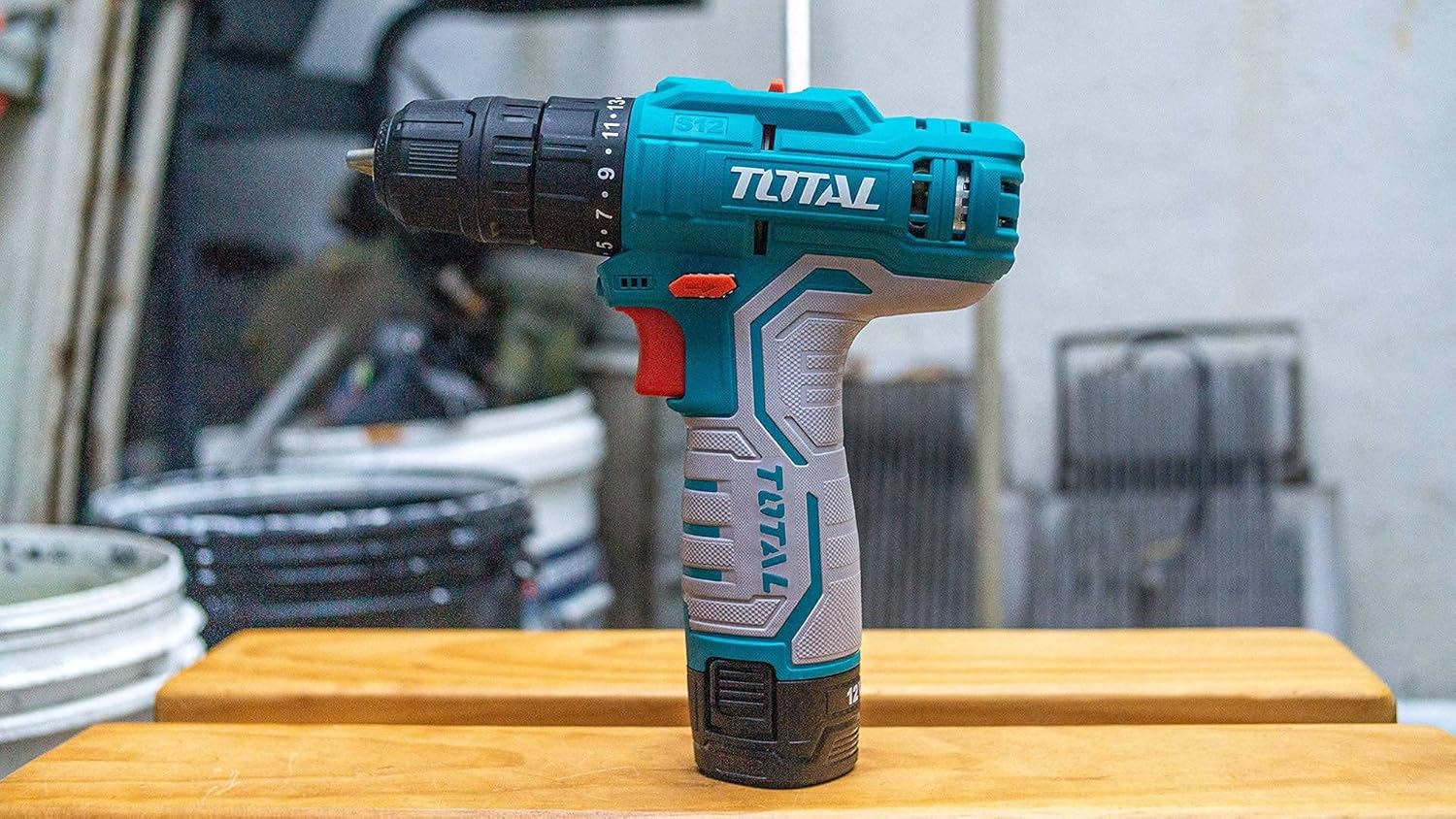
Aworan 4.1: Apa kan view of the TOTAL TDLI12325 Cordless Drill, highlighting its compact design and ergonomic grip.
5. Eto
5.1. Ngba agbara si Batiri naa
Your drill is powered by 12V Lithium-Ion batteries. Ensure batteries are fully charged before first use.
- Connect the charger to a standard 220-240V ~ 50/60Hz power outlet.
- Gbe idii batiri naa sori ṣaja titi yoo fi tẹ si aaye.
- The charging indicator light on the charger will show the charging status. Refer to the charger manual for specific light indications.
- Once fully charged, disconnect the battery from the charger and unplug the charger from the power outlet.
5.2. Fifi / Yọ Batiri Pack
- Lati fi sori ẹrọ: Ṣe deede idii batiri naa pẹlu ipilẹ ti mimu liluho ki o rọra wọ inu titi yoo fi tii ni aabo.
- Lati Yọ: Tẹ awọn bọtini itusilẹ batiri ni awọn ẹgbẹ ti idii batiri naa ki o fa batiri naa jade.
5.3. Fifi/Yiyọ Drill Bits
- Lati fi sori ẹrọ: Rotate the keyless chuck counter-clockwise to open the jaws. Insert the drill bit fully into the chuck. Rotate the chuck clockwise to tighten the jaws securely around the bit.
- Lati Yọ: Rotate the keyless chuck counter-clockwise to loosen the jaws and pull the bit out.

Aworan 5.1: alaye view of the drill's chuck and torque adjustment ring, showing the numbered settings and the forward/reverse switch.
6. Awọn ilana Iṣiṣẹ
6.1. Agbara Titan / Paa ati Iyara Yiyipada
Press the trigger switch to turn the drill on. The speed is variable; the harder you press the trigger, the faster the drill rotates. Release the trigger to turn the drill off.
6.2. Siwaju / Yiyi pada
The forward/reverse switch is located above the trigger. Push it to the left for forward rotation (drilling/tightening) and to the right for reverse rotation (removing screws/loosening). Ensure the switch is in the center position to lock the trigger and prevent accidental starting.
6.3. Torque tolesese
The torque adjustment ring allows you to select the appropriate torque setting for your task. Lower settings are for driving small screws or working with soft materials, while higher settings are for larger screws or harder materials. The drill symbol setting is for drilling applications, providing maximum torque.
6.4. Iyara Aṣayan
Lo yiyan iyara lori oke liluho lati yan laarin awọn sakani iyara meji:
- Iyara Kekere (1): For driving screws and drilling larger holes.
- Iyara giga (2): For drilling smaller holes and faster operation.
7. Itọju
Itọju deede ṣe idaniloju iṣẹ ṣiṣe ti o dara julọ ati fa igbesi aye ọpa rẹ pọ si.
- Ninu: Jeki awọn aaye atẹgun di mimọ lati ṣe idiwọ igbona. Lo asọ, damp asọ lati nu ọpa casing. Maṣe lo awọn kẹmika ti o lewu tabi awọn afọmọ abrasive.
- Itọju Batiri: Store batteries in a cool, dry place away from direct sunlight. Do not store fully discharged batteries for extended periods. Recharge them periodically if not in use.
- Ibi ipamọ: Store the drill and its accessories in the provided carrying case in a dry, secure location, out of reach of children.
- Ayewo: Regularly check the power cord of the charger for damage. Inspect the chuck for wear and ensure it tightens properly.
8. Laasigbotitusita
Abala yii n ṣalaye awọn ọran ti o wọpọ ti o le ba pade.
| Isoro | Owun to le Fa | Ojutu |
|---|---|---|
| Liluho ko bẹrẹ | Battery not charged; Battery not properly installed; Forward/Reverse switch in center (locked) position | Charge battery; Reinstall battery; Move switch to forward or reverse position |
| Isonu ti agbara nigba isẹ | Battery low; Overload | Recharge battery; Reduce pressure on tool or use a lower speed/higher torque setting |
| Batiri ko ngba agbara | Charger not plugged in; Faulty battery/charger | Check power connection; Contact customer support for replacement |
| Bit yo ni Chuck | Chuck not tightened sufficiently; Bit shank is dirty or damaged | Tighten chuck firmly; Clean or replace bit |
9. Awọn pato
Technical data for the TOTAL TDLI12325 Cordless Drill.
| Ẹya ara ẹrọ | Sipesifikesonu |
|---|---|
| Nọmba awoṣe | TDLI12325-8 |
| Voltage | 12 V |
| Batiri Iru | Litiumu-Iwọn |
| Agbara Batiri | 1.5 Ah |
| Ko si-Fifuye Iyara | 0-1450 RPM |
| O pọju Torque | 20 Nm |
| Nọmba ti Awọn iyara | 2 |
| Chuck Agbara | 0.8-10 mm |
| Metal Drilling Capacity | 20 mm |
| Ṣaja Voltage | 220-240V ~ 50/60Hz |
| Orisun agbara | Agbara Batiri |
| Pataki Awọn ẹya ara ẹrọ | Iyara Ayipada |
| Ohun elo | Irin |
| Iwọn Nkan | 3000 giramu (3 kg) |
| Awọn iwọn Ọja (L x W x H) | 10 x 20 x 37 cm |
10. Atilẹyin ọja ati Support
10.1. atilẹyin ọja Information
This product carries a manufacturer's warranty for 6 months from the date of purchase. You can contact the manufacturer/its agent for maintenance or Amazon for more details.
10.2. Onibara Support
For any questions, technical assistance, or warranty claims, please refer to the contact information provided with your purchase or visit the official TOTAL tools webojula.