
1. Ifihan
Thank you for choosing the AUKEY Sprint Wireless Power Bank PB-Y32. This device is designed to provide portable power for your mobile devices, featuring both wired and wireless fast charging capabilities. Please read this manual carefully before use to ensure optimal performance and safety.
2. Awọn ẹya Ọja
- Agbara 10000 mAh: High-capacity battery to charge your devices multiple times.
- Atilẹyin Gbigba agbara Yara: Supports Quick Charge 3.0 and Power Delivery for rapid charging of compatible devices.
- Gbigba agbara Alailowaya: Conveniently charge Qi-compatible devices at up to 10W.
- Awọn Ibudo Ijade lọpọlọpọ: Equipped with USB-C and USB-A ports for versatile charging.
- Iwapọ ati Apẹrẹ to gbe: Easy to carry for on-the-go power.
- Awọn ẹya Aabo: Built-in protections against overcharge, over-discharge, overcurrent, and short circuits.
3. Package Awọn akoonu
- AUKEY Sprint Wireless Power Bank PB-Y32
- Okun USB-A si C
- Itọsọna olumulo
4. Eto ati Ibẹrẹ Lilo
4.1 Ngba agbara Bank Power
Before first use, fully charge the power bank. It takes approximately 7 hours to fully charge the power bank using a compatible USB-C power adapter.
- Connect the included USB-A to C cable to the power bank's USB-C input port.
- Connect the other end of the cable to a USB wall charger (not included).
- The LED indicators will light up to show the charging status. All four LEDs will be solid when fully charged.
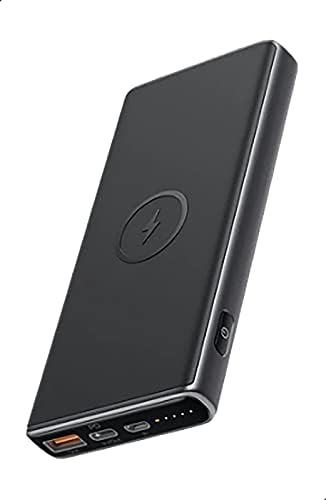
Image: The AUKEY Sprint Wireless Power Bank PB-Y32, showcasing its sleek black design and port layout.
5. Awọn ilana Iṣiṣẹ
5.1 Ti firanṣẹ Ngba agbara
To charge your device using a cable:
- Connect your device's charging cable to either the USB-A output port or the USB-C output port on the power bank.
- So opin miiran ti okun pọ si ẹrọ rẹ.
- Ile-ifowopamọ agbara yoo bẹrẹ gbigba agbara ẹrọ rẹ laifọwọyi.
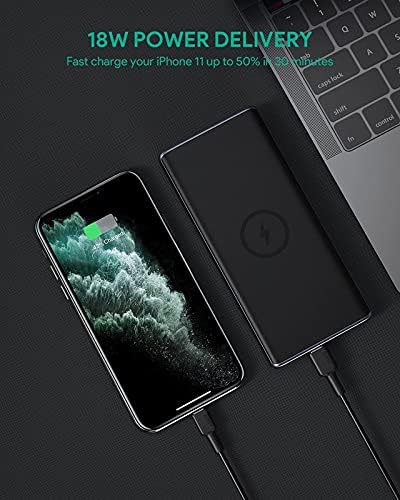
Image: The power bank connected via cable to a smartphone, demonstrating 18W Power Delivery fast charging.

Image: A smartphone connected to the power bank, illustrating Qualcomm Quick Charge 3.0 capabilities for rapid charging.
5.2 Ngba agbara Alailowaya
To charge your Qi-compatible device wirelessly:
- Place your Qi-compatible device directly onto the wireless charging pad located on the top surface of the power bank. Ensure the device is centered on the charging symbol.
- The power bank will automatically detect your device and begin wireless charging.

Image: A smartphone placed on the power bank's surface, demonstrating the wireless charging feature.

Aworan: A sunmọ-soke view of the power bank showing the silicone ring designed to keep the phone stable during wireless charging.
5.3 Ipo Gbigba agbara-kekere
This mode is ideal for charging low-power devices like wireless earbuds or smartwatches.
- Press and hold the power button for 2 seconds to enter low-current charging mode. The first LED indicator will blink green.
- Connect your low-power device or place it on the wireless charging pad.
- To exit low-current charging mode, press the power button once, or it will automatically exit after 2 hours.
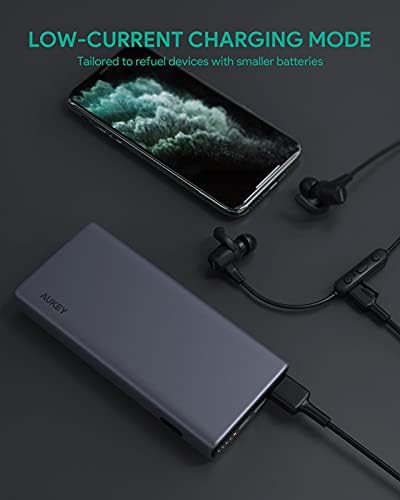
Image: The power bank connected to a smartphone and wireless earbuds, demonstrating its low-current charging mode for smaller devices.

Image: An illustration showing the power bank's broad compatibility with various devices, including smartphones, tablets, and gaming consoles.
6. Itọju
- Keep the power bank away from liquids, extreme heat, and strong magnetic fields.
- Maṣe ju silẹ tabi tẹ banki agbara si awọn ipa to lagbara.
- Clean the power bank with a dry, soft cloth. Do not use corrosive cleaners.
- Tọju banki agbara ni itura, aye gbigbẹ nigbati ko si ni lilo.
- Recharge the power bank at least once every 3 months to maintain battery health.
7. Laasigbotitusita
7.1 Power Bank Ko Ngba agbara
- Rii daju pe okun gbigba agbara ti sopọ ni aabo si banki agbara ati ṣaja ogiri.
- Gbiyanju okun USB-C ti o yatọ tabi ṣaja ogiri.
- Verify the wall charger's output meets the power bank's input requirements (DC 5V-3A / 9V-2A).
7.2 Ẹrọ Ko Ngba agbara lati Bank Power
- Rí i dájú pé bank agbára náà ní agbára tó tó.
- Gbiyanju okun gbigba agbara miiran fun ẹrọ rẹ.
- For wireless charging, ensure your device is Qi-compatible and properly aligned on the charging pad. Remove any thick cases that might interfere.
- If charging a low-power device, ensure low-current charging mode is activated.
7.3 Power Bank Overheating
- O jẹ deede fun banki agbara lati gbona diẹ lakoko gbigba agbara tabi gbigba agbara.
- Ti o ba ti gbona pupọ, ge asopọ gbogbo awọn ẹrọ ati okun gbigba agbara lẹsẹkẹsẹ. Gba laaye lati tutu ṣaaju ki o to bẹrẹ lilo.
- Rii daju pe fentilesonu to dara ati yago fun ibora banki agbara lakoko lilo.
8. Awọn pato
| Ẹya ara ẹrọ | Ẹ̀kúnrẹ́rẹ́ |
|---|---|
| Orukọ awoṣe | Tọ ṣẹṣẹ |
| Nọmba awoṣe | PB-Y32 |
| Agbara Batiri | 10000 mAh |
| USB Iru-C Input | DC 5V-3A / 9V-2A |
| USB Iru-C o wu | DC 5V-3A / 9V-2A / 12V-1.5A |
| USB Iru-A o wu | 18W |
| Agbara Ijade ti o pọju | 18W |
| O wu Ngba agbara Alailowaya | 5W, 7.5W, 10W |
| Awọn iwọn | 144 x 67 x 17 mm |
| Iwọn | 210 giramu |
| Batiri Cell Tiwqn | Litiumu polima |
| Pataki Awọn ẹya ara ẹrọ | Short Circuit Protection, Wireless Charging |
| Àwọ̀ | Dudu |
| Akoko Gbigba agbara Batiri | wakati meji 7 |
9. Atilẹyin ọja ati Support
According to the product specifications, this product comes with Ko si Atilẹyin ọja. For any product-related inquiries or support, please refer to the retailer or manufacturer's official webojula fun alaye olubasọrọ.