
1. Ifihan
The CAMMHD C2 is a compact, head-mounted 4K video camera designed for hands-free recording. It features 6-axis anti-shake stabilization, Wi-Fi connectivity for app control, and a long-lasting 2200mAh battery, making it suitable for various activities such as vlogging, travel, and sports. This manual provides detailed instructions for the proper use and maintenance of your CAMMHD C2 camera.

Figure 1: CAMMHD C2 4K Head-Mounted Video Camera
2. Package Awọn akoonu
Jọwọ rii daju pe gbogbo awọn ohun ti a ṣe akojọ rẹ si isalẹ wa ninu package rẹ. Ti awọn ohun kan ba nsọnu tabi bajẹ, jọwọ kan si atilẹyin alabara.
- CAMMHD C2 4K Head-Mounted Camera
- Headband Bracket
- Àṣíborí akọmọ
- Awọn paadi alemora 3M
- Mounting Bracket Tools
- USB Iru-C Ngba agbara USB
- Adapter agbara
- Kaadi Iranti 32GB (ti a ti fi sii tẹlẹ tabi lọtọ)
- Itọsọna olumulo

Àwòrán 2: Àwọn ohun èlò tí a fi kún un
3. Ọja Ipariview
Mọ ara rẹ pẹ̀lú àwọn ẹ̀yà ara àti àwọn ìṣàkóso kámẹ́rà náà.
3.1 Awọn ohun elo kamẹra
- Lẹnsi: Ó gba fídíò àti fọ́tò.
- Power/Wi-Fi Button: Powers the device on/off and activates Wi-Fi.
- Bọtini Fọto: Takes still images.
- Bọtini Gbigbasilẹ: Bẹrẹ ati da gbigbasilẹ fidio duro.
- Imọlẹ Atọka: Displays device status (power, recording, Wi-Fi).
- Iho Kaadi TF: Insert microSD card for storage.
- Iru Ibudo-C: Fun gbigba agbara ati gbigbe data.
- Bọtini atunto: Tun ẹrọ naa pada si awọn eto ile-iṣẹ.

olusin 3: Iwaju view of the CAMMHD C2 camera

olusin 4: Isalẹ view of the CAMMHD C2 camera showing ports
4. Eto
4.1 Gbigba agbara akọkọ
Before first use, fully charge the camera using the provided USB Type-C cable and power adapter. The indicator light will show charging status.
4.2 Fi kaadi iranti sii
Locate the TF card slot. Gently insert the provided 32GB microSD card (or another compatible card up to 512GB) until it clicks into place. Ensure the camera is powered off before inserting or removing the memory card.
4.3 Iṣagbesori Kamẹra
The CAMMHD C2 offers versatile mounting options:
4.3.1 Head-Worn Installation
Attach the camera to the headband bracket. Adjust the headband for a comfortable and secure fit on your head. This method provides a first-person perspective.
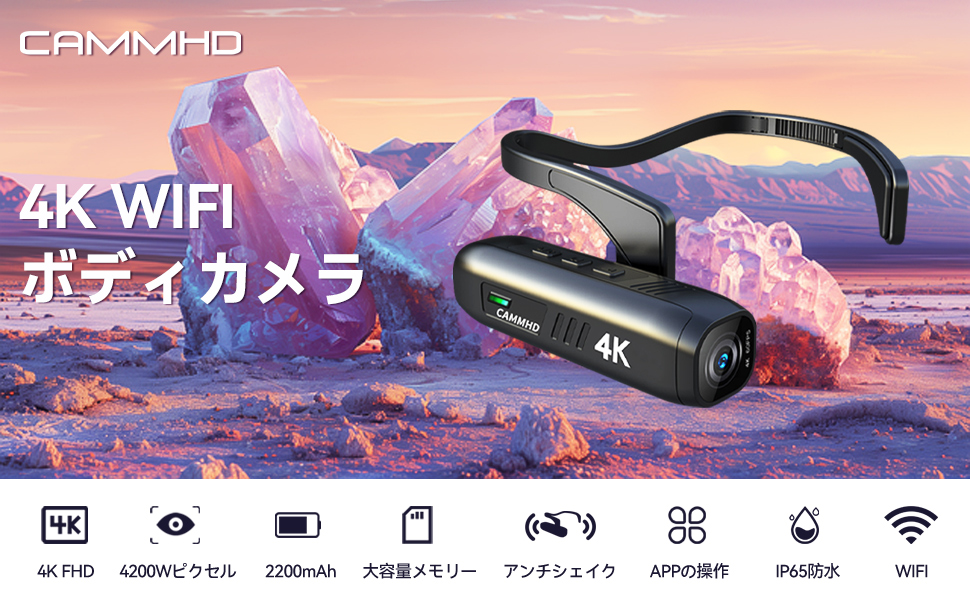
Figure 5: Head-worn installation for hands-free recording
4.3.2 Helmet-Mounted Installation
Use the helmet bracket and 3M adhesive pads to securely attach the camera to your helmet. Ensure the adhesive surface is clean and dry before application for optimal adhesion.

Figure 6: Helmet-mounted installation for secure attachment
5. Isẹ
5.1 Agbara Tan / Pa
Tẹ mọlẹ Bọtini agbara/Wi-Fi for a few seconds to turn the camera on or off. The indicator light will illuminate when powered on.
5.2 Gbigbasilẹ Video
Tẹ awọn Bọtini igbasilẹ once to start video recording. Press it again to stop recording. The indicator light will change to show recording status.
5.3 Gbigba Awọn fọto
Tẹ awọn Bọtini Fọto once to capture a still image.
5.4 Ìsopọ̀ Wi-Fi àti Ìṣàkóso Ohun èlò
The CAMMHD C2 supports Wi-Fi connectivity for real-time viewing, control, and file gbigbe nipasẹ ohun elo foonuiyara kan.
- Download the "Viidure Camera" app from your smartphone's app store.
- Power on the CAMMHD C2 camera.
- Tẹ awọn Bọtini agbara/Wi-Fi briefly to activate Wi-Fi mode on the camera. The indicator light will show Wi-Fi status.
- On your smartphone, go to Wi-Fi settings and connect to the camera's Wi-Fi network (e.g., "M20Pro_20F_XXXXXXXXXX"). The default Wi-Fi password is 12345678.
- Open the "Viidure Camera" app. You can now view gbe footage, control recording, adjust settings, and transfer files directly to your smartphone.
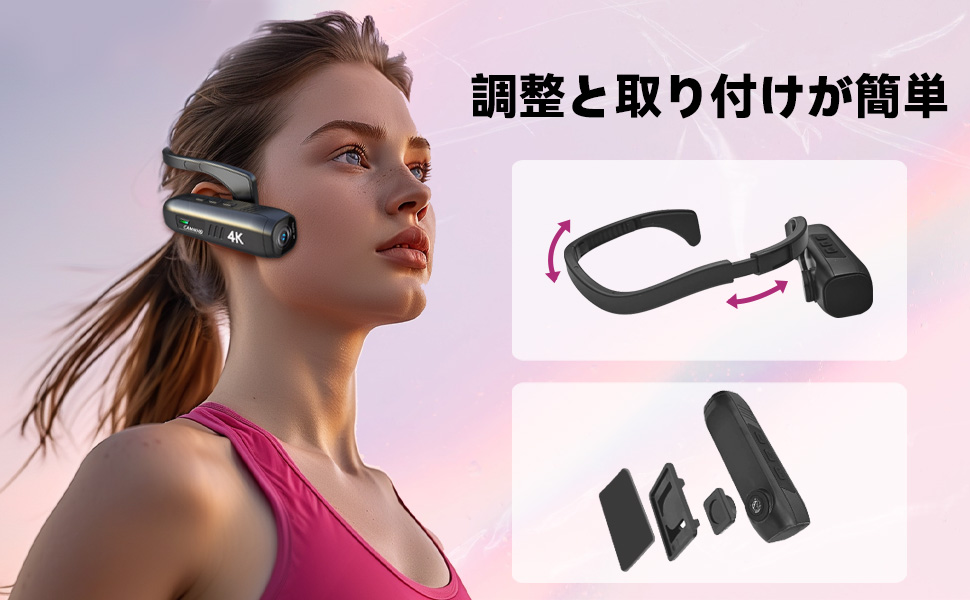
Figure 7: Wi-Fi app control interface
5.5 Key Awọn ẹya ara ẹrọ
- Ìpinnu Gíga 4K: Records videos in 3840 x 2160 4K at 30fps or 2704 x 1520 2K at 30fps for clear and vivid footage.
- 6-Axis Anti-Shake: Advanced stabilization technology minimizes blur from movement, ensuring smooth video.
- Igbesi aye batiri gigun: Integrated 2200mAh battery provides approximately 5-7 hours of continuous recording.
- Lẹnsi Igun Gigun: 130-degree wide-angle lens captures a broader field of view.
- Ibi ipamọ ti o gbooro: Ṣe atilẹyin awọn kaadi microSD to 512GB.
6. Itọju
- Jẹ́ kí lẹ́ńsì kámẹ́rà mọ́ nípa lílo aṣọ rírọ̀ tí kò ní àwọ̀. Yẹra fún àwọn ohun èlò ìfọ́.
- Tọju kamẹra naa ni itura, aye gbigbẹ kuro lati orun taara ati awọn iwọn otutu to gaju.
- Regularly back up your recorded data to prevent loss.
- Ensure the Type-C port cover is securely closed when not in use to protect against dust and moisture.
7. Laasigbotitusita
| Isoro | Owun to le Fa | Ojutu |
|---|---|---|
| Kamẹra ko ṣiṣẹ. | Batiri kekere; iṣẹ ṣiṣe ẹrọ naa ko dara. | Charge the camera fully. If problem persists, contact support. |
| Ko le sopọ si Wi-Fi. | Incorrect password; Wi-Fi not activated on camera; app issue. | Ensure Wi-Fi is active on camera. Verify password (12345678). Restart camera and app. |
| Didara fidio ko dara. | Lens is dirty; low light conditions; incorrect resolution settings. | Clean the lens. Ensure adequate lighting. Check resolution settings in the app. |
| Kámẹ́rà á dì tàbí kí ó má dáhùn. | Aṣiṣe sọfitiwia. | Tẹ bọtini Tunto. |
8. Awọn pato
| Ẹya ara ẹrọ | Ẹ̀kúnrẹ́rẹ́ |
|---|---|
| Brand | CAMMHD |
| Awoṣe | C2 |
| Ipinnu Yaworan fidio | 4K (3840 x 2160) @ 30fps, 2K (2704 x 1520) @ 30fps |
| Fọto sensọ Technology | CMOS (Sony 386 sensor) |
| Fidio Yaworan kika | MP4 |
| Ohun kika | WAV |
| Asopọmọra | USB, Wi-Fi |
| Pataki Awọn ẹya ara ẹrọ | 4K, Wi-Fi, Vlog, 6-axis Anti-shake |
| Agbara Batiri | 2200mAh Lithium-dẹlẹ |
| Apapọ batiri Life | Awọn wakati 5-7 |
| Atilẹyin ipamọ | Up to 512GB microSD card (32GB included) |
| Iwọn | 75g |
| Iwọn (D x W x H) | 28 x 26 x 101 mm |
9. Atilẹyin ọja ati Support
The CAMMHD C2 camera comes with a 1-odun atilẹyin ọja from the date of purchase. For technical support, warranty claims, or any inquiries, please contact CAMMHD customer service through the retailer where you purchased the product or visit the official CAMMHD webojula.
Awọn orisun Ayelujara: For additional support, FAQs, and firmware updates, please refer to the CAMMHD official store or product page: CAMMHD Official Store