
Groov-e GVBT750BK
Ìwé Ìtọ́ni fún Àwọn Agbọ́rọ̀kalẹ̀ Bluetooth Aláìlókùn Groov-e Ultra GVBT750BK
Ọrọ Iṣaaju
O ṣeun fun riraasing the Groov-e Ultra Wireless Bluetooth Headphones. These headphones are designed to provide a superior audio experience with features such as wireless connectivity, extended battery life, and comfortable design. This manual will guide you through the setup, operation, and maintenance of your new headphones.
Package Awọn akoonu
Please ensure all items are present in your Groov-e Ultra headphone package:
- Groov-e Ultra Wireless Bluetooth Headphones
- Okun Ngba agbara USB
- 3.5mm Audio USB
- Afowoyi Olumulo (iwe-ipamọ yii)
Ọja Pariview
Familiarize yourself with the various components of your Groov-e Ultra headphones.
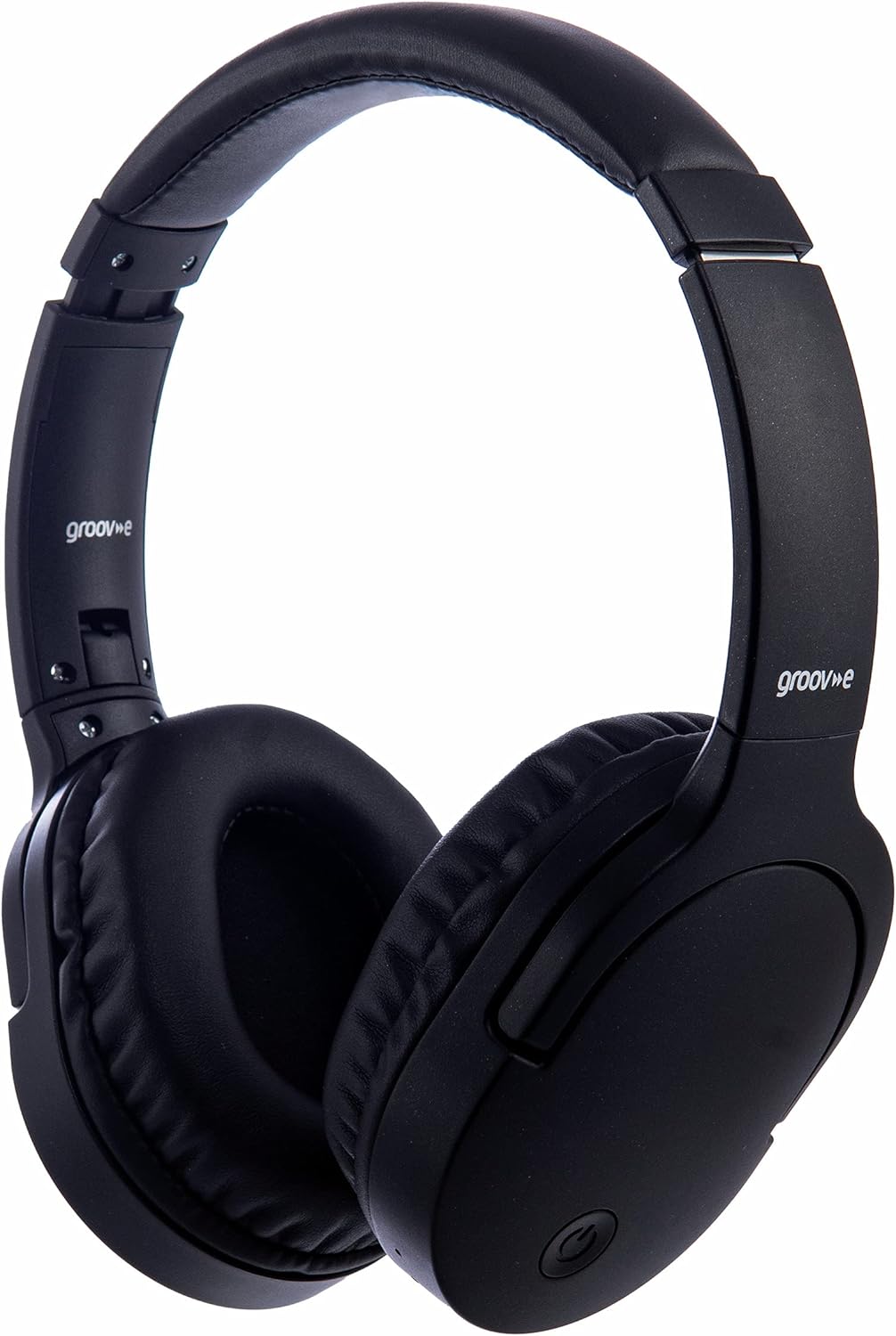
Aworan: Iwaju view of the Groov-e Ultra Wireless Bluetooth Headphones in black.
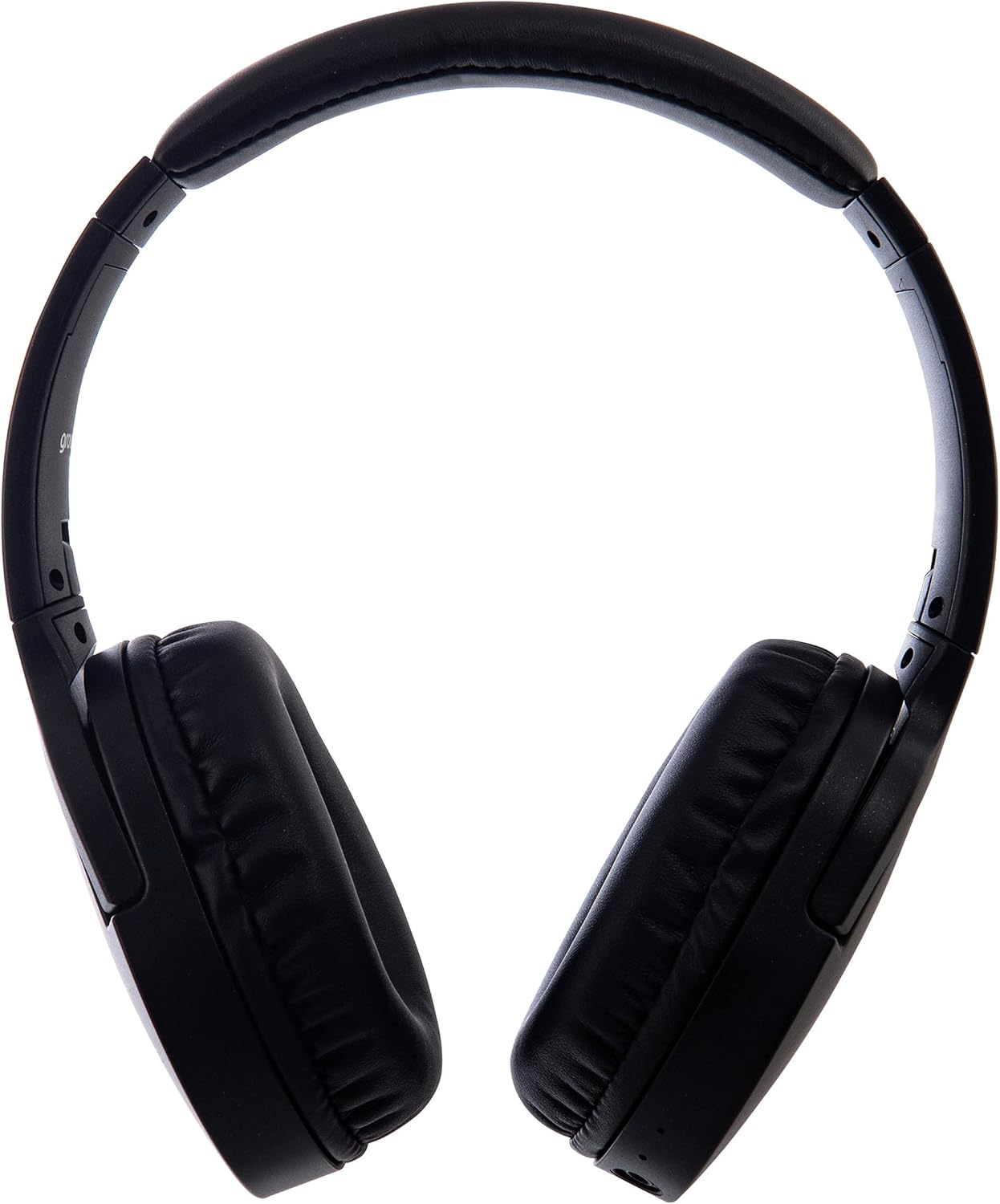
Aworan: Apa view of the Groov-e Ultra Wireless Bluetooth Headphones, showing the earcups and headband.
Key features and controls include:
- Bọtini agbara: Located on the earcup, used for powering on/off and initiating pairing mode.
- Awọn iṣakoso iwọn didun: Buttons for adjusting audio volume.
- Bọtini iṣẹ-pupọ: For play/pause, answer/end calls, and activating voice assistant.
- Gbohungbohun: Ti ṣepọ fun ipe ti ko ni ọwọ.
- Jack Audio 3.5mm: Fún ìsopọ̀ onírin sí àwọn orísun ohùn.
- Ibudo Gbigba agbara USB: For charging via the included USB cable.
- Agbègbè Gbigba agbara alailowaya: Located on the right earcup for compatible wireless charging pads.
- Atọka LED: Ṣe afihan agbara, gbigba agbara, ati ipo isopọpọ Bluetooth.
Ṣeto
1. Gbigba agbara akọkọ
Before first use, fully charge your headphones. The Groov-e Ultra headphones support both wired and wireless charging.
Ti firanṣẹ Ngba agbara:
- Connect the supplied USB charging cable to the headphone's charging port.
- So opin keji okun USB pọ mọ orisun agbara USB ti o baamu (fun apẹẹrẹ, ibudo USB kọmputa, adapter odi USB).
- Àmì LED náà yóò tànmọ́lẹ̀ nígbà tí a bá ń gba agbára, yóò sì pa tàbí yí àwọ̀ padà nígbà tí a bá ti gba agbára tán.
Gbigba agbara Alailowaya:
- Place the right earcup of the headphones onto a compatible Qi-certified wireless charging pad.
- Ensure the headphones are correctly positioned on the charging pad for optimal contact.
- Àmì LED náà yóò tànmọ́lẹ̀ nígbà tí a bá ń gba agbára, yóò sì pa tàbí yí àwọ̀ padà nígbà tí a bá ti gba agbára tán.
A gba agbara ni kikun ojo melo gba to wakati meji 2.
Image: Groov-e Ultra headphones charging wirelessly on a pad, with a laptop in the background.
Awọn ilana Iṣiṣẹ
1. Agbara Tan / Paa
- Agbara Tan: Press and hold the Power button for approximately 3 seconds until the LED indicator flashes.
- Agbara Pa: Press and hold the Power button for approximately 3-5 seconds until the LED indicator turns off.
2. Sisopọ Bluetooth
- Rii daju pe awọn agbekọri ti wa ni pipa.
- Tẹ bọtini agbara ki o si dimu fun bii awọn aaya 5-7 titi ti ifihan LED yoo fi tan pupa ati buluu ni ọna miiran, ti o fihan ipo isopọmọ.
- Lori ẹrọ rẹ (foonuiyara, tabulẹti, kọǹpútà alágbèéká), mu Bluetooth ṣiṣẹ ki o wa awọn ẹrọ to wa.
- Select "Groov-e Ultra" from the list of found devices.
- Once paired, the LED indicator will flash blue slowly, and you may hear an audible confirmation.
- Ti o ba beere fun ọrọ igbaniwọle, tẹ "0000".
Awọn agbekọri yoo gbiyanju laifọwọyi lati tun sopọ si ẹrọ ti o so pọ to kẹhin nigbati o ba wa ni tan-an.
3. Ìsopọ̀ oníwáyà (Okùn ohùn 3.5mm)
For devices without Bluetooth or to conserve battery, you can use the supplied 3.5mm audio cable.
- Connect one end of the 3.5mm audio cable to the audio jack on the headphones.
- So opin miiran pọ si iṣelọpọ ohun afetigbọ 3.5mm ti ẹrọ rẹ.
- The headphones will operate in passive mode, and Bluetooth functionality will be disabled.
4. Sisisẹsẹhin Orin
- Ṣiṣẹ/Daduro: Tẹ bọtini Olona-iṣẹ lẹẹkan.
- Orin t’okan: Tẹ mọlẹ bọtini Iwọn didun Up.
- Tẹlẹ Orin: Tẹ mọlẹ bọtini Iwọn didun isalẹ.
- Iwọn didun Up: Tẹ bọtini didun Up ni ṣoki.
- Iwọn didun isalẹ: Tẹ bọtini Iwọn didun isalẹ ni ṣoki.
5. Iṣakoso ipe
- Idahun/Ipe Ipari: Tẹ bọtini Olona-iṣẹ lẹẹkan.
- Kọ Ipe: Tẹ mọlẹ bọtini iṣẹ-ọpọlọpọ fun iṣẹju-aaya 2.
- Oluranlọwọ ohun: Double-press the Multi-function button to activate your device's voice assistant (e.g., Siri, Google Assistant).
Itoju
To ensure the longevity and optimal performance of your Groov-e Ultra headphones, follow these maintenance guidelines:
- Ninu: Lo asọ gbigbẹ, asọ ti o gbẹ lati nu awọn afikọti ati ideri ori. Ma ṣe lo abrasive ose tabi epo.
- Ibi ipamọ: Nigbati o ko ba wa ni lilo, tọju awọn agbekọri naa ni itura, aye gbigbẹ, kuro lati orun taara ati awọn iwọn otutu to gaju. Apẹrẹ ti a ṣe pọ gba laaye fun ibi ipamọ iwapọ.
- Itọju Batiri: Lati tọju igbesi aye batiri, yago fun gbigba agbara ni kikun awọn agbekọri nigbagbogbo. Gba agbara si wọn nigbagbogbo, paapaa ti kii ṣe ni lilo igbagbogbo.
- Omi Resistance: The headphones are rated as "waterproof" (as per specifications), but this typically refers to resistance against splashes or light rain. Avoid submerging them in water.
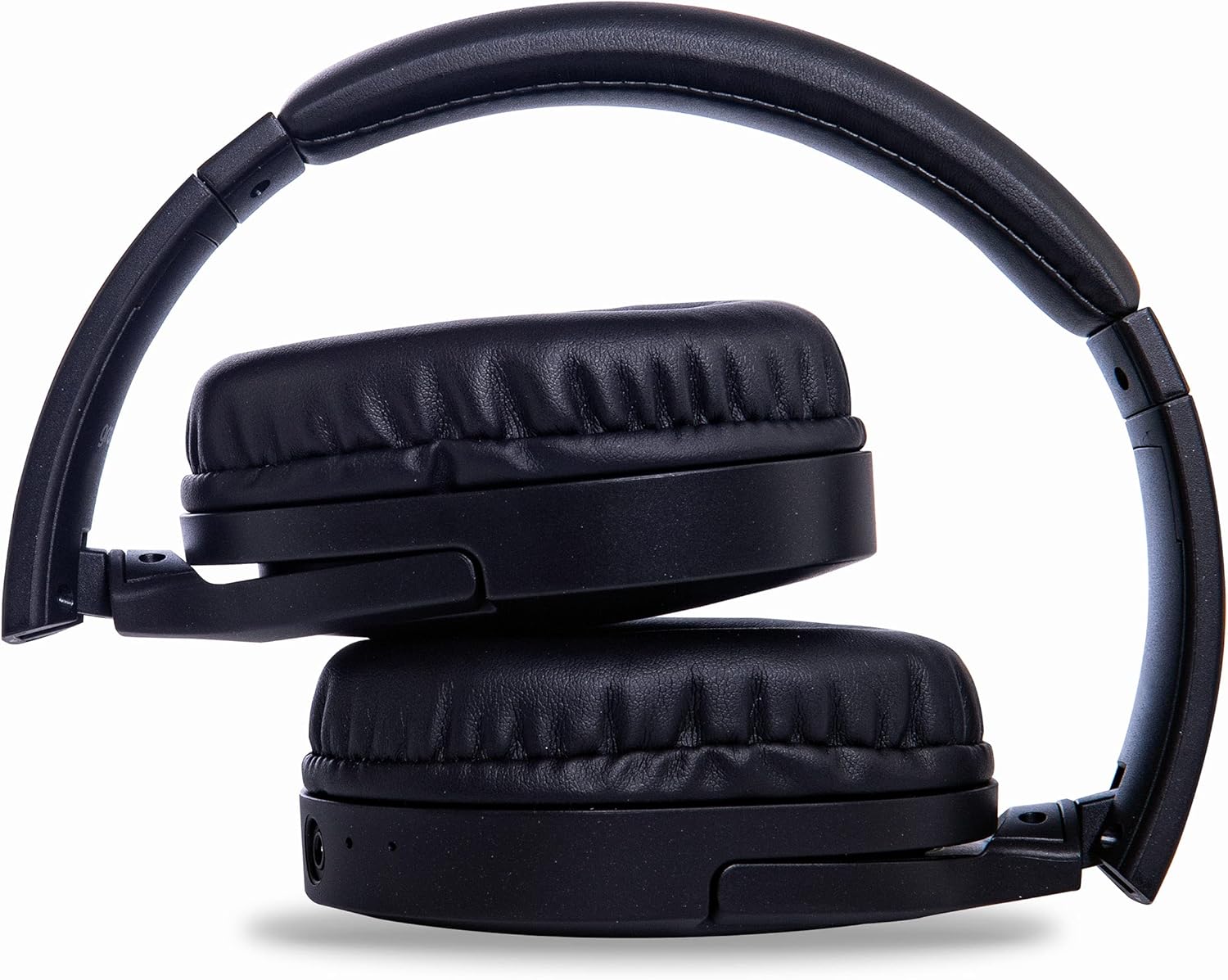
Image: Groov-e Ultra headphones folded, demonstrating their compact storage design.
Laasigbotitusita
Ti o ba pade awọn ọran pẹlu awọn agbekọri rẹ, tọka si awọn solusan ti o wọpọ wọnyi:
| Isoro | Owun to le Fa | Ojutu |
|---|---|---|
| Awọn agbekọri ko ṣiṣẹ. | Batiri kekere. | Charge the headphones fully using either wired or wireless charging. |
| Ko le so pọ nipasẹ Bluetooth. | Àwọn agbekọri kò sí ní ipò ìsopọ̀; Bluetooth ẹ̀rọ ti pa; ìdènà. | Ensure headphones are in pairing mode (flashing red/blue). Turn Bluetooth off and on on your device. Move closer to the device. |
| Ko si ohun tabi didara ohun ti ko dara. | Volume too low; incorrect source; loose wired connection; Bluetooth interference. | Increase volume on headphones and device. Check if the correct audio output is selected. Ensure 3.5mm cable is fully inserted. Re-pair Bluetooth. |
| Gbigba agbara alailowaya ko ṣiṣẹ. | Headphones not positioned correctly; incompatible charging pad. | Adjust headphone position on the charging pad. Ensure the charging pad is Qi-certified and functioning. |
| Buzzing or too loud on Bluetooth. | Bluetooth signal issue; volume settings. | Try moving closer to the source device. Adjust volume levels on both the headphones and the connected device. |
| Cannot connect to Apple Mac Book Pro. | Compatibility issue or specific Bluetooth driver problem. | Ensure your Mac's Bluetooth drivers are up to date. Try resetting Bluetooth on your Mac. Consult Apple support or Groov-e support for specific compatibility advice. |
Awọn pato
| Ẹya ara ẹrọ | Ẹ̀kúnrẹ́rẹ́ |
|---|---|
| Orukọ awoṣe | Ultra |
| Nọmba awoṣe | GVBT750BK |
| Brand | Groov-e |
| Asopọmọra Technology | Ailokun (Bluetooth) |
| Imọ-ẹrọ Ibaraẹnisọrọ Alailowaya | Bluetooth |
| Fọọmù ifosiwewe | Supra-Aural (Over-ear) |
| Gbigbe Eti | Supra-auriculaire |
| Ipinya Ariwo | Ti nṣiṣe lọwọ Ariwo bomole |
| Jack agbekọri | 3.5 mm Jack |
| Pataki Awọn ẹya ara ẹrọ | Microphone included, Sweat resistant |
| Igbesi aye batiri | Up to 30 hours (wireless audio playback) |
| Akoko gbigba agbara | O fẹrẹ to awọn wakati 2 |
| Ọna Iṣakoso | Fọwọkan (Fọwọkan) |
| Iwọn Igbohunsafẹfẹ | 20 Hz - 20,000 Hz (Possible) |
| Omi Resistance Ipele | Mabomire |
| Awọn ẹrọ ibaramu | Smartphones, laptops, tablets, car audio systems, music production equipment, televisions |
| Ohun elo | Alawọ |
Alaye Aabo
Please read and follow these safety guidelines to prevent damage to your headphones or personal injury:
- Do not expose headphones to extreme temperatures, humidity, or corrosive environments.
- Yago fun sisọ tabi tẹriba awọn agbekọri si awọn ipa to lagbara.
- Ma ṣe gbiyanju lati ṣaito tabi tun awọn agbekọri naa pada. Eyi yoo sọ atilẹyin ọja di ofo.
- Jeki kuro lati awọn ọmọde ati awọn ohun ọsin.
- Prolonged listening at high volumes can cause hearing damage. Adjust volume to a safe level.
- Exercise caution when using headphones in situations requiring awareness of your surroundings (e.g., driving, cycling, walking in traffic).
- Lo awọn okùn gbigba agbara ti a fọwọsi ati awọn adapter agbara nikan.
Atilẹyin ọja ati Support
Groov-e products are designed and manufactured to the highest standards. For warranty information, please refer to the warranty card included with your purchase or visit the official Groov-e webojula.
For technical support, troubleshooting assistance, or general inquiries, please contact Groov-e customer service through their official channels. Contact details can typically be found on the product packaging or the Groov-e webojula.
Atilẹyin Ayelujara: www.groov-e.co.uk/support
Ask a question about this manual
Ask about setup, troubleshooting, compatibility, parts, safety, or missing instructions. Manuals+ will review the question and use this page’s manual context to help answer it.