
Ọrọ Iṣaaju
This manual provides essential information for the safe and efficient use of your Mophie Universal Wireless Charging Stand. Please read these instructions carefully before use and retain them for future reference.
The Mophie Universal Wireless Charging Stand is designed to wirelessly charge Qi-enabled smartphones in both portrait and landscape orientations. It delivers up to 15W fast charging and is compatible with lightweight phone cases up to 3mm thick.
Package Awọn akoonu
Daju pe gbogbo awọn nkan wa ninu apo rẹ:
- Mophie Universal Wireless Charging Stand
- Approx. 1.5M Wall Adapter
- Itọsọna Ibẹrẹ ni kiakia
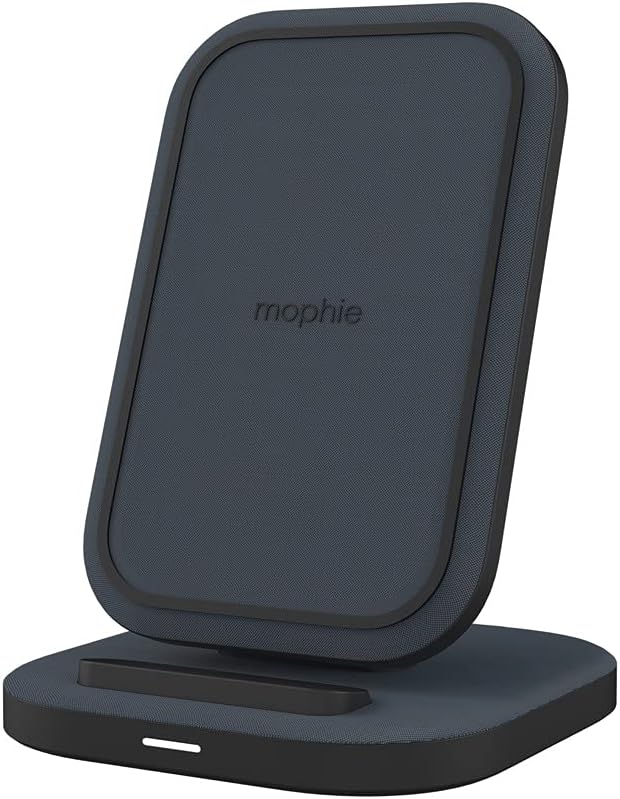
Image: The Mophie Universal Wireless Charging Stand with its power adapter and quick-start guide.
Awọn ilana iṣeto
- So ohun ti nmu badọgba agbara: Insert the small end of the provided 1.5M wall adapter cable into the power input port on the back of the charging stand.
- So sinu Agbara: Plug the wall adapter into a suitable electrical outlet.
- Ibi: Place the charging stand on a flat, stable surface, such as a desk or nightstand. Ensure there is adequate ventilation around the stand.
Image: The Mophie Wireless Charging Stand ready for use, showing the power cable connected.
Awọn ilana Iṣiṣẹ
The Mophie Universal Wireless Charging Stand is designed for simple operation.
- Gbe Ẹrọ Rẹ: Position your Qi-enabled smartphone directly onto the charging surface of the stand. The phone can be placed in either portrait or landscape orientation.
- Ṣayẹwo gbigba agbara: Your device should indicate that it is charging. The stand is equipped with an LED indicator (if present, typically a small light on the base) that illuminates to confirm charging.
- Ibamu ọran: The stand can charge through lightweight phone cases up to 3mm thick. For optimal charging performance, remove thicker cases or cases containing metal.

Image: A smartphone placed vertically on the Mophie charging stand, indicating active charging.

Image: A smartphone placed horizontally on the Mophie charging stand, indicating active charging.
The stand features 15W sare gbigba agbara alailowaya, optimized for compatible Apple and Samsung devices, ensuring quick power delivery.
Itoju
- Ninu: Disconnect the power adapter before cleaning. Use a soft, dry, lint-free cloth to wipe the surface of the charging stand. Do not use abrasive cleaners, solvents, or aerosol sprays.
- Ibi ipamọ: Nigbati o ko ba wa ni lilo fun awọn akoko ti o gbooro sii, tọju imurasilẹ gbigba agbara ni ibi ti o tutu, ibi gbigbẹ kuro lati orun taara ati awọn iwọn otutu to gaju.
- Yago fun Olomi: Jeki gbigba agbara duro kuro lati omi ati awọn olomi miiran.

Aworan: A alaye view of the premium fabric finish on the Mophie charging stand.
Laasigbotitusita
If you encounter issues with your Mophie Universal Wireless Charging Stand, refer to the following common problems and solutions:
| Isoro | Owun to le Fa | Ojutu |
|---|---|---|
| Ẹrọ kii ṣe gbigba agbara tabi gbigba agbara laiyara. |
|
|
| LED indicator is blinking. |
|
|
| Stand feels warm during charging. | Iṣiṣẹ deede. | A slight warmth during wireless charging is normal. If it becomes excessively hot, discontinue use and contact support. |
The Mophie charging stand includes built-in overcharge Idaabobo ati ajeji ohun erin lati rii daju iṣẹ ailewu.
Awọn pato
| Nọmba awoṣe | 401305903 |
| Brand | Mophie |
| Asopọmọra Technology | Wireless (Qi-compatible) |
| Agbara Ijade | Up to 15W Fast Charging |
| Ibamu ti ọran naa | Charges through lightweight cases up to 3mm thick |
| Iṣagbewọle Voltage | 230 Volts (via included wall adapter) |
| Ampigba | 0.07 Amps |
| Àwọ̀ | Dudu |
| Iwọn Nkan | 14 iwon (nipa 397 giramu) |
| Package Mefa | 7.95 x 4.33 x 3.19 inches |
| USB Ipari | Approx. 1.5 meters (wall adapter cable) |
| Awọn ẹrọ ibaramu | Qi-enabled smartphones including Apple iPhone (11, 12, 13, 14, 15 series, etc.), Samsung Galaxy (S22, S23 series, etc.), Google Pixel (7, 8 series, etc.). |
Alaye atilẹyin ọja
Specific warranty details for the Mophie Universal Wireless Charging Stand are typically provided with the product packaging or available on the official Mophie webojula. Jọwọ tọka si iwe ti o wa pẹlu rira tabi ṣabẹwo rẹ mophie.com/support for the most current warranty terms and conditions.
Onibara Support
For further assistance, technical support, or to inquire about replacement parts, please contact Mophie customer service through their official webojula:
- Webojula: mophie.com/support
- Refer to the Quick-Start Guide for any additional contact information.