
Ọrọ Iṣaaju
The Ambition Ninja Pro is a high-performance wireless rotary tattoo machine designed for professional and beginner tattoo artists. It features a custom coreless motor, a 2000mAh battery, and a 4.0mm stroke length, offering precision and durability. This manual provides essential information for the safe and effective use of your tattoo machine.
Package Awọn akoonu
Daju pe gbogbo awọn nkan ti a ṣe akojọ rẹ si isalẹ wa ninu package rẹ:
- 1x Ambition Battery Tattoo Pen
- 1x RCA Adapter
- 1x Batiri afikun
- 1x Extra 4.0mm Stroke Cam
- 1x Okun gbigba agbara
- 1x Apoti ipamọ
This video demonstrates the unboxing and initial components of the Ambition Ninja Pro Wireless Tattoo Machine kit.
Ṣeto
Ngba agbara si Batiri naa
The Ambition Ninja Pro features a 2000mAh battery. Before first use, fully charge the battery.
- Connect the provided charging cable to the machine's charging port.
- Use a 5V/2A charging adapter (not included, but recommended to be original).
- Akoko gbigba agbara jẹ isunmọ awọn wakati 2-2.5.
- The battery screen will display the charging status.
Important: Do not completely drain the battery before charging, as this can damage the battery.
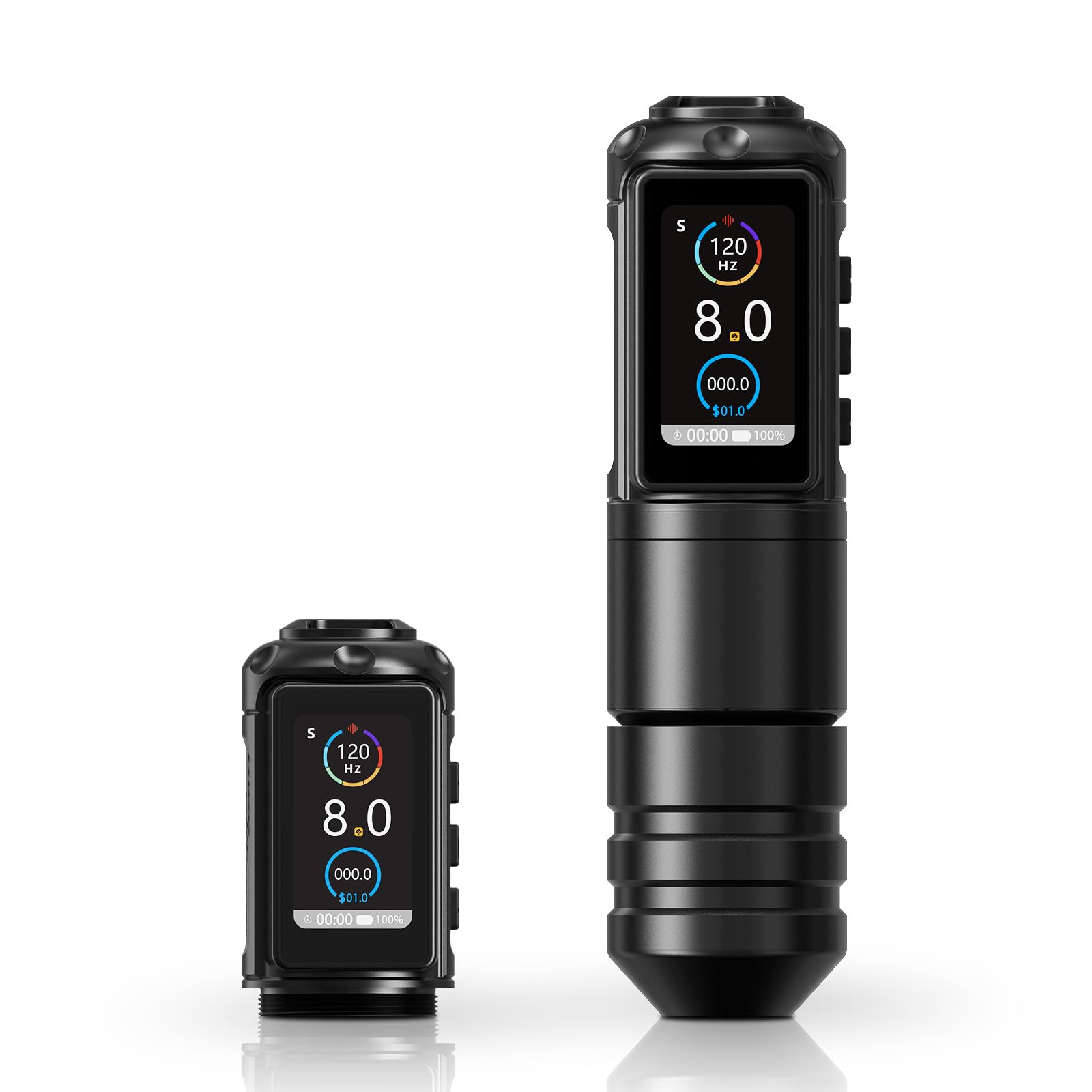
Image showing the Ambition Ninja Pro Tattoo Machine with its integrated battery display, indicating voltage ati ipele idiyele.
Attaching the Needle Cartridge
Ensure the machine is turned off before attaching or detaching needle cartridges.
- Gently push the needle cartridge into the machine's front opening until it clicks into place.
- To adjust needle depth, rotate the grip of the machine.

A sunmọ-soke view of the Ambition Ninja Pro Tattoo Machine demonstrating the insertion of a needle cartridge.
Switching to Wired Operation (RCA Adapter)
If the battery runs out or for preference, the machine can be used with an RCA adapter.
- Unscrew the battery pack from the machine body.
- Screw the RCA adapter onto the machine body.
- Connect a standard RCA cable from your power supply to the adapter.

Image illustrating the flexibility of the Ambition Ninja Pro, showcasing both its wireless battery pack and the option to connect via an RCA adapter for wired operation.
Awọn ilana Iṣiṣẹ
Titan / Paa
- Press and hold the power button (usually the center button) for a few seconds to turn the machine on or off.
Voltage Atunṣe
- Use the "+" and "-" buttons to increase or decrease the voltage. Iwọn naatage ibiti o jẹ 1V-12V.
- Awọn àpapọ yoo fi awọn ti isiyi voltage.

The display of the Ambition Ninja Pro, showing the current voltage (8.0V) and Hertz (120 Hz) settings.
Oye Ifihan naa
The battery screen displays:
- Voltage (V)
- Remaining Charge (%)
- Hertz (Hz)
- Ṣiṣe Aago
- Billing Information (if applicable)
This video demonstrates the operation of the Ambition Ninja Pro, including power on, voltage adjustment, and needle movement.
Itoju
Ninu
- Always disconnect the power source (battery or RCA cable) before cleaning.
- Wipe the machine body with a soft, damp cloth and a mild disinfectant.
- Má ṣe fi omi rì ẹ̀rọ náà.
- Ensure no liquids enter the motor or electronic components.
Ibi ipamọ
- Store the machine in its original case or a clean, dry environment.
- Yago fun awọn iwọn otutu to gaju ati imọlẹ orun taara.
Itọju Batiri
- For optimal battery life, avoid fully discharging the battery regularly.
- Charge the battery using the provided cable and a compatible 5V/2A adapter.
Laasigbotitusita
Ẹrọ Ko Titan
- Ṣàyẹ̀wò ipele agbara batiri. Tun agbara pada ti o ba jẹ dandan.
- Ensure the battery pack is securely attached.
- If using the RCA adapter, verify the power supply and cable connections.
Inconsistent Needle Movement
- Ensure the needle cartridge is correctly seated and not damaged.
- Check for any debris obstructing the needle bar.
- Jẹrisi voltage setting is appropriate for the needle and task.
Batiri Sisan Ni kiakia
- Ensure the battery is fully charged before use (2-2.5 hours).
- Operating at higher voltages will consume battery faster.
- Battery life is approximately 5-6 hours under normal 8V operation.
- If issues persist, consider using the RCA adapter for continuous power.
Note: One user reported difficulty with battery replacement due to the machine's design, where the battery part does not unscrew easily. If you encounter this, contact customer support.
Awọn pato
| Ẹya ara ẹrọ | Ẹ̀kúnrẹ́rẹ́ |
|---|---|
| Ohun elo | Space Aluminum Alloy |
| Mọto | Custom Coreless Motor |
| Iyara mọto | 8V - 9000RPM (up to 12V - 11500RPM) |
| Agbara Batiri | 2000mAh |
| Akoko gbigba agbara | Isunmọ. 2-2.5 wakati |
| Akoko isẹ | 5-6 hours (at 8V stable voltage) |
| O wujade Voltage | 1V-12V |
| Needle Stroke | 4.0mm |
| Ọja Mefa | 7.48 x 5.1 x 2.3 inches |
| Iwọn Nkan | 15.68 iwon |
| Iye gbigbọn | 1.5m/s² |
| Decibels | 55-57dB |

Detailed specifications for the Ambition Ninja Pro Tattoo Machine, including weight, size, voltage range, battery capacity, and motor details.

Information highlighting the coreless motor of the Ambition Ninja Pro, detailing its speed, size, and torque.

Visual representation of the Ambition Ninja Pro's battery charging time and operational battery life.
Atilẹyin ọja ati Support
This product comes with a return policy of 30 days for refund or replacement. For further support or warranty claims, please contact Ambition Tattoo Equipment directly.
Ṣabẹwo si osise naa Ambition Store on Amazon for more information and to browse other products.
Caution: For external use only. Avoid contact with eyes. Keep away from naked flame.