
1. Ifihan
Thank you for choosing the A4tech FG1112 Fstyler Wireless Keyboard and Mouse Set. This compact and efficient combo provides a reliable 2.4GHz wireless connection, offering convenience and comfort for your daily computing needs. The keyboard features a Q Turkish layout with FN multimedia keys, while the mouse offers precise 1200 DPI optical tracking. This manual will guide you through the setup, operation, and maintenance of your new device.
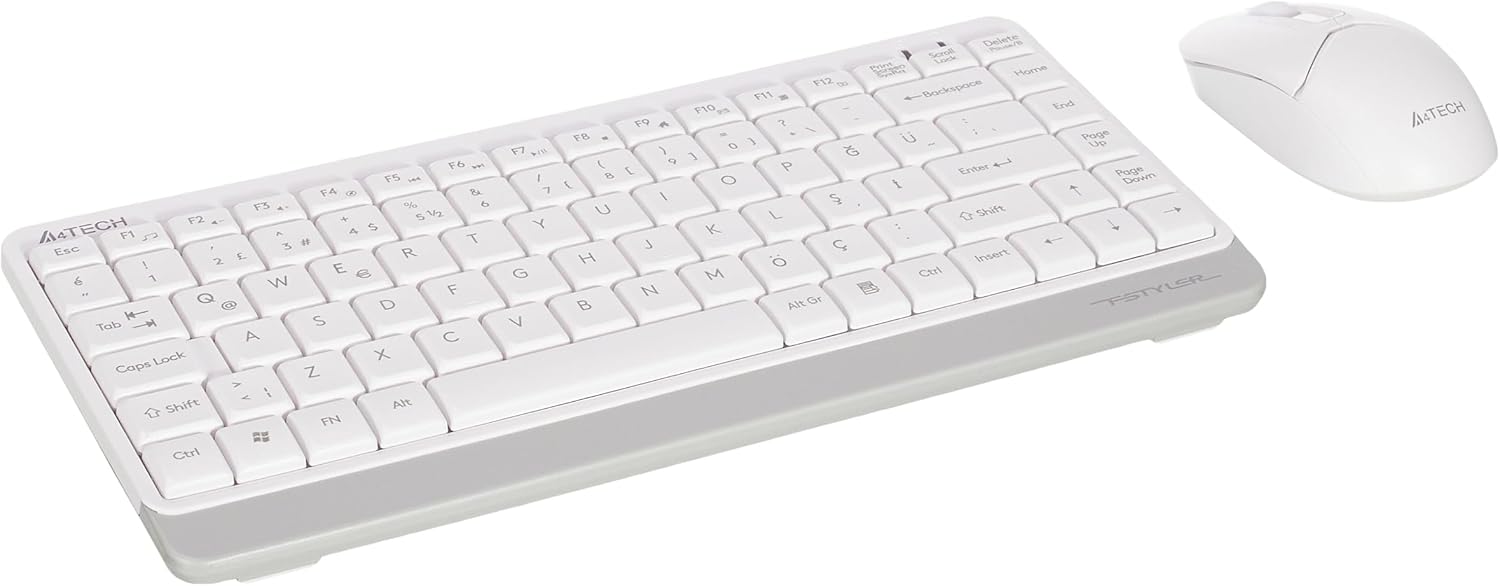
Image 1.1: A4tech FG1112 Fstyler Wireless Keyboard and Mouse Set (White)
2. Package Awọn akoonu
Jọwọ ṣayẹwo awọn akoonu package lati rii daju pe gbogbo awọn ohun kan wa:
- 1 x A4tech FG1112 Wireless Keyboard
- 1 x A4tech Fstyler Wireless Mouse
- 1 x USB Nano olugba
- 2 x Awọn batiri AAA (fun keyboard)
- 1 x AA Battery (for mouse, typically included)
- 1 x Itọsọna olumulo (iwe yii)
3. Awọn ilana iṣeto
- Fi awọn batiri sii:
- For the keyboard: Open the battery compartment cover on the underside of the keyboard. Insert two AAA batteries, ensuring correct polarity (+/-). Close the cover.
- For the mouse: Open the battery compartment cover on the underside of the mouse. Insert one AA battery, ensuring correct polarity (+/-). Close the cover.

Image 3.1: Mouse bottom view showing battery compartment and power switch.
- So Olugba Nano USB pọ: Locate the USB Nano Receiver, typically stored inside the mouse's battery compartment or packaged separately. Plug the receiver into an available USB port on your computer.
- Agbara Tan:
- For the keyboard: Ensure the keyboard is powered on. There might be a power switch on the top right or underside.
- For the mouse: Slide the power switch on the underside of the mouse to the "ON" position.
- Asopọmọra Aifọwọyi: Your computer should automatically detect and install the necessary drivers for the keyboard and mouse. This process may take a few moments. Once complete, your devices are ready for use.
Video 3.1: A short demonstration of the A4tech Fstyler Wireless Keyboard and Mouse Set, showing its compact design and wireless connectivity. This video illustrates the product's features and ease of use.
4. Awọn ilana Iṣiṣẹ
4.1 Keyboard Lilo
The A4tech FG1112 keyboard features a compact design with a Q Turkish layout. It is designed for comfortable and quiet typing.

Aworan 4.1: Oke view of the A4tech FG1112 Wireless Keyboard, highlighting its Q Turkish layout.
Àwọn bọtini Multimedia àti Iṣẹ́:
The keyboard includes 12 multimedia and internet function keys integrated into the F1-F12 keys. To activate these functions, press the FN bọtini ni nigbakannaa pẹlu F-bọtini ti o fẹ.
- FN + F1: Media Player
- FN + F2: Iwọn didun isalẹ
- FN + F3: Iwọn didun Up
- FN + F4: Dakẹ
- FN + F5: Ti tẹlẹ Track
- FN + F6: Next Track
- FN + F7: Ṣiṣẹ / Sinmi
- FN + F8: Duro
- FN + F9: Home Page
- FN + F10: Imeeli
- FN + F11: Kọmputa mi
- FN + F12: Ẹrọ iṣiro

Image 4.2: Illustration of FN key functionality for multimedia controls.
4.2 Asin Lilo
The A4tech Fstyler mouse provides precise 1200 DPI optical tracking for smooth and accurate cursor movement.

Aworan 4.3: Oke view of the A4tech Fstyler Wireless Mouse.
Awọn iṣẹ ipilẹ:
- Tẹ osi: Primary function, used for selecting items, opening files, ati bẹbẹ lọ.
- Tẹ-ọtun: Secondary function, typically opens context menus.
- Yi lọ Kẹkẹ: A lo fun awọn iwe aṣẹ lilọ kiri ati web pages vertically. Can also function as a middle click button.
5. Itọju
- Ninu: Lo asọ asọ ti o gbẹ lati nu keyboard ati Asin. Fun idoti alagidi, die-die damp cloth can be used, but ensure no liquid enters the devices.
- Rirọpo Batiri: When the keyboard or mouse becomes unresponsive or exhibits delayed input, it's time to replace the batteries. Follow the "Insert Batteries" steps in the Setup section.
- Ibi ipamọ: When not in use for extended periods, turn off the mouse to conserve battery life. Store the devices in a cool, dry place.
6. Laasigbotitusita
| Isoro | Owun to le Solusan |
|---|---|
| Keyboard/Asin ko dahun |
|
| Delayed or intermittent response |
|
| Awọn bọtini multimedia ko ṣiṣẹ |
|
7. Awọn pato
| Ẹya ara ẹrọ | Ẹ̀kúnrẹ́rẹ́ |
|---|---|
| Brand | A4tech |
| Awoṣe | FG1112 |
| Asopọmọra Technology | Alailowaya 2.4GHz |
| Ifilelẹ bọtini itẹwe | Q Turkish |
| Keyboard Iru | Multimedia Membrane |
| Asin DPI | 1200 DPI Optical |
| Orísun Agbára Kííbọọ̀dù | 2 x AAA batiri |
| Orísun Agbára Asin | 1 x AA Battery (typical) |
| Pataki Awọn ẹya ara ẹrọ | Wireless, Mini, Multimedia Keys, Optical Mouse, Laser Printed Keys, Water-resistant design (with drainage channels) |
| Iwọn Ọja | 0.62 Kilograms (Set) |
| Awọn iwọn (Atẹbọtini) | Approx. 315mm (Width) x 146mm (Depth) x 25mm (Height) |
| Awọn iwọn (Asin) | Approx. 64mm (Width) x 108mm (Depth) x 35mm (Height) |

Image 7.1: Dimensions of the A4tech FG1112 Keyboard and Mouse.
8. Atilẹyin ọja ati Support
This A4tech FG1112 Fstyler Wireless Keyboard and Mouse Set comes with a 2-odun atilẹyin ọja lati ọjọ ti o ra. Jọwọ ṣe idaduro ẹri rira rẹ fun awọn iṣeduro atilẹyin ọja.
For technical support, troubleshooting assistance, or warranty inquiries, please contact A4tech customer service through their official webojula tabi agbegbe rẹ olupin.
O le wa alaye diẹ sii ati awọn orisun atilẹyin lori awọn A4tech Store on Amazon.