
GP E211
GP ReCyko USB Charger User Manual
Awoṣe: E211
1. Ifihan
Thank you for choosing the GP ReCyko USB Charger. This manual provides essential information for the safe and efficient operation of your charger and rechargeable batteries. Please read it thoroughly before use and retain it for future reference.
The GP ReCyko E211 USB Charger is designed to provide a simple, reliable, and safe method for charging NiMH AA and AAA rechargeable batteries. Its compact design makes it suitable for use at home, in the office, or while traveling.
2. Alaye Aabo
To ensure safe operation, always follow these precautions:
- Use only NiMH rechargeable batteries with this charger. Do not attempt to charge alkaline, carbon-zinc, or other types of batteries, as this may lead to leakage, rupture, or explosion.
- Ma ṣe fi ṣaja han si ojo, ọrinrin, tabi awọn iwọn otutu to gaju.
- Má ṣe tú charger náà ká tàbí yí i padà. Tọ́ka gbogbo iṣẹ́ ìtọ́jú náà sí àwọn òṣìṣẹ́ tó mọ̀ nípa rẹ̀.
- Jeki ṣaja ati awọn batiri kuro ni arọwọto awọn ọmọde ati awọn ohun ọsin.
- Ensure proper polarity when inserting batteries into the charger.
- Yọ ṣaja kuro lati orisun agbara nigbati o ko ba lo tabi ṣaaju ki o to nu.
- Do not cover the charger during operation to prevent overheating.
- If a battery becomes excessively hot during charging, discontinue charging immediately and remove the battery carefully.
3. Package Awọn akoonu
Daju pe gbogbo awọn nkan wa ninu apo rẹ:
- 1 x GP ReCyko USB Charger (Model E211)
- 2 x GP ReCyko 800mAh AAA NiMH Rechargeable Batteries
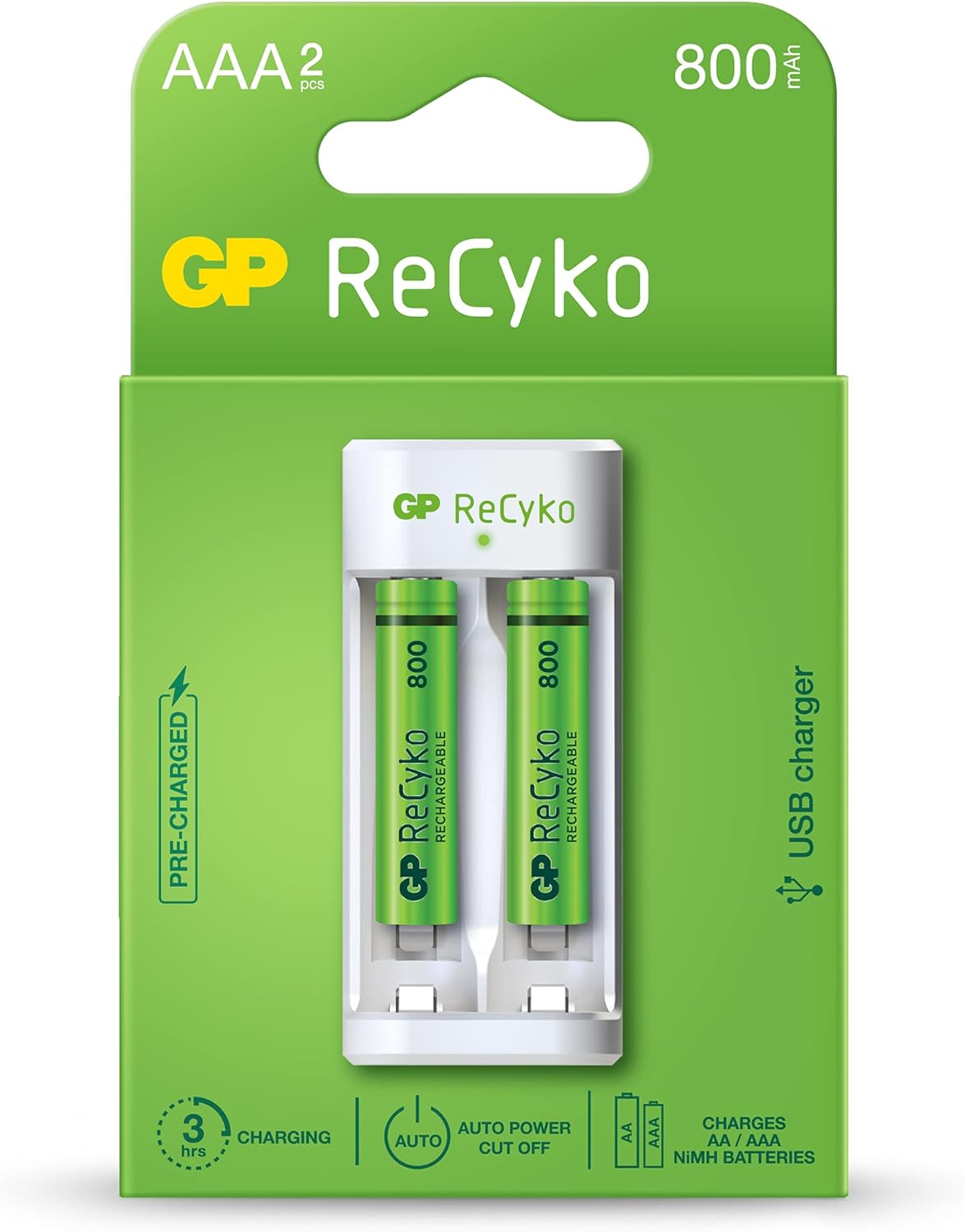
Image: The GP ReCyko USB Charger and two 800mAh AAA rechargeable batteries, displayed in their retail packaging. The packaging highlights features such as "PRE-CHARGED", "3 hrs CHARGING", "AUTO POWER CUT OFF", and "CHARGES AA / AAA NiMH BATTERIES".
4. Setup and Charging Instructions
- Fi awọn batiri sii: Open the battery compartment of the charger. Insert 1 or 2 AA or AAA NiMH rechargeable batteries into the charging slots, ensuring correct polarity (+ and - ends match the markings inside the charger).

Aworan: A sunmọ-soke view of the GP ReCyko USB Charger with two green GP ReCyko 800mAh AAA batteries correctly inserted into their respective charging slots. The charger's white casing and the green batteries are clearly visible.
- Sopọ si Agbara: Plug the USB connector of the charger into a compatible USB power source (e.g., computer USB port, USB wall adapter, power bank). The charger requires a standard USB 5V input.
- Atọka gbigba agbara: The charger features an LED indicator for each charging slot.
- Ri to LED: Tọkasi pe batiri n gba agbara.
- LED didan: Indicates a malfunctioning battery, an alkaline battery, or a bad battery has been detected. Remove the battery immediately.
- LED Paa: Indicates charging is complete, or no battery is inserted, or the charger is not connected to power.
- Ipari gbigba agbara: The charger is equipped with -DV and timer power cut-off features to prevent overcharging and overheating, optimizing battery lifespan. Once charging is complete, the LED indicator will turn off.
- Yọ awọn batiri kuro: Once charging is complete, unplug the charger from the USB power source and remove the charged batteries.
5. Operating Times
Approximate charging times for various battery capacities:
| Batiri Iru | Agbara | Akoko Gbigba agbara isunmọ |
|---|---|---|
| AA NiMH | 1300mAh | 5-6 wakati |
| AA NiMH | 2100mAh | wakati meji 8 |
| AAA NiMH | 650mAh | 2.5-3 wakati |
| AAA NiMH | 800mAh | wakati meji 3 |
| Highest Capacity AA NiMH | 2600mAh | (Charging time will be longer than 2100mAh) |
| Highest Capacity AAA NiMH | 950mAh | (Charging time will be longer than 800mAh) |
Note: Charging times are approximate and may vary based on battery condition, capacity, and power source.
6. Itọju ati Ipamọ
- Ninu: Yọ ṣaja kuro ninu orisun agbara ṣaaju ki o to nu. Lo aṣọ rirọ ati gbigbẹ lati nu oju ṣaja naa. Maṣe lo awọn ohun elo fifọ tabi awọn ohun elo olomi.
- Ibi ipamọ: Tọ́jú charger àti bátìrì sí ibi gbígbẹ tí ó tutù tí ó sì jìnnà sí oòrùn tààrà àti ooru tí ó le koko.
- Itọju Batiri: For optimal battery life, it is recommended to fully discharge NiMH batteries periodically before recharging.
7. Laasigbotitusita
| Isoro | Owun to le Fa | Ojutu |
|---|---|---|
| Atọka LED n tan. | Malfunctioning battery, alkaline battery, or bad battery detected. | Remove the battery immediately. Ensure you are only using NiMH rechargeable batteries. Try a different battery. |
| No LED indicator when batteries are inserted and charger is plugged in. | Charger not receiving power, batteries not inserted correctly, or batteries are already fully charged. | Check USB connection. Ensure batteries are inserted with correct polarity. If batteries are fully charged, the LED will be off. |
| Batteries are not charging or charging slowly. | Low power USB source, faulty USB cable, or very old/damaged batteries. | Try a different USB port or a higher-power USB adapter. Use a different USB cable. Replace old or damaged batteries. |
8. Awọn pato
| Ẹya ara ẹrọ | Ẹ̀kúnrẹ́rẹ́ |
|---|---|
| Brand | GP |
| Orukọ awoṣe | ReCyko E211 |
| Olupese | Awọn batiri GP |
| Ibamu Batiri Orisi | NiMH AA / AAA |
| Nọmba ti gbigba agbara Iho | 2 (Single channel charging system) |
| Iṣagbewọle Voltage | USB 5V |
| Ijade lọwọlọwọ | 2 Amps (Charger output rating) |
| Aabo Awọn ẹya ara ẹrọ | -DV & timer power cut-off, Malfunctioning/Alkaline/Bad battery detection |
| Ọja Mefa | 4 x 3 x 9 cm |
| Iwọn Nkan | 100 g (Charger only) / 0.1 Kilograms (Total package weight) |
9. Atilẹyin ọja ati Support
For warranty information and technical support, please refer to the official GP Batteries webaaye tabi kan si olupin agbegbe rẹ. Jeki ẹri rira rẹ fun awọn iṣeduro atilẹyin ọja.
Osise Webojula: www.gpbattery.com
Ask a question about this manual
Ask about setup, troubleshooting, compatibility, parts, safety, or missing instructions. Manuals+ will review the question and use this page’s manual context to help answer it.