
1. Ifihan
This instruction manual provides essential information for the proper installation and function of your new Silvercrest 7-tooth coupling gears. These are original replacement parts designed specifically for the Monsieur Cuisine Edition Plus food processor. Please read this manual carefully before installation to ensure correct usage and to maintain the performance of your appliance.
2. Ọja Ipariview
The coupling gear is a critical component that facilitates the rotation of the chopping knife within your Monsieur Cuisine Edition Plus food processor. This package contains two (2) original Silvercrest 7-tooth coupling gears, ensuring you have a spare or can replace both if needed.

Aworan 2.1: Oke view of the two 7-tooth coupling gears.
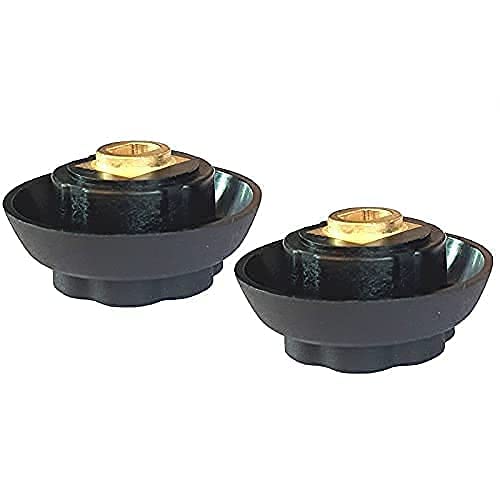
Aworan 2.2: Isalẹ view of the two 7-tooth coupling gears, showing the shaft mechanism.
3. Ibamu
These coupling gears are specifically designed for the following Monsieur Cuisine Edition Plus models:
- SKMK 1200 C2
- SKMK 1200 C3
- SKMK 1200 D4
- SKMK 1200 E5

Image 3.1: Visual representation of the coupling gear's location within the Monsieur Cuisine Edition Plus and compatible models.
4. fifi sori
Follow these steps to correctly install the 7-tooth coupling gear into your Monsieur Cuisine Edition Plus food processor:
- Igbaradi: Ensure your Monsieur Cuisine Edition Plus appliance is unplugged from the power outlet and completely cooled down. Remove the mixing bowl and any other accessories to access the coupling mechanism.
- Remove Old Gear (if applicable): If replacing an existing gear, carefully remove the old or damaged coupling gear from its housing.
- Insert New Gear: Align the new 7-tooth coupling gear with the opening in the appliance's base. Gently press the gear down into the slot.
- Secure the Gear: Continue to press firmly until you hear an audible 'click' sound. This indicates that the gear is securely seated and locked into place.
- Jẹrisi fifi sori ẹrọ: Gently try to pull the gear upwards. If it remains firmly in place, the installation is successful.

Image 4.1: Step-by-step illustration of inserting the coupling gear into the appliance.

Image 4.2: Illustration showing the coupling gear fully engaged, indicated by a 'clic'.
5. Ṣiṣẹ
Once installed, the coupling gear works automatically when the Monsieur Cuisine Edition Plus is in operation. It transmits power from the motor to the chopping knife, ensuring efficient mixing and processing of ingredients. No specific user interaction is required for the coupling gear itself during operation.
6. Itọju
To ensure the longevity and proper function of your coupling gear:
- Ninu: After each use, ensure the area around the coupling gear is free from food debris. Use a damp cloth to wipe clean. Do not immerse the appliance base in water.
- Ayewo: Periodically inspect the gear for any signs of wear, cracks, or damage. If damage is observed, replace the gear immediately to prevent further issues with your appliance.
- Ibi ipamọ: Tọju ohun elo naa ni ibi ti o mọ, ibi gbigbẹ nigbati ko si ni lilo.
7. Laasigbotitusita
If you encounter issues with the coupling gear:
- Gear Not Engaging: Ensure the gear is fully pressed down and you hear the 'click' during installation. Check for any obstructions in the slot.
- Chopping Knife Not Rotating: If the motor runs but the knife does not rotate, the coupling gear may be worn or damaged. Inspect the gear for stripped teeth or cracks. If damaged, replace it.
- Ariwo Dani: A grinding or unusual noise during operation might indicate a worn or improperly seated coupling gear. Discontinue use, inspect, and replace if necessary.
8. Awọn pato
| Iwa | Ẹ̀kúnrẹ́rẹ́ |
|---|---|
| Brand | Silvercrest |
| Olupese | HOYER Handel GmbH |
| Awọn awoṣe ibaramu | Monsieur Cuisine Edition Plus (SKMK 1200 C2, C3, D4, E5) |
| Nọmba ti Awọn nkan | 2 |
| Package Mefa | 10.5 x 7.1 x 2.4 cm |
| Iwọn Nkan | 30 giramu |
| Awọn batiri ti a beere / to wa | Rara |
9. Atilẹyin ọja ati Support
As an original Silvercrest part, this coupling gear is designed for durability and performance. For specific warranty information or further support regarding your Monsieur Cuisine Edition Plus appliance, please refer to the original appliance's user manual or contact Silvercrest customer service directly. Information regarding spare parts availability for this specific component is not provided.

Image 9.1: Silvercrest brand logo.


