
Ọrọ Iṣaaju
This manual provides comprehensive instructions for the safe and efficient operation, installation, and maintenance of your Candy CS4 1172DE/1-S washing machine. Please read this manual carefully before using the appliance and keep it for future reference.

Aworan: Iwaju view of the Candy CS4 1172DE/1-S washing machine, showing the control panel, detergent drawer, and large front-loading door.
Alaye Aabo pataki
Nigbagbogbo tẹle awọn iṣọra aabo ipilẹ nigba lilo awọn ohun elo itanna lati dinku eewu ina, mọnamọna, ati ipalara si eniyan.
- Rii daju pe ohun elo ti wa ni ilẹ daradara.
- Ma ṣe gba awọn ọmọde laaye lati ṣere lori tabi ninu ohun elo naa.
- Yọọ ohun elo ṣaaju ṣiṣe mimọ tabi ṣiṣe itọju.
- Maṣe fi sori ẹrọ tabi tọju ohun elo naa nibiti yoo ti farahan si oju ojo.
Eto ati fifi sori
Ṣiṣi silẹ
Fi ìṣọ́ra yọ gbogbo ohun èlò ìdìpọ̀ kúrò. Ṣe àyẹ̀wò ohun èlò náà fún ìbàjẹ́ èyíkéyìí. Pa àwọn ohun èlò ìdìpọ̀ mọ́ kúrò lọ́wọ́ àwọn ọmọdé.
Yiyọ Transit Bolts
Before using the washing machine, it is essential to remove all transit bolts located at the rear of the appliance. Failure to do so will cause damage during operation.
- Locate the transit bolts on the back of the machine.
- Lo wrench lati tú ati yọọ boluti kọọkan kuro.
- Insert the plastic caps provided into the holes.
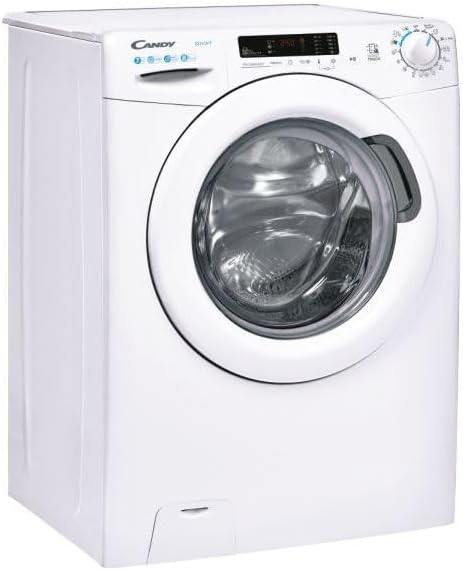
Aworan: Apa view of the Candy CS4 1172DE/1-S washing machine, showing its compact design.
Ipo ati Ipele
Place the washing machine on a firm, level floor. Adjust the leveling feet to ensure the appliance is stable and does not wobble.
Omi ati Itanna Awọn isopọ
Connect the water inlet hose to a cold water tap. Ensure the drain hose is properly installed into a standpipe or sink. Plug the power cord into a grounded electrical outlet.
Awọn ilana Iṣiṣẹ
Ibi iwaju alabujutoview
The control panel features a program selector dial, a digital display, and various function buttons.

Aworan: Angled view of the Candy CS4 1172DE/1-S washing machine, highlighting the control panel and detergent drawer.
ikojọpọ ifọṣọ
Open the door and load laundry, ensuring not to overload the drum. Close the door firmly.
Fifi Detergent
Pull out the detergent drawer and add the appropriate amount of detergent and fabric softener to the designated compartments.
Yiyan Eto kan
Turn the program selector dial to choose the desired wash program based on fabric type and soil level.
Bibẹrẹ ọmọ Wẹ
Press the Start/Pause button to begin the selected wash program.
Itọju ati Cleaning
Ninu Drawer Detergent
Regularly clean the detergent drawer to prevent residue buildup. Remove the drawer and rinse it under running water.
Ninu ilu
Run a maintenance wash cycle (e.g., a hot wash with no laundry and a descaling agent) periodically to clean the drum and remove odors.
Ninu Ajọ Imugbẹ
The drain filter should be cleaned regularly to ensure proper drainage and prevent blockages.
- Open the filter cover at the bottom front of the machine.
- Fi ohun èlò kékeré kan sí i láti kó omi tó kù jọ.
- Unscrew the filter counter-clockwise and remove it.
- Nu àlẹmọ labẹ omi ṣiṣan ki o yọ eyikeyi idoti kuro.
- Reinsert the filter and screw it clockwise until tight. Close the cover.
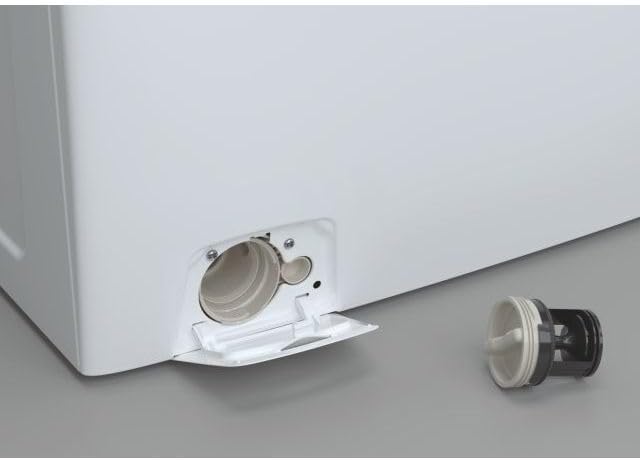
Aworan: Isunmọ view of the washing machine's drain filter compartment, showing the filter removed for cleaning.
Care for the Door Seal
Wipe the door seal after each wash to prevent mold and mildew buildup.
Laasigbotitusita
Ṣaaju ki o to kan si iṣẹ, tọka si tabili atẹle fun awọn ọran ti o wọpọ ati awọn ojutu wọn.
| Isoro | Owun to le Fa | Ojutu |
|---|---|---|
| Ẹrọ ko bẹrẹ | Ko si agbara; Ilekun ko tii; Eto ko yan. | Ṣayẹwo ipese agbara; Rii daju pe ilẹkun ti wa ni pipade ṣinṣin; Yan eto kan ki o tẹ Bẹrẹ. |
| Omi ko kun | Omi tẹ ni pipade; Inlet okun kikan; Omi titẹ ju kekere. | Ṣii omi tẹ ni kia kia; Titọ okun; Ṣayẹwo titẹ omi inu ile. |
| Ẹrọ gbigbọn pupọ | Awọn boluti irekọja ko yọ kuro; Ẹrọ kii ṣe ipele; Aiṣedeede fifuye. | Yọ awọn boluti irekọja; Ṣe atunṣe awọn ẹsẹ ipele; Tun pin ifọṣọ. |
| Omi ti ko ṣan | Drain hose kinked; Drain filter blocked; Pump fault. | Straighten hose; Clean drain filter; Contact service if problem persists. |
Imọ ni pato
Below are the key technical specifications for the Candy CS4 1172DE/1-S washing machine.
- Brand: Suwiti
- Awoṣe: CS4 1172DE/1-S
- Agbara: 7 kilo
- Iyara Yiyi to pọju: 1100 RPM
- Kilasi Iṣiṣẹ Agbara: D
- Lilo Agbara Ọdọọdun: Awọn wakati kilowatt 69
- Ipele Ariwo (Iyiyi): 79 dB
- Iru fifi sori ẹrọ: Sisun
- Ibi Wiwọle: Iwaju-ikojọpọ
- Awọn iwọn Ọja (LxWxH): 50 x 50 x 28 cm (Note: The provided dimensions seem unusually small for a washing machine. Standard dimensions are typically around 60x60x85 cm. Please refer to the product label for exact dimensions.)
- Ìwúwo: 61 kg
- Voltage: 220 Volts
- Àwọ̀: Funfun

Image: Energy label for the Candy CS4 1172DE/1-S washing machine, detailing energy efficiency, capacity, and noise levels.
Atilẹyin ọja ati Support
This product comes with a manufacturer's warranty. For detailed warranty terms and conditions, please refer to the warranty card included with your appliance or visit the official Candy webojula.
For technical assistance, spare parts, or to schedule a service appointment, please contact Candy customer support. Have your model number (CS4 1172DE/1-S) and serial number ready when contacting support.
Olupese: Suwiti
Minimum guarantee offered by the provider: 24 osu
Alaye lori ayelujara: For more information, including the product information sheet, you can visit the supplier's website. A link to the information provided by the supplier can be found at https://corporate.haier-europe.com/en/.