
1. Alaye Aabo
Jọwọ ka gbogbo awọn itọnisọna ni pẹkipẹki ṣaaju lilo ohun elo yii ati idaduro fun itọkasi ọjọ iwaju. Ikuna lati tẹle awọn ilana wọnyi le ja si mọnamọna, ina, tabi ipalara nla.
- Nigbagbogbo yọọ fanimọra kuro ni iṣan agbara ṣaaju ṣiṣe mimọ, ṣiṣe, tabi gbigbe.
- Do not operate the fan with a damaged cord or plug. If the cord or plug is damaged, contact customer service for repair or replacement.
- This fan is intended for indoor use only. Do not use outdoors or in wet locations.
- Keep the fan away from water and other liquids. Do not immerse the fan in water.
- Rii daju pe a gbe afẹfẹ naa sori iduro, dada alapin lati ṣe idiwọ fun u lati tipping lori.
- Pa awọn ọmọde ati awọn ohun ọsin kuro lati inu afẹfẹ nigba iṣẹ.
- Do not insert fingers or any objects into the grille when the fan is operating.
- Do not block air openings or operate near curtains, drapes, or other objects that could block airflow.
- Do not use the fan in areas where flammable liquids or gases are stored.
2. Ọja Ipariview
The Amazon Basics 40" 70-Degree Oscillating Digital Tower Fan is designed to provide efficient and customizable cooling for various indoor spaces. It features a sleek, compact design and user-friendly controls.
Awọn eroja
- Tower Fan Unit
- Base (requires assembly)
- Isakoṣo latọna jijin
Key Awọn ẹya ara ẹrọ
- Itutu ti o munadoko: Delivers powerful airflow for effective cooling in enclosed spaces.
- Awọn iyara isọdi: Four intuitive speed settings to adjust airflow.
- Awọn ọna pupọ: Includes Standard, Breeze, and Nature modes for varied airflow patterns.
- Oscillation: 70-degree oscillation for wide-range air flow coverage.
- Iṣẹ Aago: Programmable timer up to 15 hours for energy saving and convenience.
- Isakoṣo latọna jijin: Convenient remote for adjusting settings from a distance.
- Awọn iṣakoso oni-nọmba: Easy-to-use digital control panel located on the top of the fan.
- Apẹrẹ Iwapọ: Slim tower design (11.4"D x 11.4"W x 39.3"H) fits easily into any room.

Nọmba 2.1: The Amazon Basics 40-inch Digital Tower Fan shown with its remote control. The fan is black with a sleek, tall design, and the remote is compact with clearly labeled buttons for power, speed, mode, oscillation, and timer.

Nọmba 2.2: A diagram illustrating the key features of the tower fan, including its 40-inch height, 4 customizable airflow speed settings, timer with auto shutoff (1h, 2h, 4h, 8h options), and convenient remote control for adjusting speed, oscillation, and timer. The diagram highlights the digital display and control panel on top of the fan.
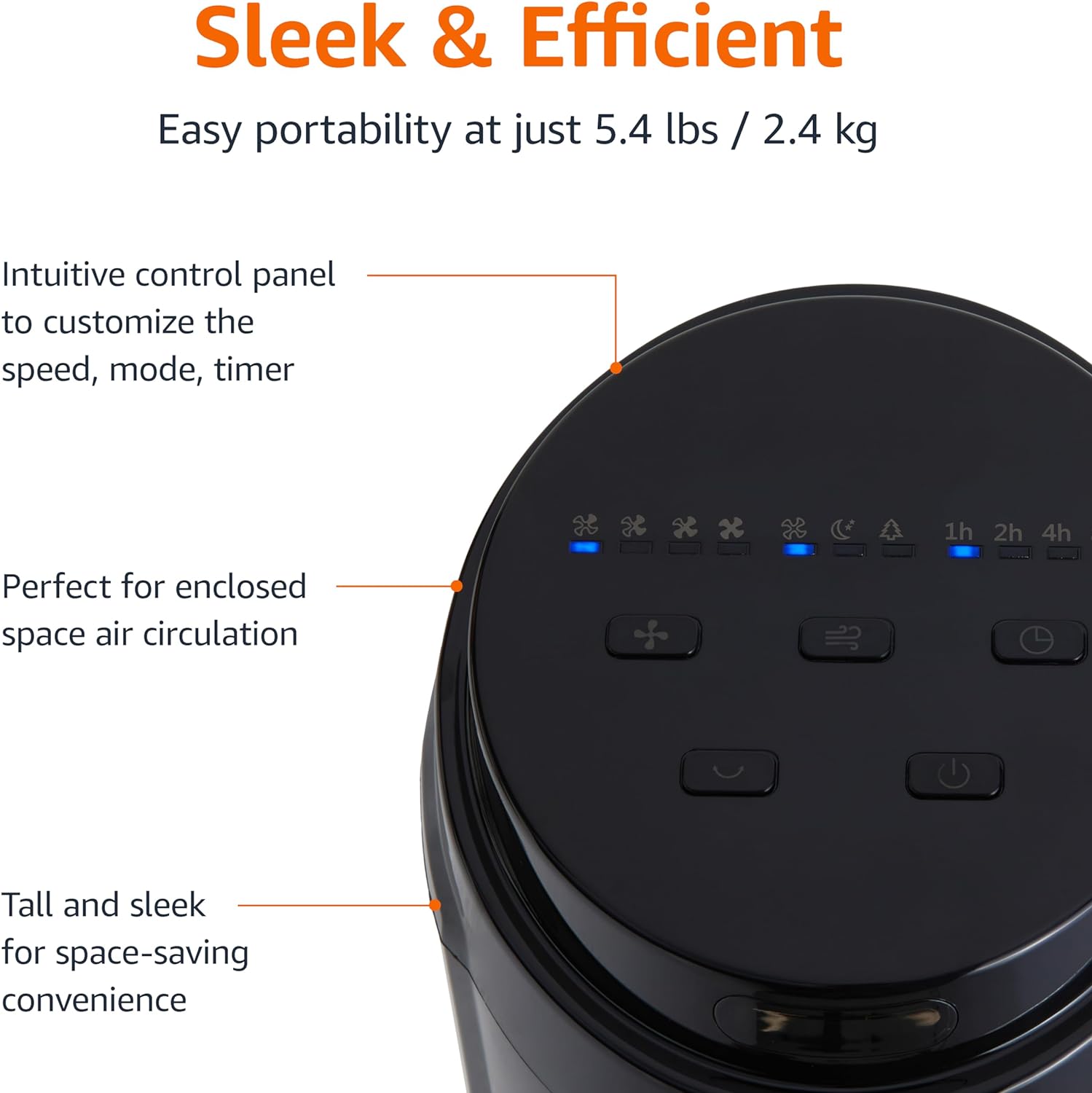
Nọmba 2.3: A sunmọ-soke view of the intuitive control panel located on the top of the Amazon Basics Tower Fan. The panel features buttons for speed, mode, power, oscillation, and timer, along with LED indicators for selected settings. This design allows for easy customization of fan operation.
3. Eto
3.1 Apejọ
- Ni ifarabalẹ yọ gbogbo awọn paati kuro ninu apoti.
- Attach the fan base to the main tower unit. Align the slots on the base with the corresponding tabs on the bottom of the fan.
- Secure the base using the provided screws, if any, ensuring it is firmly attached.
3.2 Ibi
- Gbe awọn àìpẹ lori kan duro, ipele dada.
- Ensure there is adequate space around the fan for proper air circulation, especially for the oscillation feature.
- Keep the fan at least 1 foot (30 cm) away from walls, furniture, and other objects.
- Plug the power cord into a standard NEMA 5-15 (US Standard Wall Outlet) electrical outlet.
4. Awọn ilana Iṣiṣẹ
The fan can be operated using either the control panel on top of the unit or the included remote control.
4.1 Control Panel & Remote Control Functions
| Bọtini / Iṣẹ | Apejuwe |
|---|---|
| Agbara (Titan/Paa) | Titan afẹfẹ tabi pa. |
| Iyara | Cycles through 4 fan speed settings (Low, Medium, High, Max). |
| Ipo | Selects between 3 operating modes:
|
| oscillation | Activates or deactivates the 70-degree oscillation feature, allowing the fan to sweep air across a wider area. |
| Aago | Sets the fan to automatically turn off after a specified period (up to 15 hours in 1-hour increments). |
4.2 Latọna Iṣakoso Lilo
The remote control allows for convenient operation of all fan functions from a distance. Ensure the remote is pointed towards the fan's control panel for optimal response.
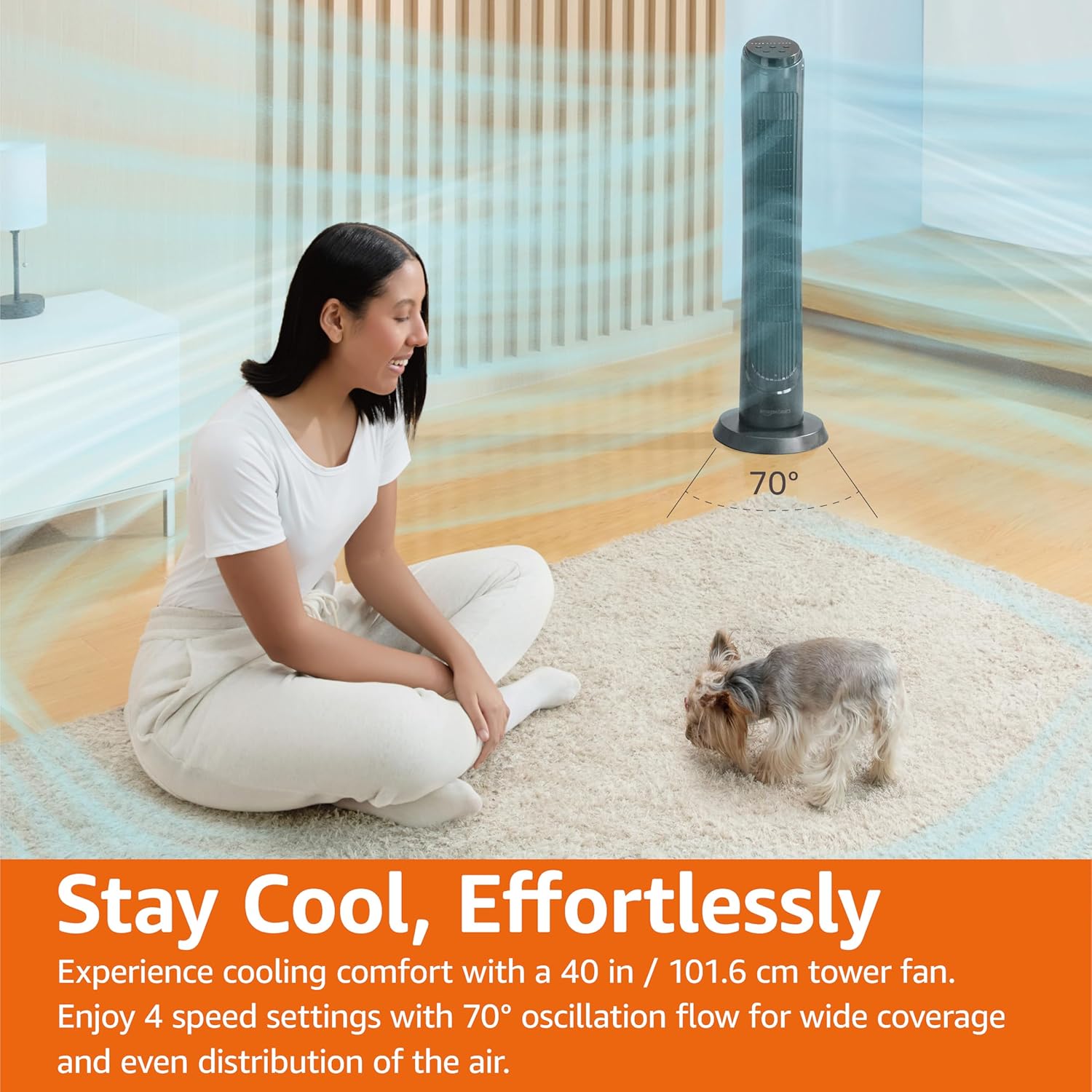
Nọmba 4.1: The Amazon Basics Tower Fan oscillating 70 degrees, providing wide coverage and even air distribution in a room. A person and a small dog are comfortably seated on a rug, benefiting from the airflow.

Nọmba 4.2: The Amazon Basics Tower Fan positioned in a modern living space, demonstrating its effective airflow. The image visually represents the air movement from the fan, highlighting its ability to circulate air throughout the room.
5. Itọju
5.1 Ninu
- Yọọ igbafẹfẹ nigbagbogbo ṣaaju ṣiṣe mimọ.
- Lo asọ, damp aṣọ láti nu àwọn ojú ìta afẹ́fẹ́ náà.
- Do not use abrasive cleaners or harsh chemicals, as these may damage the fan's finish.
- For dust accumulation on the air intake or output grilles, use a vacuum cleaner with a brush attachment to gently remove dust.
- Rii daju pe afẹfẹ naa ti gbẹ patapata ṣaaju pilọọgi pada sinu.
5.2 Ibi ipamọ
- If storing the fan for an extended period, clean it thoroughly as described above.
- Store the fan in its original packaging or a suitable box to protect it from dust and damage.
- Tọju ni itura kan, ibi gbigbẹ.
6. Laasigbotitusita
Ti o ba ni iriri awọn ọran pẹlu olufẹ rẹ, jọwọ tọka si awọn iṣoro ti o wọpọ ati awọn ojutu wọnyi:
| Isoro | Owun to le Fa | Ojutu |
|---|---|---|
| Fan ko ni tan-an. | Ko si ipese agbara; A ko tẹ bọtini agbara. | Ensure the power cord is securely plugged into a working outlet. Press the Power button on the control panel or remote. |
| Alailagbara tabi ko si ṣiṣan afẹfẹ. | Air intake/output blocked; Fan speed too low. | Check for any obstructions around the fan grilles. Increase the fan speed setting. |
| Oscillation ko ṣiṣẹ. | Oscillation feature not activated. | Press the Oscillation button on the control panel or remote. Ensure the fan is on a flat surface. |
| Isakoṣo latọna jijin ko ṣiṣẹ. | Batteries are dead; Remote not pointed correctly. | Replace the remote control batteries. Ensure the remote is pointed directly at the fan's control panel. |
| Ariwo ti ko wọpọ. | Fan not on a level surface; Internal obstruction. | Place the fan on a stable, level surface. Unplug the fan and check for any foreign objects inside the grilles (do not attempt to disassemble). |
Ti iṣoro naa ba wa lẹhin igbiyanju awọn solusan wọnyi, jọwọ kan si atilẹyin alabara.
7. Awọn pato
| Iwa | Ẹ̀kúnrẹ́rẹ́ |
|---|---|
| Brand | Amazon Awọn ipilẹ |
| Orukọ awoṣe | DC2021 |
| Àwọ̀ | Dudu |
| Electric Fan Design | Fan Fan |
| Orisun agbara | AC Agbara |
| Ara | 40" - Digital |
| Ọja Mefa | 11.4"D x 11.4"W x 39.3"H |
| Yara Iru | Yara, Yara nla, Office |
| Pataki Ẹya | Oscillating, 4 Speeds, 3 Modes, Timer, Remote Control |
| Niyanju Lilo | Cooling and Air Circulation for Indoor Spaces |
| Ariwo Ipele | 60 dB |
| Wattage | 50 watt |
| Iwọn Nkan | 7.5 Poun (iwọn 3.4 kg) |
| Awọn irinše to wa | Latọna jijin |
| inu ile / ita gbangba Lilo | Ninu ile |
| Ọna Iṣakoso | Latọna jijin |
| Blade elo | Ṣiṣu |
| Nọmba ti Awọn ipele Agbara | 4 |
| Main Power Asopọmọra Iru | NEMA 5-15 (US Standard Wall Outlet) |
| Olupese | Amazon |
| UPC | 840095880428 |
| Ilu isenbale | China |
8. Atilẹyin ọja ati Support
For detailed warranty information, please refer to the official Warranty PDF document provided by Amazon Basics. This document outlines the terms and conditions of your product's warranty.
For further assistance, troubleshooting not covered in this manual, or to inquire about replacement parts, please contact Amazon Basics customer support.
- Iwe afọwọkọ olumulo osise (PDF): Ṣe igbasilẹ PDF
- Official Warranty (PDF): Ṣe igbasilẹ PDF
- Amazon Basics Store: Ṣabẹwo Ile-itaja